Molla WordPress Theme
by don-themes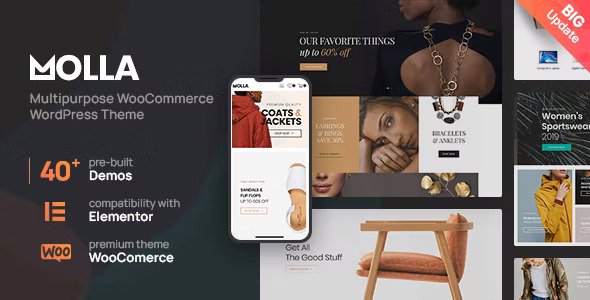
Stuck on your Molla WordPress theme? Let's fix it.
No endless back-and-forth. Just send us the details and we'll get it done.
No obligation · Replies within 1 hour · Quote within 1 day
Setup · Customization · Bug fixes · WooCommerce integration
About Molla WP Theme
Molla is a WooCommerce theme built by don-themes, designed specifically for online stores. It ships with over 30 pre-built demos covering fashion, electronics, furniture, beauty, and more. Each demo is importable in one click, giving store owners a fast starting point without building from scratch.
The theme is built on a custom page builder called Molla Page Builder, though it also supports Elementor. Product pages include quick views, sticky add-to-cart buttons, and Ajax-powered filtering. Molla is coded to meet WooCommerce standards and includes built-in support for WPML, making it a practical choice for multilingual stores.
Performance-wise, Molla is moderately optimised out of the box. It supports lazy loading, minification, and works with popular caching plugins. It is regularly updated and has a large install base on ThemeForest, where it holds strong ratings across thousands of reviews.
Get matched with a Molla developer in under one day
Tell us about your Molla project. Small fixes, Molla theme customization, or a full website build, whatever you need, we've got it covered.
We'll connect you to the right Molla developers, define the scope, and get everything 100% clear.
You'll get one estimate, hire your preferred developer, and start collaborating.
Molla has a deep feature set, but that depth means there is a lot that can go wrong without the right experience. A developer who has worked inside Molla’s template system knows where the theme hooks, how the custom plugin stack interacts with WooCommerce, and how to customise without creating update conflicts.
Through Codeable, you get matched with vetted WordPress developers who have hands-on experience with themes like Molla. No agencies, no junior developers. You post your project, get an estimate, and decide if you want to move forward. No risk involved.
Pros
- 30+ one-click demo imports covering major eCommerce niches
- Built-in WooCommerce features including quick view, Ajax filters, and sticky cart
- Header and footer builder with drag-and-drop layout controls
- WPML compatible for multilingual and multi-currency store setups
- Active development history with regular updates on ThemeForest
Cons
- Bundled plugins add bloat if not configured or disabled selectively
- Molla Page Builder is proprietary and not transferable if you switch themes
- Initial setup has a steep learning curve due to the volume of settings
- Demo import can bring in dummy content that requires significant cleanup
- Some layout options are locked behind the bundled WPBakery plugin, not Elementor
Who is Molla for?
Fashion and Apparel Stores
Molla has several fashion-specific demos with lookbook layouts, size guides, and product variation swatches. Colour and size filtering work via Ajax, so customers do not reload pages while browsing. The sticky add-to-cart and quick view features reduce friction for high-volume product catalogues common in clothing retail.
Electronics and Tech Retailers
The electronics demos include comparison tables, specification displays, and product badge systems for new arrivals or sale items. These are useful for stores with technical products where customers compare options before buying. The Ajax search and filtering work well when your catalogue has hundreds of SKUs across multiple categories.
Furniture and Home Decor
Molla’s furniture demo uses large image formats, fullwidth product sections, and room scene photography layouts. The page builder supports custom section spacing and grid arrangements that suit lifestyle imagery. Product pages can be configured to show material options and dimensions clearly without custom code in most cases.
Beauty and Cosmetics
Beauty stores benefit from Molla’s support for product swatches, ingredient list formatting, and promotional banner sections. The theme handles bundle products and cross-sell placements well within its WooCommerce settings. Several cosmetics-specific demos are included that require minimal changes to go live with a real product catalogue.
Multi-Vendor Marketplaces
Molla works with Dokan and WCFM Marketplace plugins for multi-vendor setups. The theme’s flexible header and category page templates adapt reasonably well to vendor storefronts. Custom work is usually needed to style vendor dashboards and product listing pages consistently, which is where a developer adds clear value.

Customizing Molla
Molla gives you a lot of settings inside the WordPress Customizer, covering header layouts, footer builder, typography, colour schemes, and WooCommerce-specific options like product card styles and cart behaviour. For most store owners, these options cover a lot of ground without touching code.
Where it gets complicated is when you want something the Customizer does not support. Custom category landing pages, modified checkout flows, specific product layout changes, or integrations with third-party plugins often require PHP, CSS, or child theme work. That is where a Molla expert saves you time and avoids mistakes that break your store.
A developer who knows Molla’s hook system, template structure, and custom plugin stack can make targeted changes cleanly, without patching theme files directly. This keeps your site updatable and stable long-term.
Recommended plugins for Molla
Molla includes its own set of bundled plugins: Molla Core, WPBakify for WPBakery integration, and support for Revolution Slider and Swiper-based carousels. These add functionality but also add page weight if left unconfigured.
For store performance, pairing Molla with a caching solution and a CDN makes a measurable difference. You can read more about that on the WordPress performance service page. If you are running a multilingual store, WPML integrates cleanly with Molla’s architecture. For visibility, Molla is compatible with popular SEO plugins, and a structured approach to on-site optimisation is covered in our WordPress SEO service.
Not sure which plugins to use? This WordPress plugins directory covers the most popular options with reviews and setup guides.
Molla common issues
Molla theme slow loading after demo import
Demo imports pull in all assets from the demo, including images, sliders, and plugin data that you may not need. After import, disable or remove plugins you are not using, replace demo images with properly sized production images, and configure a caching plugin. Revolution Slider and WPBakery assets load on every page by default and should be restricted to pages that actually use them. A developer can audit what is loading and remove unnecessary scripts. See our WordPress bug fixing service if the issue persists after basic cleanup.
Molla WooCommerce product page layout broken
Broken product page layouts in Molla are usually caused by a conflict between the Molla Core plugin and an updated version of WooCommerce. Check whether the Molla Core plugin is active and up to date. If the layout was working before a WooCommerce update, that is the likely source. Deactivate third-party plugins one by one to isolate the conflict. If the layout is broken only on specific products, check whether those products have custom fields or variations that differ from others in your catalogue.
Molla header not showing correctly on mobile
Molla has a separate mobile header configuration inside the Customizer under Header settings. If your mobile header looks wrong, check whether the mobile header toggle is enabled and whether a mobile-specific header was set. Logo sizing for mobile is controlled independently from desktop. If you are using a custom header built in the header builder, some layout elements do not reflow correctly on small screens without custom CSS targeting Molla’s mobile breakpoints.
Molla plugin required notice keeps appearing after activation
Molla requires its own Molla Core plugin plus several bundled plugins like WPBakify and Revolution Slider to function fully. The notice appears when these are not installed or are outdated. Go to Appearance > Install Plugins and install or update all listed plugins. If you have already installed them and the notice persists, deactivate and reactivate Molla Core. In some cases, a file permission issue on the server prevents the plugin status check from completing correctly. Check your WordPress maintenance setup if plugin updates are failing regularly.
Molla FAQ
Yes. Molla is built specifically for WooCommerce and includes purpose-built features for eCommerce: Ajax filtering, quick view, sticky cart, product swatches, and wishlist support. It handles large catalogues reasonably well and works with most WooCommerce extensions. The main consideration is that it adds its own plugin layer on top of WooCommerce, which requires maintenance to keep in sync during updates.
Molla supports Elementor, but its primary builder is the proprietary Molla Page Builder backed by WPBakery. The demo templates are built with WPBakery, not Elementor, so if you want to use Elementor exclusively you will be building pages from scratch rather than customising existing demo layouts. Some users combine both builders, which can create inconsistency in the front end and increase page load times.
Molla’s demo importer gives you the option to import only specific content types such as widgets, menus, or Customizer settings. Avoid a full import on a site with existing content. Instead, import only the Customizer settings and manually recreate the page layouts you need. Back up your site before any import. If you need a clean migration to Molla from another theme, our WordPress migration service can handle this safely.
Molla is designed around WooCommerce and most of its demos, features, and plugin dependencies assume an active store setup. You can technically use it without WooCommerce active, but you will have unused plugin requirements and settings that do not apply. If you are building a non-eCommerce site, a general-purpose theme would be a cleaner choice with less overhead.
As of 2024, Molla is still receiving updates on ThemeForest. Don-themes has maintained the theme for several years and continues to push compatibility updates for new WooCommerce versions. That said, update frequency has slowed compared to earlier years. Before purchasing, check the ThemeForest listing for the last update date and review recent comments for any unresolved compatibility issues.
Hire a Molla Developer
If you need help setting up Molla, customising your store layout, fixing a bug, or building out new functionality, working with an experienced developer is the fastest path. Through FoxyConcept and Codeable, you get access to vetted WordPress professionals who know WooCommerce themes inside and out.
Get a free estimate with no obligation. Describe your project and receive a clear quote within 24 hours. 100% risk-free.
You'll need a free Codeable account so developers can ask questions and send their quotes.