Monolit – Responsive Architecture WordPress Theme WordPress Theme
by cththemes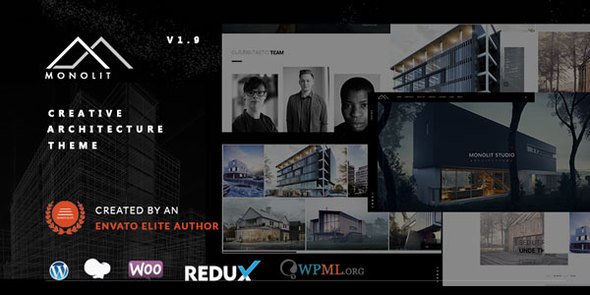
Stuck on your Monolit – Responsive Architecture WordPress Theme WordPress theme? Let's fix it.
No endless back-and-forth. Just send us the details and we'll get it done.
No obligation · Replies within 1 hour · Quote within 1 day
Setup · Customization · Bug fixes · WooCommerce integration
About Monolit – Responsive Architecture WordPress Theme WP Theme
Monolit is a responsive architecture WordPress theme built by cththemes, designed specifically for architecture firms, interior designers, and construction studios. It ships with a clean grid-based layout, full-width project galleries, and a strong visual hierarchy that lets project photography do the talking.
The theme supports multiple homepage layouts, portfolio filtering, Google Maps integration, and smooth scroll effects. It’s built on a solid foundation with clean code and compatibility with major page builders. Monolit gives architecture-focused businesses a professional online presence without needing to build from scratch. That said, getting the most out of its features often requires a developer who knows the theme inside out.
Get matched with a Monolit – Responsive Architecture WordPress Theme developer in under one day
Tell us about your Monolit – Responsive Architecture WordPress Theme project. Small fixes, Monolit – Responsive Architecture WordPress Theme theme customization, or a full website build, whatever you need, we've got it covered.
We'll connect you to the right Monolit – Responsive Architecture WordPress Theme developers, define the scope, and get everything 100% clear.
You'll get one estimate, hire your preferred developer, and start collaborating.
Monolit has a specific structure, and working with a developer who already understands how cththemes builds their themes saves a lot of back-and-forth. On Codeable, every developer is vetted, so you’re not guessing on quality. You post your project, get matched with a specialist who has relevant experience, and receive a fixed estimate before any work starts. No retainers, no surprises.
Pros
- Clean, architecture-specific design with strong visual focus on project imagery
- Multiple homepage layout options included out of the box
- Portfolio filtering with smooth Ajax transitions for project categories
- Compatible with WPBakery Page Builder for layout flexibility
- Fully responsive with well-structured mobile breakpoints for gallery-heavy pages
Cons
- Customizer options are limited, requiring code edits for deeper design changes
- No native Elementor support, which can be a blocker for some teams
- Demo import can be slow or incomplete depending on hosting environment
- Typography controls are basic compared to modern theme frameworks
- Update frequency from cththemes is inconsistent, creating occasional compatibility gaps
Who is Monolit – Responsive Architecture WordPress Theme for?
Architecture Firms
Monolit’s full-width portfolio grid and project detail pages make it a natural fit for architecture firms wanting to showcase completed buildings and concepts. The minimal layout keeps focus on the photography. A Monolit developer can extend this with custom project filtering, client-specific case study formats, and team profile sections that match the firm’s structure.
Interior Design Studios
Interior design studios need strong visual presentation with clear service breakdowns. Monolit’s layout handles both well. A specialist can configure room-type portfolio categories, integrate mood board galleries, and build out a services page structure that reflects the studio’s offering. Contact form integration with booking or consultation tools is also straightforward with the right developer.
Construction Companies
Construction companies benefit from Monolit’s project-centric layout paired with credibility sections like certifications, client logos, and testimonials. A Monolit developer can adapt the theme to include project timelines, service area maps, and sector-based portfolio filtering, making it easier for prospective clients to find relevant work by project type or location.
Urban Planning Consultancies
Urban planning consultancies often need to present large-scale projects with maps, data, and phased timelines. Monolit’s clean grid structure provides a solid base. A developer can extend it with custom post types for planning projects, embedded mapping tools, and downloadable report sections while keeping the front end visually consistent with the firm’s presentation standards.
Landscape Design Practices
Landscape design practices need portfolios that show seasonal variation and project scope across different environments. Monolit handles large image sets well. A Monolit specialist can build categorized project archives by landscape type, integrate before-and-after gallery formats, and add a client inquiry form tailored to project scoping, making the site a practical business tool as well as a portfolio.

Customizing Monolit – Responsive Architecture WordPress Theme
Out of the box, Monolit covers the essentials, but most architecture studios need something more specific. A Monolit – Responsive Architecture WordPress Theme expert can tailor the portfolio layouts to match your exact project categories, adjust typography to align with your brand identity, and modify the homepage sections without breaking the responsive structure.
Custom work often includes building out service pages, integrating contact forms with CRM tools, adding multilingual support via WPML, or creating bespoke project case study templates. The theme’s customizer options are functional but limited, so anything beyond surface-level changes typically needs direct PHP, CSS, or JavaScript work handled by someone with hands-on Monolit experience.
Recommended plugins for Monolit – Responsive Architecture WordPress Theme
Monolit works well alongside a focused set of plugins that extend its core functionality. Adding a caching layer and image optimization improves load times significantly, especially given the portfolio-heavy nature of architecture sites. See our WordPress performance services for how that’s handled properly.
For studios that want to rank locally or appear in architectural design searches, structured data, meta optimization, and schema markup for service pages matter. Our WordPress SEO services cover exactly that. WooCommerce can also be integrated if you sell design consultations or digital downloads directly from the site.
Not sure which plugins to use? This WordPress plugins directory covers the most popular options with reviews and setup guides.
Monolit – Responsive Architecture WordPress Theme common issues
Monolit WordPress theme portfolio images not displaying correctly
Portfolio image display issues in Monolit are often caused by thumbnail size mismatches after switching themes or changing media settings. Run the Regenerate Thumbnails plugin to rebuild image sizes to match Monolit’s specifications. If images still appear cropped or missing, check the portfolio post format settings and confirm the featured image is assigned correctly. Persistent issues may point to a plugin conflict. Our WordPress bug fixing service can diagnose and resolve this quickly.
Monolit theme demo import failing or incomplete
Monolit demo imports fail most often due to PHP memory limits, execution timeouts, or missing required plugins. Set memory_limit to at least 256MB and max_execution_time to 300 in your php.ini or wp-config.php. Install all required plugins before running the import. If the import stalls mid-process, clear the site and retry with the correct plugin set active. A staging environment is safer for this process than a live site. If problems persist, our bug fixing team can handle it directly.
Monolit WordPress theme not responsive on mobile after update
If Monolit loses its responsive behavior after an update, start by clearing your caching plugin and browser cache. Check whether a custom CSS override in the child theme or customizer is conflicting with updated breakpoints. Inspect the site in Chrome DevTools to identify which elements are overflowing. If the issue appeared immediately after a plugin or theme update, deactivate recent changes one at a time to isolate the cause before applying a fix.
Monolit theme WPBakery content showing shortcodes instead of rendered layout
Raw WPBakery shortcodes appearing on the front end usually means WPBakery Page Builder is deactivated or not installed. Monolit relies on it for certain layouts, so reactivating the plugin typically resolves this. If WPBakery is active and shortcodes still render as text, check whether the page is set to use the classic editor rather than the visual composer backend. Switching to the backend editor and saving the page again usually restores the rendered layout correctly.
Monolit – Responsive Architecture WordPress Theme FAQ
Monolit is built around WPBakery Page Builder, not Elementor. It does not officially support Elementor, and forcing it can break page layouts. If your team prefers Elementor, a developer can assess compatibility or help migrate the design to an Elementor-native theme without losing your content or visual structure.
Technically yes, but it takes work. Monolit’s layout, typography, and default sections are all oriented toward architecture and design studios. Adapting it for an unrelated industry means significant restyling of demo content, custom section templates, and possibly restructuring the navigation. A developer can do this, but starting with a more appropriate theme is often faster.
Monolit is not marketed as a WooCommerce theme, and its default templates do not include styled shop or product pages. Basic WooCommerce functionality will work, but product pages will use WooCommerce defaults unstyled against the Monolit design. A developer can write custom WooCommerce templates to match the theme’s visual style if e-commerce is a requirement.
Monolit uses a custom portfolio post type. In your WordPress dashboard, go to Portfolio and add a new item. Set the featured image, assign it to the relevant portfolio category, and fill in the project details fields. The item will then appear in portfolio sections based on your template and filter settings. Category assignment controls how it appears in filtered portfolio grids.
cththemes maintains Monolit, but updates are not released on a consistent schedule. Before purchasing or building on Monolit, check the ThemeForest changelog for the last update date. For existing Monolit sites, staying on a compatible version of WordPress and WPBakery is more important than forcing updates if the current setup is stable.
Hire a Monolit – Responsive Architecture WordPress Theme Developer
Whether you need a full custom build on Monolit or specific fixes to an existing site, working with an experienced developer makes the difference between a site that looks good and one that actually performs. From layout customization to plugin integration and speed optimization, a specialist handles it properly the first time. Get a Free Estimate and describe your project. No obligation, no upfront cost.
You'll need a free Codeable account so developers can ask questions and send their quotes.