Most – Creative Agency and Portfolio Theme WordPress Theme
by MadSparrow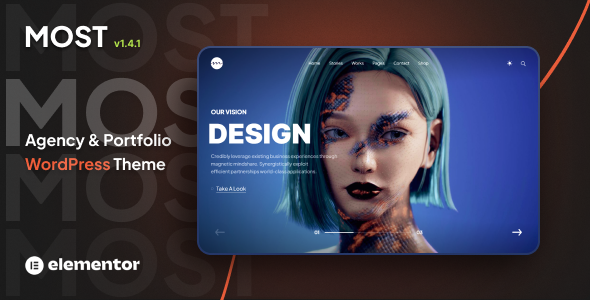
Stuck on your Most – Creative Agency and Portfolio Theme WordPress theme? Let's fix it.
No endless back-and-forth. Just send us the details and we'll get it done.
No obligation · Replies within 1 hour · Quote within 1 day
Setup · Customization · Bug fixes · WooCommerce integration
About Most – Creative Agency and Portfolio Theme WP Theme
Most – Creative Agency and Portfolio Theme, developed by MadSparrow, is a visually driven WordPress theme built for agencies, freelancers, and creatives who need a strong portfolio presence. It ships with a large collection of pre-built demo sites, a drag-and-drop page builder, and smooth scroll animations that give client work the attention it deserves.
The theme is built on a custom framework and supports WooCommerce, making it usable for studios that also sell digital products or services. Typography controls, color palettes, and layout options are handled through a clean live customizer. Most scores well on performance when configured correctly and works with major caching and optimization plugins. It suits designers, photographers, architects, and web agencies that want full visual control without writing code from scratch.
Get matched with a Most – Creative Agency and Portfolio Theme developer in under one day
Tell us about your Most – Creative Agency and Portfolio Theme project. Small fixes, Most – Creative Agency and Portfolio Theme theme customization, or a full website build, whatever you need, we've got it covered.
We'll connect you to the right Most – Creative Agency and Portfolio Theme developers, define the scope, and get everything 100% clear.
You'll get one estimate, hire your preferred developer, and start collaborating.
Most is a feature-dense theme. The options panel is large, demo imports do not always match what clients expect, and the custom page builder has its own learning curve. Errors in the builder can break layouts silently. On Codeable, vetted WordPress developers work with themes like Most daily. They know where the edge cases are, how to extend it without hacking core files, and how to deliver a finished site that holds up. You get a free estimate with no obligation.
Pros
- Ships with 30+ pre-built demo sites covering agencies, photographers, architects, and more
- Built-in portfolio post type with filterable grid and masking animation options
- Full WooCommerce compatibility for studios that sell services or digital products
- Live customizer covers headers, colors, fonts, and section spacing without code
- Supports one-page scroll layouts with smooth section transitions natively
Cons
- Demo import process can be slow and sometimes fails on shared hosting with low PHP memory limits
- The options panel is large and disorganized, making it easy to miss settings that affect layout
- Full-page scroll effects add JavaScript weight that hurts Core Web Vitals scores without optimization
- Custom page builder elements are not Gutenberg-compatible, creating long-term lock-in risk
- Support response times from MadSparrow can be inconsistent on complex technical issues
Who is Most – Creative Agency and Portfolio Theme for?
Creative Agency
Most suits agencies that need to show off client work in a polished grid format. The filterable portfolio, team member sections, and testimonial layouts cover the standard agency page structure. Case study templates can be built using the page builder without custom development for straightforward projects.
Freelance Photographer
Photographers benefit from the full-width image galleries, lightbox support, and masonry layouts included with the theme. Password-protected portfolio pages work for client proofing. A developer can add gallery category filtering or integrate a print ordering plugin if the photographer sells prints.
Architecture Studio
Architecture studios need high visual impact and clean white space. Most delivers both. Project pages can feature large hero images, before-and-after sliders, and detailed descriptions. The theme handles horizontal scrolling galleries that work well for floor plans and renders presented in sequence.
Graphic Designer Portfolio
For a solo designer, Most provides enough layout variety to build a compelling single-page or multi-page portfolio without custom theme development. Skills sections, service pricing tables, and a contact form can all be assembled from existing builder elements with minimal configuration time.
Digital Product Shop
Studios that sell fonts, templates, presets, or other digital products can use Most with WooCommerce enabled. The shop pages inherit the theme styling. A developer can create a custom product card layout that matches the portfolio aesthetic rather than defaulting to the generic WooCommerce grid.

Customizing Most – Creative Agency and Portfolio Theme
Out of the box, Most – Creative Agency and Portfolio Theme gives you a lot to work with: multiple header styles, portfolio grid layouts, filterable galleries, and custom post types for team members and testimonials. The live customizer covers fonts, colors, and section spacing without touching code.
Where it gets more demanding is when clients want layouts that fall outside the included demos, custom animations, or deeper WooCommerce integration. A Most – Creative Agency and Portfolio Theme expert can rebuild sections cleanly, create child theme overrides, and extend the builder without breaking future updates. If you need specific transitions, custom project case study templates, or a branded color system applied site-wide, working with a developer saves hours of trial and error and keeps the codebase clean.
Recommended plugins for Most – Creative Agency and Portfolio Theme
Most pairs well with several plugins that extend its built-in features. Contact Form 7 and WPForms handle lead capture. WooCommerce adds a shop for selling creative services or digital downloads. For SEO, the theme works with Yoast and Rank Math without structural conflicts. You can also connect WordPress SEO services to improve how portfolio pages rank.
On the speed side, Most can get heavy with full-page scroll effects. Pairing it with proper caching, image optimization, and a CDN keeps load times acceptable. A WordPress performance audit is worth running after launch to catch render-blocking scripts the theme loads by default.
Not sure which plugins to use? This WordPress plugins directory covers the most popular options with reviews and setup guides.
Most – Creative Agency and Portfolio Theme common issues
Most theme demo import not working or stuck loading
Demo import failures on Most usually trace back to low PHP memory limits, execution timeout settings, or a REST API conflict. Raise memory_limit to at least 256MB and max_execution_time to 300 seconds in your PHP configuration. Disable all non-essential plugins before importing. If the issue persists, a developer can import demo content manually using XML and SQL, which bypasses the one-click importer entirely. Our WordPress bug fixing service covers this.
Most theme portfolio filter not working after update
Portfolio filter breaks in Most are commonly caused by a JavaScript conflict introduced by a plugin or a failed theme update that left cached scripts in place. Clear all caches first, then check the browser console for JS errors pointing to the conflicting script. If you recently updated Most or added a new plugin, that is the likely cause. Deactivate plugins one by one to isolate it. If the filter worked before an update, roll back the theme and contact support with the error details.
Most theme page builder elements showing blank or broken layout
Blank or broken page builder elements in Most usually mean a plugin conflict with the bundled Visual Composer or King Composer version. Check whether the theme requires a specific version of the builder plugin and that it is activated properly. White screen errors often appear when the builder plugin is deactivated but the shortcodes remain in content. A developer can migrate content cleanly or rebuild broken sections. See our bug fixing service for hands-on help.
Most theme slow loading speed and poor Core Web Vitals score
Most loads full-page scroll scripts, animation libraries, and multiple Google Fonts by default, which hits Core Web Vitals hard. Start by disabling animations on mobile, combining and deferring JavaScript in a caching plugin, and self-hosting Google Fonts. Use a CDN for static assets. Replacing the bundled slider with a lighter alternative also helps. A thorough WordPress performance audit will identify which specific scripts are blocking render on your installation.
Most – Creative Agency and Portfolio Theme FAQ
Most produces clean HTML output and supports schema-friendly structure, but the heavy JavaScript and animation loading can hurt Core Web Vitals scores, which affect rankings. Using a caching plugin, deferring non-critical scripts, and self-hosting fonts improves this significantly. Running a proper WordPress SEO audit after launch is the most reliable way to find gaps specific to your setup.
Most is not built for Elementor. It ships with its own page builder, typically based on Visual Composer or King Composer depending on the version. You can install Elementor alongside it, but expect conflicts between the two builders. Most pages built with the bundled builder will not transfer cleanly to Elementor. A developer can rebuild specific pages in Elementor if you want to migrate to it long-term.
Always use a child theme for customizations. If you have edited parent theme files directly, an update will overwrite your changes. Before updating, back up the full site including the database. After updating, check your portfolio pages, header settings, and any custom CSS. If you do not have a child theme set up yet, a developer can create one and migrate your existing changes safely. See our WordPress maintenance plans for ongoing update management.
Yes. Most is WooCommerce compatible. Product pages and shop archives inherit the theme styling. The default WooCommerce layout fits reasonably well within the Most design framework, though the product card grid does not always match the portfolio grid style without CSS adjustments. A developer can bring the shop layout in line with the rest of the site design if visual consistency matters.
FoxyConcept connects you with vetted Most – Creative Agency and Portfolio Theme developers through Codeable. Post your project, describe what you need, and get matched within 24 hours. You receive a free estimate before any work starts. There is no obligation to hire. Start with a free estimate here.
Hire a Most – Creative Agency and Portfolio Theme Developer
If you need a Most – Creative Agency and Portfolio Theme expert to build, fix, or extend your site, FoxyConcept connects you with vetted WordPress developers through Codeable. Post your project, get matched within 24 hours, and receive a free estimate before committing to anything. Whether it is a full build, a broken layout, or a custom feature, you get a developer who knows the theme. Get a free estimate today.
You'll need a free Codeable account so developers can ask questions and send their quotes.