Motta WordPress Theme
by uixthemes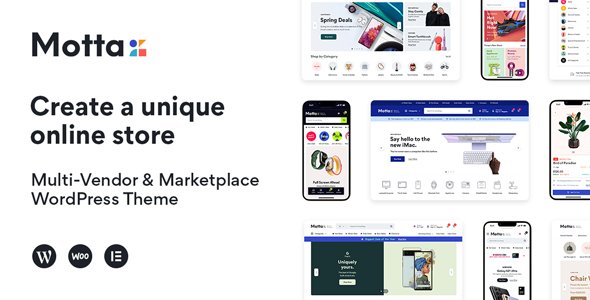
Stuck on your Motta WordPress theme? Let's fix it.
No endless back-and-forth. Just send us the details and we'll get it done.
No obligation · Replies within 1 hour · Quote within 1 day
Setup · Customization · Bug fixes · WooCommerce integration
About Motta WP Theme
Motta is a WooCommerce theme by uixthemes built specifically for modern online stores. It ships with multiple pre-built demo layouts covering fashion, electronics, furniture, and general merchandise. The theme leans on Elementor and the native block editor, giving store owners a visual way to build product pages, category sections, and promotional banners without touching code.
Under the hood, Motta includes Ajax cart and wishlist functionality, a mega menu builder, and product filter support via FiboFilters. Performance is a stated priority, with lazy loading and minified assets included by default. For stores that need a polished, feature-rich starting point without a page builder subscription cost, Motta is a solid option. That said, the volume of built-in features means the learning curve is steeper than lighter themes.
Get matched with a Motta developer in under one day
Tell us about your Motta project. Small fixes, Motta theme customization, or a full website build, whatever you need, we've got it covered.
We'll connect you to the right Motta developers, define the scope, and get everything 100% clear.
You'll get one estimate, hire your preferred developer, and start collaborating.
Most Motta problems come down to one thing: the theme does a lot, and that complexity surfaces quickly when you move away from the demo content. A developer who knows the theme’s template hierarchy, hook system, and Customizer architecture can fix issues in hours that would otherwise take days of trial and error. Through Codeable, you get access to vetted WordPress developers who have worked on WooCommerce stores across every niche. Post your project, get a free estimate, and only move forward if it makes sense for you.
Pros
- Multiple niche-specific demo imports covering fashion, electronics, furniture, and grocery
- Ajax cart, wishlist, and product quick-view built in without requiring extra plugins
- Mega menu builder included with support for images, product listings, and custom columns
- Compatible with both Elementor and the native WordPress block editor
- Active updates from uixthemes with consistent WooCommerce version compatibility
Cons
- Large feature set increases initial setup time compared to lighter WooCommerce themes
- Some demo content requires importing dummy data to understand how sections are structured
- Heavy reliance on Customizer settings makes migrating styles to a new theme difficult
- Documentation gaps for less common features like FiboFilters integration and custom header layouts
- Child theme is essentially required for any template-level customization to survive updates safely
Who is Motta for?
Fashion and Apparel Stores
Motta’s fashion demo includes lookbook-style layouts, size guide support, and product variation swatches. The clean product page template works well for apparel where multiple images, fit details, and color options need to be presented clearly. A Motta developer can extend this with custom attribute displays or brand-specific styling.
Electronics and Tech Retailers
The electronics demo ships with comparison table support, specification sections, and a layout built around high-volume product catalogs. Mega menu categories and Ajax filtering help customers navigate large inventories. A Motta specialist can configure these features and integrate stock management or pricing plugins specific to tech retail.
Furniture and Home Decor
Motta’s furniture layouts prioritize large imagery and room-scene photography. Product pages support gallery zoom and video embeds, which matter for high-consideration purchases. A Motta expert can customize the layout to include delivery information panels, material selectors, and room planner integrations that furniture buyers expect.
Grocery and Food Delivery
The grocery demo includes category tiles, promotional banner zones, and a layout suited to high-SKU stores with frequent price changes. Motta supports quick-add-to-cart from category pages, which speeds up basket building. A Motta developer can wire this up with delivery slot plugins or local pickup extensions common in food retail.
Multi-Category Marketplaces
Motta handles multi-category stores well because its mega menu and filtering system can reflect complex taxonomies without custom code. Stores selling across several product types benefit from the flexible homepage sections and the ability to surface curated collections. A Motta specialist can structure the navigation and category hierarchy for large catalogs.

Customizing Motta
Motta exposes a large set of options through the WordPress Customizer, covering header layouts, footer columns, typography, color schemes, and WooCommerce-specific settings like product card styles and checkout page layout. Most visual changes are possible without code, but getting Motta to match a specific brand identity often requires CSS overrides or child theme work.
Common customization tasks include adjusting the mega menu structure, modifying product loop templates, and tweaking the mobile header behavior. A Motta expert can handle these cleanly using a child theme, keeping your changes safe across updates. If you need custom section layouts, integration with third-party plugins, or a design that goes beyond the built-in demo styles, working with a Motta developer saves significant time and avoids template conflicts.
Recommended plugins for Motta
Motta is built to work alongside the most common WooCommerce extensions. Product filter plugins, currency switchers, and review plugins integrate without major friction. For stores focused on growth, pairing Motta with a well-configured caching layer and a CDN makes a measurable difference in load times. You can read more about that on our WordPress performance page.
On the discoverability side, Motta outputs clean markup and supports schema for products, breadcrumbs, and reviews, which gives you a reasonable SEO baseline. If you want to go further, our WordPress SEO service covers structured data audits, crawl fixes, and on-page optimization for WooCommerce stores.
Not sure which plugins to use? This WordPress plugins directory covers the most popular options with reviews and setup guides.
Motta common issues
Motta theme header not showing correctly on mobile
Mobile header issues in Motta usually come from a conflict between the theme’s built-in mobile header settings and a third-party plugin adding scripts to the header area. Start by checking the Customizer under Header and switching between mobile header styles. If the problem appeared after a plugin install, deactivate plugins one at a time to isolate the conflict. For persistent display issues, a WordPress bug fixing specialist can audit the header template and resolve conflicts without disrupting your existing setup.
Motta product page layout broken after WooCommerce update
WooCommerce template overrides in Motta can break when WooCommerce releases a major update that changes core template files. Check the WooCommerce System Status panel under Tools for any outdated template warnings. If Motta flags overridden templates, those need to be updated to match the new WooCommerce versions. This is a common post-update task. A WordPress bug fixing service can handle template reconciliation cleanly and check for any other affected areas.
Motta mega menu not working or not saving
Motta’s mega menu builder saves configuration through the WordPress Customizer. If changes are not persisting, the most common causes are a caching plugin writing stale Customizer output, a PHP memory limit preventing saves from completing, or a JavaScript error in the Customizer panel itself. Clear all caches, check your PHP error log, and test in a browser with extensions disabled. If the issue continues, the mega menu data may need to be inspected directly in the database.
Motta theme slow loading speed on WooCommerce store
Motta loads a significant amount of CSS and JavaScript to support its feature set. Slow stores running Motta usually benefit from enabling the theme’s built-in lazy loading, configuring a caching plugin like WP Rocket or LiteSpeed Cache, and serving images through a CDN. Also check whether all the bundled scripts are active even on pages that do not use those features. Selective script loading through a performance plugin can reduce page weight considerably on category and product pages.
Motta FAQ
Yes, Motta is built specifically for WooCommerce. It includes product swatches, Ajax cart and wishlist, product quick-view, a mega menu, and multiple shop layout options out of the box. It is a reasonable choice for stores that want feature depth without assembling everything from plugins. Performance requires configuration, but the core WooCommerce integration is solid.
Motta supports Elementor for page building. Several of its demo layouts are built with Elementor, and the theme registers custom Elementor widgets for WooCommerce-specific sections. That said, Motta also works with the native WordPress block editor, so you are not required to use Elementor. A Motta developer can advise which approach suits your store’s structure better.
Demo content in Motta is imported through the theme’s one-click demo importer, available under Appearance after activation. You select the demo you want, and the importer pulls in pages, settings, and sample products. You will need the required plugins installed first. Importing over an existing site overwrites Customizer settings, so it is best done on a fresh WordPress install.
Technically no, but in practice yes. If you plan to make any changes to Motta’s template files, a child theme is necessary to preserve those changes through theme updates. Customizer settings and Elementor layouts survive updates without a child theme. CSS customizations are best added via a child theme stylesheet or the Additional CSS panel for smaller changes.
Motta is developed by uixthemes, a theme author that sells primarily through ThemeForest. They maintain an active update schedule and provide support through the ThemeForest comments system and a dedicated support forum. For custom development work beyond what their support covers, hiring a Motta specialist through a service like Codeable is the practical route.
Hire a Motta Developer for Your WooCommerce Store
Whether you need a Motta expert to set up your store from scratch, fix a layout breaking on mobile, or build a custom feature on top of the theme, we can match you with the right developer fast. Work is scoped clearly before anything starts, and there are no surprise costs. Get a free estimate and describe what you need. A Motta specialist will review your project and come back with a clear plan.
You'll need a free Codeable account so developers can ask questions and send their quotes.