Mrittik WordPress Theme
by Bravis-Themes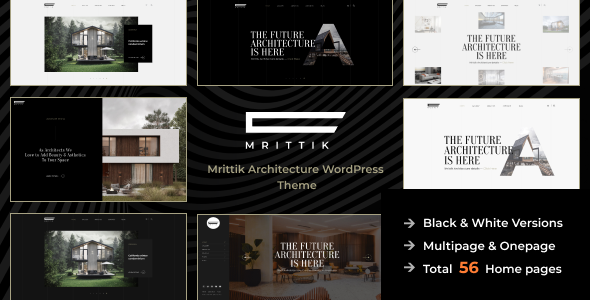
Stuck on your Mrittik WordPress theme? Let's fix it.
No endless back-and-forth. Just send us the details and we'll get it done.
No obligation · Replies within 1 hour · Quote within 1 day
Setup · Customization · Bug fixes · WooCommerce integration
About Mrittik WP Theme
Mrittik is a WordPress theme developed by Bravis-Themes, designed for creative portfolios, agencies, and design-focused businesses. It ships with a clean, minimal aesthetic that puts visual content front and center. The layout options are flexible enough to support both single-page presentations and multi-page site structures.
Built on a modern codebase, Mrittik supports the WordPress block editor and includes integration with popular page builders. The theme is translation-ready and optimized for performance out of the box. Bravis-Themes maintains active updates, which means compatibility with current WordPress versions stays solid.
If you run a creative studio, photography business, or boutique agency, Mrittik gives you a polished starting point without the bloat that slows many multipurpose themes down. The design language is restrained and professional, which makes it easy to brand without fighting the defaults.
Get matched with a Mrittik developer in under one day
Tell us about your Mrittik project. Small fixes, Mrittik theme customization, or a full website build, whatever you need, we've got it covered.
We'll connect you to the right Mrittik developers, define the scope, and get everything 100% clear.
You'll get one estimate, hire your preferred developer, and start collaborating.
Most Mrittik customization issues come from developers who don’t know the theme’s structure. Work done through Codeable connects you with vetted WordPress specialists who understand theme architecture, not just surface-level styling. Every developer on the platform has been screened — no guesswork, no trial and error with someone learning on your project. You get accurate estimates, clear timelines, and work that holds up after the project closes.
Pros
- Clean, minimal design that works well for creative and agency portfolios without heavy customization
- Block editor compatible, making content layout straightforward for non-technical users
- Relatively lightweight codebase compared to multipurpose themes, which benefits page load times
- Translation-ready with .pot file included, suitable for multilingual site builds
- Active maintenance from Bravis-Themes keeps the theme compatible with current WordPress releases
Cons
- Limited built-in demo content, which means more setup time compared to theme bundles with full demo imports
- WooCommerce support is basic — complex shop layouts require additional custom styling
- Documentation is sparse in some areas, making advanced customization harder to self-serve
- Typography options in the Customizer are limited without a plugin like Google Fonts Typography
- The theme has a smaller user community than market leaders, so third-party tutorials and resources are limited
Who is Mrittik for?
Creative Portfolio
Mrittik’s grid-based layouts and minimal chrome make it a strong fit for showcasing creative work. Illustrators, UI designers, and art directors get a presentation layer that doesn’t compete with the work itself. Custom portfolio post types can be extended to include case study details, project categories, and client information without overcomplicating the visual structure.
Design Agency
Agencies need a site that communicates quality quickly. Mrittik’s restrained design language signals professionalism without busy layouts. Service pages, team sections, and project showcases can all be built within the theme’s structure. A developer can extend it to include lead capture forms, case study templates, and proper schema markup for local business visibility.
Photography Studio
Photography sites live and die by image presentation. Mrittik’s full-width layout options and clean whitespace let images breathe. Gallery pages, session booking integration, and client proofing links can all be layered in. The theme avoids the heavy UI patterns that many photography-specific themes use, keeping the focus on the images rather than the interface.
Freelance Consultant
Freelancers need a site that builds trust fast. A clear services section, visible social proof, and a low-friction contact path matter more than visual complexity. Mrittik gives you a clean foundation to build that without the noise. Custom landing pages for specific services can be templated within a child theme, keeping the site expandable without rebuilding from scratch.
Small Boutique Brand
Small product brands benefit from Mrittik’s understated aesthetic. Paired with WooCommerce for a focused product catalogue, the theme keeps the shopping experience simple. Custom brand colors and typography applied through a child theme give the site a distinct identity. It works best for brands with a tight product range rather than large catalogue stores.

Customizing Mrittik
Mrittik hooks into the WordPress Customizer for core settings like typography, colors, header layout, and footer configuration. Most visual changes are straightforward for experienced users, but building a truly custom site around Mrittik requires deeper work — custom post types, template overrides, and proper hook usage take time to get right.
A Mrittik expert knows where the theme’s architecture allows extension and where workarounds become necessary. That means fewer conflicts, cleaner child theme code, and a result that actually matches your design brief rather than a rough approximation of it.
Custom animations, unique section layouts, and integrations with third-party tools all require code-level work. Trying to do this without experience in the theme’s structure often leads to broken updates and display inconsistencies. Hiring someone who works with Mrittik regularly saves significant time and avoids those pitfalls.
Recommended plugins for Mrittik
Mrittik works well alongside WooCommerce for light e-commerce use cases, though heavy shop builds may need additional styling work. Contact Form 7 and WPForms both integrate cleanly with the theme’s design language.
For SEO, pairing Mrittik with Yoast or Rank Math is standard practice. Learn more about WordPress SEO optimisation to get the most from your creative site. If page speed is a concern, structured caching and image optimisation are worth prioritising — see our WordPress performance services for details.
Not sure which plugins to use? This WordPress plugins directory covers the most popular options with reviews and setup guides.
Mrittik common issues
Mrittik theme header not displaying correctly after WordPress update
Header display issues after a WordPress update usually point to a JavaScript conflict or a deprecated function in the theme. Start by switching to the default WordPress theme briefly to confirm the header renders correctly — if it does, the issue is theme-specific. Clear your cache, then check the browser console for JS errors. If the theme hasn’t been updated recently, check Bravis-Themes for a patch. Persistent issues are best resolved through our WordPress bug fixing service.
Mrittik custom CSS not applying to specific page sections
Custom CSS in Mrittik sometimes fails to apply because of specificity conflicts with the theme’s own stylesheets. Use your browser’s inspector to identify which rule is overriding yours and increase your selector specificity accordingly. If you’re adding CSS through the Customizer’s Additional CSS box, confirm it’s not being cached by a performance plugin. For more complex styling work that requires template-level changes, a child theme is the right approach rather than stacking specificity hacks.
Mrittik theme slow loading on mobile devices
Mobile slowness in Mrittik typically comes from unoptimised images or render-blocking scripts rather than the theme itself. Run a PageSpeed Insights test to pinpoint the specific bottlenecks. Large hero images without lazy loading and unminified CSS or JS are the most common culprits. A caching plugin, image compression via ShortPixel or Imagify, and deferring non-critical scripts will cover most cases. For deeper performance work, see our WordPress performance service.
Mrittik contact form not sending emails
When a contact form in Mrittik stops sending emails, the issue is almost always with WordPress’s default mail function rather than the theme itself. WordPress sends email through PHP mail, which many hosts block or throttle. Install an SMTP plugin like WP Mail SMTP and connect it to a transactional email service such as SendGrid, Mailgun, or even Gmail. Once the SMTP connection is live, test the form. If emails still fail, check your spam folder and review the SMTP plugin’s error log for specific failures.
Mrittik FAQ
Yes, Mrittik is compatible with the WordPress block editor (Gutenberg). Core blocks render cleanly within the theme’s layout, and standard block patterns work without additional styling. For complex page designs, you may want to supplement with custom block styles via a child theme. Full site editing support depends on the specific version — check the Bravis-Themes changelog for FSE compatibility details.
Mrittik does support WooCommerce. Basic shop pages, product listings, and cart and checkout flows display correctly with the theme’s default styles. Heavy customization of the shop layout — custom product page templates, filtered category pages, or branded checkout flows — will require additional CSS or template overrides. For straightforward small-catalogue stores, the default WooCommerce integration is workable without extra development.
Mrittik is generally compatible with Elementor and similar page builders since they operate largely independently of the theme’s templates. That said, some header, footer, and global layout elements are theme-controlled and won’t be editable from within Elementor unless you use a builder that supports full theme building. Testing your specific builder version with Mrittik before committing to a full build is worth the time.
Creating a child theme for Mrittik follows the standard WordPress process. Create a new folder in wp-content/themes/, add a style.css with the correct header referencing Mrittik as the template, and enqueue the parent theme’s stylesheet via functions.php. Activate the child theme from the WordPress dashboard. Any template overrides or custom CSS go into the child theme, keeping your changes safe through Mrittik updates.
Mrittik is available through ThemeForest and similar marketplaces as a premium theme from Bravis-Themes. There is no officially maintained free version with full features. If you encounter a free download of Mrittik outside of authorised channels, it may be a nulled version — these carry real security risks and should be avoided. Purchase through legitimate marketplaces to ensure you receive updates and support.
Hire a Mrittik Developer
Whether you need a full Mrittik build from scratch, a customization that the Customizer can’t handle, or a fix that’s been sitting unresolved, our team delivers clean, maintainable WordPress work. Every project starts with a free estimate — no commitment required. Get your free estimate today and describe exactly what you need. You’ll hear back within 24 hours with a clear scope and price, matched through Codeable’s vetted developer network. See all available WordPress development services we offer.
You'll need a free Codeable account so developers can ask questions and send their quotes.