MusicPress WordPress Theme
by Wolf-Themes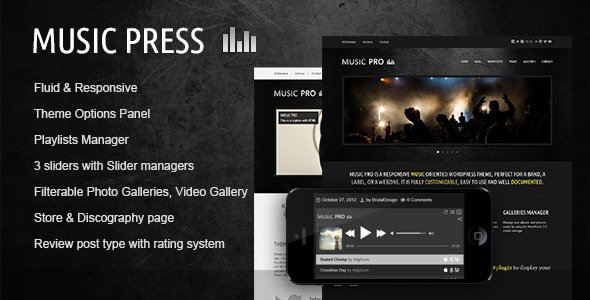
Stuck on your MusicPress WordPress theme? Let's fix it.
No endless back-and-forth. Just send us the details and we'll get it done.
No obligation · Replies within 1 hour · Quote within 1 day
Setup · Customization · Bug fixes · WooCommerce integration
About MusicPress WP Theme
MusicPress is a WordPress theme by Wolf-Themes built specifically for music artists, bands, labels, and music-related businesses. It ships with a custom post type system covering albums, artists, events, and videos, giving musicians a structured way to present their work without bolting on a dozen separate plugins.
The theme integrates with WooCommerce for selling music and merchandise, and it supports the Wolf Plugins ecosystem, which handles things like audio players, setlists, and discography management. Page builder compatibility is included, and the design leans toward dark, editorial layouts common in music branding. If you run a music website on WordPress and want purpose-built tools rather than generic portfolio workarounds, MusicPress is one of the few themes that actually fits the brief from the start.
Get matched with a MusicPress developer in under one day
Tell us about your MusicPress project. Small fixes, MusicPress theme customization, or a full website build, whatever you need, we've got it covered.
We'll connect you to the right MusicPress developers, define the scope, and get everything 100% clear.
You'll get one estimate, hire your preferred developer, and start collaborating.
MusicPress is a niche theme with its own plugin ecosystem, custom post types, and specific template structure. Generic WordPress help often falls short here. Through Codeable, you get matched with developers who have hands-on experience with Wolf-Themes builds. Every developer on the platform is vetted. You post your project, get an estimate within 24 hours, and only move forward if the scope and price work for you. No risk, no upfront commitment.
Pros
- Purpose-built custom post types for albums, artists, events, and videos out of the box
- Native WooCommerce integration supports both physical merchandise and digital music downloads
- Tight Wolf Plugins ecosystem means add-ons are designed to work together without conflicts
- Dark editorial design styles suit most music branding without heavy modification
- Audio player integration is built into the theme rather than relying on third-party shortcodes
Cons
- Heavy dependency on Wolf-Themes plugins creates lock-in if you ever want to switch themes
- Documentation is thin in places, especially around advanced template overrides
- WPBakery is the primary page builder, which feels dated compared to Elementor or block-based workflows
- Custom post type archives can be difficult to style without PHP knowledge
- Plugin updates occasionally break compatibility with the core theme and need manual fixes
Who is MusicPress for?
Independent Music Artists
Solo artists get a clean structure for discography, tour dates, and press kits without needing separate plugins for each. MusicPress handles the post types natively, so an independent artist can launch a professional site quickly. A MusicPress specialist can configure the artist bio, social links, and audio samples to match the exact layout the artist needs.
Record Labels
Labels managing multiple artists benefit from MusicPress’s multi-artist architecture. Each artist gets their own archive, linked to albums and events. A MusicPress developer can build out roster pages, label-level discography views, and submission forms, giving the label a functional hub rather than a static brochure.
Event Promoters and Venues
Event promoters need reliable date management and ticket link integration. MusicPress’s events post type handles recurring shows well, and a developer can wire up external ticketing links or embed iframes cleanly. Past events can be archived automatically, keeping the calendar accurate without manual cleanup every week.
Music Blogs and Review Sites
Music blogs need good typography, category filtering, and fast load times for long-form content. MusicPress supports editorial layouts that work for reviews and features. Pair it with proper SEO configuration and a caching layer, and a review site can rank well for artist and album searches without fighting the theme’s structure.
Online Music Stores
Selling music and merchandise through WooCommerce is a core MusicPress use case. Digital downloads, physical vinyl, and bundled packages all work within the theme’s WooCommerce integration. A MusicPress developer can set up a proper shop with product filtering by genre or artist, checkout customization, and download delivery.

Customizing MusicPress
MusicPress gives you control over fonts, colors, header styles, and layout options through the WordPress Customizer. Most visual changes are handled without touching code. But the more meaningful customization, things like restructuring the discography archive, building out a custom events calendar layout, or wiring up a specific audio player behavior, usually requires a developer who knows the theme’s template hierarchy and Wolf plugin hooks.
A MusicPress expert can also set up child themes properly so updates don’t wipe out your custom work. If you need custom single artist pages, genre filtering, or a checkout flow tailored to digital downloads, having a specialist handle that setup saves significant time. The theme is capable, but its full potential shows when someone who knows it well is driving the build.
Recommended plugins for MusicPress
MusicPress is designed to work alongside the Wolf-Themes plugin suite. Wolf WooCommerce Music adds digital download support. Wolf Vc Elements connects with WPBakery. Wolf Albums, Wolf Videos, and Wolf Events each extend the core post types with additional fields and archive behavior.
Beyond Wolf’s own plugins, you can pair MusicPress with caching plugins and a CDN to handle large audio file loads, which is covered in detail on the WordPress performance page. For artists who rely on search traffic, structured data for events and albums matters, and the WordPress SEO optimisation service covers exactly that kind of setup.
Not sure which plugins to use? This WordPress plugins directory covers the most popular options with reviews and setup guides.
MusicPress common issues
MusicPress audio player not showing on mobile
The audio player in MusicPress often breaks on mobile due to JavaScript conflicts with other plugins or a missing mobile-specific enqueue. First, disable other plugins one at a time to isolate the conflict. Check the browser console for JS errors. If the player script is failing to load, a missing dependency in the enqueue order is usually the cause. Clear any caching plugins after each test.
Wolf Albums plugin not displaying on MusicPress archive page
If Wolf Albums content isn’t appearing on the archive page, the most common cause is a mismatch between the plugin version and the active theme version. Check that both are fully updated. Also confirm the archive template in your theme files matches the expected slug. If you’re running a child theme, the parent archive template may have changed after an update and your override is now out of sync.
MusicPress events not showing correct date order
MusicPress events sort by a custom meta date field, not the standard post date. If events are appearing out of order, the date field is likely formatted inconsistently across entries. Check each event’s date field format in the backend. All dates must follow the same format for the sort query to work correctly. A quick database check can catch entries with malformed values. For persistent sorting issues, the WordPress bug fixing service can audit the query logic.
MusicPress WooCommerce shop page layout broken
WooCommerce layout breaks in MusicPress usually happen after a WooCommerce major version update that changes its template structure. MusicPress includes custom WooCommerce templates that can fall out of sync. Go to WooCommerce > Status > System Status and look for outdated templates. Override only the templates that need updating and match them to the new WooCommerce version structure. A WordPress bug fix specialist can handle this quickly.
MusicPress header menu not working on mobile
Mobile menu failures in MusicPress are often caused by a JavaScript error stopping the toggle script from firing. Open browser developer tools on mobile view and check the console. A common cause is a conflict with a caching plugin serving a minified JS file that breaks the menu script. Try disabling JS minification first. Also verify that the menu is assigned to the correct theme location in Appearance > Menus.
MusicPress custom post type returning 404 error
A 404 on a custom post type in MusicPress usually means the rewrite rules need flushing. Go to Settings > Permalinks and click Save Changes without making any edits. This regenerates the rewrite rules. If the 404 persists, check that the post type is being registered correctly. A plugin deactivation may have removed the registration hook, leaving the URL structure broken.
MusicPress child theme not loading styles correctly
Child theme style issues in MusicPress are most often caused by incorrect enqueue order. The child theme stylesheet must load after the parent. Check your child theme’s functions.php and confirm the wp_enqueue_style call includes the parent theme handle as a dependency. Also make sure the child theme’s style.css has the correct Template header pointing to the parent theme folder name exactly as it appears on disk.
MusicPress homepage slider not working after update
Slider failures after a MusicPress update usually point to a JavaScript library version conflict. The slider script may rely on a specific jQuery version or a bundled library that was updated. Check your browser console for errors referencing the slider script. Disabling caching and testing in an incognito window rules out stale files. If the slider worked before the update, a theme file comparison will show what changed. Get targeted help here.
Wolf Video post type not displaying embedded video in MusicPress
Wolf Video post types use oEmbed or iframe embeds stored in a custom field. If the video isn’t displaying, first check that the URL in the video field is a supported oEmbed format. YouTube and Vimeo both work, but direct file URLs need a different template approach. Also check that the single video template is loading and that no CSS is hiding the embed container with overflow:hidden or a zero height value.
MusicPress page builder content not showing on frontend
If WPBakery content built in MusicPress isn’t rendering on the frontend, the most likely cause is that WPBakery is not activated or its shortcodes are being stripped by a content filter. Confirm the plugin is active and licensed. Also check if a security plugin is sanitizing shortcode output. If the content shows raw shortcode text on the frontend, the do_shortcode filter isn’t running, often caused by a plugin conflict in the content output hook.
MusicPress FAQ
MusicPress was built around WPBakery, not Elementor. Elementor can be installed and used for basic page editing, but the Wolf-specific shortcodes and elements won’t carry over. If you want to build primarily with Elementor, you’ll need custom widget wrappers or a developer to bridge the gap. It works, but it’s not the intended workflow.
Yes. MusicPress has native WooCommerce support and Wolf-Themes offers a companion plugin called Wolf WooCommerce Music that adds digital download fields to album post types. You can sell MP3s, physical records, or bundled packages. Standard WooCommerce payment gateways and checkout flows work without modification.
You can run MusicPress without Wolf plugins, but you lose most of what makes it useful. The discography, events, videos, and artist post types are either registered by Wolf plugins or depend on them for display. Without them, you’re left with a styled theme and no music-specific content structure. The two are designed to work together.
MusicPress supports the Wolf Audio Player plugin for front-end playback. You can assign tracks to albums and the player renders automatically on single and archive pages. For custom players like Spotify embeds or HTML5 players, you’d add those via shortcode or template override. A MusicPress developer can configure custom player behavior to match your design.
Wolf-Themes continues to update MusicPress, though the release cadence is slower than major theme shops. Check the ThemeForest changelog for the latest version. Support is handled through ThemeForest comments and the Wolf-Themes support forum. Response times vary. For hands-on fixes, a dedicated developer is faster than waiting on theme author support.
MusicPress creates a discography archive automatically when the Wolf Albums plugin is active. Albums are added as custom post types and appear on the /albums/ archive by default. You can link to this page from your navigation menu. The layout pulls from the archive-albums.php template, which can be overridden in a child theme for custom styling.
Yes. MusicPress includes an Artist custom post type that lets you create individual profiles for multiple artists. Each artist can be linked to albums, events, and videos. It’s suitable for label sites or collaborative projects. The relationship between artists and content is managed through custom fields in the Wolf plugin ecosystem.
Both Spotify and SoundCloud support oEmbed, so you can paste their URLs directly into a WordPress content block and they’ll embed automatically. MusicPress doesn’t block oEmbed output. For more controlled placement, like embedding a Spotify player in a specific template zone, you’d use a shortcode or a template edit.
Migrating a MusicPress site follows the standard WordPress migration process: export the database, move the files, update wp-config.php, and run a search-replace on the domain. The Wolf plugin license keys may need to be reactivated on the new domain. For a smooth move with no downtime, the WordPress migration service handles this end to end.
Start with a caching plugin, image optimization, and a CDN for audio and video assets. MusicPress pages that load multiple album covers and audio files can get heavy fast. Lazy loading images and deferring non-critical scripts helps significantly. For a full performance audit and implementation, see the WordPress performance service.
Hire a MusicPress Developer for Your Project
Whether you need a full MusicPress site built from scratch, a broken layout fixed, or custom functionality added to your discography or events setup, a specialist makes the difference. Post your project and get a scoped estimate from a vetted MusicPress developer. Get a Free Estimate and know exactly what you’re getting before any work begins.
You'll need a free Codeable account so developers can ask questions and send their quotes.