MyCity WordPress Theme
by NoxonThemes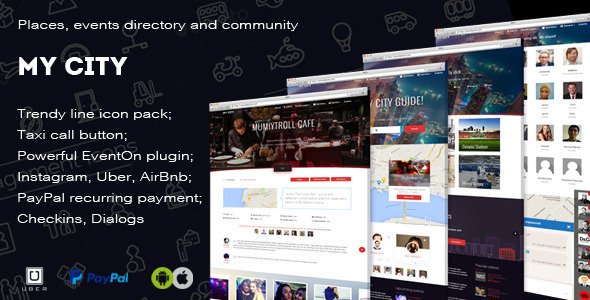
Stuck on your MyCity WordPress theme? Let's fix it.
No endless back-and-forth. Just send us the details and we'll get it done.
No obligation · Replies within 1 hour · Quote within 1 day
Setup · Customization · Bug fixes · WooCommerce integration
About MyCity WP Theme
MyCity is a WordPress theme by NoxonThemes built for city portals, municipal websites, and local community directories. It ships with a front-page builder, event listings, a business directory, and a news section — all designed to work together without heavy plugin stacking.
The theme targets local government sites and city guide projects. It includes multiple pre-built demo layouts, each covering a different type of community portal. Setup is demo-import based, so you can get a working site up quickly and customise from there.
MyCity supports WooCommerce for paid listings, The Events Calendar for event management, and integrates with popular page builders. It is translation-ready and includes RTL support, which matters if you are running a multilingual city portal or serving a non-English-speaking community.
Get matched with a MyCity developer in under one day
Tell us about your MyCity project. Small fixes, MyCity theme customization, or a full website build, whatever you need, we've got it covered.
We'll connect you to the right MyCity developers, define the scope, and get everything 100% clear.
You'll get one estimate, hire your preferred developer, and start collaborating.
MyCity is not a difficult theme, but city portal projects are rarely simple. Directory functionality, event management, map integrations, and multilingual setups all add complexity fast. A developer who has worked with NoxonThemes’ codebase knows where the theme’s limits are and how to work around them without breaking updates.
Through Codeable, you get matched with vetted WordPress developers who can assess your project and give you an honest estimate before any work starts.
Pros
- Ships with a built-in business directory and event listings, reducing the need for separate plugins from the start
- Multiple city portal demo layouts with one-click import, covering government, guide, and community site formats
- WooCommerce integration supports paid directory listings and submission upgrades without a third-party listing plugin
- RTL support and translation-ready structure makes it viable for multilingual and non-English city portals
- Front-page builder lets non-technical site owners rearrange sections without touching code
Cons
- The built-in directory is basic compared to dedicated plugins like GeoDirectory — advanced listing features require additional solutions
- Demo content imports can be heavy and leave behind placeholder data that takes time to clean up
- Customizer options are limited for header and footer layout changes — structural edits require template overrides
- Theme updates from NoxonThemes have historically been infrequent, which can become a compatibility concern over time
- Documentation covers basic setup but lacks guidance for complex configurations like multi-role listing submissions or custom map setups
Who is MyCity for?
Municipal and Local Government Websites
MyCity’s structured layout and news section work well for municipal sites that need to publish announcements, display department information, and maintain a public-facing event calendar. The theme handles formal, information-dense layouts without requiring heavy customisation to look professional and accessible.
City and Neighbourhood Guide Portals
The theme was built for this use case. Neighbourhood guides benefit from the front-page section builder, integrated map blocks, and category-based listing grids. You can organise content by area, list local businesses, and highlight upcoming events — all within the default theme structure.
Local Business Directories
MyCity’s directory functionality covers basic listing submission and display. Combined with WooCommerce, you can charge for featured or premium listings. For larger directories needing advanced filtering, proximity search, or review systems, pairing with GeoDirectory gives you more control without rebuilding the front end.
Community Event Listing Sites
The Events Calendar integration handles recurring events, category filtering, and calendar views cleanly within MyCity’s layout. Community organisations running regular markets, meetups, or seasonal events get a working events hub without needing a separate theme or custom post type setup from scratch.
Tourism and Visitor Information Sites
Tourism boards and visitor information sites need clear category navigation, attractive location pages, and easy-to-find contact details. MyCity’s grid layouts and listing templates suit this well. Adding a booking or enquiry plugin on top of the theme’s structure rounds out the visitor-facing functionality.

Customizing MyCity
MyCity gives you a decent starting point with the Customizer, but most serious builds go beyond what the theme panel covers. Font control, colour schemes, header layouts, and widget areas are all adjustable, but getting a city portal to feel genuinely custom usually requires additional CSS or template overrides.
If you need a tailored setup — custom map integrations, modified listing templates, a specific events flow, or a branded government-style layout — working with a MyCity expert is the faster route. Trying to force the theme into a shape it was not designed for through drag-and-drop alone wastes time and often creates fragile results.
A developer who knows the theme’s structure can build cleanly inside it, extending what NoxonThemes built rather than fighting it.
Recommended plugins for MyCity
MyCity works well with The Events Calendar, WooCommerce, and Yoast SEO out of the box. For directories, GeoDirectory is a common pairing that adds map-based listings and review functionality beyond what the theme ships with natively.
If your city portal needs to rank in local search, pairing the theme with proper WordPress SEO work is worth prioritising early. Page weight can grow quickly with map embeds and listing grids, so reviewing your WordPress performance setup before launch will save problems later.
Not sure which plugins to use? This WordPress plugins directory covers the most popular options with reviews and setup guides.
MyCity common issues
MyCity theme events not showing on homepage
This usually comes down to a conflict between MyCity’s homepage section settings and the version of The Events Calendar installed. Check the theme’s front-page builder settings and confirm the events widget or section is enabled and set to the correct category. If events still do not appear, deactivate other plugins temporarily to isolate a conflict. Persistent issues are worth handing to a WordPress bug fixing service to diagnose cleanly.
MyCity business directory listings not displaying correctly
Listing display problems in MyCity are often tied to widget configuration or category assignment. Verify that listings are published, assigned to the correct directory category, and that the relevant template or widget is pulling from the right post type. If you have recently updated the theme or a related plugin, a template file mismatch is a likely cause. Check for outdated template overrides in your child theme.
MyCity demo import not working or incomplete
Failed or partial demo imports in MyCity are commonly caused by server memory limits or execution time restrictions. Increase max_execution_time and memory_limit in your php.ini or wp-config.php. If the import stalls on media files, try importing without media first, then manually upload key images. Hosting environments with tight limits will need temporary adjustments before the import completes cleanly.
MyCity theme slow loading with maps and listings
MyCity pages with Google Maps embeds and listing grids can load slowly without optimisation. Start by enabling lazy loading for map iframes and deferring third-party scripts. A caching plugin with proper page cache rules helps significantly. For sites with large directories, database query load also becomes a factor. A full review of your WordPress performance setup will identify the biggest bottlenecks specific to your configuration.
MyCity FAQ
MyCity works well for smaller municipal and local government sites. It handles news publishing, event listings, and structured information pages without heavy customisation. For larger government portals with accessibility compliance requirements (WCAG 2.1 AA, for example), you should audit the theme carefully before committing — it was not built specifically for formal public sector standards.
MyCity includes its own front-page section builder and is compatible with WPBakery. Elementor works on interior pages but the theme’s built-in homepage builder operates separately. Running both systems on the same site can create conflicts or inconsistent styling. Most developers recommend committing to one page builder approach early to keep the build maintainable.
For basic setups — importing a demo, swapping content, adjusting colours and fonts — MyCity is manageable without coding. Once you need custom listing templates, modified map layouts, or structural header changes, you will hit the limits of what the Customizer handles. At that point, a developer is the more reliable option than trial-and-error CSS.
NoxonThemes has released updates for MyCity, but the release cadence is not frequent. Before building a long-term project on the theme, check the ThemeForest changelog for the last update date. Themes with infrequent updates carry a higher risk of compatibility issues as WordPress core and plugins advance. Factor in ongoing WordPress maintenance to stay on top of this.
Migrating an existing site to MyCity means moving your content and rebuilding your layout within the theme’s structure — it is not a direct conversion. Posts, pages, and custom post types transfer cleanly. Design and template logic does not. A WordPress migration handled by a developer will get your content moved correctly and rebuild the key templates without losing functionality.
Hire a MyCity WordPress Developer
Whether you need a full MyCity setup from scratch, custom template work, or fixes to an existing site, we can match you with a developer who knows the theme. Work is delivered through Codeable, so you get a free estimate before committing to anything. No obligation, no guesswork.
Get a free estimate for your MyCity project and hear back within 24 hours.
You'll need a free Codeable account so developers can ask questions and send their quotes.