N7 WordPress Theme
by ThemeREX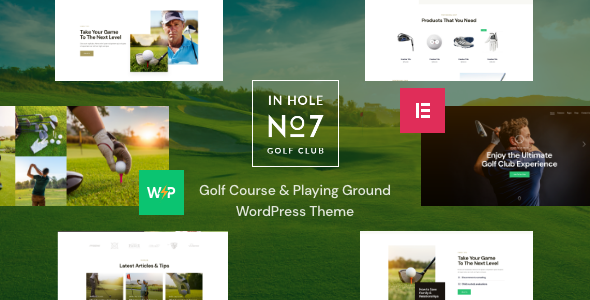
Stuck on your N7 WordPress theme? Let's fix it.
No endless back-and-forth. Just send us the details and we'll get it done.
No obligation · Replies within 1 hour · Quote within 1 day
Setup · Customization · Bug fixes · WooCommerce integration
About N7 WP Theme
N7 is a multipurpose WordPress theme built by ThemeREX. It ships with the ThemeREX Addons plugin, a drag-and-drop page builder, and over 20 pre-built demo skins covering industries from tech startups to creative agencies. The theme is built on a custom framework with deep WooCommerce integration, making it a solid choice for sites that combine content and commerce.
N7 supports Elementor and WPBakery, so you are not locked into one workflow. It includes a built-in mega menu, sticky header options, and a powerful theme options panel powered by Redux Framework. The demo importer works with one click, giving you a working starting point within minutes. N7 is regularly updated by ThemeREX and maintains compatibility with current versions of WordPress and major plugins. If you need a flexible theme that does not require heavy child theme work out of the box, N7 is worth considering.
Get matched with a N7 developer in under one day
Tell us about your N7 project. Small fixes, N7 theme customization, or a full website build, whatever you need, we've got it covered.
We'll connect you to the right N7 developers, define the scope, and get everything 100% clear.
You'll get one estimate, hire your preferred developer, and start collaborating.
N7 has a large options panel and a custom plugin dependency that not every WordPress developer knows well. Hiring someone unfamiliar with the ThemeREX framework usually means slower delivery and messier code. The developers available through Codeable have hands-on experience with ThemeREX themes and can work inside the N7 structure correctly from day one. Whether you need a full site build, a layout fix, or a custom feature added, you get a developer who already knows the codebase. No ramp-up time, no guesswork.
Pros
- Over 20 one-click demo skins covering a wide range of industries, reducing initial setup time significantly
- Deep WooCommerce integration with custom product page layouts and shop templates built into the theme
- Supports both Elementor and WPBakery, so you can choose the page builder that fits your workflow
- ThemeREX Addons plugin adds portfolio post types, team members, testimonials, and other common content structures
- Redux-based options panel gives granular control over headers, footers, typography, and colors without custom CSS
Cons
- ThemeREX Addons plugin creates content lock-in — removing it breaks shortcode-based content site-wide
- The options panel is large and can feel disorganized to users who are new to the ThemeREX framework
- Some demo skins ship with bloated CSS and unused styles that require cleanup for acceptable page speed scores
- Documentation is inconsistent across features — some advanced options have no written explanation
- Frequent updates can introduce compatibility issues with customizations made outside the child theme
Who is N7 for?
Creative Agency Website
N7 includes several agency-specific demo skins with full-width headers, animated counters, and portfolio grids. The built-in portfolio post type from ThemeREX Addons handles case studies and client work cleanly. A developer can configure custom archive pages and filter layouts to match your agency’s presentation needs without relying on third-party portfolio plugins.
WooCommerce Online Store
N7’s WooCommerce templates are pre-styled and integrate with the theme’s color and typography settings. You get custom product page layouts, wishlist support, and quick-view modals out of the box. For stores that need custom checkout flows, product bundles, or subscription pricing, an N7 developer can extend the WooCommerce setup within the ThemeREX framework without breaking theme updates.
Tech Startup Landing Page
Several N7 demo skins are built specifically for SaaS and tech products, with feature sections, pricing tables, and app screenshot layouts. The built-in mega menu handles complex navigation for product-heavy sites. Elementor compatibility means a developer can build high-converting landing page sections using a familiar interface without fighting against the theme structure.
Portfolio and Freelance Site
The ThemeREX Addons plugin registers a portfolio custom post type with category filters, grid layouts, and single project templates. N7 handles this better than most multipurpose themes because the portfolio functionality is baked into the theme rather than bolted on. A developer can modify single portfolio templates and archive layouts using a child theme without touching core files.
Corporate or Business Website
N7 includes corporate demo skins with team member sections, service blocks, testimonial carousels, and Google Maps integration. The theme handles multi-page corporate structures well, with flexible inner page templates and sidebar controls per page. For companies that need multilingual support, N7 is compatible with WPML and Polylang with some configuration work from a developer.

Customizing N7
N7 gives you a wide customization surface through its Redux-based options panel. You can control typography, color schemes, header layouts, footer columns, sidebar positions, and blog post formats without touching code. The theme includes a skin switcher, so you can swap the visual style of your entire site from a single setting.
For deeper changes, such as custom post type layouts, modified WooCommerce templates, or bespoke Elementor sections, you will want an N7 expert who knows the ThemeREX framework. Structural changes made directly in the parent theme files will be overwritten on updates. A developer can build a proper child theme, write clean custom CSS, and extend the ThemeREX Addons plugin without breaking core functionality. This keeps your site stable through every N7 update.
Recommended plugins for N7
N7 works well with the standard WordPress plugin ecosystem. WooCommerce handles product catalogs and checkout. WPML and Polylang cover multilingual setups. ThemeREX Addons adds shortcodes, widgets, and custom post types that integrate tightly with the theme. For contact forms, WPForms and Contact Form 7 are both supported.
If site speed is a concern, pairing N7 with a caching layer and a CDN makes a measurable difference. You can read more about that on the WordPress performance page. For search visibility, structured data and technical SEO work covered on the WordPress SEO page applies directly to N7 builds.
Not sure which plugins to use? This WordPress plugins directory covers the most popular options with reviews and setup guides.
N7 common issues
N7 theme not showing demo content after import
Demo import failures in N7 are usually caused by low PHP memory limits, upload size restrictions, or a timeout during the import process. Check that your server has at least 256MB of memory allocated and that max_execution_time is set to 300 seconds or higher. If the import partially completed, reset it using the WordPress importer tool before trying again. A hosting environment running PHP 8.0 or higher is also required for current ThemeREX versions. If issues persist, a developer can diagnose and fix the problem directly.
N7 page builder elements missing or showing as shortcode text
Shortcode text appearing instead of rendered elements means ThemeREX Addons is either deactivated or not installed. N7 depends on this plugin for most of its custom components. Go to Appearance > Install Plugins and activate ThemeREX Addons. If the plugin is active but elements are still missing, a version mismatch between N7 and the plugin is likely. Update both to the latest version from your ThemeForest account. Clearing any page caches after updating usually resolves the display issue.
N7 theme slow loading after demo install
N7 demo skins ship with large image assets and occasionally load multiple font libraries simultaneously. Start by running a GTmetrix or PageSpeed Insights report to identify the specific bottlenecks. Common fixes include replacing oversized demo images with optimized versions, disabling unused Google Fonts loaded by the theme options panel, and enabling CSS and JS minification through a caching plugin. For persistent speed issues, a developer familiar with WordPress performance optimization can audit the theme’s asset loading in detail.
N7 header layout broken after WordPress update
Header layout breaks after a WordPress update usually point to a JavaScript conflict or a cached stylesheet that no longer matches the current theme files. Clear all caches first, including server-side cache, CDN cache, and any plugin-level cache. If the issue remains, check the browser console for JS errors and identify which script is failing. A common cause is a sticky header script conflicting with an updated jQuery version. If you made header changes outside a child theme, those modifications may have been overwritten by the update.
N7 FAQ
Yes. N7 supports Elementor as a page builder alongside its default WPBakery integration. You can build and edit pages using Elementor without losing access to the theme’s header, footer, and style settings. Some ThemeREX-specific widgets and shortcodes are not available inside Elementor natively, but most layout and content work can be done through Elementor’s interface. A developer can bridge the two systems where needed.
Yes, ThemeREX Addons is a required dependency for N7. It registers the custom post types, shortcodes, and widgets that the theme’s demo content and layouts rely on. Deactivating it will break portfolio sections, team grids, testimonial blocks, and most ThemeREX-specific shortcodes across your site. Always keep it active and updated alongside the theme itself to avoid display issues.
Yes. You can start N7 from a blank slate without importing any demo. The theme’s options panel, header builder, and page templates are all available immediately after activation. Building from scratch gives you a cleaner starting point and avoids importing demo images and content you will not use. Most developers prefer this approach for custom projects since it avoids cleanup work later.
Always use a child theme for any code-level customizations in N7. CSS overrides, template modifications, and custom functions added to a child theme are preserved through parent theme updates. Settings saved in the Redux options panel are stored in the database and are not affected by updates. Before updating, back up your site fully. Regular WordPress maintenance helps catch update conflicts early before they cause visible problems.
N7 handles WooCommerce well compared to most multipurpose themes. It ships with custom product page templates, shop archive layouts, and cart and checkout styling that match the theme design. It supports product quick view, wishlists via a compatible plugin, and WooCommerce-specific widgets. For large stores or shops needing custom checkout logic, you will want a developer to extend the WooCommerce templates correctly within the N7 framework.
Hire an N7 WordPress Developer
Need an N7 developer to build your site, fix a layout issue, or add custom functionality? FoxyConcept connects you with vetted WordPress developers through Codeable. Post your project, get a free estimate within 24 hours, and only move forward if the proposal fits your budget and timeline. There is no obligation to hire. Get your free estimate today and start your N7 project with a developer who knows the ThemeREX framework.
You'll need a free Codeable account so developers can ask questions and send their quotes.