NanoMag WordPress Theme
by jellywp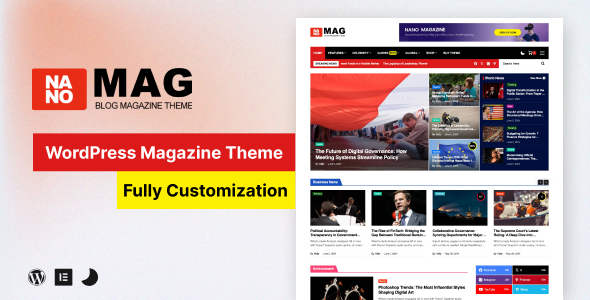
Stuck on your NanoMag WordPress theme? Let's fix it.
No endless back-and-forth. Just send us the details and we'll get it done.
No obligation · Replies within 1 hour · Quote within 1 day
Setup · Customization · Bug fixes · WooCommerce integration
About NanoMag WP Theme
NanoMag is a WordPress magazine theme built by JellyWP, designed for news sites, blogs, and online publications that need a clean, fast-loading layout without the bloat. It ships with multiple homepage layouts, a grid-based article display, and strong typography choices that keep readers focused on content.
The theme is built on a lightweight codebase, which means faster page loads compared to many competing magazine themes. It supports the WordPress block editor natively and includes widget areas suited to ad placement, category highlights, and featured post sections. If you run a content-heavy site and want something that performs well out of the box without requiring a page builder, NanoMag is worth a close look. JellyWP keeps the theme actively maintained with regular updates.
Get matched with a NanoMag developer in under one day
Tell us about your NanoMag project. Small fixes, NanoMag theme customization, or a full website build, whatever you need, we've got it covered.
We'll connect you to the right NanoMag developers, define the scope, and get everything 100% clear.
You'll get one estimate, hire your preferred developer, and start collaborating.
NanoMag looks straightforward but has enough moving parts that small mistakes create real problems. Mishandled child theme setup, poorly structured custom templates, or plugin conflicts with the theme’s scripts can break your layout across devices.
FoxyConcept connects you with vetted NanoMag developers through Codeable, a platform built specifically for serious WordPress work. Every developer on Codeable is screened. You get a free estimate first, no obligation to proceed. Work is scoped clearly before anything starts. If you need reliable help, that structure matters.
Pros
- Lightweight codebase loads faster than most magazine themes
- Multiple homepage grid layouts included without needing a page builder
- Native block editor support with no major conflicts
- Well-organized widget areas suited to ad-heavy magazine layouts
- JellyWP provides regular updates and active theme support
Cons
- Limited built-in mega menu options without custom code or a plugin
- Fewer third-party tutorials and community resources compared to larger themes
- Advanced layout changes require PHP knowledge or a developer
- No built-in dark mode toggle out of the box
- WooCommerce styling needs manual adjustments to match the theme design
Who is NanoMag for?
Online News Publication
NanoMag handles high article volumes well. The grid layouts let editors surface breaking news, featured stories, and category highlights on one homepage without it feeling cluttered. Editors working with the block editor can update layouts without touching code, which matters for fast-moving news teams.
Niche Hobby Blog
For a tightly focused blog covering one topic deeply, NanoMag’s clean typography and category-driven layout keep readers on page. The theme does not overload sidebar areas, which suits niches where long-form reading matters more than advertising density. Customizing category colors helps differentiate content sections easily.
Tech and Gadget Review Site
Review sites need clear article hierarchy and fast load times. NanoMag’s grid-based display works well for showing recent reviews, top picks, and comparison content side by side. Pairing it with a structured data plugin for review schema helps individual review pages rank in search results.
Food and Recipe Magazine
Food sites rely heavily on visual presentation. NanoMag’s featured image handling and grid layouts give recipe content the visual weight it needs. Custom category pages per cuisine type or meal category are straightforward to build. The theme scales well when post counts grow into the hundreds.
Local Community News Site
Local news sites often run on tight budgets and need reliability over complexity. NanoMag delivers a credible, newspaper-style layout without expensive licensing. Writers can publish quickly using the block editor. Ad slots are positioned practically for local display advertising without requiring custom development upfront.

Customizing NanoMag
NanoMag gives you a solid starting point, but most publishers need more than default settings. Customization typically covers custom header layouts, unique category page templates, adjusted typography scales, color schemes that match a brand, and modified ad slot positioning.
More involved work includes creating custom post formats, building author archive pages with extra profile data, or integrating a custom reading list feature. A NanoMag expert can also extend the theme’s built-in widget areas and hook into JellyWP’s options panel without breaking future updates.
If you want modifications done cleanly using a child theme so updates never wipe your changes, working with someone who knows NanoMag’s structure saves time and prevents common mistakes that break layouts on mobile or cause conflicts with caching plugins.
Recommended plugins for NanoMag
NanoMag pairs well with several common WordPress tools. WooCommerce can be added for merchandise or subscription products. Membership plugins like MemberPress or Paid Memberships Pro work well for gating premium content. For ad management, Advanced Ads integrates cleanly with the theme’s widget zones.
On the performance side, combining NanoMag with a solid caching setup and image optimization can significantly cut load times. See our WordPress performance service for that. For publications where search traffic matters, pairing NanoMag with structured SEO work covered in our WordPress SEO service helps articles rank properly.
Not sure which plugins to use? This WordPress plugins directory covers the most popular options with reviews and setup guides.
NanoMag common issues
NanoMag homepage layout broken after update
Layout breaks after a NanoMag update usually mean a conflict between the theme and a customization made directly in the theme files rather than a child theme. Check if a child theme is active. If not, your edits were overwritten. A developer can recover the intended changes and move them into a child theme so future updates do not repeat the problem. Our WordPress bug fixing service covers exactly this type of issue.
NanoMag mobile menu not working
A broken mobile menu in NanoMag is typically a JavaScript conflict with another plugin loading its own scripts on the same page. Open your browser console and check for JS errors. Deactivate plugins one at a time to isolate the conflict. If the menu uses a custom walker or was modified, the update may have reset it. A developer can patch the conflict and test across devices properly.
NanoMag widgets not saving correctly
Widget saving failures in NanoMag usually point to a PHP memory limit issue, a caching plugin serving stale data, or a conflict with the classic widget screen versus the block-based widget editor. First, clear all caches. Then check if switching to the classic widget editor resolves it. If the issue persists, it may be a database write permission problem worth investigating at the server level.
NanoMag featured image not displaying in grid
If featured images are not appearing in NanoMag’s grid, the most common cause is that posts were imported without images attached properly, or the image size registered by the theme is not being generated for existing uploads. Run a thumbnail regeneration using a plugin like Regenerate Thumbnails. If the problem affects only new posts, check that the featured image is set before publishing, not after.
NanoMag FAQ
Yes. NanoMag is built specifically for content-heavy sites. It includes multiple homepage grid options, category-based display sections, and widget areas that suit news layouts. The theme loads fast, which matters for news audiences on mobile. It lacks some advanced features like mega menus by default, but those can be added with a plugin or custom development.
NanoMag supports the WordPress block editor without major conflicts. You can build post content using blocks normally. Some template-level customizations still require PHP rather than full site editing, so it is not a fully block-based theme. For teams used to the classic editor, it also works without issues using the Classic Editor plugin.
WooCommerce can be installed alongside NanoMag, but shop pages will use WooCommerce’s default styling, which will not automatically match your theme’s design. You will need CSS adjustments to make product pages, cart, and checkout feel consistent. A developer can handle this without extensive custom code. Check our WordPress development services for scoped help.
Create a new folder in wp-content/themes/ named something like nanomag-child. Add a style.css file with the correct header referencing NanoMag as the template, then add a functions.php file that enqueues the parent theme’s stylesheet. Activate the child theme from the dashboard. All customizations go into the child theme folder so updates to NanoMag do not overwrite your changes.
JellyWP has maintained NanoMag with updates since its release. The theme receives compatibility updates for new WordPress versions. You can verify the last update date on the theme’s official product page or ThemeForest listing. For any site running NanoMag in production, keeping the theme updated and having a maintenance plan in place reduces the risk of compatibility issues over time.
Hire a NanoMag Developer
Whether you need a layout customized, a feature added, or a bug tracked down, we match you with a developer who has worked with NanoMag and understands JellyWP’s codebase. Work is delivered through Codeable, so quality is consistent and timelines are clear.
Post your project and get a free estimate within 24 hours. No obligation to hire. Get your free estimate here and describe exactly what your site needs.
You'll need a free Codeable account so developers can ask questions and send their quotes.