Nayla WordPress Theme
by pethemes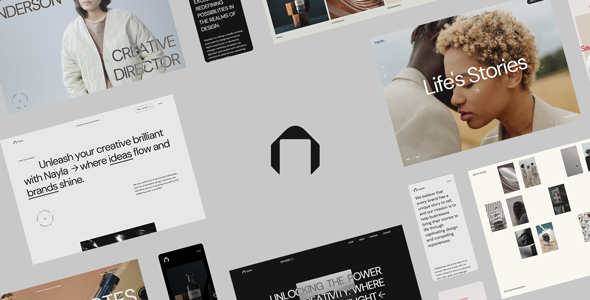
Stuck on your Nayla WordPress theme? Let's fix it.
No endless back-and-forth. Just send us the details and we'll get it done.
No obligation · Replies within 1 hour · Quote within 1 day
Setup · Customization · Bug fixes · WooCommerce integration
About Nayla WP Theme
Nayla is a WordPress theme built by pethemes, designed primarily for creative portfolios, agencies, and freelancers who want a clean, visually focused layout without a heavy page builder dependency. It ships with a block-based structure that works well with the WordPress Site Editor, giving you direct control over headers, footers, and templates.
The theme leans on full-site editing (FSE) principles, which means customization happens inside the editor rather than through a separate options panel. Typography and spacing controls are built in, and the design stays minimal by default. Nayla suits projects where the work needs to speak for itself — galleries, case studies, and service pages all render cleanly out of the box. It is lightweight, loads fast, and does not bundle unnecessary scripts that slow things down.
Get matched with a Nayla developer in under one day
Tell us about your Nayla project. Small fixes, Nayla theme customization, or a full website build, whatever you need, we've got it covered.
We'll connect you to the right Nayla developers, define the scope, and get everything 100% clear.
You'll get one estimate, hire your preferred developer, and start collaborating.
FSE themes like Nayla look straightforward until you need something outside the default block patterns. Custom query loops, dynamic content, or third-party API integrations require developer input. FoxyConcept works with vetted WordPress specialists through Codeable, matching you with a developer who knows FSE architecture and pethemes conventions. You get a fixed estimate before any work starts, no retainers, no guesswork. If your Nayla site needs to do more than the theme does by default, this is the fastest path to getting it done right.
Pros
- Built on Full Site Editing, so layout control is native to WordPress without extra plugins
- Lightweight codebase with minimal render-blocking scripts
- Clean typographic defaults that work well for portfolio and agency content
- Compatible with WooCommerce for adding a shop layer to creative sites
- Regular updates from pethemes that follow WordPress core standards
Cons
- FSE learning curve is steep for users coming from classic themes with options panels
- Limited third-party documentation and community resources compared to larger theme frameworks
- Default block patterns are minimal, so complex layouts need manual building or developer help
- No built-in mega menu — navigation customization beyond basic menus requires extra work
- Child theme tooling for FSE is less mature than classic WordPress child themes, which can complicate update safety
Who is Nayla for?
Freelance Creative Portfolio
Nayla’s minimal layout keeps focus on the work itself. Designers, illustrators, and copywriters can set up project grids, case study pages, and a contact section quickly. The FSE structure means updating the portfolio as new work comes in is straightforward without needing developer access every time.
Digital Agency Website
Agencies need a site that presents services clearly and loads fast. Nayla handles multi-page structures without bloat. Service pages, team sections, and a blog sit cleanly within the theme’s template system. A developer can extend it with custom proposal forms or CRM integrations where needed.
Photography Studio
Full-width image support and clean gallery block compatibility make Nayla a practical choice for photographers. The theme does not compress or interfere with high-resolution images the way some multipurpose themes do. Adding a WooCommerce print shop on top is manageable with developer input.
Small Business Services
Local service businesses — consultants, therapists, tradespeople — benefit from Nayla’s simple page structure. Home, services, about, and contact pages come together without unnecessary complexity. The theme’s speed also matters for local SEO, where page load time affects rankings in competitive areas.
Personal Branding Site
Writers, speakers, and professionals building a personal brand need a site that puts their name and story front and center. Nayla’s typographic focus and minimal chrome support that goal well. A blog, speaking page, and newsletter signup form can all be added without conflicting with the core design.

Customizing Nayla
Nayla customization happens through the WordPress Site Editor. You can edit global styles, swap fonts, adjust color palettes, and modify block templates without touching code. The theme follows FSE conventions closely, so most layout changes are point-and-click.
That said, deeper changes — custom post type integration, conditional template logic, or bespoke animation on scroll — require PHP and JavaScript work that goes beyond what the editor supports. A Nayla expert can build child theme structures that preserve your changes across updates, wire up custom blocks, and extend the theme’s default patterns into something fully tailored to your brand. If your project needs more than the defaults provide, working with a developer from the start saves significant rework later.
Recommended plugins for Nayla
Nayla pairs well with WooCommerce if you need a shop attached to a portfolio or agency site. Contact Form 7 and WPForms both integrate cleanly. For performance, combining Nayla with a caching plugin and a CDN keeps load times low — worth reading our notes on WordPress performance.
If you plan to rank for competitive terms, Nayla’s clean markup is a solid foundation, but you will still need proper on-page work covered in our WordPress SEO optimisation guide. The theme does not conflict with major SEO plugins like Yoast or Rank Math.
Not sure which plugins to use? This WordPress plugins directory covers the most popular options with reviews and setup guides.
Nayla common issues
Nayla theme header not showing on mobile
Mobile header issues in Nayla usually come down to the FSE template for the header not having a properly configured mobile block stack. Open the Site Editor, navigate to the Header template, and check whether a mobile-specific Group block with hidden desktop visibility is set up. If the header disappears entirely, a conflicting plugin adding custom CSS is often the cause. Disable plugins one at a time to isolate it. If the problem persists after updates, our WordPress bug fixing service can trace the exact conflict.
Nayla custom fonts not loading after update
Custom fonts stop loading in Nayla after updates typically because the theme’s Global Styles reset during the update process, reverting to system defaults. Go to Appearance > Editor > Styles and reapply your font selections. If you had set fonts via custom CSS in a child theme, verify the child theme stylesheet is still enqueuing correctly. Using @font-face in a child theme rather than relying on Global Styles alone gives you more stability across updates.
Nayla theme WooCommerce product page layout broken
WooCommerce and FSE themes sometimes conflict on product archive and single product templates because WooCommerce generates its own template files that bypass the Site Editor. In Nayla, check whether a woocommerce folder exists in the theme directory with overrides. If layouts break after a WooCommerce update, the override files may be outdated. A developer can rebuild compatible templates. Visit our WordPress bug fixing service for hands-on help with this.
Nayla Site Editor changes not saving
Site Editor changes failing to save in Nayla are almost always a permissions or file write issue on the server, or a REST API conflict. Start by checking whether your WordPress REST API is accessible — a security plugin may be blocking it. Also verify your wp-content directory has correct write permissions. Clearing object cache and disabling caching plugins temporarily often resolves save failures. If the issue is consistent across browsers, the problem is server-side rather than a browser or session issue.
Nayla FAQ
Nayla is a premium theme sold through pethemes. Pricing and licensing terms are set by the developer and may include single-site or multi-site options. There is no official free version. Always purchase directly from pethemes or an authorized marketplace to ensure you receive legitimate updates and support access.
Nayla is built on Full Site Editing and is not designed to work with Elementor. FSE themes and classic page builders like Elementor operate on different template systems and will conflict. If you need Elementor, you should use a theme built specifically for it. Nayla’s customization happens through the WordPress Site Editor using blocks.
Creating a child theme for an FSE theme like Nayla differs from classic child themes. You create a folder with a style.css referencing Nayla as the parent, but template overrides use block template HTML files rather than PHP files. A functions.php can still enqueue styles and register custom functionality. This setup protects your customizations when Nayla updates.
Yes, Nayla is WooCommerce compatible. You can add a shop, product pages, and checkout to a Nayla site without switching themes. However, advanced WooCommerce layouts — custom product builders, subscriptions, or multi-vendor setups — will need developer work to integrate cleanly with Nayla’s FSE template structure.
Migrating an existing site to Nayla means rebuilding your page templates using FSE blocks and mapping your content into the new structure. Posts and pages migrate automatically, but widget areas, custom menus, and page builder layouts need manual rebuilding. Our WordPress migration service covers theme transitions alongside hosting moves if you need both handled together.
Hire a Nayla WordPress Developer
Whether you need a Nayla site built from scratch, a design customized to match your brand, or a specific feature added, working with an experienced developer is faster than trial and error. FoxyConcept connects you with WordPress professionals who know FSE themes and can scope your project accurately. Get a free estimate — no commitment required, and you will have a clear picture of cost and timeline before anything starts.
You'll need a free Codeable account so developers can ask questions and send their quotes.