Ncmaz WordPress Theme
by BooliiTheme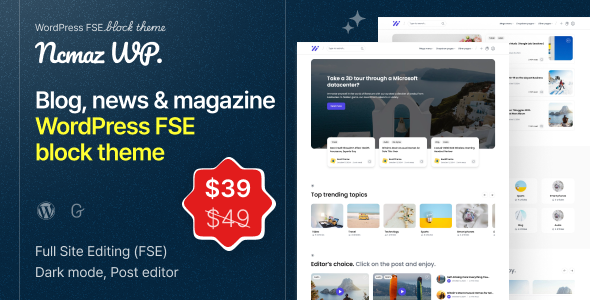
Stuck on your Ncmaz WordPress theme? Let's fix it.
No endless back-and-forth. Just send us the details and we'll get it done.
No obligation · Replies within 1 hour · Quote within 1 day
Setup · Customization · Bug fixes · WooCommerce integration
About Ncmaz WP Theme
Ncmaz is a news and magazine WordPress theme developed by BooliiTheme. It’s built for publishers who want a fast, modern-looking site without spending weeks on setup. The theme ships with multiple demo layouts covering news, blog, and magazine formats, all importable in a few clicks.
Under the hood, Ncmaz uses React-powered components for its front end, which gives it a distinctly app-like feel compared to most WordPress themes. It supports Gutenberg out of the box and pairs well with popular page builders. Category pages, author profiles, and archive layouts all come pre-styled. If you’re launching a content-heavy site and want something that looks polished from day one, Ncmaz is a strong starting point.
Get matched with a Ncmaz developer in under one day
Tell us about your Ncmaz project. Small fixes, Ncmaz theme customization, or a full website build, whatever you need, we've got it covered.
We'll connect you to the right Ncmaz developers, define the scope, and get everything 100% clear.
You'll get one estimate, hire your preferred developer, and start collaborating.
Ncmaz looks great out of the box, but publishing businesses rarely have out-of-the-box needs. Whether you need a custom ad zone, a modified category template, or a full demo import cleaned up to match your brand, a specialist gets it done faster and without the trial-and-error. Through Codeable, you get matched with a vetted WordPress developer who has hands-on experience with themes like Ncmaz. No generalist freelancers, no guesswork. Just a developer who knows exactly what they’re working with.
Pros
- React-powered front end delivers a fast, app-like reading experience compared to traditional PHP-rendered themes
- Multiple demo layouts cover news, blog, and magazine formats, all importable with one click
- Strong Gutenberg support with custom blocks for post grids, sliders, and author cards
- Built-in dark mode toggle works without a plugin and stores user preference via localStorage
- Clean category and tag archive pages with filtering options that most free themes don't include
Cons
- React component structure makes deep template customization harder for developers unfamiliar with the theme's build process
- Demo content import can be slow and occasionally requires manual cleanup before the site matches the preview
- Limited third-party page builder compatibility outside of Gutenberg
- Documentation is sparse in places, especially around advanced settings and hook locations
- Some styling inconsistencies appear on mobile when using non-default header layouts
Who is Ncmaz for?
Online News Publication
Ncmaz handles high-volume news publishing well. The category-based navigation, breaking news ticker, and flexible homepage grid let editors surface content by topic or recency. Ad placement zones are baked into the layout, which saves custom development time for sites that monetize through display advertising.
Personal Blog
For solo writers, Ncmaz offers clean single-post templates with strong typography and a distraction-free reading experience. The author card, related posts section, and social sharing buttons all come pre-configured. You can have a professional-looking personal blog live within a day of purchase.
Niche Magazine Site
Niche magazines covering topics like food, travel, or lifestyle benefit from Ncmaz’s visual-heavy layouts. The theme supports large featured images, editorial-style post cards, and section-based homepages that let you separate content by topic without plugins. It’s a good fit when the brand needs to look editorial.
Multi-Author Editorial Platform
Author profile pages in Ncmaz include bio sections, post archives, and social links. For teams with multiple contributors, this makes it easy to give each writer a proper page. Combined with user role management, it’s a workable setup for small editorial teams without needing a custom-built solution.
Tech or Gaming Media Site
Tech and gaming sites benefit from Ncmaz’s dark mode support and grid-heavy layouts that showcase screenshots and thumbnails. The theme’s modern aesthetic fits the expectations of a younger digital audience. Pair it with a video embed block and you have a solid base for multimedia content.

Customizing Ncmaz
Ncmaz gives you a solid base, but most serious publishers need changes that go beyond the built-in options. The WordPress Customizer covers colors, typography, header layouts, and footer structure. The theme also includes custom widgets for trending posts, category lists, and social links.
Where it gets more involved is custom post templates, unique advertisement placements, or changes to the React-driven components. That’s where an Ncmaz expert saves real time. A developer who knows the theme’s architecture can modify component behavior, integrate custom APIs, or wire up a membership paywall without breaking the existing layout. If your customization needs go past the theme panel, getting professional help is the smarter route.
Recommended plugins for Ncmaz
Ncmaz works well with WooCommerce if you want to sell digital products or memberships alongside your content. For email capture, it integrates cleanly with Mailchimp and ConvertKit via standard form plugins. WP Rocket and LiteSpeed Cache both work without conflicts, which matters given the theme’s React components can add page weight.
For SEO, Yoast and Rank Math both slot in without issues. If you want to push site speed further, check out our WordPress performance service. For structured content optimization, our WordPress SEO service covers technical and on-page work specific to news and magazine sites.
Not sure which plugins to use? This WordPress plugins directory covers the most popular options with reviews and setup guides.
Ncmaz common issues
Ncmaz demo import not working
Demo import failures in Ncmaz usually come down to PHP memory limits or execution time settings on the server. Increase memory_limit to at least 256MB and max_execution_time to 300 in your php.ini or via wp-config.php. Also make sure the required plugins listed in the theme documentation are installed before running the import. If the issue persists, our WordPress bug fixing service can handle it directly.
Ncmaz dark mode not saving user preference
Ncmaz stores the dark mode preference in localStorage, so if it’s not persisting, the issue is usually a caching plugin stripping JavaScript on the front end or a browser privacy setting blocking localStorage writes. Check your cache plugin’s JS optimization settings and whitelist the theme’s scripts. Disabling aggressive JS minification often resolves it without any code changes.
Ncmaz header layout broken on mobile
Mobile header issues in Ncmaz typically happen when a non-default header layout is selected and the responsive breakpoints don’t account for it correctly. Start by switching to the default header in the Customizer and test. If the default works, the issue is in the custom header CSS. Adding targeted media queries in the Additional CSS section usually fixes it without touching theme files.
Ncmaz custom fonts not loading correctly
If custom fonts aren’t loading in Ncmaz, check whether the font is being called via Google Fonts or a locally hosted file. If Google Fonts, confirm the domain isn’t blocking external requests. If locally hosted, verify the file path in the theme settings matches the actual upload location. A content security policy on the server can also block external font requests silently.
Ncmaz FAQ
Ncmaz is a premium theme sold on ThemeForest by BooliiTheme. There is no official free version. Purchasing a license gives you access to all demo layouts, future updates, and support through the ThemeForest comments system. One license covers a single site.
Ncmaz is built around Gutenberg and does not officially support Elementor. While you can install Elementor alongside it, the theme’s pre-built layouts and styling are not designed for Elementor’s editor. You’ll get better results using the native Gutenberg blocks Ncmaz provides rather than trying to force a page builder integration.
Ncmaz is primarily a content and magazine theme, but it does support basic WooCommerce functionality. Product pages and cart will inherit the theme’s styling with some layout adjustments needed. It works best for selling digital products or memberships alongside editorial content rather than running a full product catalog.
Ncmaz updates are applied through ThemeForest or via the Envato Market plugin. Your Customizer settings are stored in the database and survive theme updates. Any changes made directly to theme files will be overwritten, so use a child theme for any code-level modifications before updating.
Yes, you can migrate an existing WordPress site to Ncmaz. The process involves importing your content, setting up the new theme, and reconfiguring menus and widgets. Posts and pages carry over cleanly, but layouts built with a different theme or page builder will need to be rebuilt. Our WordPress migration service covers this end to end.
Hire an Ncmaz Developer
Need help setting up Ncmaz, customizing its layout, or fixing something that’s not working right? Our WordPress development services connect you with a developer who knows the theme inside out. Get a free, no-obligation estimate and hear back within 24 hours. Submit your project here and let’s sort it out.
You'll need a free Codeable account so developers can ask questions and send their quotes.