Neeon WordPress Theme
by RadiusTheme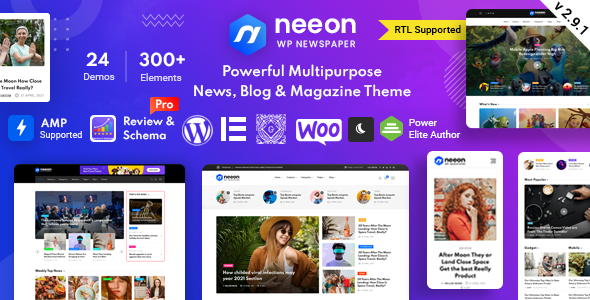
Stuck on your Neeon WordPress theme? Let's fix it.
No endless back-and-forth. Just send us the details and we'll get it done.
No obligation · Replies within 1 hour · Quote within 1 day
Setup · Customization · Bug fixes · WooCommerce integration
About Neeon WP Theme
Neeon is a multipurpose WordPress theme built by RadiusTheme. It ships with Elementor page builder support, multiple pre-built demo templates, and a clean modular structure aimed at agencies, portfolios, and business sites. The theme includes a sticky header, custom post types, a dark mode toggle, and WooCommerce compatibility out of the box.
RadiusTheme maintains the plugin ecosystem around Neeon through their own companion plugin, which unlocks additional widgets and template sections. Updates have been consistent, and the codebase follows standard WordPress conventions. For straightforward sites, the default configuration gets you far. For anything custom, you will want a Neeon specialist who knows where the theme’s structure ends and custom development begins.
Get matched with a Neeon developer in under one day
Tell us about your Neeon project. Small fixes, Neeon theme customization, or a full website build, whatever you need, we've got it covered.
We'll connect you to the right Neeon developers, define the scope, and get everything 100% clear.
You'll get one estimate, hire your preferred developer, and start collaborating.
Most Neeon customizations look simple until you’re three layers deep in a child theme or debugging a RadiusTheme plugin conflict. Codeable connects you with vetted WordPress developers who have worked with themes like Neeon and know how RadiusTheme structures its companion plugins and template hierarchy. You post your project, get a clear estimate within 24 hours, and only move forward if the scope and price make sense. No retainers, no guesswork.
Pros
- Ships with 20+ pre-built demos covering multiple industries, reducing initial setup time significantly
- Dark mode toggle is built into the theme core, no plugin required
- Full Elementor compatibility with additional RadiusTheme widgets for layout control
- WooCommerce support is included out of the box with styled product and cart templates
- Regular updates from RadiusTheme with documented changelogs and active support forum
Cons
- Many advanced features depend on the RadiusTheme companion plugin, creating a locked-in dependency
- Demo import can pull in bloated content and unused assets that need manual cleanup
- Child theme is not included by default, so updates can overwrite custom CSS added to the parent
- Page load times increase noticeably when multiple RadiusTheme widgets are stacked on a single page
- Support quality drops for complex customization questions that go beyond the documented options
Who is Neeon for?
Creative Agency
Neeon’s agency demo layouts include service grids, team sections, and case study templates. A Neeon developer can extend these with custom post types for services or client work, making it easier to manage content without touching the page builder every time something needs updating.
Personal Portfolio
The portfolio-focused demos in Neeon support filterable project grids and full-width case study pages. A Neeon specialist can strip the layout down to a minimal presentation, connect a contact form, and set up a child theme so your customizations survive updates without breaking.
Small Business Website
For local businesses or service providers, Neeon’s header layouts, call-to-action sections, and Google Maps integration through Elementor widgets cover the basics well. A Neeon expert can tighten up the mobile layout and configure a lead capture form that routes inquiries correctly.
Blog or Magazine
Neeon includes multiple blog archive layouts and article templates. For content-heavy sites, pairing it with a solid SEO plugin and a caching layer makes a measurable difference. A Neeon developer can also customize category pages and related post logic beyond what the theme settings allow.
WooCommerce Store
WooCommerce support is built into Neeon, with styled product pages and cart templates included. A Neeon specialist can override shop templates through a child theme, adjust product grid columns, and connect payment or shipping plugins without breaking the existing page builder layouts.

Customizing Neeon
Neeon exposes most design controls through the WordPress Customizer and Elementor’s native panel. You can adjust typography, color schemes, header layouts, and footer columns without touching code. The companion plugin adds shortcodes and widgets that extend what Elementor alone can do.
Where things get more involved: custom post type layouts, conditional header behavior, WooCommerce template overrides, and child theme setup for long-term maintainability. A Neeon expert can rebuild a demo section to match your brand, wire up custom fields, or strip out unused template parts that slow the frontend down. If the drag-and-drop approach is hitting a wall, that is usually the point to bring in a Neeon developer rather than work around limitations.
Recommended plugins for Neeon
Neeon works alongside the standard WordPress plugin stack. For caching and image optimization, plugins like LiteSpeed Cache or WP Rocket integrate without conflicts on most setups. If you’re running WooCommerce, product filtering and checkout flow plugins slot in cleanly.
Two areas worth investing in separately: site speed and search visibility. RadiusTheme’s widgets add DOM weight, so a proper WordPress performance audit pays off quickly. For content-heavy or blog-focused Neeon sites, pairing the theme with a structured WordPress SEO setup gives you better control over schema, meta, and crawlability than relying on defaults alone.
Not sure which plugins to use? This WordPress plugins directory covers the most popular options with reviews and setup guides.
Neeon common issues
Neeon theme not loading styles after update
Style loading failures after a Neeon update usually point to a caching problem or a CSS file path that changed in the new version. Start by clearing all caching layers, including server, plugin, and CDN. If you modified styles in the parent theme rather than a child theme, those changes may have been overwritten. Check the browser console for 404 errors on stylesheet requests. If the problem persists, a WordPress bug fixing specialist can trace the exact file conflict and restore styles without affecting your content.
RadiusTheme plugin conflict causing white screen in Neeon
White screens tied to the RadiusTheme companion plugin are usually caused by a PHP version mismatch or a conflict with a recently updated third-party plugin. Deactivate the companion plugin first to confirm it’s the source. Check your server’s PHP error log for the exact fatal error. If you can’t access the admin, use FTP to rename the plugin folder temporarily. A WordPress bug fixing expert can identify the root cause and apply a targeted fix rather than a broad rollback.
Neeon Elementor widgets missing or not showing
Missing Neeon Elementor widgets typically mean the RadiusTheme companion plugin is inactive or incompatible with the current version of Elementor. Make sure both the theme and companion plugin are updated to their latest versions. Also check if Elementor’s experiment settings have disabled third-party widget registration. If widgets appear in the panel but don’t render on the frontend, a template cache clear in Elementor usually resolves it.
Neeon dark mode toggle not working correctly
The Neeon dark mode toggle can fail when a caching plugin serves a cached version of the page that ignores the user’s preference stored in localStorage or cookies. Exclude the dark mode cookie from your caching rules, or configure your cache plugin to vary output based on that value. If the toggle works on first load but resets on navigation, the JavaScript initializing the mode state is likely running before the DOM is ready. Adjusting script load order in the Customizer usually fixes it.
Neeon FAQ
RadiusTheme releases compatibility updates alongside major WordPress versions. Check the theme’s changelog on ThemeForest or the RadiusTheme website to confirm support for the current WordPress release. Before updating either the theme or WordPress core on a live site, test in a staging environment first. A Neeon developer can handle the update safely if you’re unsure about compatibility with your current plugin stack.
The base Neeon theme functions without the companion plugin, but you lose access to the additional Elementor widgets, shortcodes, and some demo sections that depend on it. If your site was built using those widgets, deactivating the plugin will break those elements. For sites relying heavily on RadiusTheme’s custom components, keeping the plugin active and updated is necessary for stable operation.
Neeon is built around Elementor and most of its demo templates require it. You can technically use the theme with the classic editor or another page builder, but you’ll lose access to most of the layout options and demo imports. For non-Elementor workflows, the theme offers limited value over simpler alternatives. A Neeon specialist can advise whether the theme fits your preferred editing approach.
Neeon’s demo importer gives you options to import only specific content types such as pages, widgets, or theme settings separately. To avoid overwriting existing posts, deselect posts and media during the import. Always back up your database before importing any demo content. If your live site already has content, importing a full demo on a fresh staging install first is the safer approach.
Neeon includes WooCommerce-compatible templates and styled product pages, making it a workable option for small to mid-sized stores. It handles standard shop, product, and cart pages without requiring extra plugins. For complex stores with custom checkout flows, product configurators, or large catalogs, you may need a Neeon developer to extend the templates beyond what the theme settings cover.
Hire a Neeon Developer for Your WordPress Project
Whether you need a Neeon expert to build from a demo, customize an existing site, or fix something that stopped working after an update, the right developer makes the difference between a patched workaround and a clean solution. Describe your project and get a free, no-obligation estimate from a vetted WordPress specialist. Get a Free Estimate and have a developer matched to your project within 24 hours.
You'll need a free Codeable account so developers can ask questions and send their quotes.