Neoton WordPress Theme
by backtheme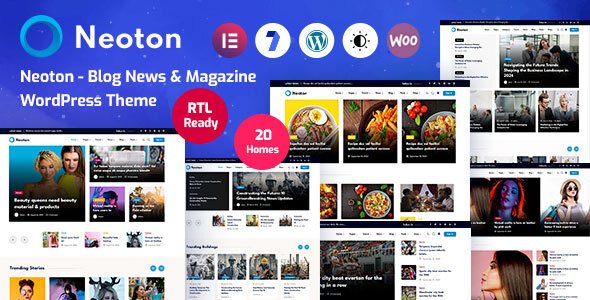
Stuck on your Neoton WordPress theme? Let's fix it.
No endless back-and-forth. Just send us the details and we'll get it done.
No obligation · Replies within 1 hour · Quote within 1 day
Setup · Customization · Bug fixes · WooCommerce integration
About Neoton WP Theme
Neoton is a multipurpose WordPress theme built by Backtheme. It targets agencies, freelancers, and businesses that want a clean, modern layout without writing custom code from scratch. The theme ships with multiple demo layouts, Elementor support, and a range of prebuilt sections covering services, portfolios, testimonials, and contact pages.
Backtheme has structured Neoton around a visual page builder workflow. Most layout changes happen inside Elementor rather than a custom theme panel, which keeps the learning curve low for most users. The theme is WooCommerce compatible, making it a practical choice for businesses that want to sell alongside their main content. It is also translation-ready and supports RTL layouts, which broadens its usability across different markets.
Get matched with a Neoton developer in under one day
Tell us about your Neoton project. Small fixes, Neoton theme customization, or a full website build, whatever you need, we've got it covered.
We'll connect you to the right Neoton developers, define the scope, and get everything 100% clear.
You'll get one estimate, hire your preferred developer, and start collaborating.
Neoton is straightforward to set up from a demo, but production sites usually need work the theme panel cannot handle alone. Custom layouts, plugin integrations, speed improvements, and bug fixes all need a developer who knows how WordPress themes actually work.
FoxyConcept connects you with vetted Neoton developers through Codeable, a platform used by agencies and business owners who want reliable WordPress work without hiring in-house. Every developer on the platform has been screened for quality. You post your project, get matched within 24 hours, and receive a free estimate before committing to anything.
Pros
- Multiple prebuilt demo layouts reduce initial setup time significantly
- Full Elementor compatibility means layout changes are visual and fast
- WooCommerce ready out of the box with styled product and cart pages
- RTL support and translation-ready structure suits multilingual and international projects
- Clean, minimal design base makes it easy to apply a consistent brand identity
Cons
- Heavily dependent on Elementor, making it hard to switch page builders later
- Demo content import can be slow and occasionally fails on shared hosting
- Limited built-in mega menu options without additional plugins
- Some prebuilt sections feel generic and require significant editing to stand out
- Documentation from Backtheme is sparse for edge cases and developer-level customisation
Who is Neoton for?
Creative Agency
Neoton’s portfolio layouts and service section templates suit agencies that need to present case studies and client work quickly. The Elementor integration makes it practical to build bespoke project pages without starting from a blank template each time.
Freelance Portfolio
Freelancers get a clean base for presenting work samples, a short bio, and a contact form. The minimal design keeps attention on the work rather than the theme itself, which is exactly what a portfolio site should do.
Small Business Website
Local businesses benefit from Neoton’s prebuilt sections for services, team members, testimonials, and contact details. A developer can configure the full site from a relevant demo in a day, cutting down the time before the site goes live.
WooCommerce Store
WooCommerce compatibility means Neoton handles product listings, cart pages, and checkout without requiring a separate shop theme. It works best for stores with a relatively clean product catalogue rather than large-scale inventory setups.
SaaS or Tech Product Landing Page
The single-page and landing page demos in Neoton translate well to SaaS products that need a features section, pricing table, and a clear call to action. The layout stays focused without requiring heavy modification to the core structure.

Customizing Neoton
Neoton ships with a WordPress Customizer panel that handles global colors, typography, header styles, and footer layout. Most visual work happens inside Elementor, where you can rebuild any section using the prebuilt widgets Backtheme includes with the theme.
Common customization tasks include swapping demo content for client copy, adjusting font pairings, configuring the sticky header behavior, and setting up custom portfolio categories. More advanced changes, like modifying template files, adding custom post types, or integrating third-party APIs, move beyond what the Customizer and Elementor handle out of the box. A Neoton expert can handle those modifications cleanly without breaking the theme on future updates. If you want specific functionality added, working with a developer from the start saves a lot of rework later.
Recommended plugins for Neoton
Neoton works with the standard WordPress plugin ecosystem. Elementor Pro unlocks additional widgets that pair well with its layout system. For contact and lead forms, WPForms or Gravity Forms both integrate without conflicts. WooCommerce handles shop functionality if the site sells products or services.
For sites that need better search visibility, adding an SEO plugin like Yoast or Rank Math covers the technical fundamentals. Speed-critical projects benefit from caching plugins and image optimisation tools. You can find more detail on WordPress performance improvements and WordPress SEO optimisation to understand what is worth prioritising for a Neoton-based site.
Not sure which plugins to use? This WordPress plugins directory covers the most popular options with reviews and setup guides.
Neoton common issues
Neoton theme header not showing correctly after update
Header display problems after a Neoton update are usually caused by a conflict between the theme’s header settings and a cached version of the CSS. Start by clearing any caching plugin and refreshing. If the issue persists, check whether a child theme is overriding the header template. In some cases, the Customizer header settings revert after an update, so verify the sticky header and layout options are still set correctly. If the conflict involves Elementor header templates, deactivate and reactivate the Elementor plugin to force a cache rebuild.
Neoton demo import failing or stuck on loading
Demo import failures in Neoton are most common on shared hosting with low PHP memory limits or execution time caps. Increase max_execution_time and memory_limit in your php.ini or wp-config.php. Also ensure the required plugins, typically Elementor and the Backtheme companion plugin, are installed and activated before importing. If the import still stalls, try the manual XML import method using WordPress’s built-in importer rather than the one-click option in the theme panel.
Neoton Elementor widgets missing or not loading
Missing Neoton Elementor widgets usually mean the Backtheme core or companion plugin is inactive or out of date. Check the Plugins screen and ensure any Backtheme-specific plugin is activated. If widgets disappeared after an Elementor update, regenerate the Elementor CSS by going to Elementor > Tools > Regenerate Files. If the theme widgets still do not appear, check for a PHP version conflict, as some older Backtheme plugin versions have issues with PHP 8.1 and above.
Neoton theme slow page load speed
Neoton sites can load slowly when running unoptimised images, loading full Elementor assets site-wide, or running on underpowered hosting. Start by enabling Elementor’s improved asset loading option under Elementor > Settings > Advanced. Compress images using a plugin like ShortPixel. Add a caching layer through WP Rocket or W3 Total Cache. If the site is still slow after those steps, a developer can audit the theme’s script and style loading to identify what is blocking render. See more on WordPress performance optimisation.
Neoton FAQ
Neoton is manageable for beginners who are comfortable with Elementor. Setting up from a demo is straightforward if your hosting environment meets the requirements. That said, customising beyond the demo, adjusting templates, or fixing conflicts usually needs developer knowledge. Beginners building anything beyond a basic layout will hit friction points without some coding background.
Neoton’s core layouts work with Elementor Free. The Backtheme companion plugin adds the theme-specific widgets, so those are not locked behind Elementor Pro. However, Elementor Pro adds features like theme builder templates, popup builder, and WooCommerce widgets that are worth having for more complex projects. Most Neoton users run both.
Technically the theme loads without the companion plugin, but you will lose the Neoton-specific Elementor widgets and some demo content functionality. For a basic build using only standard Elementor widgets, it is possible to run without it. For anything close to the demo layouts, the companion plugin is required. Deactivating it on a live site will break sections that rely on its widgets.
Before updating Neoton, back up your site files and database. If you are using a child theme, the update should not overwrite your customisations. If you edited the parent theme directly, those changes will be lost. After updating, clear all caches and check key pages visually. Test the header, footer, and any Elementor templates that use Backtheme widgets specifically.
Migrating an existing site to Neoton means rebuilding your current layouts in Elementor using the Neoton structure. The content itself, posts, pages, and media, transfers across normally. The design work is the time-consuming part. A developer can handle both the WordPress migration and the Neoton rebuild in a single project to keep things clean.
Hire a Neoton Developer
Whether you need a full Neoton site built from a demo, a specific feature added, or an existing build cleaned up, a dedicated developer makes the difference between a site that works and one that keeps causing problems. FoxyConcept delivers Neoton development through Codeable’s vetted network. Get a free estimate with no obligation. You describe the project, get matched with a Neoton developer within 24 hours, and decide whether to proceed. There is no risk in asking.
You'll need a free Codeable account so developers can ask questions and send their quotes.