Nest – Grocery, Supermarket & Multivendor WooCommerce Theme WordPress Theme
by SteelThemes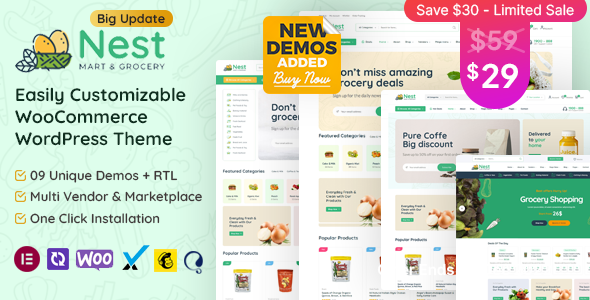
Stuck on your Nest – Grocery, Supermarket & Multivendor WooCommerce Theme WordPress theme? Let's fix it.
No endless back-and-forth. Just send us the details and we'll get it done.
No obligation · Replies within 1 hour · Quote within 1 day
Setup · Customization · Bug fixes · WooCommerce integration
About Nest – Grocery, Supermarket & Multivendor WooCommerce Theme WP Theme
Nest is a WooCommerce theme built specifically for grocery stores, supermarkets, and multivendor marketplaces. Developed by SteelThemes, it ships with a large collection of pre-built homepages, a dedicated grocery layout, and deep WooCommerce integration right out of the box.
The theme supports popular multivendor plugins like Dokan and WCFM, making it a practical choice for marketplace builds. It includes a mega menu, AJAX-powered search with category filtering, product quick view, and a sticky header — all features that matter for high-SKU stores with large product catalogs.
Nest is compatible with Elementor, includes RTL support, and is translation-ready. Performance is reasonable for a feature-heavy theme, though stores with large inventories will benefit from additional optimization. It targets store owners who want a market-ready design without building from scratch.
Get matched with a Nest – Grocery, Supermarket & Multivendor WooCommerce Theme developer in under one day
Tell us about your Nest – Grocery, Supermarket & Multivendor WooCommerce Theme project. Small fixes, Nest – Grocery, Supermarket & Multivendor WooCommerce Theme theme customization, or a full website build, whatever you need, we've got it covered.
We'll connect you to the right Nest – Grocery, Supermarket & Multivendor WooCommerce Theme developers, define the scope, and get everything 100% clear.
You'll get one estimate, hire your preferred developer, and start collaborating.
Nest has a lot of moving parts. Multivendor configuration, delivery logic, product filtering, and mobile performance all need careful setup. A developer who knows WooCommerce and has worked with Nest specifically will save you time and avoid the common configuration mistakes that cause slow load times or broken checkout flows.
Through Codeable, you get access to vetted WordPress developers who can handle everything from initial setup to complex customization. No generalist freelancers, no guesswork.
Pros
- Ships with 30+ pre-built homepage layouts including grocery and supermarket-specific designs
- Native support for Dokan and WCFM multivendor plugins with styled vendor pages
- AJAX product search with live category filtering built into the header
- Elementor compatibility allows visual page building without touching code
- RTL and translation-ready with WPML compatibility for multilingual stores
Cons
- Theme options panel is large and can be overwhelming for first-time users without documentation
- Demo import content can conflict with existing WooCommerce product data during setup
- Mobile performance drops noticeably on stores with large product catalogs without additional optimization
- Multivendor features require separate plugin purchases on top of the theme cost
- Some design elements are tightly coupled to shortcodes, making layout changes harder without developer help
Who is Nest – Grocery, Supermarket & Multivendor WooCommerce Theme for?
Online Grocery Store
Nest was designed with grocery in mind. Category-heavy navigation, quick-add-to-cart on listing pages, and a structured product grid make it suitable for stores selling hundreds of SKUs across fresh produce, packaged goods, and household items. The built-in delivery slot plugin compatibility is a practical addition for local grocery delivery businesses.
Farmers Market Marketplace
A farmers market platform with multiple local vendors selling seasonal produce is a natural fit for Nest. With Dokan or WCFM, each vendor gets their own storefront and dashboard. The theme’s product card design works well for visually-led listings like fresh vegetables, homemade goods, and artisan products sold by different sellers.
Organic and Health Food Shop
Health food and organic stores benefit from Nest’s clean product layout and category filtering. You can structure the store by diet type, ingredient, or brand using WooCommerce product attributes. The theme’s visual hierarchy supports longer product descriptions and nutritional information without the page feeling cluttered or hard to scan.
Wholesale Supermarket B2B Store
Nest can support wholesale and B2B store setups when combined with a WooCommerce wholesale plugin. Bulk pricing, tiered discounts, and restricted catalog access for registered buyers are all achievable. The mega menu structure works well for organizing large product ranges across multiple departments or supplier categories.
Multivendor Food Marketplace
For marketplace builds where multiple food vendors sell through a single storefront, Nest provides the frontend framework while Dokan or WCFM handles vendor management on the backend. Commission settings, vendor registration pages, and individual shop pages all integrate with the theme’s existing layout without requiring heavy customization work.

Customizing Nest – Grocery, Supermarket & Multivendor WooCommerce Theme
Out-of-the-box, Nest covers the basics well. But most store owners need more than a demo import. Customizing the Nest – Grocery, Supermarket & Multivendor WooCommerce Theme to match your brand, product structure, and checkout flow requires hands-on work with the theme options panel, Elementor, and often custom CSS.
A Nest – Grocery, Supermarket & Multivendor WooCommerce Theme expert can configure vendor dashboards, adjust mega menu structures, set up category-specific layouts, and fine-tune the mobile experience. They can also handle WooCommerce settings, shipping zones, and product attribute displays that the default setup doesn’t fully address.
Custom work might include integrating a delivery scheduling plugin, adjusting the mini-cart behavior, or building a custom homepage layout that better fits your product range. These tasks go beyond what theme settings alone can achieve.
Recommended plugins for Nest – Grocery, Supermarket & Multivendor WooCommerce Theme
Nest pairs well with several plugins that extend its core functionality. For multivendor setups, Dokan or WCFM Marketplace are the primary options. For delivery and scheduling, plugins like Orddd or Delivery Slots work alongside the theme cleanly.
If your store carries hundreds of products, adding a performance optimization layer is worth prioritizing early. Caching, image optimization, and database cleanup all make a measurable difference. For stores targeting local or organic search traffic, a dedicated SEO strategy built around product categories and location-based terms will drive consistent results over time.
Not sure which plugins to use? This WordPress plugins directory covers the most popular options with reviews and setup guides.
Nest – Grocery, Supermarket & Multivendor WooCommerce Theme common issues
Nest theme AJAX cart not working after update
AJAX cart failures in Nest are usually caused by plugin conflicts, a mismatched jQuery version, or a caching layer serving stale JavaScript. Start by disabling caching plugins and testing in a private browser window. Check the browser console for JavaScript errors. If the issue appeared after a theme or WooCommerce update, compare the current functions.php against the previous version. A WordPress bug fixing specialist can trace the conflict quickly and restore cart functionality without breaking other features.
Nest WooCommerce theme mega menu not displaying on mobile
Nest’s mega menu relies on specific CSS breakpoints and JavaScript initialization. On mobile, issues often appear when a third-party plugin injects conflicting CSS, or when the theme’s mobile menu script doesn’t fire correctly. Check whether a page builder or header plugin is overriding the menu markup. Clearing the CSS cache and testing with plugins disabled one at a time will help isolate the source. If the problem persists across themes, it may be a WooCommerce menu walker conflict requiring code-level adjustment.
Nest theme homepage slider not loading correctly
Slider problems in Nest are most commonly caused by missing slider plugin activation, a failed demo import, or JavaScript errors from conflicting scripts. Nest typically uses Revolution Slider or a bundled carousel component. Make sure the required plugin is activated and updated. If the slider worked before a plugin update, temporarily revert the plugin version and test. Image size mismatches can also cause blank slides — regenerating thumbnails using a plugin like Regenerate Thumbnails often resolves visual display issues.
Nest Dokan vendor page layout broken
Broken Dokan vendor pages in Nest are usually a template conflict between the theme’s WooCommerce overrides and Dokan’s own templates. This happens after plugin or theme updates when template files go out of sync. Check Dokan’s status page under WooCommerce for outdated template warnings. Manually updating the overridden templates to match the latest Dokan versions resolves most layout breaks. For ongoing stability, consider using a WordPress maintenance plan that keeps theme and plugin versions aligned.
Nest – Grocery, Supermarket & Multivendor WooCommerce Theme FAQ
Nest handles large catalogs reasonably well, but out-of-the-box performance is not optimized for 1,000+ products. You’ll need a caching plugin, image compression, and database optimization to keep page speed acceptable. Product filtering through WooCommerce layered navigation also benefits from a dedicated indexing plugin like FiboSearch or WOOF for better query performance at scale.
Yes. Nest is built with Dokan compatibility in mind and includes styled templates for vendor storefronts, registration pages, and dashboards. You still need to purchase and install Dokan separately. Some advanced Dokan features like vendor subscriptions or delivery management require Dokan Pro. SteelThemes documents the setup process in their theme documentation.
Yes, though many of Nest’s demo layouts were built using Elementor widgets. The theme works with the native WordPress block editor for basic page building. However, replicating the more complex demo homepage layouts without Elementor requires custom coding or shortcodes. Most users find Elementor the more practical path for building out category and landing pages.
Nest does not include delivery slot functionality natively. You need a separate plugin like Order Delivery Date for WooCommerce or Delivery Slots by Iconic. These plugins add date and time picker fields to the checkout page. Configuration involves setting available delivery windows, blackout dates, and order limits per slot. A developer can integrate the plugin cleanly with Nest’s checkout styling.
Yes, migrating an existing WooCommerce store to Nest is possible. Products, orders, and customer data stay in the database. What changes is the frontend theme layer. You’ll need to rebuild page layouts, configure menus, and adjust widget areas. A WordPress migration specialist can handle the switchover with minimal downtime and make sure WooCommerce settings carry over correctly.
Hire a Nest – Grocery, Supermarket & Multivendor WooCommerce Theme Developer
Need help setting up, customizing, or extending your Nest-powered store? Whether you’re building a single-vendor grocery shop or a multivendor marketplace, a specialist developer will get it done faster and cleaner than trial and error.
Get a free estimate through FoxyConcept. You’ll be matched with a vetted WooCommerce developer within 24 hours. No obligation, no risk.
You'll need a free Codeable account so developers can ask questions and send their quotes.