Noisa WordPress Theme
by rascals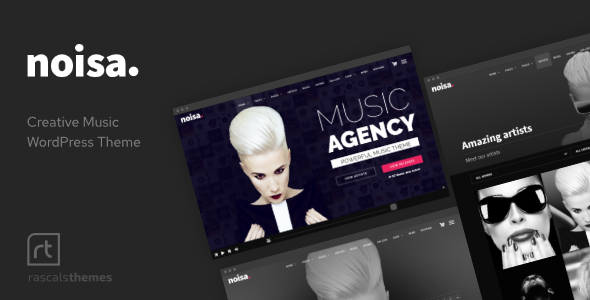
Stuck on your Noisa WordPress theme? Let's fix it.
No endless back-and-forth. Just send us the details and we'll get it done.
No obligation · Replies within 1 hour · Quote within 1 day
Setup · Customization · Bug fixes · WooCommerce integration
About Noisa WP Theme
Noisa is a premium WordPress theme built by Rascals, a developer studio known for clean code and strong visual design. The theme targets creative agencies, music artists, photographers, and portfolio sites that need a dark, bold aesthetic without sacrificing usability.
It ships with a full-screen layout, smooth page transitions, and a built-in audio player — features that set it apart from generic multipurpose themes. The demo content covers agency, music, portfolio, and photography setups, making it flexible without being bloated.
Noisa is built on the WPBakery page builder, includes Revolution Slider, and supports custom post types for portfolio projects. If you need a site that feels modern and distinctive without extensive custom development, Noisa is a solid starting point.
Get matched with a Noisa developer in under one day
Tell us about your Noisa project. Small fixes, Noisa theme customization, or a full website build, whatever you need, we've got it covered.
We'll connect you to the right Noisa developers, define the scope, and get everything 100% clear.
You'll get one estimate, hire your preferred developer, and start collaborating.
Noisa has specific quirks — its transition system, custom audio player, and WPBakery dependency all interact in ways that can cause unexpected issues during customization. A developer unfamiliar with the theme will spend hours just understanding its structure.
Through Codeable, you get matched with WordPress developers who have worked with themes like Noisa before. You post your project, receive an estimate within 24 hours, and only move forward if the scope and price make sense. No risk, no obligation.
Pros
- Built-in audio player works well for music artists and podcasters without extra plugins
- Smooth full-screen page transitions give the site a polished, premium feel
- Multiple pre-built demo layouts covering agency, music, photography, and portfolio niches
- Revolution Slider included at no extra cost, saving license fees
- Dark aesthetic is distinctive and well-suited to creative and entertainment industries
Cons
- WPBakery dependency makes migrating to other page builders or block editor difficult
- Heavy animations and full-screen images can hurt Core Web Vitals without optimization
- Demo content import can be unreliable, sometimes requiring manual setup
- Limited documentation makes troubleshooting non-obvious issues slow
- WooCommerce integration looks rough out of the box and needs CSS work to fit the theme's style
Who is Noisa for?
Music Artists and Bands
Noisa’s built-in audio player and dark, full-screen layout make it a natural fit for musicians and bands. You can showcase tracks directly on the homepage, display tour dates, and build a strong visual identity without needing custom development from the start. The audio functionality alone saves the cost of a separate plugin.
Creative Agencies
The agency demo layout includes smooth transitions, portfolio grids, and a structured services section. Creative agencies benefit from the polished first impression Noisa creates. With developer help, you can adapt the layout to match your brand and add custom case study pages that go beyond what the default portfolio post type offers.
Photographers
Full-screen image support and minimal UI make Noisa a good base for photography portfolios. The theme keeps the focus on the images rather than decorative page elements. A developer can set up filtered gallery views, client proofing integrations, or custom lightbox behavior to make the portfolio more functional.
Event Promoters
Event promoters can use Noisa’s visual weight to build hype-driven landing pages for shows, festivals, or club nights. Pairing it with an events plugin gives you ticket links and lineup displays. The full-screen sections work well for video backgrounds and countdown timers that are common in event marketing.
Freelance Designers and Illustrators
Freelance designers and illustrators need a portfolio that communicates craft quickly. Noisa’s typography and layout options support strong visual storytelling. With some customization, you can create a site that reflects your personal style rather than looking like the standard Noisa demo, which matters when your work is the product.

Customizing Noisa
Noisa gives you a decent range of options out of the box, but getting it to match a specific brand takes some work. The theme panel controls typography, colors, header styles, and layout behavior, but many design decisions are locked into WPBakery shortcodes that require hands-on editing to change.
A Noisa expert can help you move beyond the demo look quickly. That means custom color schemes, modified header and footer structures, adjusted animations, and integrating third-party plugins without breaking the theme’s transitions or audio player functionality.
Custom post type layouts, menu styling, and mobile breakpoints are common areas where clients need developer help. Working with someone who knows Noisa’s file structure saves significant time compared to trial and error in the visual editor.
Recommended plugins for Noisa
Noisa works well with WooCommerce if you want to sell merchandise, digital downloads, or event tickets directly from your site. The theme’s dark visual style carries over reasonably well, though WooCommerce pages often need CSS adjustments to fit properly.
For performance, Noisa’s animations and full-screen assets can slow load times without proper optimization. A developer can implement caching, image compression, and script loading improvements through our WordPress performance service.
If organic visibility matters, pairing Noisa with Yoast or Rank Math and addressing structured data gaps is worth doing. We cover that through our WordPress SEO service.
Not sure which plugins to use? This WordPress plugins directory covers the most popular options with reviews and setup guides.
Noisa common issues
Noisa page transitions not working after update
Page transition breaks in Noisa are usually caused by a JavaScript conflict introduced by a plugin update or a WordPress core update that changed how scripts load. Start by disabling plugins one by one to isolate the conflict. If the transitions use the theme’s built-in AJAX navigation, check whether any caching plugin is interfering with partial page loads. Clearing all caches after each change is essential for accurate testing. If the issue persists, a developer can audit the JS console errors directly.
Noisa audio player not playing on mobile
Mobile browsers, particularly iOS Safari, block autoplay audio by default. This affects Noisa’s built-in player when it’s set to play automatically. The fix requires either updating the player settings to require a user tap before playback starts, or replacing the built-in player with a plugin that handles mobile audio policies correctly. Check the theme panel for autoplay settings first. If the player itself is broken rather than restricted, the issue is likely a script loading conflict. Our bug fixing service can resolve this.
Noisa demo import not working or showing blank pages
Noisa’s demo import relies on importing XML content, widget data, and theme options simultaneously. Failures usually come from server memory limits, PHP timeouts, or file upload size restrictions. Increase memory_limit, max_execution_time, and upload_max_filesize in your PHP configuration before importing. If pages import but appear blank, the WPBakery shortcodes may not have loaded correctly. Saving and updating each page through WPBakery’s editor often rebuilds the layout.
Noisa theme slow loading speed
Noisa loads full-screen images, custom fonts, Revolution Slider assets, and JavaScript for page transitions on every page load. Without optimization, this creates significant performance overhead. Start by enabling lazy loading for images, deferring non-critical scripts, and compressing images before upload. A caching plugin with proper exclusions for AJAX-based navigation helps significantly. For deeper performance gains, see our WordPress performance service for asset optimization and server-level improvements.
Noisa FAQ
Noisa was built around WPBakery and older WordPress architecture. It generally works with WordPress 6.x, but some features may behave unexpectedly, particularly around the full-site editing tools introduced in recent versions. Rascals periodically releases updates, but checking the ThemeForest changelog before updating WordPress on a live site is advisable. Testing on a staging environment first reduces risk.
Noisa is built specifically around WPBakery shortcodes. Switching to Elementor means rebuilding every page from scratch, since Elementor cannot interpret WPBakery content. The theme’s custom sections, transitions, and audio player are also tied to WPBakery. A migration to Elementor would effectively mean choosing a different theme or doing significant custom development work.
Noisa includes basic WooCommerce compatibility, but the styling does not carry over cleanly. Product pages, cart, and checkout will look noticeably off without CSS adjustments. If ecommerce is a primary requirement, plan for developer time to align WooCommerce templates with Noisa’s visual style. It is workable but not plug-and-play.
Noisa support is handled through the Rascals ThemeForest profile. Buyers get six months of included support, which can be extended. Support covers theme bugs but not custom modifications. For customization help, troubleshooting conflicts, or ongoing changes, working with a WordPress developer through a service like ours is faster and more practical than waiting on theme support queues.
Yes, Noisa sites can be migrated to a new host without losing content or design. The process involves moving the database and files, then updating the site URL configuration. Theme-specific settings stored in the database transfer with the migration. For a smooth move, see our WordPress migration service. Testing on the new host before pointing DNS is always recommended.
Hire a Noisa WordPress Developer
Whether you need help setting up Noisa from scratch, customizing it beyond the default demo, or fixing something that broke after an update, we can match you with the right developer. Work is scoped clearly before anything starts.
Post your project and get a free estimate through our free estimate page. You’ll hear back within 24 hours. If the fit isn’t right, you’re under no obligation to proceed. Our WordPress development services cover everything from single fixes to full builds.
You'll need a free Codeable account so developers can ask questions and send their quotes.