Norebro WordPress Theme
by colabrio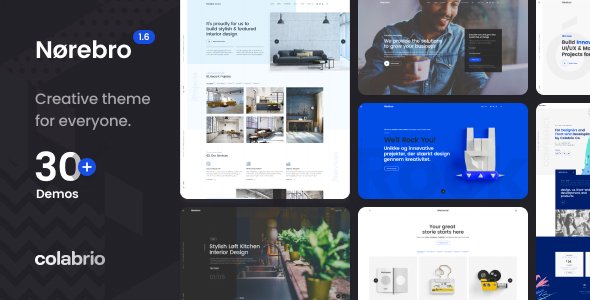
Stuck on your Norebro WordPress theme? Let's fix it.
No endless back-and-forth. Just send us the details and we'll get it done.
No obligation · Replies within 1 hour · Quote within 1 day
Setup · Customization · Bug fixes · WooCommerce integration
About Norebro WP Theme
Norebro is a multipurpose WordPress theme built by Colabrio. It targets creative agencies, portfolios, and studios that need flexible layouts without writing custom code. The theme ships with a drag-and-drop page builder, a large library of pre-built demos, and smooth AJAX-based transitions that give sites a polished, app-like feel.
Under the hood, Norebro uses a custom options panel with deep control over typography, colors, header styles, and portfolio layouts. It supports WooCommerce, which makes it usable for studios that sell digital products or merchandise alongside their work. Page load performance depends heavily on how many demo assets you import and whether you clean up unused scripts after setup. With the right configuration, Norebro produces fast, visually sharp sites that hold up well across devices.
Get matched with a Norebro developer in under one day
Tell us about your Norebro project. Small fixes, Norebro theme customization, or a full website build, whatever you need, we've got it covered.
We'll connect you to the right Norebro developers, define the scope, and get everything 100% clear.
You'll get one estimate, hire your preferred developer, and start collaborating.
Norebro has enough moving parts that small configuration mistakes can cause layout breaks, slow load times, or AJAX conflicts with plugins. A vetted Norebro developer on Codeable has already solved these problems on other projects. Codeable screens developers before they touch client work, so you are not gambling on a freelancer profile. You post your project, get matched within 24 hours, and receive a free estimate before any work starts. No retainers, no lock-in.
Pros
- Large demo library covers agencies, photographers, studios, and product brands without heavy rework
- AJAX page transitions work reliably across most browsers and give sites a smooth single-page feel
- Portfolio module supports masonry, grid, and fullscreen layouts with built-in filtering
- WooCommerce integration is handled natively, not bolted on as an afterthought
- Typography controls include variable font sizing and per-element font assignment, reducing the need for custom CSS
Cons
- Options panel is deep and poorly documented, making first-time setup slow without prior experience
- Animation scripts add noticeable page weight if you do not manually dequeue unused libraries
- Colabrio support response times can be slow during peak periods on ThemeForest
- Some demo layouts rely on specific plugin combinations that create dependency conflicts on existing sites
- AJAX navigation can break third-party plugins that initialize on standard page load events
Who is Norebro for?
Creative Agencies
Norebro handles multi-service agency sites well. You can build separate portfolio sections for different disciplines, assign team member profiles, and use the fullscreen header demos to make a strong first impression. The WooCommerce layer adds the option to sell branded merchandise or digital downloads without switching themes.
Freelance Photographers
Photographers get clean grid and masonry gallery options with lightbox support baked in. The fullscreen image headers and minimal navigation styles let the work take focus. A Norebro developer can fine-tune image lazy loading and disable unused animation scripts to keep gallery pages fast on mobile connections.
Architecture and Interior Design Studios
Architecture and interior studios need large image real estate with controlled whitespace. Norebro’s project detail pages support full-width media, custom fields for project specs, and related project linking. The horizontal scrolling portfolio option is a good fit for studios that want something less conventional than a standard vertical grid.
Digital Product Shops
Norebro’s WooCommerce support makes it a solid choice for designers or developers selling templates, presets, or digital tools. Product pages can be styled to match the wider site aesthetic, and the AJAX cart behavior keeps the shopping experience consistent with the rest of the site’s transitions.
Music Artists and Labels
Music artists and labels can use Norebro’s video background headers, event listing structures, and dark-mode demo styles to build sites that match a visual identity. The theme supports embedded audio players and custom post types for releases, which a Norebro specialist can extend to fit a specific catalog structure.

Customizing Norebro
Norebro gives you a lot of knobs to turn, but the options panel can feel dense if you are setting it up for the first time. Header configurations alone cover dozens of combinations: sticky, transparent, split, and fullscreen variants. Portfolio filtering, hover effects, and grid spacing all live in separate sections, so getting a consistent look across pages takes time.
A Norebro expert can cut through that setup time significantly. From building custom demo imports tailored to your brand, to adjusting CSS for pixel-perfect typography, to wiring up WooCommerce with the right layout settings, a specialist knows where Norebro stores its logic and how to extend it cleanly. If you want custom post types, unique archive templates, or modifications to the AJAX transition system, working with a Norebro developer saves you from trial-and-error inside unfamiliar theme files.
Recommended plugins for Norebro
Norebro works well with a focused plugin stack. For caching and asset optimization, pairing it with a tool like WP Rocket or Perfmatters helps reduce the overhead from the theme’s animation libraries. Visit the WordPress performance service for help configuring those correctly with Norebro’s AJAX navigation.
On the SEO side, Norebro’s schema markup is minimal out of the box. Adding Rank Math or Yoast and configuring them alongside the theme’s portfolio and blog structures will improve how your content indexes. The WordPress SEO optimisation service covers exactly that kind of setup for creative and portfolio sites built on themes like Norebro.
Not sure which plugins to use? This WordPress plugins directory covers the most popular options with reviews and setup guides.
Norebro common issues
Norebro AJAX navigation breaking contact form 7
Contact Form 7 uses standard DOM-ready events that do not re-fire during AJAX navigation. When Norebro loads a new page via AJAX, CF7 scripts do not reinitialize. The fix is to re-trigger CF7 initialization on Norebro’s AJAX complete callback, usually hooked into the theme’s custom event. Add a small JavaScript snippet in your child theme’s JS file that listens for the transition end event and calls wpcf7.init() on any form elements found in the new page content.
Norebro portfolio filter not working after update
Portfolio filter breakage after an update usually points to a JavaScript conflict or a missing dependency. Check the browser console for errors first. If you see an Isotope or MixItUp error, the library may have been updated or dequeued. Clear your caching plugin, disable other plugins one by one to isolate the conflict, and check that your child theme is not overriding the portfolio template files with an outdated version from before the update.
Norebro demo import fails or imports incomplete
Failed demo imports are most often caused by server memory limits, execution timeouts, or missing required plugins. Before importing, set max_execution_time to 300 and memory_limit to 256M in your PHP configuration. Install all required plugins listed on the demo page first. If the import still stalls, try importing content, widgets, and customizer settings separately using the manual import method Colabrio documents in the theme folder. For persistent failures, the WordPress bug fixing service can diagnose your server environment.
Norebro menu not showing on mobile
If the mobile menu fails to open, the most common cause is a JavaScript error stopping the menu toggle script from firing. Open the browser console on a mobile viewport and look for errors. A caching plugin serving a stale JS file is another frequent cause. Clear all caches, dequeue any JS optimization plugins temporarily, and test again. Also confirm that your header style setting in the Norebro options panel matches a style that includes a mobile hamburger menu.
Norebro page builder elements not displaying correctly
Norebro uses its own page builder elements that depend on shortcode rendering and associated CSS. If elements appear broken, first check whether the required Colabrio plugin is active and up to date. A version mismatch between the theme and its companion plugin causes rendering failures. If you switched builders or copied content between installs, shortcode attributes may be malformed. Rebuilding the affected section using fresh elements from the builder panel is faster than debugging corrupted shortcode strings.
Norebro WooCommerce cart not updating with AJAX
WooCommerce AJAX cart updates rely on standard WooCommerce fragments. When Norebro’s AJAX navigation intercepts page transitions, it can prevent the cart fragment script from loading correctly on subsequent pages. Ensure WooCommerce cart fragments are not being blocked by a caching plugin. Add the cart fragment URL to your cache exclusion list. If the cart icon still does not update, check that the theme’s WooCommerce template files are not outdated compared to the installed WooCommerce version.
Norebro slow page load after demo import
Demo imports pull in all media, fonts, and plugin assets from the demo, many of which you will not use. After importing, audit your active plugins and deactivate any that came with the demo but are not needed. Use a tool like Asset CleanUp to stop scripts and styles loading on pages where they serve no purpose. Also check whether Norebro is loading multiple animation libraries globally. Restricting those to pages that actually use animations cuts load time noticeably. The WordPress bug fixing service includes performance audits for exactly this scenario.
Norebro custom CSS not applying after theme update
If custom CSS disappears or stops applying after a theme update, you were likely adding CSS directly to the parent theme’s style.css file. Always use a child theme or the Additional CSS field in the WordPress Customizer. If you were using the Customizer field and styles are still not applying, check whether a caching plugin is serving a pre-update CSS file. Clear all caches including any CDN cache layer. If you use a builder that generates inline CSS, re-save your pages to regenerate the stylesheet.
Norebro featured images not showing in portfolio
Missing portfolio featured images are usually a thumbnail regeneration issue. When you change the theme or adjust image sizes in the settings, WordPress does not automatically resize existing images. Run a thumbnail regeneration using the Regenerate Thumbnails plugin. If images are still missing, check the portfolio item edit screen to confirm a featured image is actually assigned. Norebro’s portfolio grid pulls from the featured image field, not from images inside the content editor.
Norebro white screen after plugin conflict
A white screen after activating a plugin alongside Norebro points to a PHP fatal error, usually a function conflict or memory exhaustion. Access your site via FTP or file manager and rename the conflicting plugin folder to deactivate it without needing wp-admin access. Enable WP_DEBUG in wp-config.php to see the exact error. If you cannot identify the plugin, deactivate all plugins via FTP and reactivate them one at a time. The WordPress bug fixing service can resolve this quickly if you are locked out.
Norebro FAQ
Yes, for the right type of portfolio. Norebro suits creative agencies, photographers, and studios that want full control over grid layouts, filtering, and fullscreen visuals. It is less suited to simple single-page portfolios where a lighter theme would perform better. If your work needs to be presented across multiple projects with custom detail pages, Norebro gives you the tools to do that well.
Norebro includes its own page builder through the Colabrio plugin, and mixing it with Elementor creates conflicts in most cases. Some users run Elementor on specific pages while leaving Norebro’s builder active elsewhere, but this is not a clean setup and can cause visual inconsistencies. If Elementor is your preferred builder, you are better served by a theme built specifically around it.
Purchase Norebro from ThemeForest, download the installable theme ZIP from your ThemeForest downloads page, then upload it via WordPress Admin under Appearance, Themes, Add New, Upload Theme. After activation, install the required Colabrio plugin when prompted. From there, use the demo importer under the theme options panel to load a starter layout before customizing.
Yes. Norebro includes WooCommerce support with styled product pages, cart, and checkout templates that match the theme’s visual style. It is not a dedicated ecommerce theme, so very large shops with complex filtering needs may want a more specialized option. For studios selling a small range of digital products or merchandise, Norebro’s WooCommerce integration works well without additional configuration.
Create a new folder in wp-content/themes, name it norebro-child, and add two files: style.css with the standard child theme header comment block and a functions.php file that enqueues the parent theme’s stylesheet using wp_enqueue_scripts. Activate the child theme from Appearance, Themes. All custom CSS and template overrides go into the child theme folder from that point forward.
Norebro loads animation libraries, custom fonts, and AJAX scripts globally by default. After a demo import, you also carry unused images and plugin assets. The fastest wins are dequeuing scripts not in use, running a thumbnail cleanup, removing unused plugins, and configuring a caching plugin that excludes AJAX endpoints. Disabling Google Fonts loading from the theme options and serving them locally also reduces DNS lookup time.
Colabrio does push updates through ThemeForest, though the pace is slower than some theme shops. Major WordPress and WooCommerce compatibility updates tend to arrive within a reasonable window. Check the Norebro changelog on ThemeForest before updating to see what has changed. Always test updates on a staging site first, especially if you have customized template files in a child theme.
A regular ThemeForest license covers one end product for one client. If you are building a site for a paying client, you need a license for each project. Purchasing the extended license is only required if you are packaging Norebro as part of a product you sell to multiple customers. For standard client site builds, one regular license per site is the correct approach.
Migrating a Norebro site follows standard WordPress migration steps: export the database, move all files including wp-content, update the site URL in the database, and update wp-config.php with the new host credentials. Norebro does not add unusual database tables, so standard migration tools work without extra steps. For a clean migration with zero downtime, the WordPress migration service handles the full process.
Codeable is the most reliable place to find a vetted Norebro developer. Developers on the platform are screened for WordPress expertise, and you get a free estimate before committing to anything. Post your project, describe what you need with Norebro specifically, and you will be matched with a specialist within 24 hours. There is no obligation to hire after receiving the estimate.
Hire a Norebro Expert Developer
Whether you need a full site build, a specific customization, or a bug tracked down fast, a Norebro specialist can handle it. Work is scoped clearly upfront so you know exactly what you are paying for before anything starts. Get a Free Estimate and describe your project. You will hear back within 24 hours with a clear plan from a developer who knows Norebro inside out.
You'll need a free Codeable account so developers can ask questions and send their quotes.