NovaLab WordPress Theme
by BoldThemes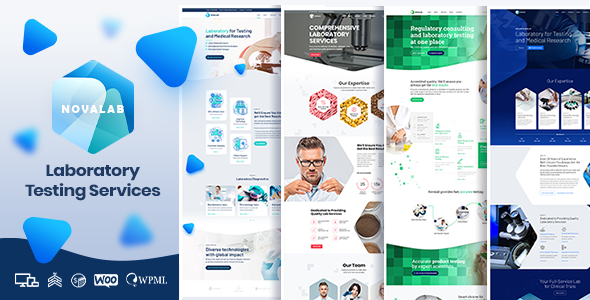
Stuck on your NovaLab WordPress theme? Let's fix it.
No endless back-and-forth. Just send us the details and we'll get it done.
No obligation · Replies within 1 hour · Quote within 1 day
Setup · Customization · Bug fixes · WooCommerce integration
About NovaLab WP Theme
NovaLab is a science and laboratory WordPress theme built by BoldThemes. It targets research institutions, biotech companies, medical clinics, and university departments that need a credible, structured online presence without hiring a full design agency.
The theme ships with multiple homepage layouts, a pre-built page library, and full compatibility with the WPBakery page builder. Visual options are handled through the Bold Page Builder, giving teams control over layout without touching code.
NovaLab is translation-ready, WPML-compatible, and includes WooCommerce support for selling lab kits, courses, or consultation packages. BoldThemes updates the theme regularly, and it passes WordPress coding standards. If you want a professional science or medical site up quickly, NovaLab is a solid starting point.
Get matched with a NovaLab developer in under one day
Tell us about your NovaLab project. Small fixes, NovaLab theme customization, or a full website build, whatever you need, we've got it covered.
We'll connect you to the right NovaLab developers, define the scope, and get everything 100% clear.
You'll get one estimate, hire your preferred developer, and start collaborating.
NovaLab is well-documented but not self-configuring. Getting the demo to match your actual content, your brand, and your workflow takes real WordPress knowledge. BoldThemes builds solid themes, but no theme vendor provides hands-on build support.
Through Codeable, you get access to vetted WordPress developers who have worked with BoldThemes products. You post your project, receive a transparent estimate, and only pay if you decide to move forward. No guesswork, no freelancer roulette.
Pros
- Purpose-built layouts for science, medical, and research sites that look credible without custom design work
- Includes Bold Page Builder alongside WPBakery, giving real layout flexibility without full developer dependency
- WPML-compatible out of the box, which matters for universities and international research organisations
- WooCommerce integration is pre-styled to match the theme, reducing friction for adding a store
- BoldThemes provides consistent updates and has a documented support track record on ThemeForest
Cons
- Demo import pulls in a lot of placeholder content and images that need manual cleanup before going live
- Relies on WPBakery, which adds page load overhead and locks content into shortcode-heavy markup
- Typography and spacing customisation beyond preset options requires CSS knowledge or a developer
- Mobile menu behaviour on complex navigation structures can need extra CSS or JavaScript adjustment
- Documentation is functional but thin on advanced use cases like custom post type integration or REST API usage
Who is NovaLab for?
University Research Departments
NovaLab’s structured layout system works well for departments that need to list researchers, ongoing projects, and published papers. Custom post types for team members and research outputs can be added without touching the theme core. The credible visual language matches what academic audiences expect from an institutional site.
Biotech and Life Science Startups
Early-stage biotech companies need a site that looks serious and converts visitors to investors or partners. NovaLab’s bold hero sections, icon blocks, and counter animations fit the pitch-style homepage these companies need. WooCommerce can be activated later if product or licensing sales become part of the model.
Medical and Diagnostic Clinics
Clinics need appointment booking, service pages, and trust signals like credentials and testimonials. NovaLab includes pre-built sections for all of these. Connecting a booking plugin like Bookly or Simply Schedule Appointments into the NovaLab layout is straightforward with a developer handling the integration.
Environmental and Testing Laboratories
Labs offering water testing, food safety, or environmental analysis need a service-focused site with clear calls to action. NovaLab’s tabbed content sections and service grid layouts present complex service catalogues clearly. Adding a quote request form via Gravity Forms fits without visual conflict.
Science Education Platforms
Online science courses or tutoring platforms can use NovaLab with a plugin like LearnDash or LifterLMS. The theme’s clean content areas work as a course wrapper. Instructors and subject listings can be built using the team and portfolio post types that ship with the theme.

Customizing NovaLab
Out of the box, NovaLab gives you color controls, Google Fonts integration, and header/footer layout options. That covers basic branding. Custom work starts the moment your site needs something beyond the demo content.
Common customization requests include building custom post types for research projects or case studies, adjusting the mobile header behavior, adding custom animated counters for stats sections, and integrating third-party booking or LMS plugins.
A NovaLab expert can also extend the theme’s child theme structure cleanly, so your changes survive updates. Modifying WPBakery shortcode output or adding custom Elementor sections alongside the Bold builder requires someone who knows exactly where to draw the boundary. That is where hiring a NovaLab developer pays off over trial and error.
Recommended plugins for NovaLab
NovaLab pairs well with several plugin categories. For forms, Gravity Forms or WS Form handle complex multi-step submissions common in research or clinic environments. WooCommerce adds a product or service store. WPML handles multilingual content for international institutions.
If site speed is a concern after adding plugins and demo content, targeted performance work makes a significant difference. For research-heavy sites that need discoverability, structured SEO improvements help Google index your content properly.
Contact Form 7, TablePress for data presentation, and The Events Calendar for conferences or lab open days all integrate cleanly with NovaLab without theme conflicts.
Not sure which plugins to use? This WordPress plugins directory covers the most popular options with reviews and setup guides.
NovaLab common issues
NovaLab demo content not importing correctly in WordPress
Demo import failures in NovaLab are usually caused by server memory limits or execution time settings. Set max_execution_time to 300 and memory_limit to at least 256MB in your php.ini or via your host’s control panel. If import still stalls, try importing XML content manually via the WordPress importer tool, then importing widgets separately. Avoid running the one-click importer on shared hosting without checking these limits first. If the issue persists, a bug fixing specialist can diagnose the exact server bottleneck.
NovaLab page builder elements not displaying on frontend
If NovaLab’s Bold Builder or WPBakery elements show as raw shortcode or blank spaces on the frontend, the most common cause is a plugin conflict or a missing required plugin. Check that both Bold Page Builder and WPBakery are active and updated. Deactivate other plugins one by one to isolate conflicts. Also confirm the theme’s required plugins were all installed during setup. JavaScript console errors often point directly to the conflicting script. Clearing cache after each test is essential to get accurate results.
NovaLab WooCommerce product pages not matching theme style
WooCommerce pages in NovaLab can lose theme styling if the WooCommerce plugin was updated after the theme was last tested by BoldThemes. First check the NovaLab changelog for a WooCommerce compatibility note. If styling is broken, the fix is usually adding targeted CSS to a child theme stylesheet to realign product grid, button, and cart styles. Never edit the parent theme files directly. Using a child theme protects your fixes from being overwritten. A developer can patch this in under an hour.
NovaLab site loading slowly after setup
NovaLab can load slowly after a full demo import because demo content includes uncompressed images and multiple scripts loaded globally. Start by running the site through GTmetrix or PageSpeed Insights to identify the exact bottleneck. Install a caching plugin, enable lazy loading for images, and remove WPBakery scripts from pages that do not use the builder. Serving images via a CDN and switching to a faster host also moves the needle significantly. For a full audit and fix, see our WordPress performance service.
NovaLab FAQ
NovaLab is built around WPBakery and the Bold Page Builder. It is not officially built for Elementor, and mixing builders on the same site causes conflicts. If you want to use Elementor, you would need to disable the included builders and accept that pre-built demo sections will not transfer over. A developer can rebuild those sections in Elementor if needed, but it is not a zero-effort switch.
BoldThemes updates NovaLab to maintain WordPress compatibility. Before updating either WordPress core or the theme, always check the ThemeForest changelog for NovaLab to confirm the current version has been tested against the latest WordPress release. Running a staging site update first is the safest approach. If you are on an older version of NovaLab and worried about compatibility, a maintenance plan covers this as part of routine upkeep.
Yes. NovaLab is WPML-compatible, which is the standard for multilingual WordPress sites. You will need to purchase a WPML licence separately, then configure string translations for theme-specific text. Menu items, widget content, and custom post types all need individual translation setup. For institutions needing full RTL support, additional CSS adjustments may be required depending on the target language.
Always use a child theme for any code changes. CSS, template overrides, and custom functions go in the child theme, not the parent NovaLab files. Theme options saved via the customiser or BoldThemes panel are stored in the database and survive updates. Before updating, back up the site fully, test the update on staging, then apply it to production. If you have not been using a child theme, a developer can set one up and migrate your existing changes safely.
NovaLab is a reasonable fit for medical clinics. It includes sections for services, team member profiles, testimonials, and calls to action that clinics typically need. It is not a clinic-only theme, so some sections will need content adjustments. For appointment booking, you will need a separate plugin. The theme does not include anything clinical-grade like patient portals or HIPAA-specific features, so those require custom development or dedicated plugins.
Hire a NovaLab WordPress Developer
Whether you need a full NovaLab site built from the demo, a specific feature added, or an existing site cleaned up and optimised, a dedicated developer will get it done faster than working through it alone. Post your project and get a free, no-obligation estimate within 24 hours. Get your free estimate here and see exactly what your project will cost before committing to anything.
You'll need a free Codeable account so developers can ask questions and send their quotes.