Novo WordPress Theme
by ypromo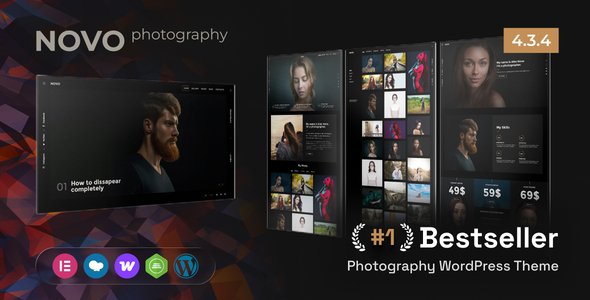
Stuck on your Novo WordPress theme? Let's fix it.
No endless back-and-forth. Just send us the details and we'll get it done.
No obligation · Replies within 1 hour · Quote within 1 day
Setup · Customization · Bug fixes · WooCommerce integration
About Novo WP Theme
Novo is a clean, portfolio-focused WordPress theme built by ypromo. It targets creatives, freelancers, and agencies who want a minimal presentation without sacrificing flexibility. The theme ships with a fullscreen layout option, smooth page transitions, and a grid-based portfolio system that handles both images and video projects well.
Built on a lightweight codebase, Novo loads fast out of the box and plays nicely with most page builders if you need to extend beyond the default options. It supports custom post types for portfolio items, has solid typography controls, and includes WooCommerce compatibility for selling digital work or services. For studios and solo creatives who want their work to speak without distractions, Novo gets the structure right from the start.
Get matched with a Novo developer in under one day
Tell us about your Novo project. Small fixes, Novo theme customization, or a full website build, whatever you need, we've got it covered.
We'll connect you to the right Novo developers, define the scope, and get everything 100% clear.
You'll get one estimate, hire your preferred developer, and start collaborating.
Novo looks straightforward until you need it to do something specific. Custom archive layouts, AJAX portfolio loading, password-protected case studies, or a shop integration all require hands-on development work. Finding someone who has built with Novo before cuts iteration time significantly.
Through Codeable, you get matched with vetted WordPress developers who know portfolio themes inside out. Post your project, get a scoped estimate, and decide whether to proceed. No commitment required upfront.
Pros
- Lightweight codebase keeps page load times low for image-heavy portfolios
- Fullscreen layout option works well for photography and visual-first projects
- Built-in smooth page transitions without requiring additional plugins
- WooCommerce compatible for selling prints, services, or digital downloads
- Clean portfolio grid with category filtering included out of the box
Cons
- Customizer options are limited compared to more developer-friendly themes
- No built-in mega menu support, requires custom code or a plugin for complex navigation
- Portfolio post type lacks advanced custom field support without adding ACF
- Page builder compatibility is partial, some layout conflicts with Elementor widgets
- Documentation from ypromo is thin, making self-troubleshooting harder for non-developers
Who is Novo for?
Photography Portfolio
Novo’s fullscreen image display and grid layouts make it a natural fit for photographers. Each project page can showcase a full gallery, and the minimal UI keeps focus on the images. A Novo developer can add EXIF data display, client-specific password protection, or a proofing workflow on top of the base theme.
Creative Agency Website
Agencies need portfolio pages that reflect actual client work without feeling templated. Novo’s structure supports multi-category filtering and per-project case study layouts. A Novo specialist can extend it with team pages, service sections, and a lead capture form that fits the existing design language without breaking the visual consistency.
Freelance Designer Portfolio
For solo designers, Novo handles the presentation cleanly. A developer can configure custom project fields for deliverables, timelines, and client names, giving each case study real depth. Combined with a contact form and a clear call-to-action structure, the site does practical business work rather than just looking good.
Video Production Showreel
Novo supports video embeds and background video on project pages, which suits video production companies well. A Novo developer can set up Vimeo or YouTube embeds with custom poster images, build a filterable reel archive, and optimize the layout so video content loads efficiently without degrading the rest of the page experience.
Digital Product Shop
With WooCommerce support built in, Novo can handle a shop alongside a portfolio. A Novo expert can configure product pages that match the theme’s aesthetic, set up digital download delivery, and structure the navigation so the shop and portfolio feel like one coherent site rather than two things bolted together.

Customizing Novo
Novo’s Customizer panel covers the essentials: logo, colors, typography, and layout modes. But most serious build requirements go beyond what the panel exposes. A Novo expert can unlock things like custom portfolio filters, per-project layout overrides, and conditional header styles that change based on page type.
Child theme development is the right approach here. Editing Novo directly risks losing changes on updates. A skilled Novo developer will build on top of the theme properly, add custom fields via ACF for richer project pages, and wire up any third-party integrations you need. If your portfolio needs a contact workflow, client login area, or dynamic filtering by category or tag, that work requires someone who knows the theme’s structure well enough to extend it cleanly.
Recommended plugins for Novo
Novo pairs well with performance and SEO plugins, but the defaults need tuning. Image-heavy portfolio grids benefit from lazy loading and a caching layer. A properly configured setup with a CDN and optimized asset delivery makes a real difference on WordPress performance scores.
On the discoverability side, schema markup for portfolio items, proper canonical tags, and structured project metadata give search engines something useful to index. A Novo specialist can handle WordPress SEO optimisation specific to portfolio and creative site structures, including open graph images and per-project meta descriptions that actually reflect the content.
Not sure which plugins to use? This WordPress plugins directory covers the most popular options with reviews and setup guides.
Novo common issues
Novo portfolio grid not loading after update
Portfolio grid failures after an update usually come from a JavaScript conflict or a cached version of an old asset. Start by clearing your site cache and browser cache. If the grid still doesn’t render, deactivate plugins one at a time to isolate a conflict. Check the browser console for JS errors. If the issue appeared right after a Novo update, your child theme or custom CSS may need adjustments to match the new markup structure.
Novo page transitions broken or not working
Novo’s page transitions rely on specific JavaScript hooks. Conflicts with caching plugins that combine or minify scripts are the most common cause of broken transitions. Disable script optimization in your cache plugin first. Also check that jQuery is loading correctly and that no other plugin is deferring scripts in a way that breaks Novo’s transition sequence. If the problem persists, a WordPress bug fixing specialist can trace the exact conflict quickly.
Novo theme header overlapping content on mobile
Header overlap on mobile is usually a CSS specificity issue or a missing viewport meta tag. Open your browser’s mobile inspector and check which CSS rule is controlling the header height and z-index. In many cases, a small custom CSS fix in your child theme or the Additional CSS field resolves this. If you’ve added a custom header plugin or a sticky nav, check whether it’s outputting its own positioning rules that conflict with Novo’s defaults.
Novo portfolio filter categories not showing
If portfolio filter buttons appear but show no results, the issue is often a taxonomy assignment problem. Check that your portfolio items are assigned to the correct categories and that the filter widget is configured to pull from the right taxonomy. If the filters don’t appear at all, confirm the portfolio post type is active and that the shortcode or widget settings have filtering enabled. Clearing transients and page cache usually helps after any taxonomy changes.
Novo fullscreen slider images not displaying correctly
Fullscreen slider issues in Novo are frequently caused by image dimension mismatches or a JavaScript error blocking the slider script from initializing. Check that images meet the recommended dimensions for the slider, and verify there are no console errors on page load. Deactivate any lazy load plugins temporarily to see if they are interfering with the slider’s image preloading behavior. If the slider worked before a recent update, compare the new template files against your child theme overrides.
Novo theme slow to load on portfolio pages
Slow portfolio pages in Novo are almost always image-related. Uncompressed full-resolution images in a grid will drag load times regardless of the theme. Start by running images through a compression tool and enabling lazy loading. Next, configure a caching plugin and a CDN if you haven’t already. Also check whether the theme is loading unused CSS or scripts on portfolio pages. A targeted WordPress performance fix can cut load times significantly with the right configuration.
Novo WooCommerce shop page layout broken
WooCommerce layout breaks in Novo usually happen when the theme’s stylesheet doesn’t fully cover WooCommerce’s default classes. This is common after a WooCommerce major version update changes its template structure. The fix involves either adding targeted CSS to your child theme or copying the relevant WooCommerce templates into your child theme folder and adjusting the markup to align with Novo’s layout system. Don’t edit WooCommerce templates inside the parent theme directly.
Novo custom fonts not applying after Customizer change
Custom fonts set through the Novo Customizer sometimes fail to apply due to browser caching or a conflict with another plugin loading its own font stack. First, clear all caches and do a hard refresh. If the font still doesn’t apply, inspect the element in your browser to see which font rule is winning. A plugin like Autoptimize combining CSS can sometimes strip or override font declarations. Disable CSS optimization temporarily to confirm, then adjust accordingly.
Novo theme white screen of death after plugin install
A white screen after installing a plugin with Novo active points to a PHP fatal error, usually a memory limit issue or a function conflict. Enable WordPress debug mode by adding define('WP_DEBUG', true); to wp-config.php to see the exact error. If it’s memory, increase the PHP memory limit in wp-config.php. If it’s a function conflict, the plugin is incompatible with Novo or another active plugin. Deactivate the new plugin via FTP if you can’t access the admin panel. A WordPress bug fixing service can resolve this fast.
Novo contact form not sending emails
If Novo’s contact form isn’t sending emails, the issue is almost never the theme itself. WordPress’s default wp_mail function relies on the server’s mail configuration, which fails silently on most shared hosts. Install an SMTP plugin like WP Mail SMTP and connect it to a transactional email service like SendGrid or Mailgun. Test the connection using the plugin’s built-in test tool. Also check your spam folder before assuming emails aren’t sending at all.
Novo FAQ
Novo is well-suited for portfolio sites. It includes a built-in portfolio post type, grid and masonry layouts, category filtering, and smooth transitions between project pages. It works best for creatives who want a minimal presentation. For more complex portfolio requirements, a Novo developer can extend the default structure without rebuilding from scratch.
Novo and Elementor can coexist, but there are known layout conflicts in certain template areas. The theme’s built-in layout system and Elementor’s box model sometimes produce overlapping styles. A Novo specialist can resolve conflicts by scoping CSS properly and deciding which areas of the site should use Elementor versus Novo’s native templates.
Go to Appearance, then Customize, then Site Identity. Upload your logo file there. Novo supports retina logos, so upload a 2x size image and set the display width to half the actual pixel dimensions. If the logo placement looks off, a small CSS adjustment in the Additional CSS field or your child theme usually fixes positioning.
Yes, Novo includes WooCommerce compatibility. Basic shop, product, and cart pages render correctly with the theme. For more tailored shop layouts that match your portfolio design exactly, a Novo developer can customize the WooCommerce templates within a child theme to align with your site’s visual style.
Novo’s fullscreen layout is enabled per portfolio item through the page settings when creating or editing a project post. Look for the layout options in the portfolio item’s meta box below the editor. Set the layout to fullscreen and assign a featured image at full resolution. The theme handles the rest, though image dimensions and browser behavior can need fine-tuning.
Novo is responsive and adjusts across screen sizes. However, portfolio grids and fullscreen layouts sometimes need CSS adjustments on specific devices, particularly tablets. Test across real devices rather than relying solely on browser emulation. A Novo developer can handle responsive fixes efficiently if the default breakpoints don’t cover your content layout well.
Novo’s page transitions can be disabled through the theme options or Customizer, depending on your version. Look for a transitions toggle under the theme’s general settings. If no toggle exists in your version, a small JavaScript snippet in your child theme’s functions.php file can prevent the transition script from running without modifying the parent theme files.
Yes. A Novo expert can handle everything from light customizations to full builds. Through Codeable, you can post your project, get a scoped estimate, and hire a vetted developer who has worked with Novo specifically. There’s no obligation after the estimate. It’s a practical way to get work done without guesswork on cost or quality.
Novo supports video backgrounds on certain sections and portfolio item pages. You can embed self-hosted video or use a YouTube or Vimeo URL depending on the section type. For more controlled video behavior like autoplay on scroll, muted loops, or fallback images on mobile, custom development work is needed beyond what the theme’s default options provide.
Always use a child theme. Any customizations made directly in Novo’s parent theme files will be overwritten when you update. A child theme inherits Novo’s functionality while keeping your changes safe. Before any update, back up your site and review the theme changelog for template changes. If you haven’t been using a child theme, a Novo developer can migrate your changes safely.
Hire a Novo WordPress Developer
Whether you need a full Novo build from scratch, a customization that the theme panel can’t handle, or a fix for something that broke after an update, a dedicated Novo developer can scope and solve it properly. Work is delivered through Codeable, so you’re hiring from a vetted pool with real accountability.
Get a Free Estimate and describe what you need. You’ll hear back within 24 hours.
You'll need a free Codeable account so developers can ask questions and send their quotes.