Nuss WordPress Theme
by uxper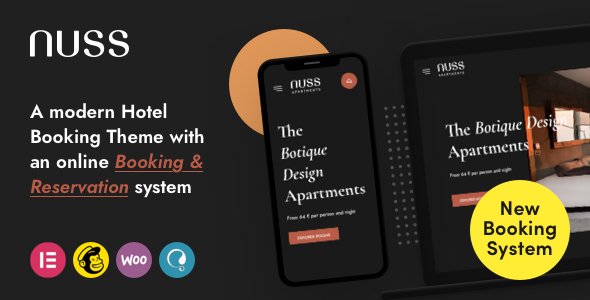
Stuck on your Nuss WordPress theme? Let's fix it.
No endless back-and-forth. Just send us the details and we'll get it done.
No obligation · Replies within 1 hour · Quote within 1 day
Setup · Customization · Bug fixes · WooCommerce integration
About Nuss WP Theme
Nuss is a premium WordPress theme built by Uxper, a developer known for clean, typography-driven designs. It targets creative agencies, portfolios, and studios that want a minimal aesthetic without sacrificing layout flexibility.
The theme ships with a selection of pre-built demo layouts, a drag-and-drop page builder integration, and support for custom post types. Navigation is smooth, the mobile breakpoints are well-handled, and the overall code quality reflects the attention Uxper puts into their commercial themes.
If you run a design studio, photography business, or boutique creative agency, Nuss gives you a solid visual foundation. It handles both grid-based portfolio layouts and long-form service pages without needing heavy customisation out of the box. That said, tailoring it to match a specific brand identity usually requires some developer time.
Get matched with a Nuss developer in under one day
Tell us about your Nuss project. Small fixes, Nuss theme customization, or a full website build, whatever you need, we've got it covered.
We'll connect you to the right Nuss developers, define the scope, and get everything 100% clear.
You'll get one estimate, hire your preferred developer, and start collaborating.
Nuss looks polished out of the box, but matching it precisely to a brand takes real WordPress knowledge. Uxper themes have their own structural patterns, and working with them efficiently means understanding how their hooks, template hierarchy, and customizer bindings interact.
Through Codeable, you get matched with vetted developers who have hands-on experience with premium themes like Nuss. No outsourcing, no guesswork. You post your project, get a clear estimate, and decide if you want to move forward. There’s no obligation to hire.
Pros
- Clean minimal design that works well for creative and agency portfolios
- Pre-built demo layouts reduce initial setup time significantly
- Good mobile responsiveness with well-structured breakpoints
- Compatible with Elementor and WPBakery without major conflicts
- Typography system gives strong visual hierarchy without custom CSS
Cons
- Customizer options can conflict with page builder overrides, causing layout inconsistencies
- Limited WooCommerce styling support beyond basic product pages
- Documentation is sparse in certain areas, particularly around custom post types
- Performance requires attention when combined with heavy plugins or large image galleries
- Some demo content requires specific plugins to replicate exactly, adding dependency overhead
Who is Nuss for?
Creative Agencies
Nuss suits agency sites that need a strong visual presence with clear service sections. The grid layouts handle case study presentations well, and the typography scale makes long service pages readable. It positions an agency as design-literate from the first scroll without requiring extensive custom development to get there.
Photography Studios
Photography sites need fast-loading galleries and clean image presentation. Nuss handles both. The portfolio grid supports full-width imagery, and the minimal chrome keeps the focus on the work. Pairing it with a proper image optimization setup produces a portfolio site that loads quickly and looks sharp across devices.
Freelance Designers
Freelancers need a portfolio that communicates quality without a complex build. Nuss provides that starting point. A designer can set up a functional, good-looking portfolio using the demo layouts and customizer without writing code. Further personalisation is straightforward with some developer time if the project grows.
Architecture Firms
Architecture firms need large imagery, project categorization, and a professional tone. Nuss handles all three. The portfolio templates accommodate project detail pages with image sequences, and the overall visual restraint matches the aesthetic expectations of architecture audiences and prospective clients reviewing project credentials.
Boutique Branding Studios
Branding studios need a site that reflects craft and attention to detail. Nuss communicates both through its typographic defaults and layout options. It supports the kind of case study structure that branding clients expect, with room to add custom sections or expand the feature set as the studio’s service offering develops.

Customizing Nuss
Nuss offers a live customizer panel that covers fonts, colors, header layout, and footer structure. Most surface-level changes are straightforward. Where it gets more involved is when you want to modify the portfolio grid behavior, adjust spacing across breakpoints, or override the default typography scale.
Child theming is the right approach for any structural changes. Working without a child theme risks losing edits during updates. A Nuss expert will also know which customizer settings conflict with the built-in page builder options, which can produce unexpected layout shifts if you’re not familiar with the theme’s internal hierarchy.
Custom post type styling, WooCommerce integration tweaks, and header scroll behavior are three areas where hiring a Nuss expert saves hours of trial and error.
Recommended plugins for Nuss
Nuss integrates well with Elementor and WPBakery for layout building. It also supports WooCommerce if you need a light shop presence alongside a portfolio or agency site.
For performance, the theme’s asset loading is reasonably lean, but adding multiple plugins can affect that quickly. A structured caching and optimization setup helps. See our WordPress performance service for details.
On the SEO side, Nuss works with Yoast and Rank Math without conflicts. If you want to take that further, our WordPress SEO service covers technical and on-page optimization specific to your setup.
Not sure which plugins to use? This WordPress plugins directory covers the most popular options with reviews and setup guides.
Nuss common issues
Nuss theme portfolio grid not displaying correctly
Portfolio grid issues in Nuss usually come from a column setting mismatch or a plugin conflict affecting the masonry script. First, check the portfolio widget settings and confirm the column count matches your content count. Then deactivate plugins one by one to isolate any JavaScript conflicts. If you’re using Elementor, check whether the theme’s native grid is being overridden. A WordPress bug fixing specialist can identify and resolve the conflict quickly.
Nuss WordPress theme slow loading on mobile
Slow mobile performance on Nuss is typically caused by unoptimized images, unminified scripts loading from the theme, or render-blocking resources. Start by running a PageSpeed Insights test to identify the specific bottlenecks. Nuss doesn’t lazy-load images natively in all versions, so adding that via a caching plugin helps. If multiple plugins are queuing scripts on every page load, a performance audit will give you a clear action list.
Nuss theme customizer changes not saving
If Nuss customizer changes aren’t saving, the most common causes are a caching plugin serving a stale version or a permissions issue with the WordPress options table. Clear all caches first, then attempt saving again. If the problem persists, check whether a security plugin is blocking the AJAX request the customizer uses. Also confirm your WordPress user role has full administrator access, as restricted roles can prevent certain options from writing to the database.
Nuss header menu not showing on mobile devices
Mobile menu issues in Nuss are often tied to a JavaScript conflict or a theme option that hasn’t been configured for the mobile breakpoint. Check the Nuss header settings for a separate mobile menu toggle option. If the toggle appears but doesn’t open the menu, a JavaScript error is likely blocking it. Open your browser console on mobile simulation and look for script errors. Deactivating plugins that inject scripts sitewide can help isolate the cause quickly.
Nuss FAQ
Yes, Nuss is compatible with Elementor. You can use Elementor to build and edit pages within the theme’s structure. Some of the native Nuss layout options run parallel to Elementor’s, so it’s worth deciding early which system you’ll use for layout control. Mixing both on the same page can produce unexpected spacing or styling conflicts.
Nuss includes basic WooCommerce support. Product pages, cart, and checkout inherit the theme’s styling, but the out-of-the-box WooCommerce templates are minimal. If you need a polished shop with custom product layouts or category filtering, some additional development is required to bring the store design up to the same level as the rest of the theme.
Nuss demo content can be imported through the theme’s built-in one-click demo importer, usually found under the theme options panel in your WordPress dashboard. You’ll need to have the recommended plugins installed before importing. Some demo elements depend on specific plugins being active, so install those first to avoid missing content or broken layout sections after import.
Nuss is a commercial theme sold through ThemeForest under a regular or extended license. A regular license covers use on a single project, including client sites, as long as the end product is not charged for separately. If you’re building a site to sell or distributing it to multiple clients, an extended license is required. Check Uxper’s licensing terms before delivery.
Nuss is generally compatible with WPML for multilingual builds. The theme uses standard WordPress translation functions, which WPML can work with. String translation through WPML’s String Translation module handles theme text. For complex multilingual setups with multiple portfolio categories or custom post types, some manual configuration and testing is needed to confirm everything translates correctly.
Hire a Nuss WordPress Developer
Whether you need a full Nuss setup, a design refresh, or help with a specific feature that isn’t behaving, a dedicated developer will get it done faster and cleaner than working through it solo. Every project starts with a free estimate so you know exactly what you’re getting into before committing.
Get a free estimate and get matched with a Nuss developer within 24 hours.
You'll need a free Codeable account so developers can ask questions and send their quotes.