Ohlala WordPress Theme
by BoldThemes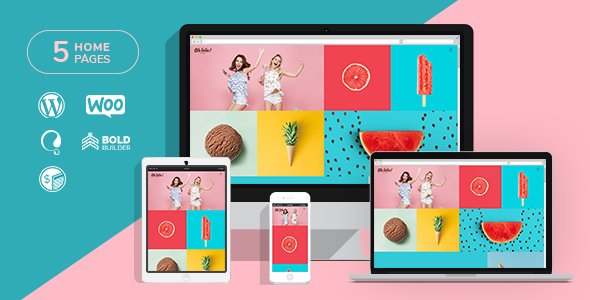
Stuck on your Ohlala WordPress theme? Let's fix it.
No endless back-and-forth. Just send us the details and we'll get it done.
No obligation · Replies within 1 hour · Quote within 1 day
Setup · Customization · Bug fixes · WooCommerce integration
About Ohlala WP Theme
Ohlala is a WordPress theme built by BoldThemes, designed specifically for beauty salons, spas, hair studios, and wellness businesses. It ships with a polished visual style, appointment booking support, and a layout system built around service-based businesses.
The theme includes multiple pre-built demos, WPBakery Page Builder support, and tight integration with the BoldThemes booking plugin. Out of the box, it handles service listings, staff profiles, pricing tables, and gallery sections without needing extra configuration.
It works well for small businesses that want a professional-looking site quickly. The design is feminine and clean, with soft typography and plenty of white space. For salons or spas that need a functional site without a custom build, Ohlala covers the essentials without much friction.
Get matched with a Ohlala developer in under one day
Tell us about your Ohlala project. Small fixes, Ohlala theme customization, or a full website build, whatever you need, we've got it covered.
We'll connect you to the right Ohlala developers, define the scope, and get everything 100% clear.
You'll get one estimate, hire your preferred developer, and start collaborating.
BoldThemes built Ohlala with a specific niche in mind, which means customizing it outside that scope takes real WordPress knowledge. Generic freelancers often struggle with the BoldThemes options panel, the booking plugin quirks, or getting WPBakery layouts to behave predictably across devices.
Through Codeable, you get matched with vetted WordPress developers who have hands-on experience with themes like Ohlala. No guesswork, no trial-and-error billing. Post your project, get a clear estimate, and move forward knowing the work will be done properly the first time.
Pros
- Purpose-built for beauty and wellness businesses with relevant demo content and section types
- Includes BoldThemes Booking plugin integration out of the box for appointment scheduling
- Multiple pre-built demos covering salons, spas, barbershops, and nail studios
- Staff profiles, service listings, and pricing tables are built into the theme structure
- Clean, minimal design with soft typography that works well for premium beauty brands
Cons
- WPBakery Page Builder is bundled rather than Gutenberg-native, which feels dated on newer WordPress installs
- The BoldThemes Booking plugin has fewer features than dedicated booking tools like Amelia or Bookly
- Deep customization outside the Redux options panel requires CSS or PHP knowledge
- Demo import can be slow and occasionally incomplete, requiring manual cleanup afterward
- Limited third-party developer documentation compared to larger theme ecosystems like Divi or Avada
Who is Ohlala for?
Hair Salons
Ohlala suits hair salons well. The service listing layout handles cuts, coloring, and treatment menus clearly. Staff profile sections showcase stylists with photos and bios. The booking integration lets clients request appointments without a phone call, which reduces admin time and keeps the front desk free during busy periods.
Day Spas and Wellness Centers
Spa sites need atmosphere before anything else. Ohlala’s clean layouts and full-width image sections create that without heavy customization. Treatment menus, pricing tables, and a gallery section come ready to fill in. Pair it with a solid booking plugin and the site handles most of what a day spa needs from day one.
Nail Studios
Nail studios benefit from Ohlala’s gallery-forward design. Showcasing nail art and seasonal collections is straightforward with the built-in portfolio sections. Service pricing tables keep the menu clear and easy to update. The compact layout works well for single-operator studios that need a professional site without a large development budget.
Barbershops
BoldThemes includes a barbershop demo within Ohlala that shifts the visual tone darker and more masculine. Staff cards, service menus, and a prominent booking call to action all carry over. It is one of the less common use cases for the theme but the structure fits without needing to start from scratch or force a mismatched design.
Beauty Academies and Training Schools
Beauty schools and training academies can use Ohlala’s course-adjacent layout for program listings, instructor profiles, and enrollment inquiries. It is not built for LMS functionality natively, so adding LearnDash or LifterLMS requires extra development work. But for a brochure-style academy site, the base theme handles the structure well enough.

Customizing Ohlala
Ohlala includes a theme options panel built on the Redux Framework, giving you control over colors, fonts, header styles, and footer layouts without touching code. The WPBakery integration means most layout changes happen via drag-and-drop, which is fine for straightforward edits.
Where things get more specific, you will want an Ohlala expert. Custom booking flows, color scheme overrides that go beyond the panel options, integrating third-party appointment systems like Bookly or Amelia, or building out additional service pages all require hands-on work. Child theme setup is also worth doing properly if you plan to make CSS or template changes, so updates do not wipe your work.
An experienced developer can also clean up any leftover demo content structure and rebuild it to match your actual business layout rather than the placeholder demo.
Recommended plugins for Ohlala
Ohlala pairs well with several plugins depending on what your site needs beyond the default setup. For booking, Amelia and Bookly both integrate cleanly. WooCommerce works if you sell products alongside services. For forms, Gravity Forms or WPForms handle contact and inquiry pages without issues.
If search visibility matters, pairing Ohlala with proper on-page work through a WordPress SEO service will help local searches find your salon or spa. Page speed is also worth addressing since image-heavy beauty sites can slow down quickly. A WordPress performance service can get load times to where they need to be for both users and rankings.
Not sure which plugins to use? This WordPress plugins directory covers the most popular options with reviews and setup guides.
Ohlala common issues
Ohlala theme booking plugin not sending confirmation emails
This is usually a server-level email delivery issue rather than a theme bug. The BoldThemes Booking plugin relies on WordPress’s default mail function, which many hosts block or throttle. Install an SMTP plugin like WP Mail SMTP and connect it to a transactional email service such as SendGrid or Mailgun. Test the connection after setup. If emails still do not arrive, check spam folders and verify that the from address matches your domain. Need hands-on help? Our WordPress bug fixing service can diagnose and resolve this quickly.
Ohlala demo import not working or missing content
Demo import failures in Ohlala are almost always caused by server timeout limits or memory restrictions. Increase the PHP memory limit to at least 256MB and set the max execution time to 300 seconds or higher in your php.ini or wp-config.php. If your host does not allow this, the import will cut off mid-process and leave sections missing. Running the import on a staging environment first also helps catch issues before they affect a live site. A developer can complete the import manually if the automated process keeps failing.
Ohlala theme WPBakery layout broken after update
WPBakery layout breaks after an update are common when the bundled version of WPBakery inside Ohlala is older than the standalone plugin version. BoldThemes packages a specific WPBakery version with the theme and updates to it are tied to theme releases, not plugin releases. Deactivate any separately installed WPBakery instance and rely only on the bundled one. If you need the latest WPBakery features, check whether a newer Ohlala version bundles them before updating either independently.
Ohlala theme slow loading on mobile
Slow mobile performance on Ohlala sites is almost always tied to uncompressed images, unused CSS from WPBakery, or unoptimized Google Fonts loading. Start by running the site through PageSpeed Insights to identify the specific bottlenecks. Use an image optimization plugin like ShortPixel, enable lazy loading, and consider a caching plugin like WP Rocket. For more involved performance work, our WordPress performance service can systematically reduce load times across the full site.
Ohlala FAQ
BoldThemes has kept Ohlala updated through recent WordPress releases, but compatibility depends on which version you are running. Always check the theme changelog before updating WordPress to a new major version. Running a staging site and testing the update there first is the safest approach. If you are running an older version of Ohlala and have not updated in some time, a developer review before any WordPress core update is worth doing.
Ohlala is built around WPBakery and its shortcodes are embedded throughout the demo content. Switching to Elementor is possible but requires rebuilding your pages from scratch inside Elementor since the WPBakery shortcodes do not carry over. It is a significant rebuild rather than a simple swap. If you prefer Elementor, it may be worth evaluating whether a different base theme would save time overall.
Yes, Ohlala is WooCommerce compatible. Basic shop pages, product listings, and cart and checkout flows work without conflicts. The styling may need some CSS adjustments to match the rest of the Ohlala design since WooCommerce templates are not always deeply styled in beauty-focused themes. For product-heavy setups or custom shop layouts, developer input will speed up the process considerably.
Always use a child theme before making any CSS or template edits. Updates to the parent Ohlala theme will overwrite changes made directly to theme files. Settings saved through the theme options panel are stored in the database and survive updates. If you have not set up a child theme yet and have already made direct edits, a developer can migrate those changes safely before you update.
Ohlala is a solid starting point for a salon booking site. The bundled booking plugin handles basic appointment requests. For more advanced features like staff calendars, payment deposits, or automated reminders, you will need a dedicated plugin like Amelia or Bookly. The theme itself does not limit what booking functionality you can add, it just does not include the advanced features natively.
Hire an Ohlala WordPress Developer
If you need help setting up Ohlala, customizing the layout, fixing a booking issue, or building out new sections for your salon or spa site, working with a developer who knows the theme saves time and money. Post your project through our free estimate form and get matched with a vetted Ohlala expert within 24 hours. No obligation to hire, no upfront payment, and no risk. Just a clear estimate and a developer who knows what they are doing.
You'll need a free Codeable account so developers can ask questions and send their quotes.