OliveOil WordPress Theme
by AncoraThemes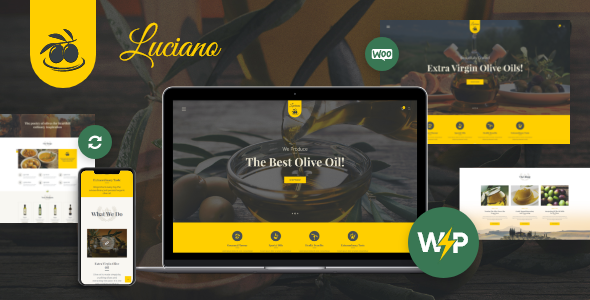
Stuck on your OliveOil WordPress theme? Let's fix it.
No endless back-and-forth. Just send us the details and we'll get it done.
No obligation · Replies within 1 hour · Quote within 1 day
Setup · Customization · Bug fixes · WooCommerce integration
About OliveOil WP Theme
OliveOil is a WordPress theme built by AncoraThemes, designed specifically for olive oil producers, specialty food brands, and agricultural businesses. It comes with a clean, earthy aesthetic that puts product photography front and center. Page layouts are built to showcase origin stories, tasting notes, and product lines without cluttering the design.
The theme includes WooCommerce compatibility for selling bottles and gift sets directly from your site. It ships with pre-built demo content, making it straightforward to get a working site up quickly. Typography is clean, color palettes lean warm and natural, and the overall structure suits businesses that want to look artisan without hiring a designer for every page. It works well for small producers and boutique importers alike.
Get matched with a OliveOil developer in under one day
Tell us about your OliveOil project. Small fixes, OliveOil theme customization, or a full website build, whatever you need, we've got it covered.
We'll connect you to the right OliveOil developers, define the scope, and get everything 100% clear.
You'll get one estimate, hire your preferred developer, and start collaborating.
AncoraThemes builds solid foundations, but customizing OliveOil to fit a specific business takes WordPress knowledge beyond the theme options panel. Codeable connects you with vetted WordPress developers who have real track records. No bidding, no guessing. You post your project, get an estimate, and decide if you want to move forward. There is no obligation to hire. If your OliveOil site needs custom work done properly, that is where to start.
Pros
- Purpose-built for food and agricultural brands with layouts that suit product storytelling
- WooCommerce ready from install, suitable for selling olive oil products without major setup
- Demo content imports quickly and gives a realistic starting point for real sites
- Clean code from AncoraThemes means fewer plugin conflicts and a stable base to build on
- Warm, natural design aesthetic fits artisan and premium food branding without heavy customization
Cons
- Niche design makes it a poor fit for businesses outside food, agriculture, or specialty goods
- Theme options panel is limited, so meaningful layout changes require PHP or child theme work
- Demo images are placeholders and professional photography is needed to make the site look right
- Limited third-party documentation or community resources compared to larger theme frameworks
- Advanced WooCommerce features like subscriptions or tiered pricing require additional plugin setup and custom coding
Who is OliveOil for?
Olive Oil Producers and Estates
Estate producers need a site that tells the origin story and sells bottles direct to consumers. OliveOil’s layout handles both. Hero sections work well for orchard photography, and WooCommerce handles the shop. A developer can add harvest year filtering, tasting note fields, and a wholesale inquiry form that keeps trade buyers separate from retail customers.
Specialty Food Online Stores
Shops selling curated food products alongside olive oil need a clean catalog structure and smooth checkout. OliveOil’s WooCommerce foundation handles this with the right configuration. Product categories, gift set bundles, and shipping rules can all be built out. The design keeps focus on the product without visual noise that distracts buyers.
Olive Oil Importers and Distributors
Importers managing multiple SKUs from different regions need product filtering and clear origin labeling. OliveOil provides the visual framework and WooCommerce handles inventory. Custom taxonomy setups for country, varietal, and flavor profile help buyers find what they want. A developer can build these into the theme without breaking the design.
Food Bloggers and Recipe Sites
Food bloggers covering Mediterranean cuisine, healthy cooking, or specialty ingredients can use OliveOil’s editorial layouts effectively. The theme handles blog archives cleanly and pairs well with recipe plugins. Display ads, affiliate links, and email opt-in forms can be added without disrupting the reading experience if the integration is done correctly.
Organic and Farm-to-Table Brands
Farm-to-table and organic brands need a site that communicates quality and transparency. OliveOil’s earthy design language matches that positioning. Custom sections for certifications, farming practices, and producer profiles can be added to product pages. The result is a site that supports both direct sales and brand trust building.

Customizing OliveOil
Out of the box, OliveOil covers the basics. But most businesses need more than a demo swap. You might want a custom product filtering system for varietals, a regional origin map, a subscription box setup, or a wholesale inquiry form that connects to your CRM.
An OliveOil expert can adapt the theme’s layout sections, adjust WooCommerce templates for your specific product catalog, and build features AncoraThemes never shipped. That includes things like custom post types for recipes, harvest year archives, or private label ordering flows.
Getting the most from OliveOil usually means going beyond the theme panel. A developer who knows the codebase can make changes that hold up through updates and don’t break the design you started with.
Recommended plugins for OliveOil
OliveOil works with most major WordPress plugins without conflicts. WooCommerce handles your shop, and pairing it with a product add-ons plugin lets customers choose bottle sizes or gift packaging at checkout. WPML or Polylang add multilingual support for export-focused brands.
For producers who want better visibility in search, adding structured data for food products and local business schema can improve rankings. Site speed also matters for conversion. Image-heavy food sites need proper caching and optimization to load fast on mobile.
Not sure which plugins to use? This WordPress plugins directory covers the most popular options with reviews and setup guides.
OliveOil common issues
OliveOil theme WooCommerce checkout not working
Checkout issues in OliveOil are usually caused by a JavaScript conflict between the theme and a plugin like a caching tool or page builder. Start by deactivating plugins one at a time with the theme active to isolate the conflict. Clear your cache after each deactivation and test checkout again. If the issue started after a theme or WooCommerce update, a child theme with a patched template file may be needed. A WordPress bug fixing specialist can trace the exact conflict faster than manual testing.
OliveOil theme demo import not loading correctly
Demo import failures in OliveOil are usually related to server memory limits or PHP execution timeouts. Your host may cap memory at 128MB, which is not enough for a full demo with images. Ask your host to temporarily raise this to 256MB. Also check that the required plugins listed by AncoraThemes are installed before importing. If the import hangs or only partially completes, run it again or import XML content manually through the WordPress importer tool.
OliveOil theme custom fonts not displaying on mobile
Custom font failures on mobile in OliveOil often trace back to how Google Fonts are loaded. Some caching or performance plugins defer font loading in ways that cause fallback fonts to appear on slower connections. Check your caching plugin’s asset optimization settings and exclude the font stylesheet from deferral. If you are hosting fonts locally for speed, verify the font-face declarations in your child theme CSS are pointing to the correct file paths.
OliveOil theme product images showing wrong size
Wrong product image sizes in OliveOil usually mean your WooCommerce image dimensions do not match what the theme expects. Go to WooCommerce settings and check the image size values under the Products tab. After adjusting them, run the Regenerate Thumbnails plugin to reprocess existing uploads. If images still appear stretched or cropped incorrectly, the theme’s CSS may need a targeted fix for specific product template files.
OliveOil FAQ
Yes. OliveOil includes WooCommerce compatibility and product-focused layouts that suit food and specialty goods. You can list products, handle cart and checkout, and manage inventory without additional theme work. More advanced features like subscriptions, wholesale pricing, or product configurators will need plugin additions and likely some developer configuration to work correctly with the theme.
OliveOil is not built as an Elementor theme. It uses its own customizer and layout system. You can install Elementor and use it for specific pages, but you may run into styling conflicts with the theme’s default CSS. Using a child theme helps keep customizations separate. For full Elementor integration across all templates, a developer would need to review and resolve any conflicts before the site goes live.
The safest way to customize OliveOil is through a child theme. This keeps your changes separate from the parent theme files, so updates from AncoraThemes do not overwrite your work. Use the child theme for any CSS overrides, template changes, or function additions. Avoid editing the parent theme files directly. If you are not comfortable with PHP or CSS, a developer can set up the child theme and make changes correctly the first time.
Technically yes, but it is not a good fit. The design language is specifically built around food, agriculture, and natural products. Using it for a tech company, law firm, or service business would require significant restyling to look appropriate. You would spend more time fighting the theme’s defaults than building your site. A general-purpose theme would be a better starting point for unrelated industries.
Setup costs depend on how much customization you need beyond the demo. A basic installation with demo content and plugin setup might run a few hundred dollars. A fully customized site with WooCommerce, custom layouts, and brand-specific features will cost more. The best way to get an accurate number is to describe your project and get a free estimate before committing to anything.
Hire an OliveOil WordPress Developer
Whether you need a full OliveOil setup, a WooCommerce integration, or specific features added to an existing site, working with a developer who knows the theme saves time and avoids mistakes. FoxyConcept delivers WordPress work through Codeable, where every developer is vetted and projects come with a free estimate before anything starts. Get a free estimate and see what your project would cost with no obligation to hire.
You'll need a free Codeable account so developers can ask questions and send their quotes.