Organico WordPress Theme
by ThemeFTC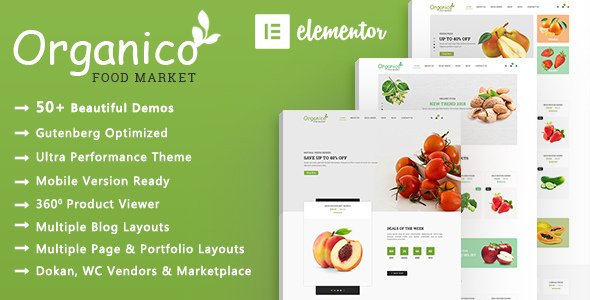
Stuck on your Organico WordPress theme? Let's fix it.
No endless back-and-forth. Just send us the details and we'll get it done.
No obligation · Replies within 1 hour · Quote within 1 day
Setup · Customization · Bug fixes · WooCommerce integration
About Organico WP Theme
Organico is a WordPress theme by ThemeFTC built for organic food stores, health shops, and natural product businesses. It ships with WooCommerce support out of the box, making it straightforward to set up a working online store without custom development.
The theme includes multiple homepage layouts, product showcase sections, and a clean design that fits the natural and eco-friendly market well. It uses the Visual Composer page builder, which gives non-technical users a way to rearrange content without touching code.
ThemeFTC built Organico with a specific niche in mind. That focus shows in the demo content, the product grid styles, and the promotional banner layouts. If you sell food, supplements, skincare, or anything in the organic space, Organico gives you a solid starting point without having to strip away unrelated features from a generic theme.
Get matched with a Organico developer in under one day
Tell us about your Organico project. Small fixes, Organico theme customization, or a full website build, whatever you need, we've got it covered.
We'll connect you to the right Organico developers, define the scope, and get everything 100% clear.
You'll get one estimate, hire your preferred developer, and start collaborating.
Organico has a specific structure that takes time to learn. If you modify templates without understanding how ThemeFTC built the theme, you can break the WooCommerce integration or create layout conflicts that are hard to trace.
The developers available through Codeable have worked across dozens of WooCommerce themes. They know where Organico’s customization limits are and how to work within them efficiently. Whether you need a single fix or a full store build, you get someone who has done this before, not someone figuring it out on your project.
Pros
- Purpose-built for organic and natural product stores, so the design fits the niche without heavy modification
- WooCommerce integration is included from the start, with product grids, cart, and checkout all styled out of the box
- Multiple homepage layouts in the demo content give you real starting points rather than a blank canvas
- Visual Composer page builder is included, letting non-technical users rearrange sections without code
- Clean, minimal aesthetic works well for health, food, and skincare products without looking cluttered
Cons
- Visual Composer adds page bloat and can slow load times if not managed carefully
- The theme options panel lacks granular control over WooCommerce template sections, requiring custom CSS for finer adjustments
- Update frequency from ThemeFTC is inconsistent, which can create compatibility gaps with newer WooCommerce versions
- Demo import does not always work cleanly, and matching the demo layout exactly often requires manual fixes
- Limited documentation for advanced customization means trial and error when modifying template files
Who is Organico for?
Organic Food Store
Organico suits grocery and packaged food sellers well. The product grid layouts handle multiple SKUs cleanly, and the promotional banner sections are built for seasonal campaigns and featured product highlights. WooCommerce categories map naturally to the demo structure, so a food store can be up and running with relatively little rework.
Natural Skincare Shop
The clean, light aesthetic of Organico translates well to skincare brands that want a natural, minimal feel. Product image display is a priority in the design, and the single product page gives enough space for ingredient lists and usage instructions without heavy customization. It pairs well with product review plugins.
Health Supplements Brand
Supplement brands benefit from Organico’s structured product sections and the ability to add trust-building elements like certifications and ingredient callouts. The theme supports tabbed content on product pages, which works well for displaying nutritional information, dosage details, and customer testimonials in a clean format.
Zero-Waste Product Store
Stores focused on eco-friendly or zero-waste products fit the Organico visual identity without needing a full redesign. The earthy color defaults and clean typography align with the market. Adding a custom filter by material type or certification is straightforward with the right WooCommerce plugin.
Local Farm Shop
A local farm shop or seasonal produce seller can use Organico to display available products, handle local delivery or pickup options through WooCommerce shipping settings, and communicate the farm’s story through the flexible homepage sections. The design does not look overly corporate, which suits smaller independent sellers.

Customizing Organico
Organico comes with a theme options panel that covers fonts, colors, header styles, and footer layout. Most visual changes can be made without writing any code. But the defaults only get you so far.
If you want a layout that actually fits your brand rather than looking like the demo, you need someone who knows the theme well. An Organico expert can modify the WooCommerce templates, adjust the homepage sections, add custom CSS, and wire up third-party plugins without breaking the existing structure.
Common customization requests include custom product filters, modified checkout flows, unique homepage sections, and mobile layout fixes. These go beyond what the options panel handles. Working with someone experienced in Organico means faster results and fewer workarounds that cause problems later.
Recommended plugins for Organico
Organico works with most major WooCommerce plugins. Common additions include product wishlist plugins, currency switchers, subscription billing tools, and advanced product filter plugins like FiboFilters or YITH.
For performance, pairing Organico with a caching plugin and a CDN makes a noticeable difference, especially if your store carries a large product catalog. You can find specific recommendations on the WordPress performance page.
If search traffic matters to your business, running an SEO plugin like Rank Math alongside proper schema markup for products is worth the setup time. More detail is available on the WordPress SEO page.
Not sure which plugins to use? This WordPress plugins directory covers the most popular options with reviews and setup guides.
Organico common issues
Organico theme not compatible with latest WooCommerce version
WooCommerce compatibility issues in Organico usually appear after a WooCommerce major version update. Template files in the theme become outdated when WooCommerce changes its core templates. The fix involves updating the overridden templates in the theme’s woocommerce folder to match the new WooCommerce versions. This is not something to do by guessing. Check the WooCommerce system status report first, then compare outdated templates. If you need hands-on help, the WordPress bug fixing service covers this type of issue.
Organico homepage layout broken after update
A broken homepage layout after an update is usually caused by a Visual Composer version conflict or a plugin that changed how shortcodes are processed. Start by deactivating plugins one at a time to isolate the conflict. If the layout uses VC shortcodes, check whether Visual Composer itself needs an update or a license reactivation. Restoring a backup and updating plugins individually is safer than troubleshooting a live site. The WordPress maintenance service includes staging environments that prevent this problem.
Organico theme slow loading speed
Organico loads Visual Composer assets, theme scripts, and WooCommerce resources together, which adds up quickly. Start by running the site through GTmetrix or PageSpeed Insights to identify the largest assets. Install a caching plugin, enable CSS and JS minification, and serve images in WebP format. Removing unused Visual Composer elements also reduces script load. If the product catalog is large, consider a hosting upgrade. More guidance is available on the WordPress performance page.
Organico Visual Composer not working or missing elements
Visual Composer problems in Organico are often license-related. ThemeFTC bundles a specific version of VC, and if it is deactivated or if there is a version mismatch, elements disappear or the editor stops loading. First check if the bundled plugin is active under Plugins. If elements are missing from the editor, try deactivating and reactivating Visual Composer. If the issue persists after a theme update, a developer may need to manually restore the VC configuration from the theme files.
Organico FAQ
Yes, Organico is built around WooCommerce. The theme includes styled templates for the shop page, product pages, cart, and checkout. However, keeping the theme’s WooCommerce templates updated when WooCommerce releases major versions is important. Outdated templates are a common source of display and functionality issues in Organico stores.
Organico was designed to work with Visual Composer, not Elementor. You can technically use Elementor alongside it, but template conflicts are likely. Most developers working with Organico stick with the bundled Visual Composer to avoid compatibility problems. Switching to Elementor usually means rebuilding your page layouts from scratch.
Organico’s design works best for organic, natural, or health-focused products. It can be adapted for other niches, but the default styling, color palette, and demo content are all built around food and wellness. Using it for an unrelated store type requires more custom work to make it feel like a fit.
Organico includes a one-click demo import tool in the theme options. Go to Appearance, then Theme Options, and look for the demo import section. You will need to have WooCommerce and Visual Composer active before importing. The import does not always complete cleanly, and images sometimes need to be re-linked manually after the process finishes.
Yes, you can migrate an existing WooCommerce store to Organico. Products, orders, and customer data stay in the database. What changes is the front-end template layer. You will need to rebuild your page layouts in Organico’s structure and check that all WooCommerce pages are assigned correctly. A developer can handle this with minimal downtime. See the WordPress migration page for more detail.
Hire an Organico Developer
If you need help setting up, customizing, or fixing your Organico store, you can get matched with a vetted WordPress developer within 24 hours. No retainers, no guesswork. Post your project, get a free estimate, and decide whether to move forward with zero obligation.
Get a free estimate and describe what you need. A developer familiar with Organico and WooCommerce will review it and come back with a clear scope and price.
You'll need a free Codeable account so developers can ask questions and send their quotes.