Organik WordPress Theme
by ThemeMove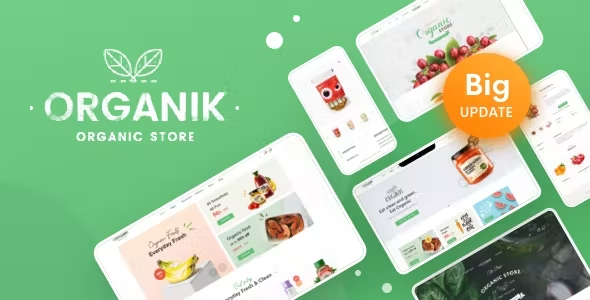
Stuck on your Organik WordPress theme? Let's fix it.
No endless back-and-forth. Just send us the details and we'll get it done.
No obligation · Replies within 1 hour · Quote within 1 day
Setup · Customization · Bug fixes · WooCommerce integration
About Organik WP Theme
Organik is a WooCommerce theme by ThemeMove built specifically for organic food, grocery, and farm-to-table stores. It ships with a clean, nature-inspired design, multiple homepage layouts, and tight WooCommerce integration out of the box.
The theme uses Elementor as its primary page builder, giving you drag-and-drop control over product pages, blog layouts, and landing sections. It also includes prebuilt demo content for multiple store types, AJAX cart functionality, and product filtering — features that matter on a real shopping site.
ThemeMove keeps the codebase relatively lean, but like most multi-purpose WooCommerce themes, getting Organik to match your exact brand and product structure usually requires developer input beyond what the default settings offer.
Get matched with a Organik developer in under one day
Tell us about your Organik project. Small fixes, Organik theme customization, or a full website build, whatever you need, we've got it covered.
We'll connect you to the right Organik developers, define the scope, and get everything 100% clear.
You'll get one estimate, hire your preferred developer, and start collaborating.
Finding a developer who knows Organik specifically means fewer back-and-forth explanations and faster turnaround. On Codeable, all developers are vetted and specialise in WordPress — no generalist freelancers, no bidding wars. You post your project, get matched with an Organik developer who fits your scope, and receive a fixed estimate before any work starts. There’s no obligation to proceed. It’s a straightforward way to get qualified help without the usual hiring risk.
Pros
- Designed specifically for food, grocery, and organic product stores — not a generic theme retrofitted for WooCommerce
- Elementor-based page builder with dedicated Organik widgets for product showcases and category grids
- Multiple prebuilt demo layouts covering farm shops, health food stores, and organic marketplaces
- Built-in AJAX product filtering and cart updates without full page reloads
- Solid WooCommerce compatibility including variable products, product bundles, and quick-view modals
Cons
- Heavy reliance on Elementor means page performance can degrade with complex layouts and many widgets
- Demo import doesn't always replicate exactly in all hosting environments, requiring manual adjustments
- Some design elements are tightly coupled to the theme's own custom CSS, making overrides tricky without a child theme
- ThemeMove support response times vary and documentation for edge cases is limited
- Mobile layout inconsistencies appear on some product page templates when plugins add extra content blocks
Who is Organik for?
Organic Food & Grocery Stores
Organik’s category grid layouts and product filtering are well-suited to stores with large SKU counts across fruit, vegetables, dairy, and pantry items. An Organik developer can set up attribute-based filtering and custom product badges to handle seasonal stock and provenance labelling cleanly.
Farm-to-Table and Local Farm Shops
Local farm stores need clear product origin storytelling alongside functional WooCommerce catalogues. Organik’s editorial-style section blocks let you mix produce listings with farm photography and delivery zone information. A specialist can configure local pickup and postcode-based shipping rules to match how your farm actually operates.
Health Food and Supplement Retailers
Health supplement retailers need trust signals, ingredient detail, and compliance text alongside their product listings. Organik’s flexible product page templates support custom tab content and upsell layouts. An Organik specialist can wire in review apps, nutritional information tables, and bundle pricing displays without custom plugin conflicts.
Meal Kit and Subscription Box Businesses
Subscription-based food businesses have more complex WooCommerce requirements — recurring billing, box customisation, and pause or skip logic. Organik provides a solid front-end foundation, but a developer needs to integrate WooCommerce Subscriptions and any add-on selection plugins correctly for the checkout to work reliably.
Zero-Waste and Eco Product Shops
Eco product stores often need refill calculators, bulk quantity pricing, and sustainability content woven into product pages. Organik’s Elementor foundation allows this kind of customisation, but it takes developer work to build cleanly. The theme’s minimal aesthetic suits zero-waste branding without heavy restyling.

Customizing Organik
Out of the box, Organik handles the basics well. But most store owners run into gaps quickly — custom product layouts, modified checkout flows, homepage sections that need restructuring, or WooCommerce settings that don’t behave as expected.
An experienced Organik expert can rebuild demo sections to match your brand without breaking the theme’s structure, connect third-party plugins without conflicts, and set up product categories and attributes in a way that actually scales. If you’re using Organik for a subscription box, a local farm shop, or a multi-vendor marketplace, having an Organik specialist handle the build saves significant time and avoids common configuration mistakes that compound later.
Custom header and footer layouts, sticky cart behaviour, and mobile menu adjustments are among the most frequently requested changes.
Recommended plugins for Organik
Organik works with most major WordPress plugins, but some combinations need careful setup. Popular extensions include YITH WooCommerce Wishlist, WooCommerce Subscriptions, Dokan for multi-vendor, and MailChimp for WooCommerce.
On the technical side, adding a caching layer and image optimisation matters a lot for food and grocery stores with large product catalogues. A developer can configure these correctly without breaking Elementor’s dynamic content. If you’re also thinking about search visibility, pairing Organik with a structured WordPress SEO setup and a tuned performance stack makes a measurable difference in both rankings and conversion.
Not sure which plugins to use? This WordPress plugins directory covers the most popular options with reviews and setup guides.
Organik common issues
Organik theme Elementor widgets not loading after update
This usually happens when the Organik companion plugin falls out of sync with the theme version after an update. First, deactivate and reactivate the ThemeMove Core or Organik addons plugin. If widgets are still missing, check for a plugin version mismatch in the Elementor system info panel. Clearing Elementor’s CSS cache often resolves display issues after that. If the problem persists across caches and plugin reactivations, a WordPress bug fixing specialist can trace whether the issue is a hook conflict or a corrupted widget registration.
WooCommerce product images not displaying correctly in Organik
Image display problems in Organik are typically caused by mismatched WooCommerce image size settings or a thumbnail regeneration that hasn’t run after switching themes. Go to WooCommerce Settings, then Products, and check the image dimensions match Organik’s recommended sizes. Run a thumbnail regeneration using a plugin like Regenerate Thumbnails. If images are still cropped incorrectly or missing on specific product types, the issue may be in the theme’s image template overrides and needs direct file-level review.
Organik homepage layout broken after WordPress update
Homepage layout breaks after a WordPress core update are usually caused by Elementor compatibility gaps or CSS changes introduced in the update. Check the Elementor changelog for any notices about the current WordPress version. Regenerate Elementor’s CSS files under Elementor Tools. If sections are collapsed or columns have shifted, the layout data may need correcting in Elementor’s page settings. A WordPress bug fixing service can restore the layout without losing your content.
Organik AJAX cart not working or showing errors
AJAX cart failures in Organik are often caused by JavaScript conflicts with third-party plugins — particularly security plugins that block admin-ajax.php requests or caching plugins serving stale cart data. Start by disabling caching on cart and checkout pages and checking your browser console for blocked requests. If a security plugin is filtering AJAX calls, whitelist the WooCommerce cart actions. Persistent failures after these checks usually point to a theme or plugin JavaScript conflict that needs targeted debugging.
Organik FAQ
Yes, Organik is built with WooCommerce as its core use case. It includes product filtering, AJAX cart, quick-view, and multiple shop layout options. It works best for food, grocery, and organic product stores. More complex WooCommerce setups — multi-vendor, subscriptions, or custom checkout flows — will need developer configuration beyond the default theme options.
Organik uses Elementor as its primary page builder and includes dedicated Organik widgets that appear inside the Elementor editor. These widgets handle product grids, category showcases, and promotional banners. The theme requires the Elementor free plugin and ThemeMove’s companion plugin to function correctly. Elementor Pro is optional but adds form and dynamic content features some stores find useful.
After activating Organik, a setup wizard prompts you to install required plugins and import demo data. Choose your preferred demo, run the one-click import, and the theme will pull in pages, settings, and placeholder content. Demo imports work best on a clean WordPress install. Importing onto an existing site can overwrite menus and widget areas, so back up first or have a developer handle it.
Organik provides the front-end foundation for a subscription store, but the subscription logic itself requires WooCommerce Subscriptions or a similar plugin. An Organik developer can integrate recurring billing, box customisation options, and skip or pause functionality into the theme’s checkout and account pages. The setup is not something the theme handles out of the box.
Rates vary by project scope. A focused task like a layout fix or plugin integration typically costs less than a full store build. On Codeable, you post your project and receive a fixed estimate from a vetted Organik specialist before committing. There’s no hourly uncertainty and no obligation to hire. It’s a practical way to get an accurate cost upfront for whatever scope you have in mind.
Hire an Organik WordPress Developer
Whether you need a full store build, a layout fix, or a performance overhaul, working with a dedicated Organik developer gets you results without the guesswork. Every project starts with a free estimate — no commitment required. Get a Free Estimate and describe what you need. You’ll be matched with a specialist who has direct experience with Organik and WooCommerce, and you’ll know the cost before anything begins.
You'll need a free Codeable account so developers can ask questions and send their quotes.