Pablo Guadi WordPress Theme
by AncoraThemes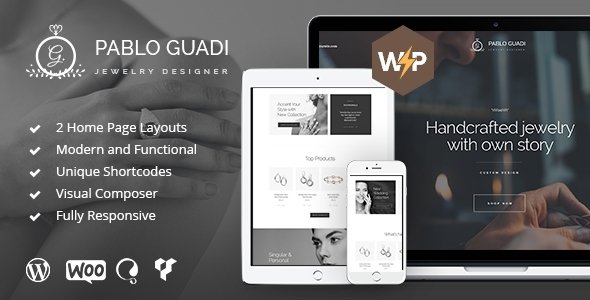
Stuck on your Pablo Guadi WordPress theme? Let's fix it.
No endless back-and-forth. Just send us the details and we'll get it done.
No obligation · Replies within 1 hour · Quote within 1 day
Setup · Customization · Bug fixes · WooCommerce integration
About Pablo Guadi WP Theme
Pablo Guadi is a WordPress theme by AncoraThemes built for architects, interior designers, and creative studios. It uses a full-width, image-forward layout that puts visual portfolios front and center. The design is clean and minimal, with generous whitespace and a grid-based project gallery that works well for showcasing built work or design concepts.
The theme is built on the Elementor page builder, which means most layout changes are handled visually without touching code. It ships with multiple demo layouts, a dedicated project post type, a services section, and a contact form integration. It supports WooCommerce if you want to sell prints or design consultations directly from the site. AncoraThemes maintains the theme with regular updates and documentation to cover most setup scenarios.
Get matched with a Pablo Guadi developer in under one day
Tell us about your Pablo Guadi project. Small fixes, Pablo Guadi theme customization, or a full website build, whatever you need, we've got it covered.
We'll connect you to the right Pablo Guadi developers, define the scope, and get everything 100% clear.
You'll get one estimate, hire your preferred developer, and start collaborating.
Pablo Guadi looks polished in demos, but getting it to match your exact vision takes more than importing sample content. A vetted developer on Codeable can handle the full build, from layout customization and plugin integration to performance tuning and launch. Work is scoped clearly upfront, and you only pay once you agree on the approach. No guesswork, no back-and-forth with unreliable contractors. Just a developer who knows the theme and delivers clean, maintainable work.
Pros
- Full-width image layouts suit architecture and interior design portfolios well
- Elementor-based, so non-technical users can manage content without developer help
- Includes a dedicated project post type with category and tag support
- Multiple pre-built demo pages reduce initial setup time
- WooCommerce compatible for selling services or digital products directly
Cons
- Relies heavily on Elementor, which adds page load overhead if not optimized
- Demo content import can be inconsistent, sometimes requiring manual cleanup
- Limited built-in filtering options for large project portfolios without extra plugins
- Typography and spacing customization requires Elementor Pro for full control
- AncoraThemes support response times can be slow during high-demand periods
Who is Pablo Guadi for?
Architecture Firms
Pablo Guadi’s project grid and full-width imagery work well for architecture firms that need to present built work clearly. The project post type lets you organize work by typology, year, or location. A developer can add filterable categories so visitors can browse by project type without leaving the portfolio page.
Interior Design Studios
Interior designers need a site that makes spaces look the way they actually feel. Pablo Guadi’s minimal layout keeps the focus on photography rather than competing design elements. Custom before-and-after galleries or room-type filtering can be added to give prospective clients a better sense of your range and style.
Landscape Design Practices
Landscape practices can use Pablo Guadi to showcase seasonal project photography and large-scale site plans. The theme handles wide images cleanly, and a developer can add project maps or location-based filtering. A contact form tied to an inquiry workflow makes it easier to convert visitors into consultation requests.
Real Estate Developers
Real estate developers often need to present multiple developments in various stages. Pablo Guadi’s project structure can be adapted to show current, completed, and upcoming projects with separate detail pages. Adding an inquiry or brochure download feature makes the site functional for lead generation, not just showcase purposes.
Freelance Designers and Creatives
Freelance designers and creatives who want a clean, image-led portfolio without heavy overhead will find Pablo Guadi straightforward to set up. The Elementor foundation means you can adjust layouts as your work evolves. A one-time setup with a developer ensures the site is structured correctly and performs well from the start.

Customizing Pablo Guadi
Pablo Guadi gives you a solid starting point, but most architecture and design firms need adjustments that go beyond swapping colors and fonts. A Pablo Guadi expert can reshape the project grid, add custom post type filters, or connect the site to a booking or inquiry system that fits how you actually work with clients.
Common customization requests include custom project category filtering, animated transitions between portfolio pages, multilingual setup with WPML, and integration with third-party CRMs or email tools. Header layouts, typography pairings, and mobile responsiveness often need fine-tuning to match a firm’s brand standards. If the demo content doesn’t map cleanly to your services, a developer can rebuild those sections from scratch using Elementor Pro widgets or custom PHP templates while keeping everything maintainable long-term.
Recommended plugins for Pablo Guadi
Pablo Guadi pairs well with several plugins that extend what the theme does out of the box. Elementor Pro unlocks form widgets, pop-ups, and dynamic content that the free version doesn’t cover. WPML or Polylang handles multilingual sites, which matters for firms working across markets. Yoast SEO or Rank Math helps with on-page optimization. For faster load times, combining a caching plugin with a CDN makes a real difference given the theme’s heavy image use. If you want to explore WordPress performance improvements or need proper SEO setup, both are worth handling early before the site grows.
Not sure which plugins to use? This WordPress plugins directory covers the most popular options with reviews and setup guides.
Pablo Guadi common issues
Pablo Guadi demo import not working
Demo import failures in Pablo Guadi are usually caused by server memory limits, PHP timeouts, or missing required plugins. First, make sure Elementor and all required plugins are installed and active before importing. Increase your PHP memory limit to at least 256MB in wp-config.php. If the import still fails, try importing the XML file manually through the WordPress importer rather than using the theme’s one-click option. If issues persist, a WordPress bug fixing service can sort it out quickly.
Pablo Guadi portfolio grid not displaying correctly on mobile
Portfolio grid problems on mobile in Pablo Guadi are usually tied to Elementor column settings that aren’t adjusted for smaller breakpoints. Open the affected section in Elementor, switch to the mobile view, and check the column and gap settings independently. Image aspect ratios can also cause uneven grid cells. If the grid uses custom CSS, check for fixed-width values that override responsive behavior. Adjusting breakpoint-specific settings in Elementor usually resolves the layout.
Pablo Guadi project page layout broken after update
After a Pablo Guadi or Elementor update, project page layouts can break if widget structures change or saved templates become incompatible. Start by clearing your Elementor cache under Elementor > Tools > Regenerate CSS and Files. If a specific template is broken, open it in Elementor and check for missing or deprecated widgets. Restoring from a backup before the update and comparing the two versions can help identify what changed. Keep regular maintenance in place to catch these issues early.
Pablo Guadi slow loading images on portfolio pages
Slow image loading on Pablo Guadi portfolio pages is common because the theme is built around large, high-resolution images. Start by compressing images with a tool like ShortPixel or Imagify before uploading. Enable lazy loading, which is available natively in WordPress. Add a CDN to serve images from edge locations closer to your visitors. Review your Elementor image widget settings to ensure images aren’t being loaded at larger dimensions than needed. These steps combined typically produce a significant speed improvement.
Pablo Guadi FAQ
Yes. Pablo Guadi is designed specifically for architecture and design portfolios. Its full-width layouts and project post type make it a practical choice for firms that need to present visual work cleanly. The main thing to plan for is image optimization, since the theme loads large images by default and performance needs active attention to stay fast.
Yes, Pablo Guadi is built on Elementor. All page templates and layouts are created and edited through the Elementor page builder. The free version of Elementor covers most of the demo functionality, but Elementor Pro is worth adding if you need forms, dynamic content, or more advanced widget options.
For basic content updates and layout changes, yes. Elementor’s visual editor means you can edit pages without writing code. For more complex work like custom post type filtering, header modifications, or third-party integrations, you’ll need a developer. The theme is manageable for non-technical users within its built-in options.
Yes, Pablo Guadi is WooCommerce compatible. You can add a shop to sell prints, digital downloads, or service packages. The theme’s WooCommerce styling is basic out of the box, so a developer may need to adjust the shop and product page layouts to match the rest of the site’s aesthetic.
Pablo Guadi uses a custom project post type that supports categories and tags. You can add custom categories directly from the WordPress admin under the Projects menu. To display filterable categories on your portfolio page, you’ll likely need a plugin or custom code, since the theme doesn’t include built-in front-end filtering by default.
Hire a Pablo Guadi Developer
If your Pablo Guadi site needs custom work, whether that’s a full build, layout changes, plugin integration, or something that’s broken and needs fixing, working with an experienced developer saves time and avoids costly mistakes. Post your project and get a free estimate with no obligation to hire. Get your free estimate here and get matched with a vetted WordPress developer within 24 hours.
You'll need a free Codeable account so developers can ask questions and send their quotes.