Paint WordPress Theme
by BuddhaThemes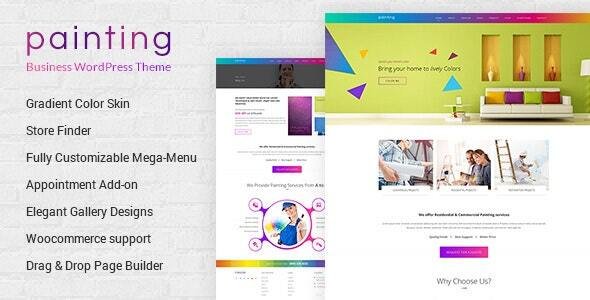
Stuck on your Paint WordPress theme? Let's fix it.
No endless back-and-forth. Just send us the details and we'll get it done.
No obligation · Replies within 1 hour · Quote within 1 day
Setup · Customization · Bug fixes · WooCommerce integration
About Paint WP Theme
Paint is a WordPress theme by BuddhaThemes built for artists, illustrators, and creative studios. It puts visual content first, with a clean grid-based layout that lets artwork breathe without clutter. The theme ships with multiple homepage layouts, a filterable portfolio section, and full-width gallery support.
Paint is built on a lightweight codebase and integrates with the WordPress Customizer, so you can adjust colours, fonts, and layout without touching code. It supports WooCommerce, which makes it practical for artists who want to sell prints or originals directly from their site.
Page speed is reasonable out of the box, and the theme follows standard WordPress coding practices. It works well for painters, photographers, and graphic designers who need a portfolio site that looks professional without requiring a developer to set up.
Get matched with a Paint developer in under one day
Tell us about your Paint project. Small fixes, Paint theme customization, or a full website build, whatever you need, we've got it covered.
We'll connect you to the right Paint developers, define the scope, and get everything 100% clear.
You'll get one estimate, hire your preferred developer, and start collaborating.
BuddhaThemes provides documentation and basic support, but theme support does not cover custom development. When you need changes beyond the Customizer, you need a developer who knows the theme’s structure.
FoxyConcept connects you with vetted Paint WordPress developers through Codeable. Every developer on the platform has passed a technical vetting process, so you are not hiring blind. Post your project, get an estimate within 24 hours, and decide whether to proceed. No upfront payment, no obligation.
Pros
- Designed specifically for visual portfolios, so the default layouts suit artists without heavy customization
- WooCommerce compatible out of the box, allowing direct print and artwork sales
- Filterable portfolio grid makes it easy for visitors to browse work by category or medium
- Lightweight codebase keeps page load times manageable compared to multipurpose themes
- WordPress Customizer integration lets non-technical users adjust colours, fonts, and basic layout without code
Cons
- Limited layout options compared to page-builder-based themes, which can feel restrictive for complex sites
- BuddhaThemes support is limited and response times can be slow for non-basic issues
- No built-in mega menu or complex navigation options, which matters for larger sites with many categories
- The shop layout is functional but plain, and usually needs custom styling to match a strong brand identity
- Documentation is thin, making it harder for developers unfamiliar with the theme to get up to speed quickly
Who is Paint for?
Fine Art Painter Portfolio
Paint works well for fine artists who want a clean, gallery-style site. The full-width image support and minimal chrome keep the focus on the work. A custom category filter can be added to separate paintings by series, medium, or year, giving collectors a clear way to browse and enquire.
Illustrator and Freelance Designer Site
Illustrators and freelance designers need a portfolio that loads fast and displays work clearly across devices. Paint handles both. Adding a contact form with project briefing fields and an ACF-powered case study section turns a basic portfolio into a client-facing sales tool.
Art Print Shop
With WooCommerce installed, Paint can run a functional print shop alongside a portfolio. Custom product templates, print sizing options, and a streamlined checkout flow can all be built on top of the theme. It suits artists selling limited editions or open prints directly to buyers.
Photography Studio Portfolio
Photography studios benefit from Paint’s grid layouts and lightbox-ready gallery sections. The theme handles large image files well when paired with proper image optimisation. Adding a booking form or client proofing plugin extends the site into a full client workflow tool.
Creative Agency Showcase
Small creative agencies can use Paint as a base for a polished showcase site. With custom post types for case studies and team members, plus a refined colour palette and typography set, the theme supports a more agency-style presentation without starting from scratch on a custom theme.

Customizing Paint
Paint gives you a solid starting point, but most serious sites need more than the defaults. A Paint expert can extend the Customizer settings, build custom post types for different artwork series, or wire up Advanced Custom Fields to give clients a structured way to manage their portfolio entries.
Common customization requests include custom gallery filtering by medium or category, a bespoke shop layout for print sales, and integration with booking or commission request forms. Typography and colour palette work is straightforward, but more structural changes, like reworking the header or adding sticky navigation, require direct theme file edits.
If you need the Paint theme to do something specific that the default settings do not cover, working with a Paint WordPress expert saves time and avoids breaking core theme functionality during updates.
Recommended plugins for Paint
Paint pairs well with several plugins that expand what the theme does by default. Elementor or Beaver Builder can be used for landing pages without touching theme templates. WooCommerce handles print and original artwork sales cleanly within the existing layout.
For galleries, Envira Gallery or FooGallery add filtering and lightbox options beyond what Paint includes natively. Yoast SEO or Rank Math handle on-page optimisation without conflicting with the theme. If your site grows, a WordPress performance review is worth running to catch any slowdowns introduced by additional plugins. For discoverability, pairing Paint with a proper WordPress SEO setup makes a real difference.
Not sure which plugins to use? This WordPress plugins directory covers the most popular options with reviews and setup guides.
Paint common issues
Paint theme portfolio filter not working after update
Portfolio filter issues after an update are usually caused by a JavaScript conflict with a newly added plugin, or a cached version of the theme scripts. Start by clearing your site cache and browser cache, then test with plugins disabled one at a time. If the filter uses isotope.js, check that the script is loading without errors in your browser console. A developer can patch the conflict or rebuild the filter using a more stable library. See our WordPress bug fixing service for faster diagnosis.
Paint theme images not displaying correctly on mobile
Image display problems on mobile with Paint are often tied to missing responsive image attributes or a CSS conflict introduced by a plugin or child theme edit. Check the image markup in your browser’s inspector tool to see if srcset values are being set correctly. Also verify that your images are sized correctly at upload. Oversized images scaled down via CSS can appear blurry or misaligned. A quick audit of the theme’s responsive CSS rules usually identifies the root cause.
Paint theme WooCommerce shop page layout broken
WooCommerce layout breaks in Paint typically happen after a WooCommerce major version update that changes template file structure. Paint’s WooCommerce templates may be outdated and need refreshing. Go to WooCommerce > Status > Tools and check for outdated templates. Updating them manually, or via a developer, usually restores the layout. Avoid overriding WooCommerce templates directly in the parent theme. Use a child theme to keep changes intact after future updates.
Paint theme slow loading on homepage gallery
A slow homepage gallery in Paint is almost always an image optimisation issue. Large uncompressed images loaded in a grid without lazy loading will slow any theme down. Install a plugin like ShortPixel or Imagify to compress existing uploads, and enable lazy loading on gallery images. Also check whether your hosting plan is undersized for the traffic you receive. A WordPress performance audit can identify the specific bottleneck and recommend fixes.
Paint FAQ
BuddhaThemes provides support through ThemeForest, but response times and update frequency vary. The theme has not had major updates in recent cycles, which means it works but may require manual fixes for compatibility with newer versions of WordPress or WooCommerce. For ongoing reliability, pairing it with a WordPress maintenance plan is a practical option.
Paint does not officially declare Elementor support, but in practice Elementor works on most pages built with the theme. Full-width Elementor sections may need minor CSS adjustments to align with Paint’s layout. For complex builds, a developer familiar with both Paint and Elementor can sort out the conflicts quickly and set up a clean template hierarchy.
Yes, Paint is WooCommerce compatible. Basic shop, product, cart, and checkout pages render correctly with the theme active. More advanced shop customization, like custom product layouts or a filtered shop grid, requires additional development work. The default WooCommerce styles load without major visual conflicts on most Paint configurations.
Paint’s portfolio section supports basic category filtering, but adding custom taxonomies or more granular filter options requires editing the theme’s portfolio template and JavaScript. A developer can set up Advanced Custom Fields with custom taxonomies and wire them into the filter UI. This is one of the more common Paint customization requests and typically takes a few hours to implement cleanly.
Yes, you can migrate an existing portfolio to the Paint theme. Content migration involves moving posts, pages, images, and portfolio entries across. If you are moving from a different theme, some layout work will be needed to match your previous design. A WordPress migration service can handle the technical side and rebuild your portfolio structure within Paint’s framework.
Hire a Paint WordPress Developer
Whether you need a small tweak or a full custom build on the Paint theme, FoxyConcept can match you with a developer who knows the codebase. Work is handled through Codeable, so estimates are free and there is no risk. Get your free estimate and describe what you need. A vetted Paint WordPress expert will review your project and come back with a clear scope and price, usually within 24 hours.
You'll need a free Codeable account so developers can ask questions and send their quotes.