Panpie WordPress Theme
by RadiusTheme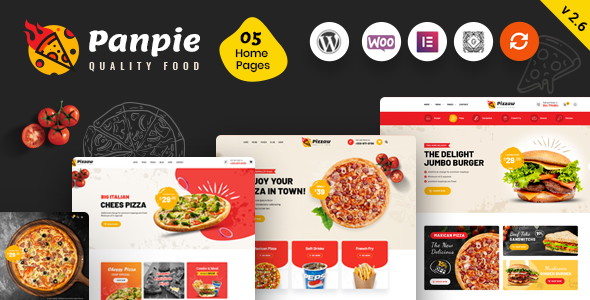
Stuck on your Panpie WordPress theme? Let's fix it.
No endless back-and-forth. Just send us the details and we'll get it done.
No obligation · Replies within 1 hour · Quote within 1 day
Setup · Customization · Bug fixes · WooCommerce integration
About Panpie WP Theme
Panpie is a multipurpose food and restaurant WordPress theme built by RadiusTheme. It targets restaurants, cafes, bakeries, and food bloggers who need a polished site without starting from scratch. The theme ships with Elementor page builder support, multiple pre-built demo layouts, a menu display system, and WooCommerce compatibility for online ordering setups.
RadiusTheme has a solid track record building niche-focused themes, and Panpie reflects that. The demo content covers a range of food business types, so most restaurant owners can get a working site imported quickly. It supports WPML for multilingual sites and integrates with popular reservation plugins. The code is clean enough to get decent performance scores out of the box, though image-heavy food sites will need some optimization work to hit Core Web Vitals targets.
Get matched with a Panpie developer in under one day
Tell us about your Panpie project. Small fixes, Panpie theme customization, or a full website build, whatever you need, we've got it covered.
We'll connect you to the right Panpie developers, define the scope, and get everything 100% clear.
You'll get one estimate, hire your preferred developer, and start collaborating.
Panpie looks straightforward until you need it to do something specific. Custom menu filtering, reservation system integration, WooCommerce modifications, or performance tuning all require real WordPress knowledge. Codeable connects you with vetted developers who have worked on food and restaurant themes like Panpie before. You get a fixed estimate upfront, no bidding, no guessing on cost. The work gets done properly the first time, and you are not locked into a long-term contract.
Pros
- Pre-built food and restaurant demo layouts reduce initial setup time significantly
- Built-in menu display system with categories, images, and pricing out of the box
- Full Elementor compatibility gives visual control over most page sections
- WooCommerce support allows online ordering without a separate theme
- WPML compatible, making it suitable for multilingual restaurant businesses
Cons
- Heavy reliance on Elementor means switching page builders later is painful
- Demo content import can conflict with existing content if not done on a clean install
- Some RadiusTheme custom widgets are not well documented for developers
- Image-heavy layouts require extra optimization work to pass Core Web Vitals
- Support response times from RadiusTheme can be slow during peak periods
Who is Panpie for?
Restaurant Website
Panpie is built around restaurant use cases. The menu display system, opening hours section, gallery layouts, and reservation integration points make it a practical starting point for a sit-down restaurant website. Most of the essential pages are covered in the demo, so setup is faster than building with a generic theme.
Food Blog
Food bloggers can use Panpie’s recipe-friendly layouts and clean blog templates. The typography is readable and the image display options work well for step-by-step recipe photography. It handles categories and archives properly, which matters for blogs with large content archives and organic search traffic as the primary growth channel.
Bakery or Cafe
Bakeries and cafes need something that looks warm and product-focused. Panpie’s grid layouts handle product showcases well, and the WooCommerce integration means you can sell gift cards, packages, or baked goods directly from the site without a separate eCommerce theme or complex setup work.
Online Food Ordering
With WooCommerce active, Panpie can support a basic online ordering workflow. You can list menu items as products, set up categories, and handle checkout. For more complex needs like time-slot delivery or table booking tied to payment, a developer will need to extend the setup with additional plugins and custom configuration.
Catering Company
Catering companies need to show off menus, service packages, and past events. Panpie’s flexible page templates and gallery sections handle this well. A custom enquiry form tied to a specific catering package is a common request, and that requires either a capable form plugin or a developer to wire things together properly.

Customizing Panpie
Panpie gives you a lot of control through the WordPress Customizer and Elementor. You can change colors, fonts, header layouts, and footer structures without touching code. The built-in menu builder lets you display dishes with images, prices, and categories in a clean grid or list format.
That said, deeper customization gets complicated fast. If you want a custom booking flow, a modified WooCommerce checkout, or a layout that does not match the demo, you will need to write custom CSS or PHP. A Panpie expert can save you significant time here. Modifying RadiusTheme’s custom widgets or extending the theme’s shortcodes without breaking future updates requires someone who knows the codebase. Child theme setup is also strongly recommended before making any direct file edits.
Recommended plugins for Panpie
Panpie works well with a standard WordPress plugin stack. WooCommerce handles online ordering, and plugins like WPForms or Gravity Forms cover reservation and contact needs. WPML and Polylang both work for multilingual restaurant sites.
For performance, pairing Panpie with a caching plugin and a CDN makes a real difference given the image-heavy nature of food sites. Check our WordPress performance service if your scores need improvement. For organic traffic, the theme is SEO-friendly at a structural level, but you will still need proper keyword targeting and schema markup, which is covered in our WordPress SEO service.
Not sure which plugins to use? This WordPress plugins directory covers the most popular options with reviews and setup guides.
Panpie common issues
Panpie demo import not working
Demo import failures in Panpie are usually caused by PHP memory limits or max execution time settings being too low on the server. Set memory_limit to at least 256MB and max_execution_time to 300 in your php.ini or via your host’s control panel. Also confirm that all required plugins listed in the theme setup wizard are installed and activated before running the import. A failed import on a live site can cause content conflicts, so always import on a clean staging environment first.
Panpie menu section not displaying correctly
If the Panpie food menu section is not displaying correctly, the most common cause is a missing or deactivated RadiusTheme companion plugin. Panpie relies on its own plugin for custom post types including menu items. Check that the plugin is active under the Plugins screen. If it is active and the issue persists, clear any caching plugins, then check the Elementor widget settings for that section to confirm the correct menu category is selected.
Panpie theme slow loading on mobile
Panpie loads a fair amount of CSS and JavaScript, and food sites tend to carry large images. Start by compressing all images using a plugin like ShortPixel or Imagify. Then use a caching plugin and enable lazy loading. Check if any unused Elementor widgets are loading scripts site-wide and disable them in Elementor’s performance settings. If scores are still poor, a WordPress bug fixing service can do a proper audit and fix the root issues.
Panpie Elementor widgets not showing after update
After updating Panpie or Elementor, custom widgets sometimes stop appearing in the Elementor panel. This is usually a cache issue. Go to Elementor > Tools and click Regenerate CSS and sync the data. Also deactivate and reactivate the RadiusTheme companion plugin. If widgets still do not appear, check for a version mismatch between the theme and the companion plugin. RadiusTheme releases them together, so both should be on the latest version at the same time.
Panpie FAQ
Yes, Panpie is specifically built for food businesses. It includes a menu display system, reservation integration points, gallery sections, and opening hours features. The demo layouts cover restaurants, cafes, and bakeries. It is a more practical starting point than adapting a generic multipurpose theme for a food business, which typically requires a lot more configuration work.
Panpie supports WooCommerce, so you can list menu items as products and handle basic checkout. It works for simple setups like selling meal kits or taking orders for collection. For advanced ordering features like time-slot selection or table-linked ordering, you will need additional plugins and likely a developer to configure everything correctly.
Technically you can use the WordPress Customizer for basic changes, but Panpie’s page layouts are built with Elementor. Removing Elementor would break most of the demo pages. The theme is designed around Elementor as the primary building tool, so working against that creates more problems than it solves. If you want a non-Elementor setup, a different theme is the better choice.
Panpie does not include a built-in reservation system. It has styling and layout sections that work with reservation plugins. Bookly, Simply Schedule Appointments, and Restaurant Reservations by TheFork are common choices. You install the plugin separately and embed it into your Panpie page using a shortcode or Elementor widget. Some configuration is needed to match your booking flow.
Yes, Panpie is listed as WPML compatible by RadiusTheme. This means the theme’s text strings and page templates can be translated using WPML. You will still need to translate your content, menu items, and any custom post types manually within WPML’s interface. For complex multilingual setups, a developer familiar with both Panpie and WPML will save you a lot of troubleshooting time.
Hire a Panpie Developer
Need changes made to your Panpie site? Whether it is a layout adjustment, a plugin integration, a performance fix, or a full build from the demo up, a vetted Panpie developer can handle it. Work is delivered through Codeable, so you get a transparent estimate before anything starts. No risk, no obligation. Get a free estimate today and describe exactly what you need.
You'll need a free Codeable account so developers can ask questions and send their quotes.