Papr WordPress Theme
by Axilthemes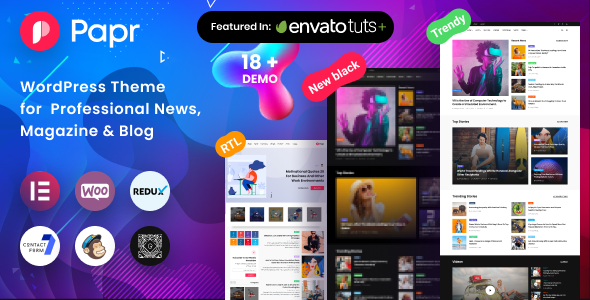
Stuck on your Papr WordPress theme? Let's fix it.
No endless back-and-forth. Just send us the details and we'll get it done.
No obligation · Replies within 1 hour · Quote within 1 day
Setup · Customization · Bug fixes · WooCommerce integration
About Papr WP Theme
Papr is a WordPress theme built by Axilthemes, designed primarily for online magazines, news portals, and blogs that publish high volumes of content. It ships with multiple homepage layouts, a strong focus on editorial hierarchy, and deep integration with Elementor.
The theme handles category-heavy sites well. Navigation menus, post grids, and breaking news tickers are all built in. It supports dark mode, RTL languages, and WooCommerce out of the box.
Axilthemes has a track record with content-focused themes, and Papr follows that pattern. It is fast to set up with demo imports, and the settings panel gives editors real control over typography, colors, and layout without touching code. It suits publishers who want a professional look without a full custom build.
Get matched with a Papr developer in under one day
Tell us about your Papr project. Small fixes, Papr theme customization, or a full website build, whatever you need, we've got it covered.
We'll connect you to the right Papr developers, define the scope, and get everything 100% clear.
You'll get one estimate, hire your preferred developer, and start collaborating.
Papr is not difficult to use, but taking it from a demo install to a production-ready news site requires real WordPress knowledge. You need someone who understands editorial workflows, ad layout, performance under traffic, and how to keep the theme stable through updates.
FoxyConcept works with vetted WordPress developers through Codeable. Every developer is screened, so you are not rolling the dice on a freelancer marketplace. You get a specialist who has worked on similar builds, can scope your project accurately, and delivers clean work.
Pros
- Multiple pre-built homepage layouts cover most editorial structures without custom work
- Built-in dark mode and RTL language support is ready out of the box
- Deep Elementor integration makes visual layout editing straightforward for non-developers
- Breaking news ticker, tabbed widgets, and category sliders are included natively
- WooCommerce compatibility allows publishers to add a shop without plugin conflicts
Cons
- Elementor dependency adds page load weight if performance is not actively managed
- Heavy use of widgets can make the homepage structure difficult to reorganize later
- Demo import does not always match exactly due to font or plugin version differences
- Advanced typography control requires CSS knowledge beyond what the settings panel offers
- Limited layout options for single post templates compared to dedicated magazine themes
Who is Papr for?
Online News Portal
Papr handles high-volume news publishing well. Category-based grids, a breaking news ticker, and multiple front page layouts make it straightforward to organize a busy editorial calendar. Publishers covering politics, business, or general news will find the structure familiar and functional from day one.
Lifestyle Blog
Lifestyle bloggers benefit from Papr’s clean post layouts and visual-first grid options. Featured image displays are strong, and the typography settings let you create a distinct reading experience. It works especially well for sites covering food, travel, wellness, or fashion with regular content output.
Tech Review Site
Tech review sites need structured single post layouts with clear headings and readable comparison sections. Papr handles this with its editorial templates. Combined with a good rating plugin, it supports product review formats that rank well in search and give readers the detail they need to make decisions.
Sports Magazine
Sports coverage demands fast updates, category depth by sport or team, and strong visual presentation. Papr’s tabbed widgets and grid layouts handle multi-sport portals cleanly. Breaking news tickers are useful for live event coverage, and the dark mode option suits a high-energy sports brand aesthetic.
Local Community Publication
Local publications covering community news, events, and classifieds benefit from Papr’s flexible homepage sections. You can highlight local categories, feature event listings, and build a familiar newspaper-style layout that works for readers of all ages. The theme scales down well for smaller, focused regional audiences.

Customizing Papr
Papr gives you a decent base, but most serious publishers need changes that go beyond the theme options panel. That is where a Papr expert becomes useful.
Common customization work includes building custom post templates for specific content types, modifying the header and footer layout, adding custom ad placements, adjusting the reading experience for long-form articles, and connecting third-party newsletter or membership plugins.
Elementor is the primary page builder, so layout work is visual, but child theme development is still the right approach for anything structural. A Papr expert can make targeted changes without breaking theme update compatibility, keeping your site stable while delivering the exact editorial design you need.
Recommended plugins for Papr
Papr works well with several plugins that extend its core functionality. WooCommerce adds a shop section for digital products or merchandise. WPML handles multilingual publishing. Ad inserter plugins slot into the existing ad zones cleanly.
For site speed, Papr responds well to caching plugins and image optimization tools. If your site carries heavy traffic, pairing it with a proper WordPress performance setup makes a measurable difference.
Papr is also compatible with Yoast SEO and Rank Math. For publishers focused on organic search, a dedicated WordPress SEO strategy built on top of these tools will strengthen your editorial reach.
Not sure which plugins to use? This WordPress plugins directory covers the most popular options with reviews and setup guides.
Papr common issues
Papr theme homepage layout not loading after update
Homepage layout issues after a Papr update are usually caused by a conflict between the updated theme and saved Elementor data. First, clear all caches including server-side and plugin caches. Then open the affected page in Elementor and check if any widgets show errors. Regenerate CSS under Elementor settings. If the issue persists, a WordPress bug fix may be needed to identify whether the conflict is theme-level or plugin-level.
Papr theme fonts not displaying correctly
Font rendering issues in Papr are typically caused by Google Fonts failing to load, a caching plugin stripping font requests, or a CSS conflict with another plugin. Check your browser console for blocked font requests. If you are using a performance plugin that combines CSS, whitelist the Google Fonts URL. Custom fonts loaded via the theme options panel may also need re-saving after a theme update clears cached settings.
Papr breaking news ticker not working
The breaking news ticker in Papr pulls from a specific post category or custom field. If it stops working, check that the assigned category still exists and contains published posts. Plugin conflicts with caching or minification tools can also break the ticker’s JavaScript. Disable minification temporarily to test. If the issue is tied to a recent plugin update rather than configuration, a WordPress troubleshooting service can isolate the cause quickly.
Papr theme slow loading on mobile
Papr’s Elementor-based layout adds render-blocking assets that slow mobile load times. Start by enabling lazy loading for images, deferring non-critical JavaScript, and using a caching plugin with mobile-specific rules. Reduce the number of homepage widgets where possible. Heavy slider sections are common culprits. A proper WordPress performance audit will identify exactly which assets are causing the slowdown and fix them in a structured way.
Papr FAQ
Papr is available in both a free version on the WordPress theme directory and a paid pro version sold by Axilthemes. The free version includes core layouts and basic customization options. The pro version unlocks additional homepage templates, advanced widget controls, priority support, and deeper Elementor integration. For a production news site, the pro version is worth the cost.
Yes. Papr is built around Elementor and uses it as the primary page builder for homepage and page layouts. Most of the visual customization is done through Elementor widgets and templates that ship with the theme. You will need Elementor installed and active for the full feature set to work as shown in the Papr demo.
Papr is specifically designed for news and magazine websites. It includes a breaking news ticker, category-based post grids, tabbed content widgets, and multiple editorial homepage layouts. It handles high content volume well and supports the kind of navigation structure a news portal needs. It is one of the stronger choices in this category among Axilthemes products.
Papr uses clean HTML structure and is compatible with Yoast SEO and Rank Math. Schema markup support is included for articles. That said, SEO performance depends more on content, site speed, and your overall WordPress SEO setup than on the theme alone. Papr does not create technical SEO problems, but it is not a shortcut to rankings on its own.
Yes, you can migrate an existing site to Papr, but it requires careful planning. Content migrates cleanly, but your existing page layouts will not carry over since Papr uses Elementor-based templates. You will need to rebuild key pages after the switch. A WordPress migration service can handle the technical side and reduce the risk of downtime or data loss during the transition.
Hire a Papr WordPress Developer
Whether you need a full Papr setup, a specific layout change, or help fixing something that broke, working with an experienced developer saves time and avoids costly mistakes. FoxyConcept connects you with Papr developers through Codeable, the vetted WordPress developer network.
Post your project and get matched within 24 hours. Get a free estimate with no obligation to hire. It is completely risk-free.
You'll need a free Codeable account so developers can ask questions and send their quotes.