Partdo WordPress Theme
by KlbTheme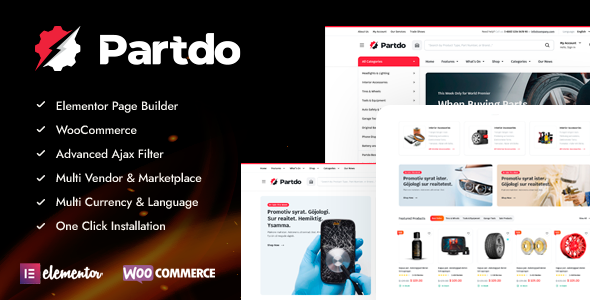
Stuck on your Partdo WordPress theme? Let's fix it.
No endless back-and-forth. Just send us the details and we'll get it done.
No obligation · Replies within 1 hour · Quote within 1 day
Setup · Customization · Bug fixes · WooCommerce integration
About Partdo WP Theme
Partdo is a WooCommerce theme built by KlbTheme, designed specifically for auto parts and car accessories stores. It ships with a parts compatibility filter, letting customers search by make, model, and year before landing on a product page. The theme includes multiple header layouts, a mega menu, Ajax cart, and a product comparison tool out of the box.
KlbTheme built Partdo on a custom framework that works alongside Elementor, so most layout changes happen visually. The theme targets shops selling spare parts, tools, tyres, or any product that needs vehicle-specific filtering. If you run a WooCommerce auto parts store and need a filtered catalog without heavy plugin investment, Partdo covers most of that ground at the theme level.
Get matched with a Partdo developer in under one day
Tell us about your Partdo project. Small fixes, Partdo theme customization, or a full website build, whatever you need, we've got it covered.
We'll connect you to the right Partdo developers, define the scope, and get everything 100% clear.
You'll get one estimate, hire your preferred developer, and start collaborating.
KlbTheme updates Partdo regularly, but their documentation leaves gaps for anything beyond a standard demo setup. When the vehicle filter breaks after an update, or your catalog layout stops working with a WooCommerce release, you need someone who knows the theme’s structure. Codeable connects you with vetted WordPress developers who have hands-on experience with KlbTheme builds. No generalist freelancers, no guesswork. Post a project and get matched with a Partdo developer who has done this before.
Pros
- Built-in vehicle compatibility filter (make, model, year) without needing a separate plugin
- Includes product comparison tool suited for technical parts with multiple spec attributes
- Ajax-powered cart and search reduce full page reloads on large catalogs
- Multiple pre-built demo layouts covering tools, tyres, and general auto accessories
- Elementor integration allows visual editing of most page sections without touching PHP
Cons
- Vehicle compatibility data must be manually entered or imported — no built-in data source
- KlbTheme support response times can be slow, especially for complex compatibility issues
- Some theme options are only accessible via custom KlbTheme panels, not standard WordPress Customizer
- Demo import can bring in dummy data that is tedious to remove from large compatibility tables
- Theme updates occasionally break customizations made outside of Elementor or the Customizer
Who is Partdo for?
Auto Parts Retailers
Partdo was built for this use case. The vehicle compatibility filter lets customers narrow down parts by make, model, and year before viewing a product. For retailers with large SKU counts across multiple vehicle ranges, this filtering system reduces wrong purchases and support queries. A Partdo specialist can map your existing parts catalog to the compatibility database correctly from the start.
Tyre and Wheel Shops
Tyre shops need size and fitment filtering as much as vehicle compatibility. Partdo’s attribute filtering works alongside the standard WooCommerce variable product system. With some customization from a Partdo developer, you can build a fitment-first browsing experience where customers select their vehicle and see only compatible tyre sizes listed.
Car Accessories Stores
Not every product in a car accessories store requires vehicle compatibility, but category-level filtering still matters. Partdo handles mixed catalogs where some products are universal and others are vehicle-specific. The mega menu and category banner system make it practical to organize a wide accessories range without everything looking like a generic WooCommerce store.
Motorcycle Parts Suppliers
Motorcycle parts follow the same make/model/year logic as car parts. Partdo’s compatibility filter works for this without modification to the core filtering system. The main task is building out your motorcycle-specific vehicle database and mapping it to the right products. A Partdo expert familiar with KlbTheme’s data structure can handle this efficiently.
Industrial Tools and Equipment
Industrial tools don’t need vehicle compatibility, but Partdo’s product comparison table and spec-heavy product layouts transfer well to equipment catalogs. If you sell items where customers compare power ratings, dimensions, or compatibility with other equipment, the theme’s comparison and attribute display features give you a solid starting point without custom development.

Customizing Partdo
Partdo ships with a decent set of pre-built demos, but most stores will need work beyond the demo import. The vehicle compatibility filter needs to be populated with your own make/model/year data, which takes time to structure correctly. Header layouts, product card styles, and category banners are all editable through the Customizer or Elementor, but some deeper changes require template overrides.
A Partdo expert can handle the parts that get complicated fast: custom compatibility databases, filtered search integration, checkout modifications, and brand-specific catalog layouts. If you need the theme to match specific supplier data formats or connect to an inventory feed, that kind of work goes beyond the standard Customizer. Hiring a Partdo specialist saves you from trial-and-error with KlbTheme’s framework.
Recommended plugins for Partdo
Partdo works with the standard WooCommerce plugin stack. For performance, a caching layer and image optimization matter more than usual here because auto parts stores tend to carry large catalogs with many product images. Read more about keeping large WooCommerce stores fast on our WordPress performance page.
On the SEO side, Partdo’s category and product URL structure needs attention when you have deep vehicle taxonomy hierarchies. Duplicate content from compatibility filters is a real issue. See our WordPress SEO optimisation service for how to handle this correctly with Yoast or Rank Math.
Not sure which plugins to use? This WordPress plugins directory covers the most popular options with reviews and setup guides.
Partdo common issues
Partdo vehicle compatibility filter not showing results
This usually means the compatibility taxonomy is empty or the product-to-vehicle relationships weren’t imported correctly. Check the KlbTheme vehicle database under WooCommerce settings and confirm at least one make/model/year entry exists. Then verify individual products have compatibility terms assigned. If the filter widget itself is missing, re-add it to the shop sidebar. Persistent issues after that typically point to a plugin conflict with filtering plugins like FacetWP.
Partdo Ajax cart not working after update
Ajax cart failures after updates are usually caused by a JavaScript conflict introduced in the new theme version or a WooCommerce update that changed nonce handling. Open your browser console and check for JS errors on the cart action. Clear all caches first, including server-side caches. If the error references a specific script, check whether a plugin is loading a conflicting jQuery version. Our WordPress bug fixing service can trace and resolve these conflicts quickly.
Partdo demo import fails or gets stuck
Partdo demo imports are large and require adequate PHP memory and execution time limits. Set max_execution_time to 300 and memory_limit to at least 256M in your php.ini or wp-config.php. Also confirm the One Click Demo Import plugin is active and up to date. If the import stalls mid-way, delete all imported content before retrying to avoid duplicate data conflicts. On shared hosting, consider asking your host to temporarily raise limits.
Partdo mega menu not displaying on mobile
Partdo’s mega menu relies on custom JavaScript for mobile toggle behavior. If it stops displaying, check whether a caching plugin is serving a stale JS file that predates your menu configuration. Also verify the menu location is correctly assigned in Appearance > Menus. If you’re using a page builder on the header template, confirm the mobile breakpoint settings in the header builder match your actual device testing range.
Partdo product comparison table broken layout
Broken comparison table layouts in Partdo are commonly caused by CSS conflicts from third-party plugins that inject their own table styles. Open the comparison page, inspect the table element, and look for overriding styles in your browser’s dev tools. Adding targeted CSS to your child theme to reset those overrides usually fixes the display. If the table doesn’t load at all, check whether the comparison plugin bundled with Partdo was deactivated during an update.
Partdo homepage not loading after Elementor update
When Partdo’s homepage breaks after an Elementor update, it usually means a widget or section uses a feature that changed in the new Elementor version. Open the page in Elementor editor and look for deprecation notices on any sections. Regenerate Elementor CSS from the Tools panel. If the page was built with Elementor Pro widgets, confirm your Pro license is active. Our WordPress bug fixing service handles post-update Elementor breaks regularly.
Partdo search returns no results for part numbers
WooCommerce’s default search doesn’t index part numbers stored in custom fields or SKU variants well. Partdo doesn’t ship with an enhanced search engine, so SKU searches often miss results. Install a plugin like SearchWP or enable the WooCommerce product SKU search option if your version supports it. For stores with complex part number formats, a dedicated search plugin with custom field indexing is the practical solution.
Partdo WooCommerce checkout page missing styling
Checkout page styling breaks in Partdo are usually caused by the theme’s stylesheet not loading on the checkout page, often because a caching or optimization plugin is excluding WooCommerce pages from theme CSS. Check your caching plugin’s page exclusion list. Also verify no custom page template is accidentally applied to the checkout page under Page Attributes. If you’ve customized the checkout with a plugin like Checkout Field Editor, re-test with it disabled to isolate the issue.
Partdo child theme changes not applying
If child theme changes aren’t applying, confirm the child theme’s style.css contains the correct Template: header pointing to the Partdo parent folder name exactly. Also check that the child theme is active under Appearance > Themes. For function changes, verify your functions.php has no PHP syntax errors, which silently prevent the child theme from loading. Use a PHP linter or check your error log at wp-content/debug.log.
Partdo compatibility data not saving correctly
Compatibility data not saving is often a permissions issue with the custom KlbTheme database tables that Partdo creates on install. Run the WooCommerce database update tool under WooCommerce > Status > Tools. If the tables are missing entirely, deactivating and reactivating the KlbTheme core plugin usually recreates them. Back up your database before doing this. For bulk compatibility data import issues, check that your CSV format matches KlbTheme’s expected column structure exactly. See our WordPress bug fixing service if database errors persist.
Partdo FAQ
Yes, Partdo is one of the few WooCommerce themes that includes a native vehicle compatibility filter. It handles make, model, and year filtering without requiring a separate compatibility plugin. For stores with large catalogs of vehicle-specific parts, it reduces the setup overhead significantly compared to building compatibility filtering on a generic WooCommerce theme.
Partdo includes Elementor support and most page sections can be edited visually using the free version of Elementor. Some theme-specific sections like the header builder and vehicle filter widget use KlbTheme’s own panels rather than Elementor. For full layout control, Elementor Pro adds more flexibility but isn’t strictly required for basic customization.
Go to the KlbTheme vehicle database panel in your WordPress admin, add your makes, models, and years, then assign those terms to individual products under the compatibility tab on the product edit screen. The filter widget is then added to the shop sidebar. For stores with large catalogs, bulk import via CSV is the practical approach rather than manual entry.
No. Partdo depends on the KlbTheme Core plugin for its vehicle compatibility system, custom post types, and several front-end features. Deactivating the plugin disables key parts of the theme. Always keep both the theme and the companion plugin updated together to avoid version mismatches that break functionality.
Partdo is mobile responsive and includes a mobile-specific menu and layout adjustments. The mega menu collapses to an accordion on smaller screens. Some complex table layouts like the product comparison view can be difficult to read on narrow screens and may need CSS adjustments depending on how many attributes you’re displaying.
KlbTheme lists WPML compatibility for Partdo, but full multilingual support for the vehicle compatibility database requires extra configuration. The standard product and page translation workflow through WPML works, but translating custom taxonomy data in the compatibility filter needs careful setup. Test with your specific language pair before committing to a multilingual build.
Install the One Click Demo Import plugin, then go to Appearance > Import Demo Data and select your preferred demo. Ensure your server has at least 256MB PHP memory and a 300-second max execution time before starting. Large demos with vehicle data can time out on shared hosting. If the import fails partway through, clear all imported content before retrying.
Yes. A Partdo developer can handle demo setup, compatibility database configuration, custom layouts, and WooCommerce integration. Codeable connects you with vetted WordPress developers who know KlbTheme builds. Get a Free Estimate to describe your project and get matched within 24 hours.
KlbTheme releases updates for Partdo periodically, covering WooCommerce compatibility, bug fixes, and occasional feature additions. The update frequency is reasonable but not as consistent as larger theme shops. Always test updates on a staging site first, particularly if you’ve made template-level customizations, as updates can overwrite modified files outside a child theme.
Partdo requires WooCommerce and the KlbTheme Core plugin as hard dependencies. It also bundles Revolution Slider or a similar slider plugin depending on the demo. Elementor is supported but optional. For the vehicle compatibility filter to work, the KlbTheme Core plugin must remain active. Additional plugins like contact form or SEO tools are not bundled and need to be added separately.
Hire a Partdo Expert Developer
Whether you need a full store setup, a vehicle compatibility filter configured, or a layout that doesn’t look like the demo, a Partdo developer can get it done without weeks of back-and-forth. Work is scoped upfront, delivered through Codeable’s vetted network, and backed by a satisfaction guarantee. Get a Free Estimate and describe what you need. No obligation to hire.
You'll need a free Codeable account so developers can ask questions and send their quotes.