Pearl WordPress Theme
by StylemixThemes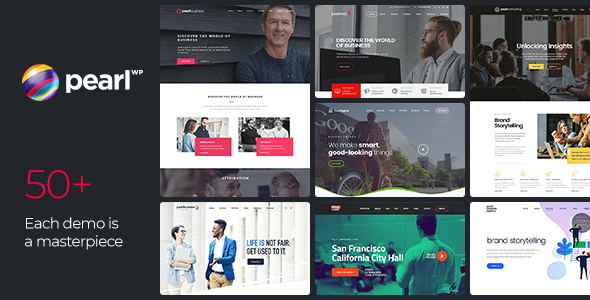
Stuck on your Pearl WordPress theme? Let's fix it.
No endless back-and-forth. Just send us the details and we'll get it done.
No obligation · Replies within 1 hour · Quote within 1 day
Setup · Customization · Bug fixes · WooCommerce integration
About Pearl WP Theme
Pearl is a multi-purpose WordPress theme built by StylemixThemes. It ships with the Master Slider, the Cost Calculator Builder plugin, and a library of pre-built demo sites covering business, portfolio, medical, and agency layouts. The theme is built on a custom framework with a drag-and-drop page builder interface, giving you a reasonable amount of layout control without writing code.
Pearl supports WooCommerce, WPML, and RTL languages out of the box. It uses a combination of its own shortcode system and Elementor compatibility for page building. Performance depends heavily on which plugins you activate alongside it. The theme is regularly updated by StylemixThemes and has an active support forum on ThemeForest, where it holds a strong rating across thousands of sales.
Get matched with a Pearl developer in under one day
Tell us about your Pearl project. Small fixes, Pearl theme customization, or a full website build, whatever you need, we've got it covered.
We'll connect you to the right Pearl developers, define the scope, and get everything 100% clear.
You'll get one estimate, hire your preferred developer, and start collaborating.
Pearl is capable, but it has a learning curve and a few rough edges around its custom plugin dependencies. A Pearl developer who has shipped real projects on this theme will get you to a finished site faster and with fewer post-launch fixes. Through Codeable, you get matched with vetted WordPress specialists within 24 hours. Every developer on the platform has passed a technical review. You post your project, receive a transparent estimate, and only move forward if you’re happy with it. No risk, no obligation.
Pros
- Bundled Cost Calculator Builder plugin adds real value for service-based businesses without extra cost
- Large library of pre-built demo sites covering a wide range of industries, importable in one click
- Built-in mega menu and multiple header layout options without needing a separate plugin
- Strong WooCommerce compatibility with dedicated shop layout controls in the customizer
- Active development from StylemixThemes with consistent updates and responsive ThemeForest support
Cons
- Relies heavily on bundled plugins like Master Slider and XStore Builder which can create lock-in
- Default page weight is high; without performance tuning, Lighthouse scores suffer on image-heavy pages
- Shortcode dependency in older demo content makes switching page builders messy
- Some customizer options require a page refresh to preview accurately, slowing design iteration
- Documentation is spread across multiple resources and not always consistent with the current theme version
Who is Pearl for?
Business & Corporate Sites
Pearl’s corporate demo templates include team sections, service pages, and testimonial layouts that map directly to what most B2B sites need. A Pearl developer can customise these templates without rebuilding from scratch, cutting build time significantly. The mega menu and sticky header options make navigation clean across larger site structures.
Medical & Healthcare Practices
StylemixThemes built several medical-specific demos into Pearl, including clinic, dental, and health coach layouts. These include appointment-style CTAs, doctor profile post types, and clean typographic layouts suited to healthcare audiences. A Pearl specialist can adapt these for HIPAA-adjacent content requirements and integrate booking plugins like Amelia or Bookly.
Creative Agencies & Portfolios
Pearl’s portfolio layouts support grid, masonry, and filterable gallery formats. Creative agencies get full-width hero options, case study page structures, and animation controls without third-party plugins. A Pearl developer can push the portfolio templates further with custom taxonomies, lightbox configurations, and client-specific filtering logic.
WooCommerce Shops
Pearl’s WooCommerce integration covers product page layouts, shop archive design, cart and checkout styling, and mini-cart in the header. The theme customizer gives you direct control over product grid columns and button styles. A Pearl expert can add custom product tabs, variation swatches, and performance tuning for larger catalogues.
Service Businesses with Quote Tools
The bundled Cost Calculator Builder makes Pearl a practical choice for contractors, consultants, and agencies that need interactive quote tools on their site. A Pearl developer can configure multi-step calculators, conditional logic fields, and email output tied to form submissions, all without a separate plugin licence.

Customizing Pearl
Pearl gives you a front-end customizer for colours, typography, header layouts, and footer options. The theme includes multiple header styles, a sticky nav option, and a mega menu builder. You can switch between full-width and boxed layouts globally or per page.
For deeper changes, a Pearl expert will typically work directly in the child theme, overriding template files and adjusting the theme’s SASS variables where available. Custom post type layouts, Cost Calculator styling, and Master Slider integration are the areas where a Pearl specialist earns their keep. Out-of-the-box customization covers about 70% of what most sites need. The remaining 30%, things like custom query loops, conditional header logic, or bespoke WooCommerce templates, requires a developer who knows Pearl’s structure well enough to avoid breaking updates.
Recommended plugins for Pearl
Pearl works alongside most major WordPress plugins without conflict. WooCommerce, WPML, Contact Form 7, and Yoast SEO all integrate cleanly. The bundled Cost Calculator Builder plugin is a genuine differentiator for service businesses that need quote tools.
If you’re running Pearl on a content-heavy or WooCommerce site, pay attention to page speed. The theme loads several scripts by default. A developer can strip unused assets and configure caching correctly. See our WordPress performance service for that. If organic traffic matters, pairing Pearl with a properly configured SEO setup is straightforward. Our WordPress SEO optimisation service covers schema, meta, and technical fixes specific to multi-purpose themes like Pearl.
Not sure which plugins to use? This WordPress plugins directory covers the most popular options with reviews and setup guides.
Pearl common issues
Pearl theme demo import fails or gets stuck
Demo import failures in Pearl are usually caused by insufficient PHP memory limits, upload size restrictions, or a timeout during XML import. Set memory_limit to at least 256MB and max_execution_time to 300 in your php.ini or wp-config.php. Also confirm all required plugins are activated before importing. If the issue persists, try importing the demo content in parts rather than all at once using the WordPress importer manually.
Cost Calculator Builder not displaying correctly on mobile
The Cost Calculator Builder plugin has its own responsive settings separate from Pearl’s customizer. Open the calculator editor and check the mobile layout tab for each element. Width values set in pixels rather than percentages will break on small screens. Switch fixed widths to percentage-based values and test across breakpoints. If the calculator is inside a column layout, the column’s mobile stacking settings in Pearl’s row options also affect how the form renders.
Pearl theme update broke my page layouts
After a Pearl update, broken layouts are usually caused by changes to shortcode markup or row/column class names that your customised templates no longer match. Clear all caches first. Then compare your child theme template files against the updated parent theme files using a diff tool. If you were not using a child theme, rebuilding in one is now urgent. For complex layout breakage, a WordPress bug fixing service can trace and restore the correct structure faster than manual trial and error.
Master Slider not showing on Pearl theme pages
Master Slider failing to appear is typically a script conflict or a missing slider assignment on the page. Check the browser console for JavaScript errors. If another plugin is deferring or combining scripts, exclude Master Slider’s JS from that process. Also confirm the slider is published and assigned correctly in the page’s Master Slider block. Deactivate plugins one by one to isolate conflicts if the console shows no clear error.
Pearl theme slow loading speed after adding plugins
Pearl loads several CSS and JS files by default including Master Slider assets, Google Fonts, and icon libraries, even on pages that don’t use them. Use a plugin like Asset CleanUp or Perfmatters to disable unused scripts per page template. Combine this with server-side caching and a CDN. Check our WordPress performance service for a full audit. Reducing initial page weight by 30 to 40 percent is realistic with proper asset management on Pearl.
Pearl mega menu not working on mobile devices
Pearl’s mega menu relies on JavaScript that can conflict with mobile menu scripts if a caching plugin or minification tool has combined files incorrectly. First, clear all caches and test with minification disabled. Check Pearl’s theme options under the Header section to confirm the mobile breakpoint is set correctly. If the hamburger icon appears but the menu doesn’t open, look for a JavaScript error in the console pointing to the nav toggle function.
WooCommerce cart page styling broken in Pearl
WooCommerce cart styling breaks in Pearl when a WooCommerce update changes markup that Pearl’s CSS targets. Inspect the broken elements using browser dev tools and identify which selectors have lost their target. Add corrected CSS to your child theme’s stylesheet rather than editing Pearl directly. If the issue appeared after updating either Pearl or WooCommerce, check the Pearl changelog for WooCommerce compatibility notes. A WordPress bug fixing specialist can audit and patch this efficiently.
Pearl theme header overlapping page content
Header overlap happens when the sticky or transparent header option is enabled but the page content does not have a top margin or padding to compensate. In Pearl’s page settings, look for a header offset option per page. Alternatively, add a CSS rule targeting the main content wrapper with a padding-top value matching your header height. This is also common when switching between header styles without clearing the customizer cache.
Pearl child theme not loading parent styles correctly
Pearl child theme style loading issues usually come from an incorrect @import or missing wp_enqueue_scripts hook in the child theme’s functions.php. Do not use @import in the child stylesheet to load the parent. Instead, use wp_enqueue_style with the parent style as a dependency. Check that your child theme’s style.css Template: header exactly matches the parent theme folder name, which is case-sensitive on Linux servers.
Pearl theme contact form not sending emails
Contact form email failures in Pearl are a server deliverability problem, not a theme problem. Pearl itself does not handle email routing. If you’re using Contact Form 7 or WPForms, the issue is that WordPress’s default wp_mail() function relies on server mail which most hosts block. Install an SMTP plugin like WP Mail SMTP and connect it to a transactional email service such as Mailgun, Brevo, or Amazon SES. Test using the plugin’s built-in diagnostic tool.
Pearl FAQ
Pearl has Elementor compatibility, but it was originally built around its own shortcode-based system. You can use Elementor to build pages in Pearl, though some theme-specific elements like the Cost Calculator Builder and Master Slider work best through Pearl’s native blocks. A Pearl specialist can advise on which builder approach suits your project before you commit to a direction.
Yes. Pearl includes WooCommerce support with customiser controls for shop archives, product pages, cart, and checkout styling. It is not a dedicated WooCommerce theme, but it handles standard shop setups well. For heavily customised stores with complex product filtering or subscription logic, a Pearl developer will need to add custom templates and possibly additional plugins.
After installing and activating Pearl, go to Appearance > Pearl Options or the dedicated import panel. StylemixThemes provides a one-click demo importer. Select your target demo, choose whether to import content, widgets, and customiser settings, then run the import. Ensure your server’s PHP memory and upload limits meet the requirements listed in the Pearl documentation before starting.
StylemixThemes actively maintains Pearl with regular updates on ThemeForest. The theme receives WooCommerce compatibility patches and PHP version updates. Check the changelog on the ThemeForest product page for the latest release date. It remains one of their flagship products alongside Eduma and Monstroid2, so continued development is expected.
Pearl uses its own custom page builder based on rows, columns, and shortcode elements. It also has Elementor compatibility for users who prefer that workflow. The bundled Master Slider handles hero and banner sections separately. A Pearl developer familiar with both systems can help you decide which approach gives you the most maintainable long-term setup.
Yes, Pearl is WPML certified. You can translate pages, theme strings, the Cost Calculator Builder, and custom post types through the WPML interface. RTL language support is also built in. For complex multilingual setups with separate currency or regional content, a Pearl specialist can configure WPML correctly from the start and avoid the messy string conflicts that come from a rushed setup.
Create a folder in wp-content/themes/ named pearl-child. Add a style.css with the correct Template: pearl header and a functions.php that enqueues the parent stylesheet using wp_enqueue_scripts. Activate the child theme from Appearance > Themes. All your custom code and template overrides go into the child theme so Pearl updates do not overwrite your changes.
Pearl produces clean HTML output and is compatible with major SEO plugins like Yoast and Rank Math. It does not have significant built-in SEO features beyond that. Page speed is the main SEO concern with Pearl, since the default asset load is heavy. Pairing Pearl with proper caching, image optimisation, and an SEO plugin configuration covers the technical requirements for most sites.
Pearl developer rates through Codeable typically range based on project scope, complexity, and the developer’s experience level. Simple customisation tasks cost less than full builds or complex integrations. The advantage of using Codeable is that you get a fixed estimate before any work starts. Get a Free Estimate by posting your project details and a Pearl specialist will scope it for you.
Yes, migrating an existing site to Pearl is possible but requires planning. Content migrates easily through standard WordPress export and import. The design work, rebuilding your existing layouts inside Pearl’s system, takes the most time. If your current site uses a different builder like Divi or Beaver Builder, that content will need to be rebuilt in Pearl. Our WordPress migration service can manage the technical side of the move.
Hire a Pearl Theme Expert for Your WordPress Project
Whether you need a full Pearl theme build, custom template work, plugin integration, or a site that’s gone wrong fixed quickly, a vetted Pearl developer can scope and deliver it. Post your project and get a transparent estimate with no obligation to proceed. Get a Free Estimate and describe what you need. A Pearl specialist will review it and come back to you within 24 hours through the Codeable platform.
You'll need a free Codeable account so developers can ask questions and send their quotes.