Pendulum WordPress Theme
by rascals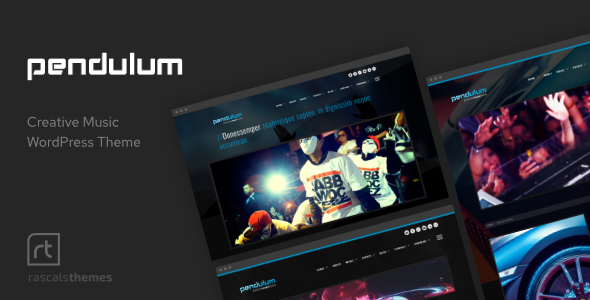
Stuck on your Pendulum WordPress theme? Let's fix it.
No endless back-and-forth. Just send us the details and we'll get it done.
No obligation · Replies within 1 hour · Quote within 1 day
Setup · Customization · Bug fixes · WooCommerce integration
About Pendulum WP Theme
Pendulum is a WordPress theme built by Rascals, a theme development team known for clean code and well-structured layouts. The theme is aimed at creative agencies, portfolios, and businesses that want a modern visual presence without excess complexity.
It ships with a grid-based layout system, smooth scroll effects, and a focus on typography-driven design. The theme integrates with the WordPress block editor and supports popular page builders, making it accessible to developers and site owners alike.
Pendulum is built with performance in mind. The codebase is lean, the default styles are minimal, and the theme does not bundle unnecessary scripts. For teams that want a polished starting point without inheriting bloat, Pendulum is a solid choice worth evaluating.
Get matched with a Pendulum developer in under one day
Tell us about your Pendulum project. Small fixes, Pendulum theme customization, or a full website build, whatever you need, we've got it covered.
We'll connect you to the right Pendulum developers, define the scope, and get everything 100% clear.
You'll get one estimate, hire your preferred developer, and start collaborating.
Pendulum is well-built, but every site has specific requirements that the theme alone cannot cover. Whether that is a custom layout, third-party integration, or a feature the Customizer does not expose, you need someone who knows WordPress at the code level.
Through Codeable, you get access to vetted WordPress developers who have worked with themes like Pendulum across many project types. Post your project, get an estimate within 24 hours, and only move forward if the scope and price work for you. No commitment required.
Pros
- Clean, minimal codebase with no unnecessary scripts bundled by default
- Grid-based layout system that handles responsive design well across screen sizes
- Compatible with the WordPress block editor without requiring a page builder
- Typography-focused design that works especially well for text-heavy creative sites
- Regular updates from Rascals with documented changelogs
Cons
- Limited built-in demo content, so setup takes more manual work than some competitors
- WooCommerce styling requires additional CSS work to match the core theme aesthetic
- Header customization options are limited in the Customizer without a child theme
- No dedicated mega menu support out of the box
- Community forum support is smaller compared to themes with larger user bases
Who is Pendulum for?
Creative Agency
Pendulum’s grid system and clean aesthetic make it a natural fit for creative agencies presenting case studies, team pages, and service offerings. The typography-first design lets copy lead, which works well when you need clients to read before they scroll. Agencies typically pair it with a custom child theme to match brand guidelines precisely.
Freelance Portfolio
Freelancers building a portfolio benefit from Pendulum’s minimal style. There is no visual noise competing with the work itself. Project grids display clearly, and the scroll behavior adds polish without feeling overdone. A developer can quickly add a custom project post type to make portfolio management straightforward for the site owner.
Photography Studio
Photography studios need fast-loading image galleries and a layout that does not crowd the visuals. Pendulum handles both. The theme’s whitespace-heavy design gives photos room to breathe. Paired with a lightweight gallery plugin, it performs well without requiring heavy optimization work after launch.
Small Business Website
Small businesses using Pendulum get a professional-looking site without the complexity of a multipurpose theme. Service pages, a contact form, and a blog all fit naturally within the theme structure. The setup is straightforward enough that a non-developer owner can manage content day to day after initial configuration.
Digital Magazine or Blog
Pendulum’s typography system translates directly to editorial and blog use cases. Article layouts are readable, category pages are cleanly structured, and the theme handles high post volumes without layout issues. Adding an SEO plugin and a caching layer gives you a publication setup that is both well-designed and technically sound.

Customizing Pendulum
Pendulum gives you a solid base, but most sites will need customization to move beyond the defaults. That means adjusting the color palette, typography stack, header layout, and section spacing to match your brand. Some of these changes are straightforward through the Customizer; others require CSS or template overrides.
If you need deeper changes, like custom post types, modified archive templates, or WooCommerce integration, you are looking at child theme work or custom plugin development. A Pendulum expert can handle this without touching the parent theme files, which protects your changes through future updates.
Rascals releases updates periodically, so building on a child theme from the start is always the right call. Getting the setup correct early saves significant time later.
Recommended plugins for Pendulum
Pendulum works well with standard WordPress plugins. WooCommerce can be added for e-commerce, though you may need additional styling to match the theme’s aesthetic. Contact Form 7 and WPForms both integrate without conflict.
For SEO, pairing Pendulum with Yoast or Rank Math covers the basics, but deeper technical improvements are covered in our WordPress SEO service. If the site loads slowly after adding plugins, the fixes are covered under our WordPress performance service. Most extension issues come down to script conflicts or render-blocking assets, both of which are fixable.
Not sure which plugins to use? This WordPress plugins directory covers the most popular options with reviews and setup guides.
Pendulum common issues
Pendulum theme menu not showing on mobile
Mobile menu failures in Pendulum are usually caused by a JavaScript conflict with another plugin. Start by deactivating plugins one at a time and checking the menu after each. If the menu works with all plugins off, re-enable them in batches to isolate the conflict. Also check that your jQuery version is not being overridden. If the issue persists, our WordPress bug fixing service can isolate and resolve the conflict without affecting your live site.
Pendulum WordPress theme slow loading after plugin install
A slowdown after installing a plugin usually points to render-blocking scripts, unoptimized images loaded by the plugin, or database queries being added on every page load. Use a tool like Query Monitor to identify slow queries. Check your browser’s Network tab for large or blocking assets. Plugins that add front-end scripts without conditions are common culprits. See our WordPress performance service for a full audit and fix.
Pendulum theme layout broken after update
If a Pendulum update broke your layout, the most likely cause is a conflict between the updated parent theme and CSS or template overrides in your child theme. Check whether you have a child theme active. If not, any custom code may have been overwritten. Compare your templates against the updated parent theme files to identify what changed. Always back up before updating and test updates on a staging environment first.
Pendulum custom CSS not applying correctly
Custom CSS failing to apply in Pendulum is almost always a specificity issue. The theme’s built-in styles may be more specific than your selectors. Open browser developer tools, inspect the element, and check which styles are being overridden. Add more specific selectors or use the correct hook in a child theme stylesheet. Avoid using !important broadly as it creates maintenance problems down the line.
Pendulum FAQ
Pendulum is compatible with WooCommerce, but it does not ship with dedicated WooCommerce templates. Product pages, cart, and checkout will inherit base WooCommerce styles, which often clash visually with the theme. You will need additional CSS or a developer to style the WooCommerce pages to match Pendulum’s design properly before going live with a shop.
Pendulum supports the WordPress block editor natively. It works with Elementor, though some layout options may conflict with the theme’s own grid and spacing styles. Testing on a staging site before building a full Elementor layout is recommended. Gutenberg is the safer default choice and aligns more naturally with how Pendulum was designed to be used.
Create a new folder in your themes directory, add a style.css file with the correct Template: header pointing to Pendulum, and add a functions.php that enqueues the parent stylesheet. Activate the child theme from the WordPress dashboard. All custom CSS and template overrides go in the child theme, keeping your changes safe through parent theme updates.
Yes, migrating an existing site to Pendulum is possible. The main work involves rebuilding page layouts to match the new theme structure, since templates rarely transfer directly between themes. Content, images, and posts migrate without issue. A developer can handle the layout rebuild systematically. Our WordPress migration service covers this type of theme switch as part of a broader migration project.
Rascals has continued to release updates for Pendulum, though the update frequency is not as high as some larger theme shops. Check the changelog on the theme’s official page or your account dashboard for the latest version details. Before updating, always test on a staging site to confirm compatibility with your installed plugins and any child theme customizations you have made.
Hire a Pendulum WordPress Developer
If your Pendulum site needs custom development, fixes, or a feature that is not available out of the box, the fastest path is working with a developer who already knows WordPress inside out. Through FoxyConcept and Codeable, you get matched with a vetted developer within 24 hours. Get a free estimate with no obligation to hire. Tell us what you need and we will take it from there.
You'll need a free Codeable account so developers can ask questions and send their quotes.