Periodic WordPress Theme
by designcrumbstoo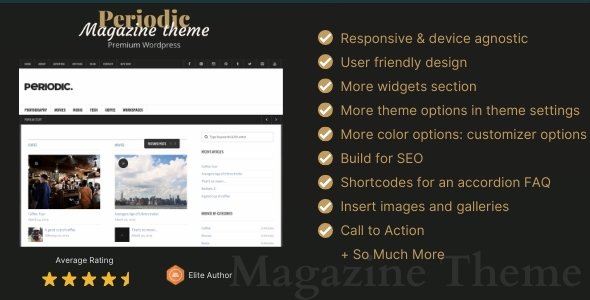
Stuck on your Periodic WordPress theme? Let's fix it.
No endless back-and-forth. Just send us the details and we'll get it done.
No obligation · Replies within 1 hour · Quote within 1 day
Setup · Customization · Bug fixes · WooCommerce integration
About Periodic WP Theme
Periodic is a WordPress theme by designcrumbstoo built around a clean, grid-based layout that suits content-heavy sites. It uses a structured visual rhythm that makes it popular for portfolios, agencies, and editorial projects where hierarchy and spacing matter.
The theme ships with custom post types, flexible widget areas, and a straightforward options panel. It is designed to work without a page builder, which keeps the codebase lighter than most commercial themes. Typography is a clear focus, with well-considered font scales and line spacing baked in by default.
Out of the box, Periodic handles responsive layouts without much configuration. For developers and site owners who want a structured starting point without the overhead of a bloated framework, it is a practical choice.
Get matched with a Periodic developer in under one day
Tell us about your Periodic project. Small fixes, Periodic theme customization, or a full website build, whatever you need, we've got it covered.
We'll connect you to the right Periodic developers, define the scope, and get everything 100% clear.
You'll get one estimate, hire your preferred developer, and start collaborating.
Most Periodic issues come down to knowing where the theme’s structure ends and custom code needs to begin. A developer who has worked with designcrumbstoo themes will get there faster than someone learning the codebase from scratch.
Through Codeable, you get matched with vetted WordPress developers who can handle Periodic customisation, bug fixes, or full builds. Post a project, get a free estimate, and only move forward if it makes sense for your budget.
Pros
- Clean grid-based layout with strong typographic defaults that require minimal setup
- No page builder dependency keeps the theme lightweight and fast to load
- Standard WordPress template hierarchy makes child theme development straightforward
- Responsive layout works across screen sizes without additional configuration
- Customizer options cover the most common visual settings without needing code
Cons
- Limited built-in demo content makes initial setup slower for non-developers
- WooCommerce product templates are unstyled and need significant CSS work
- The options panel lacks granular control over individual post type layouts
- Multi-level navigation can break visually without custom CSS on smaller screens
- Community support is thin compared to larger commercial themes on ThemeForest
Who is Periodic for?
Creative Portfolio
Periodic’s grid layout and clean typography make it a strong base for showcasing visual work. A Periodic developer can configure custom post types for project categories, set up filterable portfolio grids, and ensure images are displayed at the right dimensions without cropping issues.
Digital Agency
Agencies need a site that loads fast and looks structured. Periodic’s minimal framework keeps overhead low. A Periodic specialist can build out service pages, team member sections using custom fields, and a case study post type that fits the existing grid without visual inconsistency.
Online Magazine
The theme’s editorial-friendly grid handles multiple post formats and category feeds well. A Periodic expert can configure archive templates, set up featured content zones on the homepage, and adjust the sidebar layout per category to give sections their own identity.
Freelance Designer
Freelancers benefit from Periodic’s straightforward setup and clean aesthetic. A developer can quickly configure a one-page layout or a simple multi-page site covering work samples, an about section, and a contact form, keeping the build cost low and the result professional.
Small Business Website
Small businesses get a solid, readable site without paying for features they will never use. A Periodic specialist can configure the theme’s options, integrate a contact form, set up basic SEO structure, and ensure the site performs well on mobile without a full custom build.

Customizing Periodic
Periodic gives you a Customizer-based options panel covering colours, typography, header layout, and sidebar positions. Most visual changes can be made without touching code, but the theme’s real flexibility shows when a Periodic expert steps in to extend it properly.
Custom CSS can be added through the Customizer or a child theme. The template hierarchy follows standard WordPress conventions, so overriding page templates or the loop is straightforward for a developer who knows the theme’s file structure.
A Periodic specialist can also wire up Advanced Custom Fields to add structured content zones, adjust the grid columns for specific post types, or rework the navigation for multi-level menus. Without that kind of targeted work, some layouts can feel constrained at larger screen sizes.
Recommended plugins for Periodic
Periodic pairs well with WooCommerce for simple shop setups, though the product templates will need styling work to match the theme’s grid. Contact Form 7 and Gravity Forms both integrate cleanly.
For site speed, adding a caching layer and optimising image delivery through a CDN makes a measurable difference. A WordPress performance specialist can audit load times and implement the right stack for your hosting environment.
If search visibility matters, the theme’s clean HTML structure is a solid foundation. Pairing it with proper schema markup and a WordPress SEO service will take it further than any plugin alone.
Not sure which plugins to use? This WordPress plugins directory covers the most popular options with reviews and setup guides.
Periodic common issues
Periodic theme menu not showing on mobile
Mobile menu issues in Periodic are usually caused by a JavaScript conflict with another plugin or a missing script dependency. Check the browser console for JS errors first. If a plugin is enqueueing a conflicting jQuery version, deactivating plugins one at a time will isolate it. A WordPress bug fixing specialist can trace the conflict quickly and apply a targeted fix without breaking other functionality.
Periodic WordPress theme sidebar not displaying correctly
Sidebar display problems in Periodic often come from the page template selection or a widget area that has not been populated. Check that the correct template is assigned under Page Attributes. If the sidebar shows on some pages but not others, the template file may be overriding the default layout. A WordPress developer can audit the template hierarchy and correct the logic in a child theme.
Periodic theme featured image not showing on posts
If featured images are not appearing on Periodic posts, the most likely cause is either the image size not being registered or the template not calling the_post_thumbnail() correctly. Run add_image_size checks in the child theme’s functions file and regenerate thumbnails using the Regenerate Thumbnails plugin. Confirm the correct image size name is referenced in the template file for the post type in question.
Periodic theme slow to load after adding plugins
Slow load times after adding plugins to a Periodic site usually point to unoptimised scripts and styles being loaded on every page regardless of need. Use Query Monitor to identify which plugins are adding render-blocking assets. Conditional loading, a caching plugin, and image optimisation will recover most of the performance loss. A full audit will identify the heaviest offenders and the right fix for each.
Periodic FAQ
Designcrumbstoo’s support activity on Periodic is limited compared to larger theme shops. Updates are infrequent, so it is worth checking the theme’s changelog and the ThemeForest comments section before purchasing or relying on it for a new project. For critical sites, having a developer on hand to handle any compatibility issues with WordPress core updates is advisable.
Periodic is not officially WooCommerce-compatible out of the box. Basic WooCommerce pages will load, but the product archive, single product, and cart pages will not match the theme’s styling. A Periodic developer can write the necessary template overrides and CSS to bring the shop pages in line with the rest of the site’s visual design.
Create a new folder in /wp-content/themes/ named periodic-child. Add a style.css with the correct Template: periodic header and a functions.php that enqueues both the parent and child stylesheets. Any template files you copy into the child folder will override the parent without touching the original theme files, keeping updates safe.
Periodic uses its own template structure and was not built with Gutenberg block patterns in mind. Basic Gutenberg blocks will work inside the content area. Elementor can be used, but the theme’s grid layout may conflict with Elementor’s full-width sections. A Periodic specialist can configure compatibility and ensure the editor experience is consistent across both.
Post your project on Codeable and describe the work you need done with the Periodic theme. You will be matched with vetted WordPress developers who have relevant experience. You get a free estimate before committing to anything. It is a straightforward way to find a Periodic specialist without trawling through freelancer profiles yourself.
Hire a Periodic WordPress Developer
Whether you need a specific layout adjusted, a plugin conflict resolved, or a full Periodic build from scratch, working with a specialist saves time. Our developers know the theme’s structure and can scope work accurately.
Get a Free Estimate and describe what you need. There is no obligation to hire, and you will have a clear picture of cost and timeline before any work begins.
You'll need a free Codeable account so developers can ask questions and send their quotes.