Phoenix WordPress Theme
by GoodLayers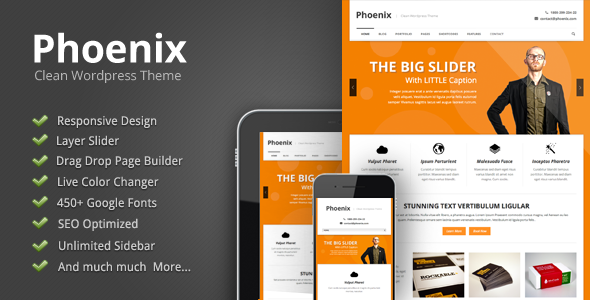
Stuck on your Phoenix WordPress theme? Let's fix it.
No endless back-and-forth. Just send us the details and we'll get it done.
No obligation · Replies within 1 hour · Quote within 1 day
Setup · Customization · Bug fixes · WooCommerce integration
About Phoenix WP Theme
Phoenix is a multipurpose WordPress theme built by GoodLayers, the team behind the popular Goodlayers Page Builder. It ships with a large library of pre-built demo sites covering business, portfolio, restaurant, and agency layouts, so you can get a working site up quickly without starting from scratch.
The theme is built around GoodLayers’ own page builder, which handles columns, sections, and content blocks without requiring a third-party plugin. Typography controls, header styles, and color schemes are all managed from the customizer. Phoenix also supports WooCommerce out of the box, making it viable for shops as well as content-focused sites.
It is a solid mid-market theme for freelancers and small agencies who want design flexibility without writing code. That said, the page builder has a learning curve, and heavy customization usually requires someone who knows the theme well.
Get matched with a Phoenix developer in under one day
Tell us about your Phoenix project. Small fixes, Phoenix theme customization, or a full website build, whatever you need, we've got it covered.
We'll connect you to the right Phoenix developers, define the scope, and get everything 100% clear.
You'll get one estimate, hire your preferred developer, and start collaborating.
GoodLayers themes are well-documented, but Phoenix has enough moving parts that small mistakes in the page builder or customizer can cost hours to fix. An experienced Phoenix developer knows the theme’s structure and won’t spend your budget figuring out basics.
Through Codeable, FoxyConcept works exclusively with vetted WordPress specialists. Every developer on the platform has passed a rigorous vetting process, so you are not rolling the dice on quality. You get a real estimate before any work starts, with no obligation to hire.
Pros
- Large demo library with ready-made layouts for multiple industries
- Built-in GoodLayers Page Builder removes dependency on third-party builders
- WooCommerce compatible out of the box with styled product and cart pages
- Extensive header and footer options including sticky and transparent variants
- Active updates and ongoing support from GoodLayers
Cons
- GoodLayers Page Builder has a steeper learning curve than Elementor or Gutenberg
- Heavy demo imports can leave behind unused content that slows the admin
- Slider and animation elements can hurt page speed scores if not optimised
- Styling WooCommerce beyond the default requires custom CSS or developer help
- Locked into GoodLayers Page Builder, so switching builders later is painful
Who is Phoenix for?
Creative Agency
Phoenix ships with agency-specific demos that include project portfolios, team sections, and service pages. The page builder handles animated counters, client logo grids, and case study layouts cleanly. Agencies that want a polished presentation without a fully custom build will find a usable starting point here, provided someone takes time to tailor the demo to the actual brand.
Restaurant or Food Business
GoodLayers includes restaurant-specific demo layouts with menu sections, reservation form integration, and full-width image headers. The theme handles the visual richness that food businesses need. You’ll want a developer to configure the booking system and map the menu structure properly, but the design foundation is solid and avoids the generic look of cheaper options.
WooCommerce Store
Phoenix’s WooCommerce support covers product pages, cart, checkout, and account pages with themed styling. It won’t replace a dedicated WooCommerce theme for complex shops, but for businesses that need a content-heavy site with an integrated store, Phoenix handles both without requiring two separate themes or heavy plugin stacking.
Freelance Portfolio
The portfolio post type and grid layouts in Phoenix suit designers, photographers, and developers who need to show work visually. Filterable portfolio grids, lightbox image support, and full-width project pages are all available without extra plugins. The challenge is making it feel personal rather than demo-like, which takes deliberate customization work.
Corporate Business Site
Phoenix has clean corporate demo layouts with service sections, team members, testimonials, and contact pages. It presents well for professional services firms, consultancies, and B2B companies. The customizer gives enough control over brand colors and typography that it doesn’t require code changes for most standard corporate requirements.

Customizing Phoenix
Phoenix gives you control over headers, footers, fonts, colors, and layout spacing through its customizer panel. The GoodLayers Page Builder handles drag-and-drop content construction, and most style changes are live-preview. But once you move beyond the demo setup, things get more involved.
Custom post types, conditional layouts, header scroll behavior, and WooCommerce styling all need careful configuration. Getting the theme to match a specific brand reliably takes time. A Phoenix expert knows which settings conflict, where the page builder has quirks, and how to build out custom sections without breaking the responsive layout.
If your project needs something beyond adjusting colors and swapping demo content, working with a developer who has hands-on Phoenix experience saves a lot of back-and-forth. FoxyConcept connects you with specialists who have done this before.
Recommended plugins for Phoenix
Phoenix works with WooCommerce for e-commerce, WPML for multilingual sites, and Contact Form 7 for forms. The GoodLayers Page Builder has its own element library, so you won’t always need a separate page builder plugin.
For performance, image optimization plugins like ShortPixel and a caching layer such as WP Rocket pair well with the theme. Phoenix’s built-in sliders and animations can slow load times, so WordPress performance tuning is often worth doing post-launch. For search visibility, pairing Phoenix with a proper WordPress SEO setup helps the clean markup work harder for you.
Not sure which plugins to use? This WordPress plugins directory covers the most popular options with reviews and setup guides.
Phoenix common issues
Phoenix theme page builder not saving changes
This usually comes down to a PHP memory limit or a JavaScript conflict with another plugin. First, increase the PHP memory limit to at least 256MB in your wp-config.php file. Then deactivate plugins one by one to isolate a conflict. If the GoodLayers Page Builder still fails to save, check your browser console for JS errors. Persistent issues often need a developer to dig into the server configuration. Our WordPress bug fixing service can resolve this quickly.
Phoenix theme demo import failing or incomplete
Demo imports fail most often because of low PHP timeout values or insufficient server memory. Your host needs to support a PHP max execution time of at least 300 seconds and memory above 256MB. If the import completes but images are missing, that points to an external URL issue during the import process. Try importing the demo content only without replacing theme options. A developer can run a manual import if the one-click method keeps failing.
Phoenix theme layout broken after WordPress update
After a WordPress core or PHP version update, GoodLayers Page Builder elements can break if the theme hasn’t been updated to match. Always update Phoenix through Appearance > Themes and check the GoodLayers changelog for compatibility notes. If layouts collapse or shortcodes display as raw text, a plugin conflict or incomplete update is usually the cause. Restore from a backup and apply updates one at a time to identify the break point.
Phoenix theme slow page speed score
Phoenix includes sliders, animation scripts, and multiple CSS files that add weight to every page load. Start by enabling lazy loading for images, minifying CSS and JS with WP Rocket or similar, and removing unused demo assets. The built-in slider loads scripts globally, which hurts pages where no slider is used. Conditional asset loading requires developer intervention. Full performance tuning is covered under our WordPress performance service.
Phoenix FAQ
GoodLayers updates Phoenix regularly to maintain WordPress compatibility. Before updating, always check the changelog on the GoodLayers website and take a full backup. The theme generally keeps pace with WordPress core releases, but the GoodLayers Page Builder occasionally needs a separate compatibility fix after major WordPress versions. Keeping both the theme and its associated plugins current is important.
Technically you can install Elementor alongside Phoenix, but it is not the recommended setup. Phoenix is designed around the GoodLayers Page Builder, and running two builders creates conflicts, bloat, and inconsistent styling. If you prefer Elementor, a different base theme will give you cleaner results. Mixing the two builders on the same pages is not supported and causes layout problems.
Theme updates in Phoenix overwrite theme files, so any changes made directly to theme files will be lost. Customizations made through the GoodLayers Page Builder and the customizer are stored in the database and survive updates. For code-level changes, always use a child theme. Before updating, back up your site fully and confirm the new version changelog doesn’t break existing page builder elements.
Yes, Phoenix is listed as WPML compatible. GoodLayers has tested the theme with the WPML plugin for translating pages, posts, and custom content. The page builder content can be translated using WPML’s String Translation and the Translation Editor. Configuration takes time to get right across multiple languages, so a developer with WPML experience is worth involving from the start of a multilingual build.
Yes, Phoenix sites can be migrated to a new host. The migration process involves moving your database and files, then updating URLs if the domain changes. GoodLayers Page Builder stores its data in the database, so it transfers with a standard migration. Our WordPress migration service handles this without downtime and checks that all theme settings and builder content display correctly after the move.
Hire a Phoenix WordPress Expert
Whether you need a full Phoenix build, a layout fix, or a custom feature added to an existing site, FoxyConcept can match you with a developer who knows GoodLayers themes well. Work is delivered through Codeable, so quality is vetted before anyone touches your project.
Get a free estimate and describe what you need. You’ll hear back within 24 hours with a clear scope and price, no obligation to proceed.
You'll need a free Codeable account so developers can ask questions and send their quotes.