Photolio WordPress Theme
by kotofey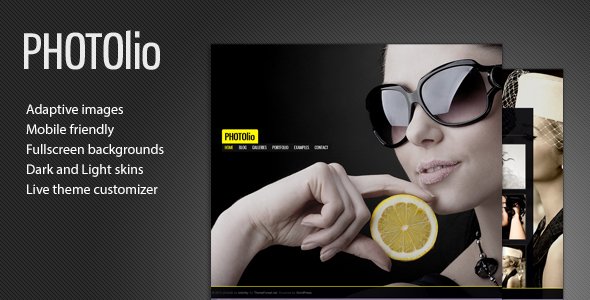
Stuck on your Photolio WordPress theme? Let's fix it.
No endless back-and-forth. Just send us the details and we'll get it done.
No obligation · Replies within 1 hour · Quote within 1 day
Setup · Customization · Bug fixes · WooCommerce integration
About Photolio WP Theme
Photolio is a photography-focused WordPress theme developed by kotofey. It is built for photographers, visual artists, and creative studios who want a clean, image-first presentation without a lot of clutter getting in the way.
The theme uses a minimal layout that puts your portfolio work front and center. Galleries load fast, navigation stays out of the way, and the overall design stays neutral so your images do the talking. It supports full-screen galleries, multiple portfolio layouts, and custom post types for project organization.
Photolio works well with the WordPress block editor and includes theme options that cover typography, color, and layout adjustments without requiring any coding. If you need something more tailored, the theme’s structure is clean enough for a developer to extend without fighting the codebase.
Get matched with a Photolio developer in under one day
Tell us about your Photolio project. Small fixes, Photolio theme customization, or a full website build, whatever you need, we've got it covered.
We'll connect you to the right Photolio developers, define the scope, and get everything 100% clear.
You'll get one estimate, hire your preferred developer, and start collaborating.
Most Photolio sites start simple and grow into something more specific: a booking flow, a private client area, a shop for prints. At that point, the built-in Customizer options stop being enough. Working with a vetted Photolio developer through Codeable means you get someone who has handled these exact requests before, on this exact theme, without handing your project to a generalist who will figure it out as they go. The work is scoped, estimated upfront, and you are under no obligation until you decide to hire.
Pros
- Clean, image-first layout that does not compete with your photography
- Multiple portfolio grid options including masonry and full-width layouts
- Lightweight codebase that keeps page load times manageable for image-heavy sites
- Works with the native WordPress block editor without requiring a page builder
- Neutral design style that suits different photography niches without looking genre-specific
Cons
- Customizer options are limited compared to themes with dedicated options panels
- No built-in client proofing or password-protected gallery functionality
- Documentation from kotofey is minimal, which makes self-troubleshooting harder
- Advanced layout changes require direct PHP or CSS edits to theme templates
- Limited community support and few third-party tutorials compared to mainstream themes
Who is Photolio for?
Wedding Photographers
Photolio’s full-screen gallery option and clean navigation work well for wedding photographers who need to display large image sets from multiple events. The minimal design keeps the focus on the couples and moments rather than the site itself. You can organize galleries by event date or location using the custom portfolio categories.
Commercial Studio Portfolios
Commercial studios often need a portfolio that looks professional without being distracting. Photolio’s neutral layout handles product photography, brand work, and editorial spreads without forcing a specific aesthetic. Adding a contact or booking form alongside the portfolio pages turns the site into a functional client acquisition tool.
Fine Art Photographers
Fine art photographers need a site that treats images like gallery wall pieces. Photolio’s full-width and grid layouts accommodate this without adding unnecessary UI noise. The theme’s whitespace and typography defaults match the quiet, considered feel that most fine art contexts require. Print sales can be added via WooCommerce.
Travel and Landscape Photography Blogs
Travel and landscape photographers often combine portfolio work with written content. Photolio handles both through its standard WordPress blog structure alongside the portfolio post type. Category filtering lets visitors separate gallery work from editorial posts. SEO optimization for location-based searches can drive consistent organic traffic.
Freelance Photographers Selling Prints
Photographers selling prints need a portfolio that converts visitors into buyers. Photolio integrates with WooCommerce, allowing print product pages to sit alongside the portfolio without visual inconsistency. You can display the portfolio image and link directly to the corresponding product, keeping the purchase path short and clear.

Customizing Photolio
Out of the box, Photolio gives you a decent set of controls through the WordPress Customizer. You can adjust fonts, set your color palette, choose between gallery grid styles, and configure your header and footer layout. That covers most standard photography site needs.
Beyond those defaults, customization gets technical. Adding custom hover effects, restructuring the portfolio archive layout, or integrating a client proofing workflow requires direct template or CSS work. A Photolio expert can handle these without breaking the existing theme structure.
If you want a filterable portfolio by category, a password-protected client gallery section, or a custom contact flow tied to specific project types, that kind of work benefits from someone who knows the theme’s template hierarchy and hook system well enough to extend it cleanly.
Recommended plugins for Photolio
Photolio pairs well with plugins that extend its core gallery and portfolio functionality. WooCommerce works if you want to sell prints or digital downloads directly. Contact Form 7 or Gravity Forms handle inquiries cleanly. For client delivery, adding a private gallery plugin on top of Photolio’s existing structure is a common request.
On the performance side, Photolio’s image-heavy nature means caching and image optimization matter more than on text-based sites. See our WordPress performance services for that. If you are building out a photography blog alongside the portfolio, WordPress SEO work can help each gallery page rank for location or style-specific searches.
Not sure which plugins to use? This WordPress plugins directory covers the most popular options with reviews and setup guides.
Photolio common issues
Photolio gallery images not displaying correctly after WordPress update
Gallery display issues after a WordPress update usually come from a conflict between the theme’s gallery shortcode handling and the updated block editor. First, check if the issue appears in both the classic and block editor contexts. Clear your site cache, then deactivate plugins one by one to isolate any conflict. If the theme’s template files are the cause, a developer can patch them without modifying core theme files by using a child theme. See our WordPress bug fixing service for help.
Photolio portfolio page showing wrong layout or broken grid
A broken portfolio grid in Photolio is often caused by a missing or mis-assigned page template. Go to the page settings and confirm the correct Photolio portfolio template is selected. Also check whether a caching plugin is serving an outdated version of the layout. If the grid CSS is broken, inspect the browser console for 404 errors on stylesheet files. A theme file conflict after a manual edit is another common cause. Restoring the original template file and reapplying changes through a child theme usually resolves it.
Photolio theme customizer changes not saving or not showing on front end
Customizer changes not saving in Photolio are typically caused by a PHP memory limit issue, a JavaScript error blocking the save request, or a caching layer intercepting the output. Check your browser console for JS errors when hitting the publish button. Increase the PHP memory limit in wp-config.php if you see timeout errors. Flush all caches after any Customizer save attempt. If the problem persists, a plugin conflict with the Customizer API is likely and requires systematic plugin deactivation to identify.
Photolio site loading slowly due to large image files
Slow load times on Photolio sites almost always trace back to uncompressed, full-resolution images being served without lazy loading. Install an image optimization plugin like ShortPixel or Imagify and run it across your media library. Enable lazy loading for images below the fold. If you are using full-screen hero images, serve them in WebP format and use srcset for responsive sizing. A caching plugin with static file delivery will also reduce server response time significantly. Our WordPress performance service covers this end to end.
Photolio FAQ
Photolio was built for WordPress and generally works with current versions, but kotofey’s update cadence is slower than larger theme shops. Always test a WordPress core update on a staging environment before applying it to a live Photolio site. If you encounter compatibility issues after an update, the most common fixes involve the gallery template files and block editor integration rather than fundamental theme architecture.
Yes. Photolio does not include native ecommerce features, but WooCommerce installs and runs alongside it without major conflicts. You will likely need some CSS adjustments to make WooCommerce’s default product and cart pages match the Photolio aesthetic. A developer can handle that with a child theme stylesheet so nothing is overwritten when the theme updates.
Photolio includes full-width and full-screen layout options for portfolio pages. Full-screen background gallery functionality depends on which layout template you select and how your images are sized. Very small images will not scale well to full-screen. Serve high-resolution images optimized for web delivery, and use the theme’s full-width page template to get the best result.
Creating a Photolio child theme requires a new folder in your themes directory with a style.css file that references Photolio as the template, and a functions.php file that enqueues the parent theme’s styles. Any template or CSS customizations go into the child theme so they survive Photolio updates. If you are not comfortable doing this manually, a developer can set it up quickly as part of a larger customization project.
Migrating an existing photography site to Photolio is straightforward for content but requires planning for layout. Your posts, pages, and media transfer cleanly via the WordPress importer. Portfolio items from another theme’s custom post type may need remapping. Gallery shortcodes from other themes often break and need rebuilding in Photolio’s format. Our WordPress migration service covers this kind of structured move.
Hire a Photolio Expert Developer
Whether you need a layout adjustment, a custom gallery feature, or a full photography site build on Photolio, we match you with a developer who knows the theme. Post your project and get a free estimate within 24 hours. No commitment required. Get your free estimate here and describe exactly what you need. The developer assigned to your project will have relevant experience with Photolio and photography-focused WordPress builds.
You'll need a free Codeable account so developers can ask questions and send their quotes.