Physio WordPress Theme
by QreativeThemes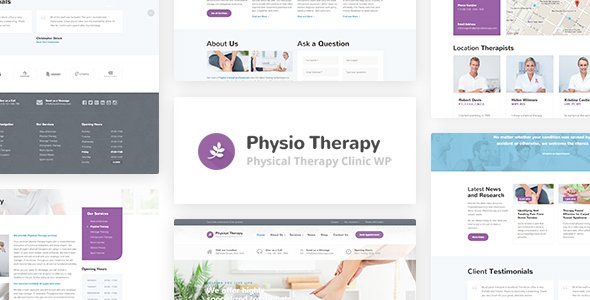
Stuck on your Physio WordPress theme? Let's fix it.
No endless back-and-forth. Just send us the details and we'll get it done.
No obligation · Replies within 1 hour · Quote within 1 day
Setup · Customization · Bug fixes · WooCommerce integration
About Physio WP Theme
Physio is a WordPress theme built by QreativeThemes for physiotherapy clinics, sports rehab centres, and allied health practitioners. It ships with a clean, professional layout designed to communicate trust and availability to patients searching for treatment.
The theme includes appointment booking integration, service pages, staff profiles, and a testimonials section. It runs on Elementor, so pages are built visually without touching code. The design is mobile-first, with fast-loading templates that suit local health businesses trying to rank in Google Maps and organic search.
Out of the box, Physio gives small clinics a solid starting point. The default demo is close enough to a real clinic site that most practices can go live after swapping content and colours.
Get matched with a Physio developer in under one day
Tell us about your Physio project. Small fixes, Physio theme customization, or a full website build, whatever you need, we've got it covered.
We'll connect you to the right Physio developers, define the scope, and get everything 100% clear.
You'll get one estimate, hire your preferred developer, and start collaborating.
Physio is straightforward to set up from the demo, but clinics with specific requirements quickly run into its limits. Custom booking logic, third-party integrations, and multi-practitioner scheduling all need proper development work.
Through Codeable, you get matched with a vetted WordPress developer who has worked with health and wellness themes before. No agencies, no bids from developers who haven’t read your brief. Post your project, get a clear estimate, and decide from there with no obligation to proceed.
Pros
- Built specifically for physiotherapy and health clinics, so the default layout matches real-world clinic content needs
- Elementor integration means non-developers can update service pages, staff bios, and opening hours without coding
- Appointment booking section is built into the demo, reducing setup time compared to starting from a blank theme
- Mobile-first design works well for the high proportion of patients searching on phones
- Clean, minimal aesthetic builds patient trust without requiring heavy design customisation
Cons
- Limited demo variety means multiple clinics in the same area can end up with near-identical looking sites
- Deep customisation requires Elementor knowledge or a developer, the Customizer alone won't cover complex layout changes
- No built-in booking system, you still need a third-party plugin which adds cost and potential compatibility issues
- QreativeThemes has a smaller support community compared to major theme shops, so troubleshooting resources are limited
- Theme updates can occasionally break Elementor-built layouts if not tested on a staging site first
Who is Physio for?
Physiotherapy Clinic
Physio suits single-location physiotherapy clinics well. The service pages, practitioner profiles, and contact section give patients the information they need before booking. The layout communicates professionalism without looking generic, which matters in a competitive local health market.
Sports Rehabilitation Centre
Sports rehab centres can adapt the Physio theme by replacing clinic-focused content with sport-specific services and injury type pages. The clean structure handles condition-based landing pages well, useful for targeting searches like ‘ACL rehab’ or ‘sports massage near me’.
Occupational Therapy Practice
Occupational therapy practices need a professional, clear site that explains services to both patients and referrers. Physio’s layout supports this without requiring much structural change. Adding a resources or blog section takes minimal development work and helps with search visibility.
Chiropractic and Manual Therapy Clinic
Chiropractors and manual therapists can use the Physio theme with minimal adjustment to the visual design. The treatment service section adapts easily to spinal, joint, and soft tissue services. Testimonials and before-and-after case content also fit the layout without custom development.
Allied Health Group Practice
Multi-practitioner allied health groups need slightly more development work to handle staff directories and service filtering by discipline. The Physio theme provides the right foundation, but a developer will typically need to extend it to support a group practice’s full range of practitioners and services.

Customizing Physio
Physio uses the Elementor page builder, which means most visual changes are handled through drag-and-drop. You can update colours, fonts, section layouts, and widget content without editing PHP or CSS. The Customizer handles global settings like header style, logo, and button colours.
That said, meaningful customisation beyond the demo often requires developer input. Building custom booking flows, integrating clinic management software, or creating multi-location setups needs someone who understands both WordPress and the Physio theme structure.
A Physio expert can extend the theme cleanly, without plugin conflicts or layout breaks. If you need the site to match your exact brand and workflows rather than the default demo, working with a developer from the start saves time and avoids costly rework later.
Recommended plugins for Physio
Physio pairs well with several plugin categories. Appointment booking plugins like Bookly or Simply Schedule Appointments drop into the layout without breaking the design. WooCommerce can be added for selling physiotherapy products or session packages.
For clinics focused on local search, on-page SEO work pays off quickly given the local-intent searches patients use. Improving WordPress SEO on service and location pages can drive meaningful organic traffic. Page caching and image optimisation also matter for mobile users. A proper WordPress performance setup keeps load times under two seconds, which directly affects conversion rates for new patient enquiries.
Not sure which plugins to use? This WordPress plugins directory covers the most popular options with reviews and setup guides.
Physio common issues
Physio theme appointment form not sending emails
This is almost always a WordPress email delivery problem, not a theme bug. WordPress uses PHP mail by default, which most hosting providers block or route unreliably. Install an SMTP plugin like WP Mail SMTP, connect it to a mail service such as SendGrid or Mailgun, and test the form again. Also check your spam folder and confirm the form plugin itself is configured with the correct recipient address.
Physio theme Elementor layout broken after update
Elementor layout breaks after updates usually happen when the theme or Elementor itself updates without the other following. First, regenerate CSS under Elementor > Tools > Regenerate CSS & Data. If the layout is still broken, check whether the Elementor or Elementor Pro version is compatible with the current Physio theme version. A WordPress bug fixing specialist can diagnose and resolve conflicts without losing your existing design.
Physio theme mobile menu not working
A non-functional mobile menu in the Physio theme is usually caused by a JavaScript conflict with another plugin. Open your browser console and look for JS errors. Temporarily deactivate recently added plugins to isolate the conflict. Also check that your jQuery version is not being deferred by a performance plugin, as this breaks mobile menu scripts that depend on jQuery loading first.
Physio theme slow loading on mobile
Slow mobile load on the Physio theme is typically caused by uncompressed images, unminified scripts, or no page caching. Start with image compression using ShortPixel or Smush. Add a caching plugin like WP Rocket and enable lazy loading. If the theme loads large Elementor assets on every page, a developer can strip unused CSS and defer non-critical scripts to bring load time down significantly.
Physio FAQ
Yes. Physio is built for exactly this use case. A small single-location clinic can go live using the included demo content as a starting point, swapping in their own services, staff, and contact details. You won’t need heavy customisation unless your clinic has specific booking or branding requirements that differ from the default layout.
Physio does not include a built-in booking system, but it works alongside plugins like Bookly, Simply Schedule Appointments, and Amelia. These can be embedded into service or contact pages using shortcodes or Elementor widgets. Some plugins require configuration to match the site’s visual style, which a developer can handle quickly.
Most day-to-day updates, text changes, image swaps, and page edits can be done through Elementor without coding. Global settings like fonts and colours are handled in the WordPress Customizer. If you need new features, custom layouts, or plugin integrations, a developer will save you time and prevent accidental layout breaks.
The Physio theme includes a team or staff section built with Elementor. You can duplicate existing practitioner cards and update the photo, name, title, and bio for each person. For larger teams or filterable staff directories by specialty, a developer can build a custom post type solution that scales without cluttering the Elementor layout.
Compatibility depends on how recently QreativeThemes has released updates. Always check the theme’s changelog and test on a staging site before updating WordPress core. If the theme hasn’t been updated in over a year, there may be minor compatibility issues. A WordPress maintenance plan helps keep everything updated and tested safely.
Hire a Physio WordPress Developer
Whether you need the Physio theme set up from scratch, a custom booking flow built, or existing issues fixed, a specialist developer can handle it properly. Work is scoped clearly before anything starts, so you know exactly what you’re paying for.
Get a free estimate and describe your project. You’ll hear back within 24 hours with a realistic quote and a developer matched to your specific requirements.
You'll need a free Codeable account so developers can ask questions and send their quotes.