Picante WordPress Theme
by code-less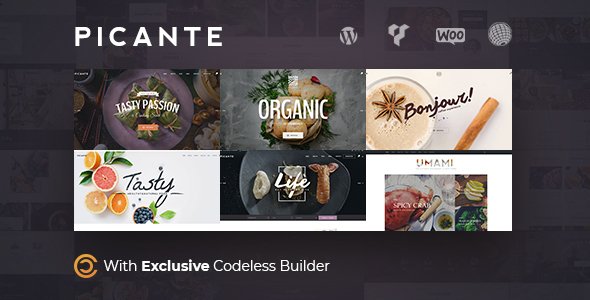
Stuck on your Picante WordPress theme? Let's fix it.
No endless back-and-forth. Just send us the details and we'll get it done.
No obligation · Replies within 1 hour · Quote within 1 day
Setup · Customization · Bug fixes · WooCommerce integration
About Picante WP Theme
Picante is a WordPress theme built by code-less, designed for food bloggers, recipe sites, and restaurant owners who want a clean, content-forward layout without heavy page builder dependency. It ships with a recipe card system, category filtering, and a visual style that puts food photography front and center.
The theme follows modern WordPress standards, supporting full-site editing features and block-based content where appropriate. It loads fast out of the box and integrates well with popular recipe plugins like WP Recipe Maker and Tasty Recipes.
Whether you are launching a personal cooking blog or a multi-author food publication, Picante gives you a solid starting point. The typography is well-chosen for readability, and the color palette works well for food-related branding without requiring significant design work from day one.
Get matched with a Picante developer in under one day
Tell us about your Picante project. Small fixes, Picante theme customization, or a full website build, whatever you need, we've got it covered.
We'll connect you to the right Picante developers, define the scope, and get everything 100% clear.
You'll get one estimate, hire your preferred developer, and start collaborating.
Picante is approachable for DIY users, but the moment you need custom recipe layouts, third-party plugin integration, or a design that stands apart from the default look, you need a developer who has worked with the theme directly.
Through Codeable, you get matched with a vetted WordPress developer who knows food-focused themes and can handle everything from minor CSS tweaks to full custom builds on top of Picante. No guesswork, no freelancer roulette. Just a developer who knows what they are doing.
Pros
- Strong visual focus on food photography with well-structured image display areas
- Compatible with major recipe plugins including WP Recipe Maker and Tasty Recipes
- Fast default load times with minimal bloat compared to multipurpose themes
- Clean typography choices that improve recipe readability on mobile
- Active development from code-less with regular theme updates
Cons
- Limited homepage layout variations without custom development work
- Deeper customization requires a child theme and PHP knowledge
- No built-in mega menu, which limits navigation for large recipe archives
- Color palette options in the Customizer are narrower than premium competitors
- WooCommerce support exists but is not a primary focus, so shop styling needs extra work
Who is Picante for?
Personal Food Blog
Picante suits solo food bloggers well. The theme handles single-author recipe archives cleanly, the category layout works for sorting by cuisine or diet type, and the reading experience on mobile is solid. Pair it with a recipe plugin for structured data and you have a blog ready for Google search visibility from day one.
Restaurant Website
For a restaurant site, Picante gives you a strong visual base for showcasing menu items and food photography. You will likely need custom development for reservation integration, location pages, or a menu builder. The theme handles the design side well, but a developer should wire up the restaurant-specific functionality.
Recipe Magazine or Multi-Author Site
Multi-author food sites can work with Picante, but the default author display and archive structure may need customization. A developer can extend the theme to handle contributor profiles, category landing pages, and editorial layouts that go beyond what the base theme provides.
Cooking Course or Food Education Site
If you are selling cooking courses or hosting video recipe content, Picante provides a clean content canvas. You will want to integrate it with a course plugin like LearnDash or LifterLMS. That integration needs developer work to ensure the lesson and course pages match your Picante branding.
Food Photography Portfolio
Food photographers can use Picante as a portfolio base given its image-first design. The gallery and featured image handling work well for high-resolution shots. For a full client-facing portfolio with contact forms, inquiry workflows, or gallery filtering, some additional customization is needed.

Customizing Picante
Picante uses the WordPress Customizer for core settings like colors, fonts, header layout, and footer structure. You can adjust sidebar positioning, set featured recipe sections on the homepage, and control how category archives display without touching any code.
For deeper changes, things like custom recipe card styling, unique homepage sections, or branded color schemes that go beyond the built-in palette, you will need a Picante expert who understands both the theme’s structure and how it interacts with your chosen recipe plugin.
Custom child themes are the right approach here. A developer can extend Picante without breaking updates. Modifications to the header, archive templates, or card layouts are common requests that need hands-on PHP and CSS work to do properly.
Recommended plugins for Picante
Picante pairs well with WP Recipe Maker, Tasty Recipes, and WPZoom Recipe Card for structured recipe content and schema markup. For growth-focused food sites, combining it with a solid WordPress SEO setup helps recipe pages rank in Google’s rich results.
If your site carries a lot of high-resolution food photography, image optimization and caching are important. A proper WordPress performance configuration keeps load times fast even with large media libraries. Picante does not include a built-in CDN or caching layer, so those need to be handled separately.
Not sure which plugins to use? This WordPress plugins directory covers the most popular options with reviews and setup guides.
Picante common issues
Picante theme recipe card not displaying correctly
Recipe card display issues in Picante usually come from a plugin conflict or a missing schema configuration in your recipe plugin settings. First, check whether the issue appears with all plugins disabled except the recipe plugin. If the card renders correctly, reactivate plugins one at a time to find the conflict. If the layout is broken specifically in Picante, the theme’s CSS may need a targeted fix. A developer can resolve this quickly. See our WordPress bug fixing service for fast turnaround.
Picante homepage featured section not showing posts
If the featured section on your Picante homepage is blank or not pulling in posts, the most common cause is a misconfigured Customizer setting or a post category that does not match what the theme expects. Check the homepage settings under Appearance > Customize and confirm the correct category or post type is selected. If posts still do not appear, a theme template or query conflict may be involved, which needs a developer to debug properly.
Picante theme slow loading with large image library
Slow loading with a large image library is not a Picante-specific problem, but the theme does not include built-in image optimization or lazy loading beyond WordPress core defaults. Install an image compression plugin like ShortPixel or Imagify, enable a caching plugin, and consider a CDN for media delivery. For a properly tuned setup, our WordPress performance service covers full optimization including server-level and theme-level improvements.
Picante custom fonts not applying after Customizer save
Custom fonts not applying after saving in the Customizer is often a caching problem. Clear your browser cache, your caching plugin cache, and any server-side cache first. If the font still does not apply, check whether a child theme or custom CSS is overriding the font-family declaration. Using browser developer tools to inspect the element will show you which CSS rule is winning. If the issue persists, a developer can trace it through the theme’s enqueue functions.
Picante FAQ
Picante is developed by code-less and is available as a premium theme. Pricing and licensing details are available directly through the code-less website or the marketplace where it is sold. Premium themes from code-less typically include updates and support through their standard license terms.
Picante includes basic WooCommerce compatibility, meaning standard shop, product, and cart pages will display without breaking the layout. However, the theme is not built primarily as a WooCommerce theme, so shop pages may need CSS adjustments to match your branding. A developer can handle that styling work if you plan to sell products alongside your recipe content.
Yes. Picante will function as a standard WordPress theme without a recipe plugin. You can publish posts using regular WordPress blocks and the theme will display them correctly. A recipe plugin adds structured data for SEO and a formatted recipe card, both of which are worth having if food content is your main focus.
Go to Appearance > Customize > Site Identity in your WordPress dashboard. Upload your logo file there and save. Picante supports the standard WordPress custom logo feature. If your logo is not sizing or positioning as expected, a small CSS adjustment in a child theme or the Additional CSS field in the Customizer will fix it.
Picante is built to work with the WordPress block editor (Gutenberg) for content creation. Elementor can technically be used alongside it, but the theme is not specifically designed as an Elementor theme, so full-page builder layouts may conflict with the theme’s native templates. For best results, use the block editor with Picante as intended.
Hire a Picante WordPress Developer
Need help customizing Picante, fixing a layout issue, or building something the theme does not support out of the box? A dedicated Picante developer can handle it. From child theme builds to plugin integrations and performance work, you get reliable delivery through a vetted network.
Get a free estimate with no obligation. Describe your project and get matched with a WordPress expert within 24 hours. 100% risk-free.
You'll need a free Codeable account so developers can ask questions and send their quotes.