Piemont WordPress Theme
by dedalx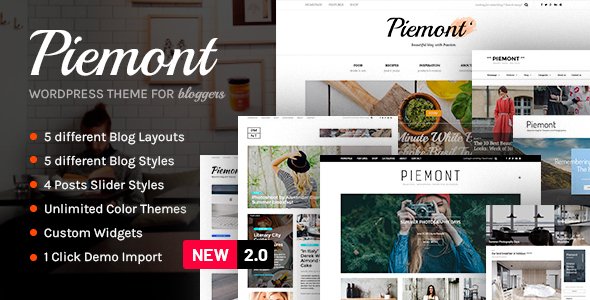
Stuck on your Piemont WordPress theme? Let's fix it.
No endless back-and-forth. Just send us the details and we'll get it done.
No obligation · Replies within 1 hour · Quote within 1 day
Setup · Customization · Bug fixes · WooCommerce integration
About Piemont WP Theme
Piemont is a WordPress theme by dedalx built for clean, content-focused websites. It suits photographers, creatives, and portfolio-driven businesses who want minimal design without sacrificing structure. The theme ships with a straightforward layout system, typography controls, and enough flexibility to build a polished site without heavy customisation work.
It works well with the WordPress block editor, keeping the setup process simple for non-technical users. That said, the more you push it beyond its default design, the more you benefit from someone who knows the theme’s underlying architecture. Piemont is not overbuilt, which is genuinely useful. It loads fast out of the box and avoids the bloat common in multi-purpose themes. If your project fits within its intended scope, it delivers reliable results with minimal friction.
Get matched with a Piemont developer in under one day
Tell us about your Piemont project. Small fixes, Piemont theme customization, or a full website build, whatever you need, we've got it covered.
We'll connect you to the right Piemont developers, define the scope, and get everything 100% clear.
You'll get one estimate, hire your preferred developer, and start collaborating.
Piemont is a focused theme, and that focus is its strength. But focused tools still need skilled hands. Whether you need a customisation that goes beyond the Customizer, a plugin conflict sorted, or a full site built on Piemont from scratch, working with a vetted developer makes a difference. Through Codeable, you get matched with a WordPress specialist who has real experience, not a generalist guessing their way through your project. Post a project, get a free estimate, and know exactly what you are getting before any work starts.
Pros
- Minimal, clean design that loads fast without configuration
- Built for the block editor, reducing reliance on page builder plugins
- Lean codebase with no unnecessary scripts or stylesheets bloating the front end
- Well-suited for portfolio, photography, and creative agency sites
- Straightforward theme structure makes customisation predictable for developers
Cons
- Limited built-in layout options compared to multi-purpose themes
- WooCommerce support requires additional styling work to look consistent
- Fewer pre-built templates and block patterns than larger commercial themes
- Community support and documentation are limited outside the official channels
- Not ideal for complex multi-content sites like magazines or directories without significant custom development
Who is Piemont for?
Photography Portfolio
Piemont’s minimal layout puts images front and centre without visual clutter. Photographers can present their work cleanly across gallery pages and project posts. A Piemont developer can extend the default gallery functionality, add lightbox support, and set up custom portfolio post types that match your exact workflow and presentation needs.
Creative Agency
Creative agencies need a site that reflects their work, not a template everyone recognises. Piemont’s clean structure gives a Piemont specialist room to build something distinctive. Custom landing pages, service sections, and case study layouts can all be developed within the theme’s framework without overriding its core design logic.
Freelancer Website
Freelancers benefit from a site that is fast, credible, and easy to maintain. Piemont covers all three. A Piemont expert can set up a professional one-page or multi-page site with a contact form, project showcase, and testimonials section, keeping the design tight and the maintenance burden low for a solo operator.
Boutique Studio
Interior designers, architects, and boutique studios need a site that matches their visual standards. Piemont’s typography and whitespace defaults align with that aesthetic. With targeted customisation from a Piemont developer, you can build a site that represents the studio’s brand precisely, including custom fonts, colour palettes, and image-forward layouts.
Personal Blog
Writers and content creators who want a distraction-free reading experience will find Piemont a solid base. The theme’s typography defaults are readable and the layout keeps focus on the content. A Piemont specialist can add category filtering, email subscription integration, and refined post formatting to build a blog that works properly.

Customizing Piemont
Piemont’s default settings cover the basics well, but most real projects need adjustments. Custom colour palettes, refined spacing, font pairing beyond the defaults, and layout tweaks all require hands-on work inside the theme files or a child theme. A Piemont expert can handle these changes without breaking the base theme or creating update conflicts.
More involved customisations, like adding custom post types, adjusting template hierarchy, or integrating third-party plugins cleanly into the design, go beyond what the Customizer allows. A Piemont developer can build these out properly using PHP, CSS, and block patterns. Whether you need a small visual adjustment or a full design extension, working with someone who understands this theme’s structure saves time and avoids workarounds that cause problems later.
Recommended plugins for Piemont
Piemont pairs well with several types of plugin additions. WooCommerce integration is possible but needs styling work to match the theme’s minimal aesthetic. SEO plugins like Yoast or Rank Math slot in without conflict. For site speed, image optimisation and caching plugins work cleanly alongside Piemont’s already lean codebase.
If you want to push performance further, a WordPress performance audit can identify bottlenecks specific to your setup. Similarly, if you are building a content-heavy site, a proper WordPress SEO strategy ensures Piemont’s clean structure is fully utilised for search visibility.
Not sure which plugins to use? This WordPress plugins directory covers the most popular options with reviews and setup guides.
Piemont common issues
Piemont theme header not displaying correctly after update
Header layout breaks after a theme update usually point to a conflict between updated template files and existing customisations stored in a child theme or the Customizer. Check whether a child theme is active and whether any template overrides are out of date. Clear your caching plugin after the update. If the issue persists, a developer can compare the updated header template against your customisations and resolve the conflict. For recurring issues like this, the WordPress bug fixing service covers systematic diagnosis and a clean fix.
Piemont footer widgets not showing on mobile
Footer widgets disappearing on mobile often comes down to a CSS visibility rule or a theme option that collapses the footer widget area below a certain screen width. Open browser dev tools, inspect the footer element on a mobile viewport, and check for display:none or visibility:hidden rules on the widget containers. If the theme has a footer layout option in the Customizer, verify it is set correctly. If you cannot locate the source, a WordPress bug fixing specialist can trace it quickly.
Custom fonts not loading in Piemont WordPress theme
If custom fonts are not loading in Piemont, the most common causes are an incorrect font enqueue in the child theme’s functions.php, a missing Google Fonts API call, or a Content Security Policy header blocking the external font request. Check the browser console for blocked resource errors. Verify that the font is correctly referenced in your CSS using the exact font-family name. If you are using a local font file, confirm the file path and format declarations are correct.
Piemont theme slow to load on mobile devices
Slow mobile load times on a Piemont site are usually caused by unoptimised images, render-blocking scripts, or a lack of caching rather than the theme itself. Run the site through PageSpeed Insights to identify the specific bottlenecks. Install an image optimisation plugin, enable caching, and check whether any third-party scripts are loading synchronously. Piemont’s base code is lean, so performance issues are almost always plugin or media-related. A targeted performance review will surface the exact causes.
Piemont FAQ
Yes. Piemont is built with the block editor in mind. You can build pages using core blocks without needing a separate page builder plugin. Some advanced layout work still benefits from a developer, but the standard block editing experience works cleanly with this theme. Block patterns and template parts are available within the editor.
Piemont does not include dedicated WooCommerce templates, so default WooCommerce pages will use the plugin’s own styling rather than the theme’s design. Basic shop functionality works, but product pages, cart, and checkout will need custom CSS or template overrides to match Piemont’s aesthetic. A Piemont specialist can handle this integration properly.
Create a new folder in wp-content/themes with a name like piemont-child. Add a style.css file with the correct header declaring the parent theme as Piemont, then add a functions.php that enqueues the parent stylesheet. Activate the child theme from the WordPress dashboard. All your customisations go into the child theme to survive updates.
Piemont can technically run alongside Elementor, but it is designed for the native block editor. Using a page builder alongside it can introduce styling conflicts and add unnecessary page weight. If you need advanced layout control, extending Piemont through custom block patterns or a developer-built template is a cleaner approach than adding a full page builder on top.
Cost depends on the scope of work. Small fixes or styling adjustments can be done in a few hours. A full site build on Piemont typically ranges from several hundred to a few thousand pounds depending on complexity. Through Codeable, you post your project and receive a free estimate before committing. There is no obligation to hire after receiving the estimate.
Hire a Piemont Developer for Your WordPress Project
Need a Piemont expert who can handle customisation, fixes, or a full build? FoxyConcept delivers WordPress development through Codeable, where every developer is vetted and every project starts with a free estimate. No obligation, no risk. Whether it is a small styling tweak or a complete site built on Piemont, you get a clear scope and a developer who knows what they are doing. Get a Free Estimate and have your project reviewed within 24 hours.
You'll need a free Codeable account so developers can ask questions and send their quotes.