PILE WordPress Theme
by pixelgrade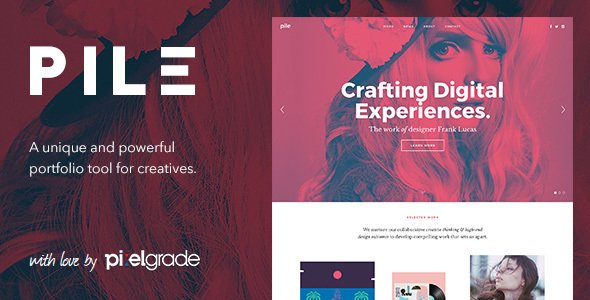
Stuck on your PILE WordPress theme? Let's fix it.
No endless back-and-forth. Just send us the details and we'll get it done.
No obligation · Replies within 1 hour · Quote within 1 day
Setup · Customization · Bug fixes · WooCommerce integration
About PILE WP Theme
PILE is a WordPress theme by Pixelgrade built around a masonry-style card layout. It’s designed for creatives who want to present projects, images, and content in an overlapping, stacked visual style. Each card can carry a different size, orientation, and content type, making the layout feel editorial rather than grid-locked.
The theme uses Pixelgrade’s own component system, which means it integrates tightly with their other tools and follows a specific structural logic. Typography is clean, whitespace is generous, and the overall aesthetic leans toward portfolio and magazine use cases.
It’s a theme that works well when the content itself is strong. The layout steps back and lets photos, project titles, and short descriptions carry the page. Setup is straightforward, but getting the card proportions and content balance right takes some deliberate configuration.
Get matched with a PILE developer in under one day
Tell us about your PILE project. Small fixes, PILE theme customization, or a full website build, whatever you need, we've got it covered.
We'll connect you to the right PILE developers, define the scope, and get everything 100% clear.
You'll get one estimate, hire your preferred developer, and start collaborating.
PILE has a specific visual logic that rewards developers who understand Pixelgrade’s component system. Customising it without that knowledge leads to hacks that break on updates. The developers available through Codeable have hands-on experience with themes like PILE and can handle everything from initial setup to complex layout modifications. If you want the theme to work exactly the way you need it to, working with a specialist is faster and more reliable than working through it alone.
Pros
- Masonry card layout creates a visually distinctive portfolio or editorial presentation without custom development
- Pixelgrade's component architecture keeps the codebase consistent and update-safe
- Typography and whitespace defaults are well-considered and require minimal adjustment for most use cases
- Works well with mixed content types including images, text-only posts, and project case studies in the same grid
- Responsive behavior on the card layout is handled thoughtfully and holds up across screen sizes
Cons
- The overlapping card style is opinionated and doesn't suit all brand directions or content types
- Pixelgrade's component system creates a learning curve for developers unfamiliar with their architecture
- JavaScript dependency for card positioning can cause performance issues if not optimised correctly
- Limited plugin ecosystem support compared to more mainstream themes like Divi or Astra
- Content balance inside cards requires careful management to avoid a visually uneven or cluttered layout
Who is PILE for?
Creative Portfolio
PILE’s stacked card layout suits portfolios where each project has a distinct visual identity. Designers, illustrators, and art directors can present case studies, client work, and personal projects in a layout that doesn’t flatten everything into the same visual weight. A PILE specialist can configure card sizes to reflect project importance and add custom meta fields for project details.
Photography Blog
Photography content benefits from PILE’s image-forward card structure. Galleries and individual posts sit naturally in the masonry layout without needing heavy customisation. Lazy loading and image optimisation are important here to keep the layout fast. A PILE developer can handle both the visual configuration and the performance setup so the site loads cleanly.
Design Agency Site
Design agencies need a site that communicates craft. PILE’s editorial aesthetic does that without relying on flashy animations or overbuilt page templates. The card layout works well for showcasing a range of services, team profiles, and project highlights. Custom card templates and brand-aligned typography make the difference between a generic install and a site that actually represents the agency.
Editorial Magazine
Editorial sites with multiple content categories work well in PILE because different post types can coexist in the card grid without visual conflict. Articles, features, and photo essays all sit in the same layout with their own proportions. A PILE expert can configure category filters, custom taxonomies, and archive templates to support a proper editorial workflow.
Personal Branding Site
For freelancers, consultants, and independent creatives, PILE provides a way to present work and writing in a single coherent layout. The theme handles the mix of project highlights and blog content well. Keeping the card count manageable and the content sharp matters more here than on larger sites. Setup is quick with the right configuration.

Customizing PILE
PILE customization goes beyond color and font choices. The theme’s card-based layout means decisions about card sizing, overlap depth, and content density all affect how the final page reads. Getting this wrong produces a cluttered result. Getting it right produces something genuinely distinctive.
A PILE expert can configure the Customizer settings to match your brand, set up custom post types if your content structure requires them, and adjust the underlying CSS to handle edge cases the theme doesn’t cover out of the box. Pixelgrade’s component architecture is opinionated, so working around it requires knowing where the boundaries are.
Custom header treatments, modified card templates, and integration with third-party plugins are all achievable but benefit from hands-on development work rather than trial and error in the admin panel.
Recommended plugins for PILE
PILE pairs well with performance-focused plugins, but because its layout relies on JavaScript for card positioning, WordPress performance optimisation needs to account for script loading order and render-blocking behavior. Lazy loading images inside the card grid also requires careful implementation to avoid layout shifts.
On the SEO side, the theme’s visual-first structure means metadata, schema markup, and heading hierarchy need deliberate attention. Portfolio and editorial content especially benefits from structured data. Pairing PILE with a solid WordPress SEO setup ensures the content that looks good also ranks well.
Not sure which plugins to use? This WordPress plugins directory covers the most popular options with reviews and setup guides.
PILE common issues
PILE theme cards overlapping incorrectly on mobile
Mobile overlap issues in PILE usually come from the JavaScript responsible for card positioning failing to recalculate on smaller viewports. This can be triggered by a caching plugin serving a stale script, a theme update changing the positioning logic, or a CSS conflict from another plugin. Clear your cache first, then check the browser console for JS errors. If the problem persists, a WordPress bug fixing specialist can trace the exact failure point and patch it without breaking the desktop layout.
PILE WordPress theme not loading custom fonts
Custom font failures in PILE are often caused by incorrect enqueue order, a CDN blocking font file requests, or a security plugin stripping external font references. Check the browser network tab to see if font files are returning a 404 or being blocked. If you’re using Google Fonts through Pixelgrade’s component system, a plugin conflict may be interfering with the request. A WordPress bug fixing service can identify the conflict and restore font loading reliably.
PILE theme masonry layout broken after plugin update
A broken masonry layout after a plugin update usually points to a JavaScript conflict. WooCommerce, page builders, and some SEO plugins load their own jQuery versions or modify script loading order in ways that disrupt the card positioning script. Disable plugins one at a time in a staging environment to isolate the cause. Once identified, the conflict can typically be resolved by adjusting script dependencies or deferring load order.
PILE theme Customizer changes not saving
Customizer settings not saving in PILE can be caused by a nonce failure, a PHP memory limit being hit during save, or a permission issue on the uploads folder. Check your server error logs immediately after a failed save attempt. The problem is often server-side rather than theme-related. Increasing PHP memory limit and checking folder write permissions resolves this in most cases. If the issue is intermittent, a caching layer interfering with the Customizer preview is the next thing to rule out.
PILE FAQ
Yes, PILE works well for photography portfolios. The card-based layout presents images with varying proportions, which suits photographers who want their work to feel editorial rather than grid-locked. Performance matters here since image-heavy cards need lazy loading and proper compression. A PILE developer can configure both the visual presentation and the image optimisation side of the setup.
PILE is not a WooCommerce theme and doesn’t include native shop templates. You can install WooCommerce and use its default templates, but the visual integration with PILE’s card layout will be limited. If you need a shop that matches the PILE aesthetic, a developer would need to build custom WooCommerce templates aligned with the theme’s design system.
Card layout adjustments in PILE are made through the WordPress Customizer and through individual post settings that control card size and content display. Deeper changes, like modifying the masonry columns, card aspect ratios, or overlap depth, require CSS and sometimes PHP edits. These changes should be made in a child theme to avoid being overwritten during updates.
Pixelgrade continues to maintain their theme portfolio, but support terms and update frequency vary. Check the theme’s changelog on ThemeForest or Pixelgrade’s own site for recent activity. If you’re running PILE on an older version, it’s worth reviewing compatibility with your current WordPress and PHP version before making any major site changes.
Yes. A PILE specialist can handle everything from initial theme setup to custom layout work and plugin integration. Through Codeable, you can post your project, get a free estimate from a vetted developer, and move forward only if the scope and price work for you. There’s no obligation to hire after getting the estimate.
Hire a PILE Developer for Your WordPress Project
Whether you need PILE configured from scratch, customised to match a specific design, or fixed after something broke, a vetted WordPress developer can handle it. Projects are scoped clearly, estimates are free, and there’s no obligation to proceed. Get a Free Estimate and describe what you need. You’ll hear back within 24 hours with a clear plan from a developer who knows the theme.
You'll need a free Codeable account so developers can ask questions and send their quotes.