Pinhole WordPress Theme
by meks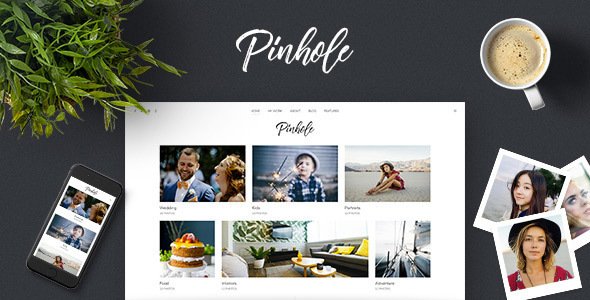
Stuck on your Pinhole WordPress theme? Let's fix it.
No endless back-and-forth. Just send us the details and we'll get it done.
No obligation · Replies within 1 hour · Quote within 1 day
Setup · Customization · Bug fixes · WooCommerce integration
About Pinhole WP Theme
Pinhole is a photography-focused WordPress theme built by Meks, a developer known for clean, fast themes with minimal bloat. It’s designed specifically for photographers and visual storytellers who want their images to take center stage without interference from heavy UI elements.
The theme uses a fullscreen grid layout that adapts well across screen sizes. Navigation stays out of the way, and the focus stays on the photos. Pinhole supports custom post formats, multiple gallery layouts, and integrates neatly with standard WordPress media tools. It’s a theme that does one thing well: showcase visual work without distractions.
Out of the box, Pinhole is lightweight and loads quickly, which matters for image-heavy sites. It’s built on clean code and follows WordPress standards, making it straightforward to extend or customize when needed.
Get matched with a Pinhole developer in under one day
Tell us about your Pinhole project. Small fixes, Pinhole theme customization, or a full website build, whatever you need, we've got it covered.
We'll connect you to the right Pinhole developers, define the scope, and get everything 100% clear.
You'll get one estimate, hire your preferred developer, and start collaborating.
Pinhole is straightforward to set up, but getting it to work exactly the way you need takes real WordPress knowledge. Whether it’s a custom gallery layout, a client portal, or a third-party booking tool that needs to fit the design, the details matter.
Through Codeable, you get access to vetted WordPress developers who have worked with Meks themes and understand how Pinhole is built. No generalist freelancers, no guesswork. Just developers who know WordPress deeply and can scope your project accurately. Explore our WordPress development services to see what’s possible.
Pros
- Fullscreen image display puts photography front and center without UI clutter
- Lightweight codebase keeps page load times low even on image-heavy pages
- Built by Meks, a developer with a strong track record of clean, well-coded themes
- Supports multiple gallery layout options out of the box
- Works well with standard WordPress media tools and custom post formats
Cons
- Limited Customizer options mean significant design changes require custom code
- Not built for content-heavy sites like blogs or business pages with text focus
- Plugin compatibility needs testing, especially for complex gallery or ecommerce tools
- No built-in client proofing or password-protected gallery system
- Active development and support may be slower compared to larger theme marketplaces
Who is Pinhole for?
Freelance Photographers
Pinhole gives freelance photographers a clean, fast portfolio without the overhead of multipurpose themes. The fullscreen grid lets the work speak for itself. A contact form, an about page, and a well-organized gallery are all most freelancers need, and Pinhole handles that setup without unnecessary complexity.
Photography Studios
Photography studios often need separate sections for different services: weddings, portraits, commercial work. Pinhole’s category filtering and gallery structures support this kind of organization. A developer can add booking inquiry forms and style them to match the studio’s brand, keeping everything cohesive.
Photo Bloggers
For photographers who publish written content alongside their images, Pinhole’s post format support makes it easy to mix full-width photo posts with standard text entries. The visual hierarchy stays strong even on content-heavy pages, which is difficult to achieve with generic blog themes.
Fine Art Print Sellers
Photographers selling prints can connect Pinhole with WooCommerce to handle product listings and checkout. The clean layout works well for presenting print sizes, framing options, and pricing without the site looking like a generic shop. Custom development can tighten the product page design to match the gallery aesthetic.
Travel and Documentary Photographers
Travel and documentary photographers often have large archives organized by location or project. Pinhole’s grid layout and category structure handle this well. A developer can build custom taxonomy pages that let visitors browse by region or assignment, making large photo libraries genuinely navigable.

Customizing Pinhole
Pinhole gives you a solid foundation, but most photographers want something that reflects their specific brand. That’s where a Pinhole expert becomes useful. The theme’s Customizer options cover the basics: colors, fonts, logo, and layout toggles. But going beyond that requires working directly with code.
Custom gallery filters, unique hover effects, portfolio category pages, client proofing integrations, and modified header behavior all need hands-on development work. A developer familiar with Pinhole knows how it structures its templates and where to add functionality without breaking the layout.
If you want a contact form styled to match your site, a custom booking flow, or a password-protected client gallery section, those aren’t features you can configure through the admin panel alone. They need proper implementation from someone who knows the theme’s codebase.
Recommended plugins for Pinhole
Pinhole pairs well with a focused set of plugins that extend its core functionality without adding unnecessary weight. WooCommerce works for selling prints or digital downloads. WPML handles multilingual sites for photographers with international clients.
For galleries beyond the defaults, Envira Gallery or FooGallery integrate cleanly. Jetpack’s site stats and image tools are commonly used alongside Pinhole. If speed is a priority, pairing Pinhole with a proper caching setup makes a real difference. You can learn more about that through our WordPress performance service. For photographers who want search visibility, WordPress SEO work applied to image alt text and structured data can drive organic traffic from Google Images.
Not sure which plugins to use? This WordPress plugins directory covers the most popular options with reviews and setup guides.
Pinhole common issues
Pinhole theme images not displaying correctly on mobile
Mobile display issues in Pinhole are usually caused by image size settings or CSS conflicts with added plugins. Check your WordPress media settings first and confirm thumbnail and large image sizes are configured correctly. If a recent plugin added its own styles, those may be overriding Pinhole’s responsive rules. A developer can audit the CSS output and resolve conflicts. For persistent issues, our WordPress bug fixing service can diagnose and fix this quickly.
Pinhole WordPress gallery layout broken after plugin update
Gallery layout breaks after plugin updates are common when a gallery plugin updates its output structure or CSS classes. Pinhole’s styling may depend on specific markup that the updated plugin no longer produces. The fix usually involves updating the child theme’s CSS or adjusting how the gallery shortcode is configured. Check the plugin’s changelog for breaking changes first, then compare the rendered HTML before and after the update to identify what changed.
Pinhole theme slow loading with high-resolution photos
Slow load times with high-resolution images in Pinhole almost always come down to uncompressed images and missing lazy loading. Pinhole doesn’t enforce image optimization itself. Install a plugin like ShortPixel or Imagify to compress uploads, and enable lazy loading if it isn’t already active. A CDN makes a significant difference for international visitors. For a full audit of your site’s performance, visit our WordPress performance service.
Pinhole WordPress theme footer customization not working
Footer customization in Pinhole is limited through the standard Customizer. If changes aren’t applying, you may be editing the wrong location, or a caching plugin is serving an old version of the page. Clear all caches first and reload. If you need deeper footer changes like adding custom columns, widget areas, or removing the Meks credit link, those changes need to be made in a child theme’s template files rather than through the admin panel.
Pinhole FAQ
Pinhole is a premium WordPress theme sold by Meks through ThemeForest. It comes with a standard Envato license that covers one site. Extended licenses are available for projects where end users are charged. The purchase includes theme updates and access to Meks support for the license period. Free alternatives exist but lack Pinhole’s specific fullscreen photography focus.
Pinhole is not built as a WooCommerce theme, but it can work with WooCommerce for basic print or digital product sales. The default WooCommerce templates will use your active theme’s styling, which means shop and product pages may need CSS work to match Pinhole’s visual style. A developer can write those overrides in a child theme to keep everything consistent.
Pinhole supports video post formats, so embedding YouTube or Vimeo content works within the theme’s grid. For a dedicated video portfolio, the out-of-the-box options are limited. A video-first site would benefit from custom template work to handle video thumbnails, autoplay previews, and category filtering. Pinhole’s clean grid structure makes a good foundation for that kind of build.
Create a new folder in your wp-content/themes directory named something like pinhole-child. Inside it, add a style.css file with a header that references Pinhole as the parent theme, and a functions.php file that enqueues the parent stylesheet. Activate the child theme from the WordPress dashboard. All custom CSS and template overrides go in the child theme to survive future Pinhole updates.
Meks continues to maintain their theme catalog, but update frequency varies. Check the ThemeForest listing for Pinhole’s last update date and read recent buyer comments to gauge current support responsiveness. If you need ongoing maintenance regardless of theme support status, our WordPress maintenance service covers updates, backups, and security monitoring.
Hire a Pinhole WordPress Developer
Need help with Pinhole? Whether you’re starting from scratch, fixing a layout issue, or adding custom functionality to an existing site, we can match you with a developer who knows this theme. Work is scoped properly, priced transparently, and delivered by someone who understands WordPress at a code level. Get a free estimate with no obligation to hire. You’ll have a clear picture of what the work involves before committing to anything.
You'll need a free Codeable account so developers can ask questions and send their quotes.