Pinkmart WordPress Theme
by KiteStudio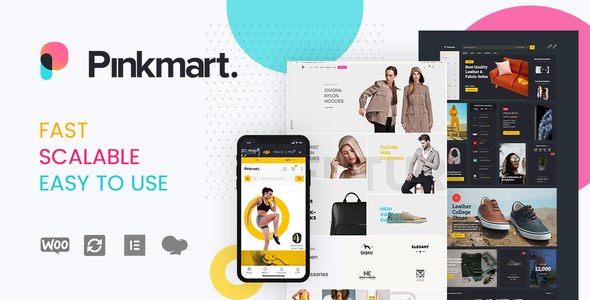
Stuck on your Pinkmart WordPress theme? Let's fix it.
No endless back-and-forth. Just send us the details and we'll get it done.
No obligation · Replies within 1 hour · Quote within 1 day
Setup · Customization · Bug fixes · WooCommerce integration
About Pinkmart WP Theme
Pinkmart is a WooCommerce theme built by KiteStudio, aimed at fashion, beauty, and lifestyle online stores. It ships with a drag-and-drop page builder, multiple homepage layouts, and a product quick-view feature that keeps shoppers on the page longer. The theme supports AJAX cart and wishlist functionality, making the buying experience faster without full page reloads.
Pinkmart is built on a clean codebase with support for popular plugins like WPML, WooCommerce Subscriptions, and various payment gateways. It handles both small boutique stores and larger catalogs reasonably well. The included demo content makes initial setup straightforward, though getting the store to match your exact vision usually takes some hands-on configuration work.
Get matched with a Pinkmart developer in under one day
Tell us about your Pinkmart project. Small fixes, Pinkmart theme customization, or a full website build, whatever you need, we've got it covered.
We'll connect you to the right Pinkmart developers, define the scope, and get everything 100% clear.
You'll get one estimate, hire your preferred developer, and start collaborating.
Finding a developer who actually knows Pinkmart’s structure is harder than it sounds. Generic WordPress freelancers often treat every theme the same way, which leads to sloppy overrides and customizations that break on update. Through Codeable, you get matched with vetted WordPress developers who have worked with WooCommerce-focused themes like Pinkmart before. Every project starts with a free estimate, and you only move forward if the scope and price make sense for your store.
Pros
- Multiple pre-built homepage layouts reduce initial design time for fashion and lifestyle stores
- AJAX-powered cart, wishlist, and quick-view features work out of the box without extra plugins
- WPML and RTL support makes it viable for multilingual and international WooCommerce stores
- Bundled Revolution Slider and WPBakery Page Builder add layout flexibility without additional purchases
- Clean product category and filter design handles mid-size catalogs without major visual clutter
Cons
- WPBakery Page Builder creates shortcode lock-in that complicates switching themes later
- Default script loading adds noticeable weight to page load times on catalog and homepage
- Theme updates occasionally conflict with child theme overrides and require manual review
- Built-in customization options are limited compared to purpose-built WooCommerce frameworks
- Support from KiteStudio can be slow during high-volume periods, with forum responses taking several days
Who is Pinkmart for?
Fashion Boutique
Pinkmart’s lookbook-style layouts and clean product grid make it a natural fit for independent fashion boutiques. A Pinkmart developer can configure collection pages, seasonal homepage banners, and style-focused category structures that match how fashion customers browse and buy.
Beauty and Cosmetics Store
Beauty brands need strong product photography presentation and fast filtering by type, skin tone, or ingredient. Pinkmart’s product quick-view and wishlist features suit cosmetics shoppers well. A Pinkmart specialist can tune the catalog layout and add swatches or comparison features where needed.
Lifestyle and Wellness Brand
Wellness stores selling supplements, skincare, or fitness products benefit from Pinkmart’s clean design language. Subscription plugin compatibility is useful for repeat-purchase products. A Pinkmart expert can set up subscription flows, ingredient callout sections, and content-rich product pages.
Jewelry and Accessories Shop
Jewelry stores need high-quality image zoom, variation displays for metal type and stone, and a premium browsing feel. Pinkmart handles this category well with the right configuration. Custom product templates built by a Pinkmart developer can elevate presentation beyond the default layout.
Children's Clothing Store
Children’s clothing shops need clear size guides, age-range filtering, and a friendly visual style. Pinkmart’s flexible homepage sections and category layouts adapt well to this niche. A Pinkmart specialist can add custom size chart modals and kid-friendly design touches without overcomplicating the codebase.

Customizing Pinkmart
Pinkmart gives you a solid starting point, but most serious stores need customization beyond what the bundled options cover. The theme’s Customizer settings handle colors, fonts, and layout switches. For anything deeper, such as custom product page templates, modified checkout flows, or brand-specific header designs, you need someone who knows the codebase.
A Pinkmart expert can extend the theme without breaking updates, build child theme overrides for core templates, and integrate third-party tools cleanly. Whether you need a specific mega menu structure, a custom size guide popup, or a tailored product filter layout, working with a Pinkmart specialist saves significant trial-and-error time and avoids the kind of hacks that cause problems down the line.
Recommended plugins for Pinkmart
Pinkmart works well with several key WooCommerce extensions. Commonly used additions include product bundles, subscription billing, advanced product filters, and loyalty reward plugins. Each adds complexity, so testing compatibility before going live matters.
On the performance side, pairing Pinkmart with a caching solution and image optimization plugin is worth doing early. The theme loads several scripts by default, and without tuning, page speed scores can drop on image-heavy catalog pages. See our WordPress performance service for how that gets handled. For stores targeting organic traffic, structured data and on-page fundamentals covered through our WordPress SEO service make a measurable difference.
Not sure which plugins to use? This WordPress plugins directory covers the most popular options with reviews and setup guides.
Pinkmart common issues
Pinkmart theme slow loading on mobile
Mobile speed issues on Pinkmart usually come from unoptimized images, unminified bundled scripts, or Revolution Slider loading on pages where it is not used. Start by auditing which scripts load on each page type and defer or remove anything unnecessary. A caching plugin paired with a CDN closes most of the gap. For persistent issues, our WordPress bug fixing service can run a full performance audit and implement fixes without breaking existing functionality.
Pinkmart WooCommerce cart not updating without page reload
AJAX cart issues in Pinkmart are often caused by plugin conflicts, particularly with caching plugins that serve stale fragment data, or with security plugins blocking the WooCommerce AJAX endpoint. Check that wc-ajax requests are excluded from caching rules. If the issue appeared after adding a new plugin, deactivate recent additions one at a time to isolate the conflict. For complex cases, our WordPress bug fixing service handles WooCommerce AJAX diagnostics systematically.
Pinkmart homepage layout broken after update
Post-update layout breaks in Pinkmart typically happen when a theme update overwrites a template file you had customized directly in the parent theme. Always use a child theme for template overrides before updating. If you are already in a broken state, compare your modified files against the new versions using a diff tool and re-apply your changes to the updated templates. WPBakery shortcode structure changes between versions can also cause visible layout shifts on saved pages.
Pinkmart product filter not working correctly
Product filter problems in Pinkmart are usually tied to the plugin handling the filtering, most commonly WooCommerce’s built-in widgets or a third-party plugin like YITH or Woof. Check that product attributes are properly assigned at the product level and that the filter widget is querying the correct taxonomy. Permalink structure mismatches and transient cache conflicts can also cause filters to return incorrect results. Flushing rewrite rules under Settings then Permalinks resolves some cases quickly.
Pinkmart FAQ
Yes, Pinkmart is built specifically for WooCommerce and includes features like AJAX cart, quick-view, wishlist, and product filtering. It suits small to mid-size fashion, beauty, and lifestyle stores well. Larger catalogs with complex filtering needs may require additional plugin support and performance tuning to run efficiently.
Pinkmart ships with WPBakery Page Builder, not Elementor. You can add Elementor alongside it, but mixing page builders creates conflicts and adds unnecessary weight. If you want to use Elementor as your primary builder, a Pinkmart developer can help you transition cleanly while keeping the theme’s WooCommerce-specific features intact.
Pinkmart includes one-click demo import through the theme’s setup wizard. Go to Appearance, then select the Pinkmart import option and choose your preferred demo. The process installs pages, widgets, and sample products. You will need the required plugins activated first, including Revolution Slider and WPBakery, or the import may skip certain elements.
Pinkmart’s design language leans toward fashion and lifestyle, but the underlying WooCommerce structure works for other product types too. Stores selling homeware, pet products, or gifts can use it with some restyling. A Pinkmart specialist can adjust typography, color schemes, and layout sections to fit a different brand direction without rebuilding from scratch.
Pinkmart developer rates vary depending on the scope of work. Small fixes or tweaks typically run between $50 and $150. Full customization projects or feature builds range from a few hundred to over a thousand dollars depending on complexity. Through Codeable, you get a free estimate before committing, so you know the cost upfront with no surprises.
Hire a Pinkmart Developer
If your Pinkmart store needs custom layouts, plugin integrations, performance fixes, or anything beyond the default settings, the right developer makes the difference between a clean build and a fragile one. Our Pinkmart specialists work through Codeable, where every developer is vetted and every project is scoped before you commit.
Get a Free Estimate and describe what your store needs. No obligation, no upfront cost.
You'll need a free Codeable account so developers can ask questions and send their quotes.