Pizzaro WordPress Theme
by MadrasThemes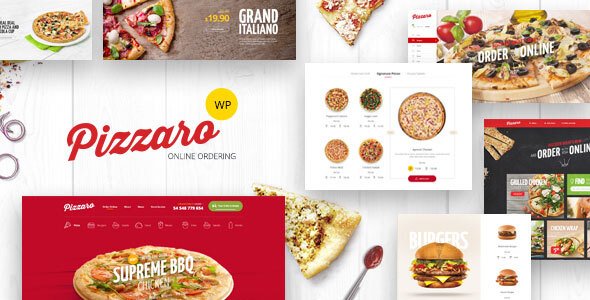
Stuck on your Pizzaro WordPress theme? Let's fix it.
No endless back-and-forth. Just send us the details and we'll get it done.
No obligation · Replies within 1 hour · Quote within 1 day
Setup · Customization · Bug fixes · WooCommerce integration
About Pizzaro WP Theme
Pizzaro is a WooCommerce theme built by MadrasThemes, designed specifically for food and restaurant stores. It ships with a clean, appetizing layout that puts product imagery front and center. The theme is built on a custom framework with Bootstrap, and it supports multiple homepage layouts aimed at different food business types.
Out of the box, Pizzaro includes a mega menu, sticky header, AJAX cart, and product quick view. It integrates tightly with WooCommerce and works with most major page builders. The theme also includes RTL support and translation-ready files, making it a practical choice for international food businesses.
MadrasThemes maintains the theme actively, with updates that track WooCommerce core releases. If you want a food-focused WooCommerce store without building a layout from scratch, Pizzaro gives you a solid starting point.
Get matched with a Pizzaro developer in under one day
Tell us about your Pizzaro project. Small fixes, Pizzaro theme customization, or a full website build, whatever you need, we've got it covered.
We'll connect you to the right Pizzaro developers, define the scope, and get everything 100% clear.
You'll get one estimate, hire your preferred developer, and start collaborating.
Pizzaro has enough flexibility to build a serious food or restaurant store, but getting the most out of it takes real WooCommerce and theme knowledge. Custom templates, modified cart behavior, and plugin integrations all need careful implementation. Mistakes in WooCommerce theme files can break checkout or product display silently.
FoxyConcept works through Codeable, a vetted network of WordPress specialists. Every developer there has been screened, which means you get reliable work rather than a gamble. If your Pizzaro project needs more than basic tweaks, that is where to start.
Pros
- Built specifically for WooCommerce food stores with layouts that match real restaurant and delivery business needs
- Includes multiple pre-built homepage demos covering restaurants, food delivery, and grocery store use cases
- AJAX cart and product quick view work out of the box without additional plugins
- RTL language support and translation-ready files make it viable for non-English markets
- MadrasThemes provides active maintenance with regular updates aligned to WooCommerce releases
Cons
- Theme options panel is limited for advanced layout changes, which often requires custom CSS or PHP
- Some bundled demo content is heavily image-dependent, making it slow without performance optimization
- Documentation covers basic setup but is thin on developer-level customization guidance
- Page builder compatibility varies, and some Elementor or WPBakery layouts can conflict with the theme templates
- Support response times from MadrasThemes can be slow during busy periods, particularly for complex issues
Who is Pizzaro for?
Restaurant Website with Online Menu
Pizzaro works well for restaurants that want a WordPress site with a browsable menu and WooCommerce for online orders. The product grid handles menu categories cleanly, and the theme’s large header image areas give food photography the space it needs. You can set up table bookings using a compatible plugin alongside the standard ordering flow.
Food Delivery Store
For food delivery businesses, Pizzaro supports delivery zone plugins and order scheduling tools that slot into WooCommerce. The AJAX cart keeps the ordering experience fast. A developer can configure minimum order rules, postcode-based delivery fees, and time-slot selection without rebuilding the theme from scratch.
Grocery and Specialty Food Shop
Grocery and specialty food stores benefit from Pizzaro’s product filtering and category layout options. The theme handles larger product catalogs reasonably well when paired with a caching solution. Variable products, weight-based pricing, and product bundles all work within the standard WooCommerce setup the theme runs on.
Bakery and Pastry Store
Bakeries need strong product photography presentation, and Pizzaro’s image-forward layouts deliver that. The quick view and wishlist features work well for stores with high product variety. Custom order notes for decorations or special requests can be added through WooCommerce checkout field plugins without theme conflicts.
Meal Kit and Subscription Box Service
Meal kit and subscription box businesses can use Pizzaro alongside WooCommerce Subscriptions. The theme’s clean product pages give enough room to explain subscription options. A developer familiar with Pizzaro can modify the product template to highlight subscription benefits and set up recurring billing without layout breakage.

Customizing Pizzaro
Pizzaro gives you a reasonable set of options through the WordPress Customizer, covering colors, typography, header layout, and footer configuration. You can switch between homepage demos and adjust widget areas without touching code.
That said, deeper changes require CSS or PHP work. Custom product layouts, modified checkout flows, or non-standard menu structures will need a developer who knows the theme well. A Pizzaro expert can also wire up third-party plugins, adjust WooCommerce templates, and build features the default settings do not cover.
If you need a custom Pizzaro build that matches your brand exactly, working with a specialist saves time. They will know where the theme hooks sit, how the layout engine behaves, and how to extend it without breaking core functionality on future updates.
Recommended plugins for Pizzaro
Pizzaro pairs well with several WooCommerce extensions. YITH WooCommerce Wishlist, WooCommerce Bookings, and table rate shipping plugins all work cleanly with the theme. For food ordering, you can add plugins for delivery zones, order scheduling, or minimum order amounts.
On the performance side, caching plugins like WP Rocket and image optimization tools make a real difference given the image-heavy nature of food stores. For search visibility, structured data and on-page SEO work matters for local restaurant searches. See our WordPress performance service and SEO optimisation service for more detail.
Not sure which plugins to use? This WordPress plugins directory covers the most popular options with reviews and setup guides.
Pizzaro common issues
Pizzaro theme checkout page not displaying correctly
Checkout display problems in Pizzaro usually come from a WooCommerce template mismatch. When WooCommerce updates its checkout templates, older theme overrides stop matching the expected output. Check which template files Pizzaro is overriding under WooCommerce > Status > Templates. Outdated files need to be updated manually or replaced. If the layout is broken after a plugin change, deactivate recent plugins one by one to isolate the conflict. Our WordPress bug fixing service can diagnose and resolve this quickly.
Pizzaro homepage slider not working after update
Slider issues after a Pizzaro or plugin update are usually caused by a JavaScript conflict or a change in the slider plugin the theme depends on. Open the browser console and look for JS errors pointing to a specific file. If Pizzaro uses Revolution Slider or a bundled slider, check whether that plugin also updated and whether its settings were reset. Clearing cache and retesting often helps narrow the cause. If the issue persists, a developer can check script loading order and plugin compatibility.
Pizzaro WooCommerce product images not showing properly
Product image problems in Pizzaro are most often tied to image size settings. Go to WooCommerce > Settings > Products > Display and check thumbnail dimensions. After changing these settings, run a thumbnail regeneration using a plugin like Regenerate Thumbnails. If images appear cropped incorrectly, the theme’s image crop settings may need adjustment in the Customizer. Broken image paths after a server migration are a separate issue and usually require a search-replace on the database.
Pizzaro theme slow loading on mobile
Pizzaro stores load slowly on mobile mainly because of large unoptimized images and unminified scripts. Start by running the site through Google PageSpeed Insights to identify the biggest offenders. Compress all product and banner images before uploading, and use a caching plugin like WP Rocket with mobile caching enabled. Disabling unused demo scripts and styles through a performance plugin also helps. Our WordPress performance service covers full audits and implementation for WooCommerce sites like Pizzaro stores.
Pizzaro FAQ
Yes, Pizzaro is purpose-built for food and restaurant businesses. It includes homepage layouts suited to restaurants, food delivery, and grocery stores. The theme handles product menus, food photography layouts, and WooCommerce ordering well. For a restaurant site that also needs online ordering or reservations, Pizzaro is a practical starting point without needing a fully custom build.
Pizzaro has basic Elementor compatibility, but it was not built around Elementor natively. Simple page builds work fine, but some theme-specific sections and WooCommerce templates sit outside Elementor’s control. If you plan to build most of your pages in Elementor, test the combination carefully before committing. A developer can help resolve conflicts between Elementor widgets and the theme’s own layout components.
Pizzaro is designed around WooCommerce and most of its core features depend on it. You could technically use the theme for a brochure-style restaurant site without WooCommerce, but you would lose the product grid layouts, cart, and ordering features that define the theme. For a site without any e-commerce, a more general restaurant theme would be a better fit.
Pizzaro includes a one-click demo importer accessible from the theme panel after installation. Before importing, install all required plugins the demo depends on. The importer will pull in pages, settings, widgets, and sample content. Note that demo images are often placeholder files due to licensing, so you will need to replace them with your own product and food photography after import.
MadrasThemes continues to release updates for Pizzaro, generally aligned with major WooCommerce releases. You can check the changelog on ThemeForest to see how recently it was updated. Active maintenance means critical WooCommerce compatibility issues are usually addressed, but update frequency is slower than some larger theme shops. Always test updates on a staging site before pushing to production.
Hire a Pizzaro Developer
Need a Pizzaro expert to build or fix your food store? FoxyConcept delivers WordPress development through Codeable, where every developer is vetted before taking on client work. Whether you need a full Pizzaro setup, custom WooCommerce templates, plugin integrations, or layout changes, you can get a free estimate with no obligation to hire. Work is scoped clearly, delivered on time, and backed by the Codeable satisfaction guarantee.
You'll need a free Codeable account so developers can ask questions and send their quotes.