Plumber WordPress Theme
by DesignArc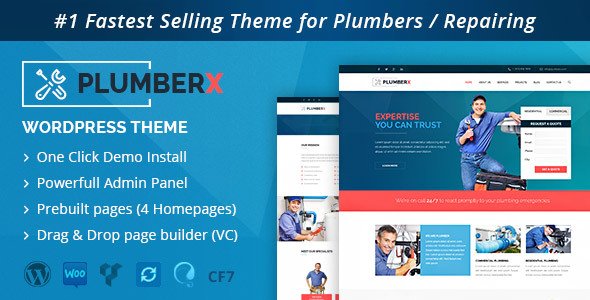
Stuck on your Plumber WordPress theme? Let's fix it.
No endless back-and-forth. Just send us the details and we'll get it done.
No obligation · Replies within 1 hour · Quote within 1 day
Setup · Customization · Bug fixes · WooCommerce integration
About Plumber WP Theme
Plumber is a WordPress theme built by DesignArc specifically for plumbing businesses, HVAC contractors, and home service providers. It ships with a layout designed to convert visitors into booked appointments, with sections for services, testimonials, emergency call buttons, and contact forms built in from the start.
The theme is compatible with Elementor and includes demo content you can import with one click. Page speed is reasonable out of the box, and the mobile layout handles well on phones, which matters given how many plumbing searches happen on mobile. DesignArc has built Plumber with local service businesses in mind, so the structure leans toward trust signals, quick contact options, and a clean presentation of service areas and pricing.
Get matched with a Plumber developer in under one day
Tell us about your Plumber project. Small fixes, Plumber theme customization, or a full website build, whatever you need, we've got it covered.
We'll connect you to the right Plumber developers, define the scope, and get everything 100% clear.
You'll get one estimate, hire your preferred developer, and start collaborating.
Plumber is a focused theme, but getting it production-ready for a real business takes more than importing the demo. A developer who knows DesignArc themes can customise the layout, fix compatibility issues, and connect the tools your business actually uses. Through Codeable, you get matched with vetted WordPress developers who have worked on themes like Plumber before. No agencies, no juniors learning on your project. Explore our WordPress development services to see what is possible.
Pros
- Purpose-built for plumbing and home service businesses, so the default layout already matches the content these sites need
- One-click demo import gets a working starting point up quickly without manual page building
- Emergency call button and sticky header options are included, which are important conversion elements for service businesses
- Elementor compatibility means layout changes are visual and do not require template file edits for most adjustments
- Mobile layout is well-structured for the high volume of phone-based searches typical in the plumbing niche
Cons
- Limited to the home services niche, so it cannot be repurposed easily for other business types without significant rework
- Demo content looks dated compared to custom-built alternatives, and requires real effort to make it feel original
- DesignArc theme support is limited, and documentation can be thin on advanced customisation topics
- Some built-in sections are difficult to remove cleanly without leaving behind unused CSS or layout gaps
- Plugin compatibility is not always tested thoroughly, so booking or CRM integrations sometimes require developer intervention
Who is Plumber for?
Local Plumbing Companies
Plumber fits a local plumbing company well. The theme supports service area pages, a Google Maps embed, testimonials, and a prominent phone number in the header. With some SEO work and a proper local schema setup, a site built on this theme can rank for plumber searches in specific towns or postcodes.
HVAC and Heating Contractors
HVAC businesses share the same conversion priorities as plumbers: fast contact options, service listings, and trust signals. The Plumber theme covers all of these. A developer can relabel sections, add heating and cooling service pages, and integrate a seasonal promotion banner without touching the core template files.
Emergency Drain and Blockage Services
For businesses that handle emergency callouts, the sticky call button and above-the-fold layout in Plumber are genuinely useful. Visitors who land from a search need to see a phone number and a clear service description immediately. The theme is set up for that, though a developer should tighten the load time for better mobile conversion.
Bathroom and Kitchen Renovation Specialists
Bathroom and kitchen specialists can use Plumber as a base, adding a portfolio or gallery section to showcase completed projects. The theme does not include a native portfolio layout, so a plugin or custom Elementor section is needed. A developer can build this out cleanly without breaking the existing page structure.
Multi-Trade Home Service Businesses
If your business covers plumbing, electrical, and general maintenance, Plumber can work as a base with some restructuring. Custom service category pages, a clear navigation structure, and a quote request form covering multiple trade types are all achievable with a developer who knows the theme well.

Customizing Plumber
Plumber gives you a lot through the WordPress Customizer: colors, fonts, header layout, footer columns, and button styles. But many business owners hit a wall when they try to go beyond the defaults. Restructuring the homepage, adding custom service pages, or integrating a booking plugin often requires PHP or CSS work that the Customizer cannot handle.
A Plumber expert can set up custom service area pages, wire up booking systems like Simply Schedule Appointments or Bookly, and adjust the theme templates so your site reflects your actual business rather than a demo. If you want the site to rank locally and convert visitors into calls, having a developer who knows the Plumber theme handle the build saves a lot of trial and error.
Recommended plugins for Plumber
Plumber works well with a few key plugins. WPForms or Gravity Forms handles contact and quote requests. Bookly or Simply Schedule Appointments adds online booking. For local SEO, pairing the theme with a solid schema setup and optimised content makes a real difference. You can read more about WordPress SEO to understand what that involves.
If the site feels slow after adding plugins, image optimisation and caching will help. Check out our WordPress performance service for a full breakdown. WooCommerce can also be added if you sell parts or maintenance plans directly through the site.
Not sure which plugins to use? This WordPress plugins directory covers the most popular options with reviews and setup guides.
Plumber common issues
Plumber theme contact form not sending emails
This is almost always an email delivery problem, not a form issue. WordPress uses the PHP mail function by default, which most hosts block. Install the WP Mail SMTP plugin and connect it to a transactional mail service like Mailgun, SendGrid, or your Google Workspace account. Once SMTP is configured, test the form again. If you are still not receiving messages, check your spam folder and confirm the recipient address in the form settings.
Plumber theme mobile menu not opening
A non-responsive mobile menu in Plumber usually points to a JavaScript conflict with another plugin. Open your browser console and look for JS errors on the page. Deactivate plugins one at a time to identify the conflict. If the menu was working before a recent update, check whether a plugin or the theme itself updated recently. In some cases, minification settings in a caching plugin can break the menu script. Our WordPress bug fixing service can resolve this quickly.
Plumber theme demo import not working
Demo import failures in Plumber are often caused by server memory limits or upload size restrictions. Check your PHP memory limit and max upload size in your hosting control panel, and raise them to at least 256MB and 64MB respectively. Also confirm that the required plugins listed in the theme documentation are active before importing. If the import stalls halfway, try importing only the content XML file manually through Tools > Import rather than using the one-click importer.
Plumber theme slow page load speed
Plumber can load slowly if images are not compressed, caching is not configured, or too many plugins are loaded site-wide. Start by running the site through PageSpeed Insights to identify the biggest issues. Install a caching plugin like WP Rocket or LiteSpeed Cache, compress images with ShortPixel, and remove any plugins that are not actively used. If performance is still poor after these steps, a developer can audit the theme and reduce unnecessary scripts. See our WordPress performance service for more detail.
Plumber FAQ
Yes, it is one of the more practical options for a small plumbing business. The layout is designed around the content these businesses actually need: services, contact details, testimonials, and a clear call to action. It is not the most flexible theme overall, but for a local service site with a limited budget, it covers the basics well without requiring a custom build from scratch.
The theme works without Elementor, but the demo content and most layout options are built around it. Using the theme with the default block editor means building pages from scratch rather than editing the demo. If you prefer to avoid Elementor, a developer can rebuild the key pages using the block editor or another builder, but expect more setup time than the one-click demo suggests.
Plumber does not include a native booking system. You will need a plugin such as Bookly, Simply Schedule Appointments, or Calendly embedded via shortcode. Installing the plugin is straightforward, but styling it to match the theme and placing it correctly on the page often needs some CSS work. A developer can integrate and style the booking flow so it feels like part of the site rather than an afterthought.
WooCommerce is technically compatible with Plumber, but the theme was not designed for ecommerce. Shop pages will use WooCommerce default styles rather than the theme design, so there will be visual inconsistencies without additional CSS. If you need to sell products or maintenance plans, a developer can add basic WooCommerce styling to bring the shop pages in line with the rest of the site.
Yes, your existing content, pages, and blog posts can be moved across. The practical work involves rebuilding your current layout within the Plumber theme structure and making sure nothing breaks in the process. Our WordPress migration service covers this kind of transfer, and a developer can also ensure redirects are in place so you do not lose search rankings during the switch.
Hire a Plumber Theme Developer
Whether you need a full site build, a layout fix, or help connecting a booking system, a specialist can get it done without the back-and-forth. Post your project and get a free estimate within 24 hours, no obligation to hire. Get your free estimate here and get matched with a developer who has hands-on experience with the Plumber theme.
You'll need a free Codeable account so developers can ask questions and send their quotes.