Plumbing Building WordPress Theme
by ThemeREX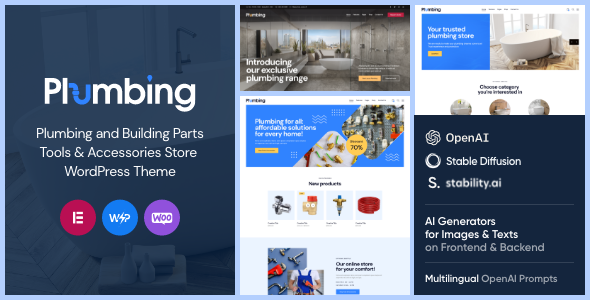
Stuck on your Plumbing Building WordPress theme? Let's fix it.
No endless back-and-forth. Just send us the details and we'll get it done.
No obligation · Replies within 1 hour · Quote within 1 day
Setup · Customization · Bug fixes · WooCommerce integration
About Plumbing Building WP Theme
Plumbing Building is a WordPress theme by ThemeREX designed specifically for plumbing companies, HVAC contractors, and home services businesses. It ships with a pre-built layout that covers service pages, team profiles, contact forms, and a booking section — so you’re not starting from a blank canvas.
The theme is built on ThemeREX’s own framework, which handles layout options, color schemes, and typography controls through a custom admin panel. It supports WPBakery Page Builder, giving you drag-and-drop control over page structure without touching code.
Out of the box, Plumbing Building is Retina-ready, mobile-responsive, and includes demo content you can import with one click. For any plumbing or trades business that wants a professional site without a long development timeline, it’s a practical starting point.
Get matched with a Plumbing Building developer in under one day
Tell us about your Plumbing Building project. Small fixes, Plumbing Building theme customization, or a full website build, whatever you need, we've got it covered.
We'll connect you to the right Plumbing Building developers, define the scope, and get everything 100% clear.
You'll get one estimate, hire your preferred developer, and start collaborating.
ThemeREX themes use a proprietary framework that behaves differently from standard WordPress themes. If you run into layout issues, slow performance, or need features the demo doesn’t include, you need someone who’s worked inside that framework before. Through Codeable, you get matched with vetted WordPress developers who have real experience with ThemeREX builds — not generalists learning as they go. Projects get estimates within 24 hours, and you only hire if the estimate works for you.
Pros
- Purpose-built demo content for plumbing and trades businesses, including service pages and team sections
- One-click demo import gets a working site structure live quickly
- WPBakery Page Builder included, allowing layout edits without code
- Retina-ready and mobile-responsive out of the box
- ThemeREX support and regular theme updates included with purchase
Cons
- ThemeREX's custom admin panel has a learning curve compared to standard WordPress theme options
- WPBakery shortcode lock-in makes switching page builders later messy
- Demo import can bloat the database with dummy content that needs manual cleanup
- Deep customisation often requires editing ThemeREX framework files, which can break on updates
- Limited third-party documentation compared to more widely used themes like Divi or Astra
Who is Plumbing Building for?
Local Plumbing Companies
Plumbing Building’s layout suits local plumbing companies well. Service pages, a contact form, and a clear call-to-action section above the fold match what customers look for when searching for a plumber. A developer can add postcode-based service area landing pages to help you rank in specific towns or districts.
HVAC and Heating Contractors
HVAC contractors can adapt the theme’s service sections to cover boiler installation, air conditioning, and annual servicing. The flexible WPBakery layout makes it straightforward to structure different service categories. Adding a seasonal promotion banner or a maintenance plan sign-up form works well within the existing design framework.
Emergency Plumbing Services
For emergency plumbing businesses, the theme’s header area can be configured to show a prominent phone number and 24/7 availability notice. A Plumbing Building developer can add a sticky call button for mobile visitors and a fast-loading contact form that captures job details and location before you even answer the phone.
Drainage and Sewer Specialists
Drainage and sewer companies can use the project gallery feature to showcase before-and-after work. The theme supports custom post types that a developer can set up to filter case studies by job type. This builds trust with visitors who want evidence of technical expertise before making contact.
Multi-Trade Home Services Businesses
If your business covers plumbing, gas, drainage, and bathroom fitting under one roof, Plumbing Building’s service section structure handles multiple trade categories cleanly. A developer can create separate landing pages per trade, each targeting its own local keywords, while keeping the overall site brand consistent.

Customizing Plumbing Building
Plumbing Building gives you a solid foundation, but most businesses need changes that go beyond what the ThemeREX admin panel can handle. Custom service area pages, Google Maps integration with multiple locations, emergency call banners, and lead capture forms tied to a CRM all require hands-on development work.
A Plumbing Building expert can also rework the WPBakery layouts to match your brand, adjust the color palette beyond the preset options, and set up custom post types for services or project galleries. If you want the theme to function as a proper lead-generation tool rather than just a brochure site, working with someone who knows both the ThemeREX framework and WordPress development makes a real difference.
Custom quote request forms, click-to-call buttons, and service area radius pages are all achievable with the right developer.
Recommended plugins for Plumbing Building
Plumbing Building pairs well with several WordPress plugins that extend its core functionality. WooCommerce can add a parts or product shop. Contact Form 7 or Gravity Forms handle quote requests and service bookings. For local SEO, pairing the theme with an SEO-optimised WordPress setup helps plumbing businesses rank for local search terms.
If the site feels slow after demo import, a proper WordPress performance audit can cut load times significantly. WPBakery, which ships with the theme, can also be replaced with Elementor if your team finds it easier to manage content updates independently.
Not sure which plugins to use? This WordPress plugins directory covers the most popular options with reviews and setup guides.
Plumbing Building common issues
Plumbing Building demo import not working in WordPress
Demo import failures in Plumbing Building usually come down to server memory limits or PHP execution timeouts. The ThemeREX importer pulls in images, content, and settings in bulk, which many shared hosting environments can’t handle. Increase max_execution_time and memory_limit in your php.ini or wp-config.php, or ask your host to raise them temporarily. If the issue persists, a WordPress bug fixing specialist can run the import manually via WP-CLI.
Plumbing Building theme layout broken after update
Layout breaks after a Plumbing Building update are often caused by changes to the ThemeREX framework conflicting with customisations made directly in theme files. If you edited theme files without a child theme, those changes get overwritten on update. The fix is to audit which customisations were lost, rebuild them inside a child theme, and re-apply them safely. Going forward, always use a child theme for any code-level changes to this theme.
WPBakery elements not displaying correctly in Plumbing Building
WPBakery rendering issues inside Plumbing Building often trace back to a plugin conflict or a cached version of the page builder scripts. Start by clearing all caching plugins and checking for JavaScript errors in the browser console. If specific elements like sliders or columns are broken, check whether a recent plugin update changed how shortcodes are parsed. Deactivating plugins one by one helps isolate the conflict quickly.
Plumbing Building site loading slowly after setup
Slow load times after a Plumbing Building setup are common because the demo content imports large images and the ThemeREX framework loads several scripts by default. Run the site through GTmetrix or PageSpeed Insights to identify the specific bottlenecks. Image compression, script deferral, and removing unused WPBakery elements help immediately. For deeper gains, a full WordPress performance optimisation review can bring load times down significantly.
Plumbing Building FAQ
Yes, it works well as a starting point. The demo content mirrors what a plumbing company needs: service descriptions, a contact section, team profiles, and a clear header with a phone number. Most businesses will need some customisation beyond the demo to match their branding and add features like booking forms or service area pages, but the foundation is solid.
Plumbing Building is built around WPBakery, not Elementor. You can technically install Elementor alongside it, but the two page builders can conflict and the theme’s built-in styles are designed for WPBakery output. Switching to Elementor fully usually requires a developer to rebuild the page layouts and adjust the theme’s CSS to avoid styling conflicts.
The ThemeREX admin panel lets you change colours, fonts, header styles, and layout options without code. WPBakery handles page-level layout editing through a drag-and-drop interface. For anything beyond those controls — custom sections, new page templates, or feature additions — you’ll need a developer familiar with the ThemeREX framework.
The theme itself doesn’t have built-in multi-location features, but a developer can set up location-specific landing pages using custom page templates and local SEO structure. Each location gets its own URL, unique content, and a tailored service area description. This is a common request for regional trades businesses and works well within the Plumbing Building framework.
Setup costs vary depending on how much customisation you need beyond the demo import. A basic setup with logo, colours, and content can cost a few hundred dollars. Custom features like booking systems, CRM integration, or location pages will add to that. Getting a free estimate through Codeable gives you a clear project cost before you commit to anything.
Hire a Plumbing Building Expert Developer
Whether you need a full Plumbing Building setup, custom features added to an existing site, or something fixed that’s broken, a specialist developer can get it done properly. Through our free estimate process, you describe your project, get matched with a vetted Plumbing Building developer through Codeable, and receive a clear quote within 24 hours. No obligation to hire. No risk. Just a straight answer on what your project needs and what it costs.
You'll need a free Codeable account so developers can ask questions and send their quotes.