Poco WordPress Theme
by pavothemes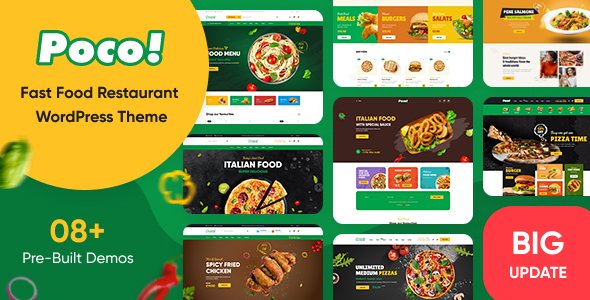
Stuck on your Poco WordPress theme? Let's fix it.
No endless back-and-forth. Just send us the details and we'll get it done.
No obligation · Replies within 1 hour · Quote within 1 day
Setup · Customization · Bug fixes · WooCommerce integration
About Poco WP Theme
Poco is a fast, multipurpose WordPress theme built by PavoThemes. It ships with over 30 demo sites covering eCommerce, portfolio, agency, and blog layouts. Each demo imports in one click, giving you a real starting point rather than a blank canvas.
The theme is built on Elementor, which means you can edit any section visually without touching code. WooCommerce support is deep and baked in from the start, not bolted on after the fact. Poco also includes its own companion plugin, PavoThemes Addons, which extends Elementor with additional widgets specific to the theme.
Performance is a priority. The codebase is lean, and Poco passes Core Web Vitals without heavy configuration on most demo setups. It suits small businesses, online stores, and creative agencies looking for a polished theme that does not require a developer to launch.
Get matched with a Poco developer in under one day
Tell us about your Poco project. Small fixes, Poco theme customization, or a full website build, whatever you need, we've got it covered.
We'll connect you to the right Poco developers, define the scope, and get everything 100% clear.
You'll get one estimate, hire your preferred developer, and start collaborating.
Poco covers a lot of ground out of the box, but production-ready sites almost always need adjustments the visual editor cannot handle. Custom WooCommerce templates, specific checkout flows, unique header behavior, or third-party API connections all require real development work.
FoxyConcept connects you with vetted Poco developers through Codeable, where every developer is screened and reviewed. You post your project, get a clear estimate within 24 hours, and only proceed if you are happy. No guesswork, no generic freelancers.
Pros
- Over 30 one-click demo imports covering diverse niches including eCommerce, portfolio, and agency
- Deep WooCommerce integration with product quick view, wishlist, and Ajax cart built in
- Built on Elementor so all page layouts are editable without code
- Lean codebase that scores well on Core Web Vitals without extensive optimization
- PavoThemes Addons plugin adds useful Elementor widgets specifically designed for Poco layouts
Cons
- Heavy reliance on PavoThemes Addons plugin creates dependency that complicates switching themes later
- Support response times can be slow, especially for non-priority license holders
- Some demo designs require the exact same plugins and images to replicate, which are not always included
- Mega menu configuration is functional but not intuitive and can frustrate non-technical users
- WooCommerce template overrides in Poco can conflict with third-party WooCommerce add-on plugins
Who is Poco for?
Fashion & Apparel Store
Poco’s WooCommerce demos for fashion include grid product layouts, size and color swatches, quick view, and wishlist features. The lookbook-style layouts work well for brands that sell through strong imagery. A developer can extend this with custom filters by category, material, or size to improve the shopping experience for customers browsing large catalogs.
Digital Marketing Agency
Agency demos in Poco come with service grids, team sections, animated counters, and case study layouts. The Elementor base makes it easy to update content without developer involvement after launch. Custom animations, contact forms tied to a CRM, and multilingual setups are common additions that a Poco developer can wire up cleanly during the build.
Furniture & Home Decor Shop
Furniture stores need product pages that showcase scale, materials, and room context. Poco supports large image galleries, product video embeds, and related product sections out of the box. A developer can add room configurators, custom product tabs for dimensions and care instructions, and filtered shop pages that let buyers sort by room type or style.
Freelance Portfolio
Poco’s portfolio demos are minimal and image-forward, with project grid layouts and individual case study pages. Elementor makes updating the portfolio straightforward. If you want filterable categories, password-protected client work, or an integrated contact booking form, a small amount of custom development turns the demo into a functional client-ready portfolio site.
Health & Wellness Brand
Health and wellness brands often combine a blog, a product shop, and a booking or appointment system. Poco handles all three content types within a consistent visual style. Integration with booking plugins like Amelia or Simply Schedule Appointments, combined with a WooCommerce shop for physical or digital products, makes Poco a practical base for this niche.

Customizing Poco
Poco gives you a lot of control through the WordPress Customizer and Elementor. You can adjust header layouts, footer columns, typography, color schemes, and WooCommerce product pages without writing a line of code. The theme panel handles global settings, while Elementor handles page-level design.
That said, advanced customization gets complicated quickly. Custom post type layouts, conditional header logic, and heavily modified WooCommerce templates often require direct PHP or CSS work. A Poco expert can help you push beyond what the visual editor allows, build custom Elementor templates, and keep child theme changes organized so future updates do not overwrite your work.
If you want a store or site that looks different from the demo, working with someone who knows the theme structure saves significant time.
Recommended plugins for Poco
Poco works well with most major WordPress plugins. WooCommerce is fully supported, including product filters, quick view, and wishlist features. WPML and Polylang handle multilingual setups cleanly.
For added functionality, the PavoThemes Addons plugin unlocks theme-specific Elementor widgets like mega menus, product carousels, and counters. You can also pair Poco with contact form plugins, booking systems, and membership tools without conflicts in most cases.
If site speed becomes a concern as you add more plugins, a WordPress performance audit can identify what is slowing things down. For stores targeting organic traffic, pairing Poco with proper WordPress SEO work makes a measurable difference.
Not sure which plugins to use? This WordPress plugins directory covers the most popular options with reviews and setup guides.
Poco common issues
Poco theme header not displaying correctly after update
Header issues after a Poco update are usually caused by cached CSS or a conflict between the updated theme files and a customized child theme. Start by clearing all caches including server-side, plugin, and browser cache. If you are not using a child theme and edited the parent directly, the update will have overwritten your changes. Check the Customizer header settings to see if the layout option reset to default. If the issue persists, a WordPress bug fixing service can pinpoint the exact conflict quickly.
Poco WooCommerce product page layout broken
Broken WooCommerce product pages in Poco are often caused by a version mismatch between the theme and WooCommerce, or outdated template overrides in the theme folder. Go to WooCommerce status and check for outdated templates flagged under the System Status tab. Updating those templates manually resolves most layout breaks. If the page structure looks wrong rather than just styled incorrectly, the Elementor template assigned to single product pages may need rebuilding after the update.
PavoThemes Addons plugin causing Elementor conflict
PavoThemes Addons and Elementor conflicts usually surface after either plugin updates. Symptoms include broken widgets, missing sections, or a blank Elementor editor. First, check that both Elementor and PavoThemes Addons are on their latest versions. If the conflict appeared after a specific update, temporarily deactivate PavoThemes Addons to confirm it is the source. A developer can identify which widget or hook is causing the conflict and apply a targeted fix without disabling the whole plugin.
Poco demo import not working or importing blank pages
Failed demo imports in Poco are typically caused by PHP memory limits, upload size restrictions, or a timeout during the import process. Check your server’s PHP memory limit and set it to at least 256MB. Increase the max execution time to 300 seconds if your host allows it. Some hosting environments block external HTTP requests, which Poco’s importer relies on to fetch demo content. If you are on shared hosting, switching to a staging environment or a better host often resolves the problem entirely.
Poco FAQ
Yes. Poco has deep WooCommerce support built into the core theme, not added through a separate plugin. It includes product quick view, Ajax cart, wishlist functionality, and multiple shop layout options. Several demo sites are built specifically for eCommerce. For stores with complex requirements like custom checkout flows or advanced filtering, a developer can extend the built-in WooCommerce features significantly.
No, not practically. Poco is built on Elementor as its page builder. The demo content, templates, and most layout features depend on Elementor being active. You could use the theme with the WordPress block editor for basic pages, but you would lose the majority of what makes Poco’s designs work. Elementor Free is sufficient for most pages, though some widgets require Elementor Pro.
You can run Poco without PavoThemes Addons, but you will lose access to the theme-specific Elementor widgets like product carousels, mega menus, and custom counters. Imported demo content that uses those widgets will show placeholder blocks instead. If your project only uses standard Elementor widgets and WooCommerce features, the dependency on the addons plugin is low.
Migrating to Poco from another theme means rebuilding your pages in Elementor since page builder content is not transferable between themes. Your posts, products, and media move over cleanly, but layouts need to be recreated. A WordPress migration specialist can handle the technical side while you focus on the design rebuild. Planning the migration carefully avoids SEO disruption and downtime.
PavoThemes actively maintains Poco and releases updates, though the frequency varies. The theme has been available for several years and has a large user base on ThemeForest. Support is handled through the ThemeForest comments and a dedicated support system. Response times can be inconsistent. For ongoing site maintenance and faster issue resolution, a WordPress maintenance plan through a dedicated developer is more reliable.
Hire a Poco WordPress Expert
Whether you need a full site built on Poco, a WooCommerce store configured to your exact spec, or a specific feature added to an existing setup, a dedicated Poco developer will get it done right. All work is delivered through Codeable, so you get a vetted professional with transparent pricing and real accountability.
Get a free estimate with no obligation and have a developer matched to your project within 24 hours.
You'll need a free Codeable account so developers can ask questions and send their quotes.