PowerMag WordPress Theme
by djwd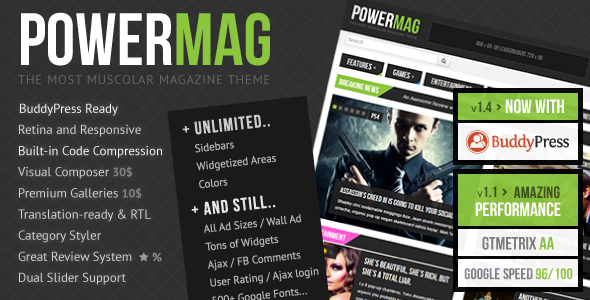
Stuck on your PowerMag WordPress theme? Let's fix it.
No endless back-and-forth. Just send us the details and we'll get it done.
No obligation · Replies within 1 hour · Quote within 1 day
Setup · Customization · Bug fixes · WooCommerce integration
About PowerMag WP Theme
PowerMag is a magazine-style WordPress theme built by djwd, designed for content-heavy sites that need strong visual hierarchy and fast browsing. It ships with multiple homepage layouts, a built-in review system, ad management zones, and a grid-based article display that suits editorial teams publishing frequently.
The theme targets news sites, tech blogs, gaming publications, and review platforms. Its review module supports star ratings, pros and cons tables, and structured verdict blocks without needing a separate plugin. Pagination options, sticky sidebars, and featured post carousels are baked in. PowerMag runs on the WordPress Customizer, so layout changes are visible in real time. It is compatible with major ad networks and supports Google AdSense placements natively, which matters for monetised editorial sites.
Get matched with a PowerMag developer in under one day
Tell us about your PowerMag project. Small fixes, PowerMag theme customization, or a full website build, whatever you need, we've got it covered.
We'll connect you to the right PowerMag developers, define the scope, and get everything 100% clear.
You'll get one estimate, hire your preferred developer, and start collaborating.
PowerMag is not a theme you hand to a general developer and expect clean results. Its review system, ad zones, and layout modules have specific interaction points that require familiarity with the theme’s structure. The developers listed on Codeable have worked across magazine and editorial themes extensively. You get a vetted specialist, a clear estimate upfront, and no obligation to proceed until you’re satisfied with the scope. That’s a lower-risk way to get PowerMag work done properly.
Pros
- Built-in review system with star ratings, pros/cons tables, and verdict blocks requires no extra plugin
- Native ad management zones with Google AdSense placement support built into the layout
- Multiple homepage grid layouts switchable from the Customizer without touching code
- Sticky sidebar and infinite scroll options suited to high-volume editorial publishing
- Strong typography defaults and featured post carousel make new sites look structured immediately
Cons
- No schema markup beyond review blocks, so news and article structured data needs a separate SEO plugin
- Customizer options become limiting quickly for sites with complex multi-category layouts
- Ad zone logic does not support header bidding out of the box without developer intervention
- Page speed suffers on ad-heavy builds without deliberate caching and script optimisation
- Limited WooCommerce compatibility means shop integration requires significant custom development
Who is PowerMag for?
Tech Review Sites
PowerMag’s built-in review module is a natural fit for tech review sites. Product scores, specification tables, and verdict blocks are all handled without additional plugins. A PowerMag specialist can extend the review post type to include custom fields like pricing tiers, compatibility notes, or comparison tables, giving tech editors structured output that also benefits search visibility.
Gaming Publications
Gaming publications need fast-loading pages with strong visual impact and flexible score displays. PowerMag’s grid layouts handle high image volumes well, and the review system maps cleanly onto game scoring conventions. A PowerMag developer can adjust the score scale, add platform tags, and build custom archive templates that sort by genre or release date rather than the default date order.
News and Politics Blogs
News and politics blogs benefit from PowerMag’s category-based grid homepages and fast article navigation. Breaking news workflows need clean editor access and quick publishing, both of which PowerMag supports. A PowerMag expert can set up editorial roles, configure category-specific ad zones, and build a front page that surfaces both latest posts and pinned long-form content simultaneously.
Entertainment and Celebrity Media
Entertainment and celebrity sites push large volumes of image-heavy content and depend on pageviews for ad revenue. PowerMag’s ad placements and infinite scroll options suit this model. A PowerMag developer can tune image lazy loading, configure related post widgets to maximise internal traffic, and set up social sharing integrations that match the visual style of the editorial layout.
Niche Affiliate Review Sites
Affiliate review sites need clear scoring, product comparison tables, and strong calls to action within article layouts. PowerMag’s review system gives affiliates a structured base. A PowerMag specialist can add custom affiliate disclaimer blocks, build comparison table shortcodes, and configure the theme’s ad zones to carry affiliate banners in positions that comply with disclosure requirements without disrupting readability.

Customizing PowerMag
PowerMag ships with a solid set of default options, but most editorial sites need more than defaults. A PowerMag expert can wire up custom post templates for review categories, adjust the ad zone logic to support header bidding, and build out author archive pages that go beyond the theme’s stock layout.
Common customisation requests include custom widget areas, modified breadcrumb logic, tailored related post algorithms, and integration with newsletter platforms like Mailchimp or ConvertKit. Child theme development is the right approach here. Editing PowerMag’s core files directly creates update conflicts. A PowerMag developer will build a child theme first, then layer in your changes cleanly so future theme updates don’t wipe custom work. Typography, colour schemes, and breakpoint behaviour can all be adjusted without touching the parent theme.
Recommended plugins for PowerMag
PowerMag works well with several plugin categories that extend what the theme does on its own. Caching plugins like WP Rocket or LiteSpeed Cache help offset the load that heavy ad scripts and multiple image grids put on page speed. If your site carries display ads, WordPress performance tuning becomes important early, not as an afterthought.
For search visibility, PowerMag doesn’t generate schema markup beyond its review blocks. Adding Rank Math or Yoast with proper configuration fills that gap. A structured approach to WordPress SEO covers meta output, XML sitemaps, and breadcrumb schema that PowerMag alone doesn’t handle. WooCommerce integration is possible but requires custom work to match the editorial layout.
Not sure which plugins to use? This WordPress plugins directory covers the most popular options with reviews and setup guides.
PowerMag common issues
PowerMag homepage layout broken after update
Homepage layout breaks after a PowerMag update usually mean a widget area has been reset or a Customizer setting has reverted. Check the Homepage Settings panel in the Customizer first and confirm each section still has content assigned. If you were editing theme files directly rather than using a child theme, the update will have overwritten those changes. A WordPress bug fixing specialist can audit the diff, rebuild the affected layout in a child theme, and make it update-safe going forward.
PowerMag review scores not displaying correctly
PowerMag review scores not displaying usually points to a conflict with a caching plugin serving stale output, or a custom CSS rule overriding the score block’s display property. Clear all cache layers first. If scores still don’t appear, inspect the review post meta in the database to confirm values were saved. Score display issues can also appear when a page builder has been used on a review post type that PowerMag expects to render with its own template. A WordPress bug fixing service can trace the exact render path and fix it cleanly.
PowerMag ads not showing in sidebar or header zones
If PowerMag’s ad zones aren’t displaying, start by checking whether an ad blocker is active in your browser during testing. Next, confirm the ad code has been pasted into the correct Customizer field or widget area. AdSense ads also require the site to be approved and the ad unit to be active. If zones appear empty on the front end but contain code in the backend, a JavaScript conflict is the likely cause. Disable plugins one by one to isolate it.
PowerMag site slow loading with multiple ad scripts
Slow loading on ad-heavy PowerMag builds is almost always a script execution problem. Multiple ad network tags firing synchronously block render. The fix involves async loading for ad scripts, a server-side caching layer, and image optimisation for the grid layouts. A CDN helps with static assets. Review your Core Web Vitals report in Search Console to identify exactly which scripts are causing the longest blocking times before making changes.
PowerMag FAQ
PowerMag handles basic SEO requirements like clean heading structure and fast templates, but it doesn’t output article schema, news schema, or full breadcrumb markup on its own. You’ll need a plugin like Rank Math or Yoast configured properly. A PowerMag specialist can set up schema output correctly so your review posts and articles are eligible for rich results in Google Search.
PowerMag has partial compatibility with Elementor, but its review post types and homepage section templates are built around its own Customizer system. Using Elementor on standard pages works fine. Trying to rebuild the homepage or review layouts with Elementor usually creates conflicts. A PowerMag developer can advise on where page builder use makes sense and where it will cause problems with the theme’s core functionality.
PowerMag isn’t built with WooCommerce in mind. Basic WooCommerce pages will render, but the product grid, cart, and checkout will look unstyled or misaligned with the editorial layout. Making it work properly requires custom CSS and template overrides. If ecommerce is central to your project rather than a small add-on, a different base theme may be a better starting point.
PowerMag supports Google Fonts through the Customizer’s typography settings. Select a font family from the available list and it loads automatically. For fonts not included in the Customizer options, you can enqueue them via a child theme’s functions.php file and apply them with CSS. A PowerMag developer can handle this in under an hour if you need a specific typeface that isn’t in the default list.
PowerMag by djwd has received updates over the years and remains available on ThemeForest. Before purchasing or building on it, check the changelog date on the ThemeForest listing and read recent buyer reviews for support responsiveness. For ongoing maintenance and updates to a live PowerMag site, a WordPress maintenance plan through a specialist is worth considering if you can’t monitor updates internally.
Hire a PowerMag Developer
Whether you need a PowerMag expert to build a site from scratch, fix a specific layout issue, or extend the theme with custom functionality, the process starts with a free estimate. Describe your project, get matched with a vetted developer within 24 hours, and review the estimate before committing to anything. Get a Free Estimate and get your PowerMag project moving without the guesswork.
You'll need a free Codeable account so developers can ask questions and send their quotes.