Preschool WordPress Theme
by jwsthemes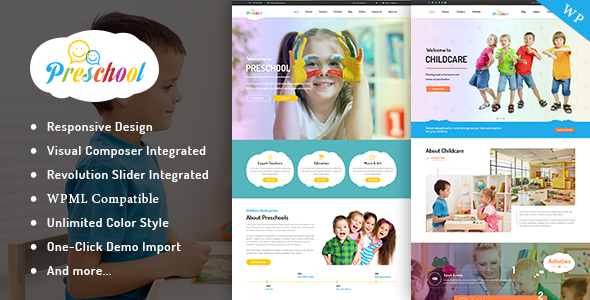
Stuck on your Preschool WordPress theme? Let's fix it.
No endless back-and-forth. Just send us the details and we'll get it done.
No obligation · Replies within 1 hour · Quote within 1 day
Setup · Customization · Bug fixes · WooCommerce integration
About Preschool WP Theme
Preschool is a WordPress theme by jwsthemes built specifically for early childhood education centres, kindergartens, and daycare providers. It ships with a warm, colourful design that appeals to parents browsing on mobile and desktop alike.
The theme includes pre-built page templates for admissions, class schedules, staff profiles, and events. A drag-and-drop page builder compatibility means most layout changes happen without touching code. WooCommerce support allows centres to sell activity packs or branded merchandise. Contact form integration and Google Maps embed make it straightforward for parents to find and reach you. Overall, Preschool covers the core needs of a childcare website without requiring a developer for basic setup.
Get matched with a Preschool developer in under one day
Tell us about your Preschool project. Small fixes, Preschool theme customization, or a full website build, whatever you need, we've got it covered.
We'll connect you to the right Preschool developers, define the scope, and get everything 100% clear.
You'll get one estimate, hire your preferred developer, and start collaborating.
Codeable connects you with vetted WordPress developers who have hands-on experience with education themes including Preschool. You post your project, get a clear estimate, and only proceed if it works for you. No bidding wars, no offshore guesswork.
Our developers on WordPress development services handle everything from initial setup to complex custom features. If you want the site built properly the first time, that is the most direct route.
Pros
- Purpose-built templates for class schedules, staff profiles, and admissions save setup time for childcare sites
- Colourful, child-friendly visual design that appeals to parents without custom design work
- WooCommerce compatibility allows centres to sell merchandise, activity kits, or event tickets directly
- Mobile-responsive layout works well on phones, which is how most parents browse
- Compatible with popular page builders, making layout edits accessible without coding knowledge
Cons
- Theme options panel can feel cluttered and takes time to learn for first-time users
- Demo content import does not always work cleanly, leaving gaps that require manual fixes
- Some bundled plugins are outdated or abandoned, requiring replacements for key functions
- No native online enrollment or fee payment system — requires third-party plugin integration
- Update frequency from jwsthemes has slowed, which can create compatibility concerns with newer WordPress versions
Who is Preschool for?
Private Preschool and Kindergarten Centres
Private preschools need a site that communicates trust and warmth to parents while clearly presenting admissions info, fees, and class availability. The Preschool theme’s pre-built templates handle these sections well, and a developer can wire up an inquiry or registration form to reduce admin workload at the centre.
Daycare and Childminding Services
Daycare providers benefit from the theme’s schedule and staff profile templates. Parents want to know who is caring for their child. Adding a booking plugin and a simple parent login area through a developer turns the site into a practical tool rather than just a brochure.
After-School and Holiday Programmes
After-school clubs and holiday camps need clear programme listings with dates, ages, and prices. The theme’s event and class templates cover this structure. Integrating WooCommerce for session bookings makes the purchase process straightforward and reduces phone enquiries.
Montessori and Alternative Education Schools
Montessori schools often have a distinct philosophy they want the site to communicate clearly. The Preschool theme provides a starting point, and a developer familiar with the theme can reshape layouts and content sections to reflect that identity without starting from scratch.
Children's Activity and Enrichment Studios
Dance studios, art classes, and coding camps for children share the same structural needs as a preschool site. Class listings, instructor bios, and a booking or contact flow are all achievable with this theme and a modest amount of customization work from a specialist.

Customizing Preschool
Out of the box, Preschool handles the basics well. Deeper customization is where things get more involved. Adjusting the colour palette, typography, and layout to match your brand requires familiarity with the theme options panel and sometimes custom CSS.
Adding features like online enrollment forms, fee payment integration, or a parent portal goes beyond what the theme provides natively. A Preschool expert can wire up third-party plugins, override template files cleanly, and make sure nothing breaks on mobile after changes. If you want a site that reflects your centre’s identity rather than looking like the demo, working with someone who knows the theme saves significant time and avoids the trial-and-error cycle most site owners hit.
Recommended plugins for Preschool
Preschool pairs well with several plugin categories. For bookings and tour scheduling, plugins like Amelia or Simply Schedule Appointments slot in without much friction. For performance, image optimisation and caching are worth prioritising early since the theme loads several visual assets. WordPress performance optimisation makes a measurable difference for parent visitors on slower mobile connections.
If your centre relies on organic search to attract new families, structured WordPress SEO work on your class pages and location content helps you show up when parents search locally.
Not sure which plugins to use? This WordPress plugins directory covers the most popular options with reviews and setup guides.
Preschool common issues
Preschool theme demo content not importing correctly in WordPress
Demo import failures with the Preschool theme usually come down to server memory limits or a timeout during the import process. Start by increasing the memory_limit and max_execution_time values in your php.ini or via wp-config.php. If the import still stalls, import XML content manually through the WordPress importer and recreate widgets separately. A WordPress bug fixing specialist can handle this cleanly if the issue persists.
Preschool theme page builder layout broken after WordPress update
After a WordPress core update, page builder elements in Preschool sometimes lose their styling or stack incorrectly. This is often a CSS conflict or a plugin version mismatch. Clear all caches first. If the problem continues, check the browser console for JS errors and identify which plugin version broke the layout. Rolling back the page builder plugin temporarily while you test is a safe approach. Persistent layout issues usually need a developer to audit the template files directly.
Preschool theme contact form not sending emails
Contact forms failing to send in Preschool are almost always an email delivery issue, not a theme problem. WordPress uses wp_mail() by default, and most shared hosts block or filter it. Install an SMTP plugin like WP Mail SMTP and connect it to a transactional email service such as Brevo or Mailgun. Test the connection through the plugin’s diagnostics tool. If forms are also failing to submit entirely, check for JavaScript conflicts in the console and disable other plugins to isolate the cause.
Preschool theme slow loading on mobile devices
The Preschool theme loads several decorative images and custom fonts that add to page weight. Start with image compression using a plugin like ShortPixel, then enable a caching plugin such as WP Rocket or LiteSpeed Cache. Defer non-critical JavaScript through your caching settings. Check Google PageSpeed Insights to identify the highest-impact fixes. If scores remain low after these steps, deeper WordPress performance work on the server and asset loading order will move the needle further.
Preschool FAQ
Update frequency from jwsthemes has slowed in recent years. The theme still functions on current WordPress versions, but compatibility with the latest PHP and plugin releases is worth testing before committing. Check the theme’s changelog on ThemeForest and review recent buyer comments for any compatibility reports before purchasing or upgrading.
The Preschool theme is built to work with a visual page builder, and most of its demo layouts rely on one. You can edit content through the standard WordPress editor, but recreating the structured layouts from the demo without a builder is difficult. For anyone planning to manage the site without technical help, keeping a builder active is the practical choice.
Yes, the Preschool theme includes WooCommerce support. You can add a shop for merchandise, activity packs, or paid event registrations. Basic product pages and cart functionality work without modification. More complex setups like subscription billing or booking-specific product types will need additional plugins and likely some developer configuration.
The Preschool theme does not include a native enrollment form. You add one through a plugin such as Gravity Forms, WPForms, or Formidable Forms. These allow multi-step forms with file uploads and conditional fields, which suit enrollment use cases well. A developer can connect form submissions to your email system or a CRM to keep intake organised.
Yes, migrating an existing site to the Preschool theme is straightforward if your content is already in WordPress. Your posts and pages carry over; you rebuild the design within the new theme. If you are moving from a different platform entirely, a WordPress migration service handles the content transfer and redirects so nothing gets lost in the move.
Hire a Preschool WordPress Developer
Need someone to set up, customise, or fix your Preschool theme? Post your project and get matched with a vetted developer within 24 hours. You get a free estimate with no obligation to hire.
Whether it is a full site build, a specific feature, or a layout that is not behaving, a specialist gets it done without the back-and-forth. Get a free estimate today and see exactly what your project will cost before committing.
You'll need a free Codeable account so developers can ask questions and send their quotes.