Primrose WordPress Theme
by SingleStroke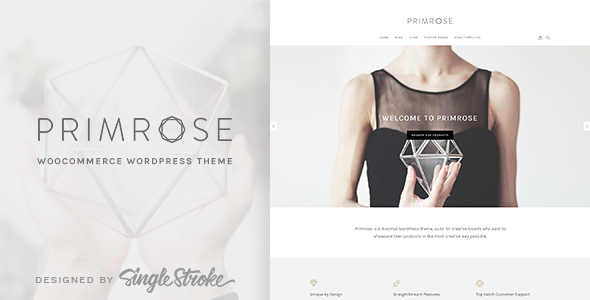
Stuck on your Primrose WordPress theme? Let's fix it.
No endless back-and-forth. Just send us the details and we'll get it done.
No obligation · Replies within 1 hour · Quote within 1 day
Setup · Customization · Bug fixes · WooCommerce integration
About Primrose WP Theme
Primrose is a WordPress theme by SingleStroke designed for elegant, image-forward websites. It suits photographers, bloggers, and small creative businesses that want a clean, minimal layout with strong visual impact. The theme leans on whitespace and typography to let content breathe, rather than relying on heavy design elements.
Built on a responsive foundation, Primrose adapts well across screen sizes without requiring extra plugins for mobile display. SingleStroke has kept the codebase relatively lightweight, which helps with initial load times compared to bloated multipurpose themes.
The Customizer integration covers fonts, colors, header layout, and widget areas, giving site owners a reasonable amount of control without touching code. It works best for sites that prioritize aesthetics over complex functionality. If you need deep e-commerce features or membership systems, you will likely need additional development work on top of the base theme.
Get matched with a Primrose developer in under one day
Tell us about your Primrose project. Small fixes, Primrose theme customization, or a full website build, whatever you need, we've got it covered.
We'll connect you to the right Primrose developers, define the scope, and get everything 100% clear.
You'll get one estimate, hire your preferred developer, and start collaborating.
Primrose looks simple on the surface, but getting it to match a specific brand, perform well under real traffic, and extend beyond its default features takes genuine WordPress experience. FoxyConcept works through Codeable, a vetted network of WordPress developers. Every project starts with a free estimate. There is no obligation to hire, and the process is fully risk-free. If your Primrose site needs more than the Customizer can deliver, this is the right place to start.
Pros
- Lightweight codebase keeps page load times lower than most multipurpose themes
- Clean, minimal design works well for image-heavy portfolios and blogs without visual clutter
- Responsive layout handles mobile and tablet displays without extra plugins
- Customizer integration lets non-developers adjust colors, fonts, and layout without code
- SingleStroke keeps the theme updated, reducing compatibility risks with newer WordPress versions
Cons
- Limited built-in layout variety means heavy customization is needed for complex page structures
- WooCommerce support is not native and requires additional CSS work to style properly
- No built-in mega menu or advanced navigation options for larger content sites
- Demo content import can be inconsistent and may not replicate the preview site exactly
- Support documentation from SingleStroke is limited compared to larger theme marketplaces
Who is Primrose for?
Photography Portfolio
Primrose handles full-width image galleries and grid-based portfolio layouts well. The minimal chrome keeps attention on the photos rather than the surrounding UI. Photographers benefit from the theme’s whitespace approach, which mirrors how print editorial design presents imagery. Adding a lightbox plugin completes the experience without conflicting with the theme’s base styles.
Lifestyle Blog
The typography-first design makes Primrose a natural fit for text-heavy blogs with editorial ambition. Category pages, featured post areas, and sidebar widgets all function cleanly within the default layout. Bloggers covering food, travel, wellness, or style will find the aesthetic matches their content without needing significant design overrides.
Small Creative Agency
Small agencies offering design, copywriting, or branding services can use Primrose as a base for a polished web presence. The theme’s restraint signals confidence, which suits service businesses that sell taste and expertise. Custom page templates for case studies and service pages extend the theme beyond its defaults with moderate development work.
Wedding or Events Business
Wedding planners, photographers, and event venues benefit from Primrose’s soft, refined visual tone. The theme supports the kind of aspirational imagery these businesses depend on. Adding an inquiry form, gallery plugin, and testimonial section gives the site the functionality clients need while keeping the design aligned with the market’s aesthetic expectations.
Independent Artist or Illustrator
Artists and illustrators need a site that shows work clearly without competing with it visually. Primrose does exactly that. The grid and whitespace give individual pieces room to read properly on screen. An online shop through WooCommerce can be added for print or original sales, though styling the shop pages to match the theme requires custom CSS.

Customizing Primrose
Out of the box, Primrose covers the basics through the WordPress Customizer. You can adjust color palettes, switch between font pairings, control header and footer layout, and configure widget areas. That gets most simple sites to a good starting point without writing any code.
Beyond those defaults, customization gets more technical. Custom page templates, modified archive layouts, adjusted spacing, and brand-specific typography changes all require direct CSS or PHP edits. Doing that inside a child theme keeps your changes safe when SingleStroke releases updates.
A Primrose expert can take the theme further than the Customizer allows. That means custom post type integration, WooCommerce styling, unique landing page layouts, and performance tuning specific to how your site uses the theme. Getting those details right the first time saves significant rework later.
Recommended plugins for Primrose
Primrose pairs well with several common WordPress tools. WooCommerce can be added for shop functionality, though you will need custom styling to match the theme’s minimal aesthetic. Elementor or Beaver Builder work as page builders if you need more layout control than the default editor provides.
For SEO, adding a dedicated plugin like Yoast or Rank Math is recommended since Primrose does not include built-in schema or advanced meta handling. Speed improvements come from pairing the theme with a caching plugin and optimized image handling. Learn more about WordPress performance tuning and WordPress SEO to get the most from your Primrose site.
Not sure which plugins to use? This WordPress plugins directory covers the most popular options with reviews and setup guides.
Primrose common issues
Primrose theme header not displaying correctly after update
Header display issues after a Primrose update usually come from a CSS conflict between the updated theme and a child theme or plugin. Open your browser’s developer tools, check the console for errors, and inspect the header element for overriding styles. If you are not using a child theme and modified the parent directly, those changes will have been overwritten. Restore from a backup or contact a developer through our WordPress bug fixing service.
Primrose WordPress theme fonts not loading on mobile
Font loading problems on mobile often trace back to a caching plugin aggressively minifying or combining CSS files, which breaks the font-face declarations Primrose uses. Disable CSS minification in your caching plugin temporarily and test. If fonts return, re-enable minification selectively excluding the theme stylesheet. Google Fonts loading issues may also relate to privacy plugins blocking external requests on mobile browsers.
Primrose theme WooCommerce shop page layout broken
Primrose does not natively style WooCommerce templates, so shop and product page layouts frequently break when WooCommerce is activated. The fix requires a WooCommerce-specific stylesheet added to your child theme that targets the plugin’s template classes and aligns them with Primrose’s spacing, typography, and color variables. This is straightforward for a developer but time-consuming to do accurately without experience in both the theme and plugin structure.
Primrose theme slow loading on shared hosting
If Primrose loads slowly on shared hosting, the issue is usually unoptimized images, no caching, or too many HTTP requests from plugins. Start by running the site through GTmetrix to identify the largest contributors. Install a caching plugin, compress images through a tool like ShortPixel, and remove any plugins not actively used. Upgrading hosting or adding a CDN makes a measurable difference if plugin and image optimization alone does not hit your target load time.
Primrose FAQ
Primrose works with the WordPress block editor for basic content editing, but it was not built as a block theme. Full site editing is not supported. Classic blocks and the standard editor workflow function as expected. If you rely heavily on block-based layout building, you may find the theme’s template structure limiting and need a page builder plugin alongside it.
Yes, WooCommerce can be installed on a Primrose site. However, the theme does not include native WooCommerce templates, so shop pages, product pages, and cart layouts will use WooCommerce’s default styling rather than matching Primrose’s design. Custom CSS in a child theme is needed to bring those pages in line with the rest of your site’s look.
Primrose includes a set of Google Fonts available through the Customizer. You can switch between those font pairings without code. Loading a custom or self-hosted font requires adding the font files to your child theme and declaring them in the stylesheet. Some third-party font plugins also work, though they add extra HTTP requests that can affect load speed.
Create a new folder in your wp-content/themes directory, name it something like primrose-child, and add a style.css file with the correct theme header including Template: primrose. Add a functions.php file to enqueue the parent theme’s stylesheet. Activate the child theme from the WordPress dashboard. All your custom CSS and PHP changes go into the child theme, not the parent.
Migrating an existing site to Primrose is possible but requires planning. Content migrates cleanly since it lives in the database. What changes is how that content is displayed, which depends on the templates and layout the new theme uses. Navigation menus, widget areas, and custom page templates will need to be reconfigured. A WordPress migration service can handle the technical side while minimizing downtime.
Hire a Primrose WordPress Developer
Whether you need a layout adjusted, a new feature added, or a full Primrose site built from scratch, FoxyConcept can help. Projects are scoped clearly before any work begins, so you know exactly what you are getting and what it costs. Get a free estimate and hear back within 24 hours. No commitment required.
You'll need a free Codeable account so developers can ask questions and send their quotes.