Printec WordPress Theme
by pavothemes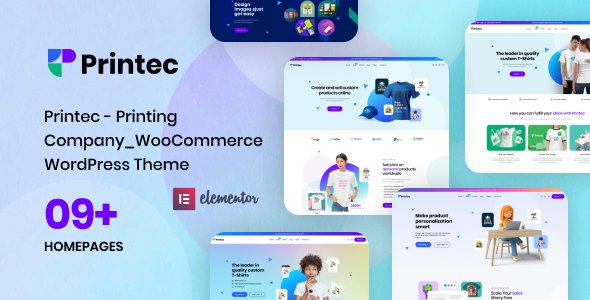
Stuck on your Printec WordPress theme? Let's fix it.
No endless back-and-forth. Just send us the details and we'll get it done.
No obligation · Replies within 1 hour · Quote within 1 day
Setup · Customization · Bug fixes · WooCommerce integration
About Printec WP Theme
Printec is a WordPress theme by PavoThemes built for print shops, design studios, and custom product businesses. It ships with WooCommerce support out of the box, making it straightforward to sell printed materials, branded merchandise, or custom stationery online.
The theme includes a drag-and-drop page builder, multiple pre-built demo layouts, and product-focused section templates. Typography and colour controls are accessible through the WordPress Customizer, so basic branding changes do not require code.
Printec targets small to mid-size print businesses that need a functional online store without starting from scratch. The demo content covers product listings, service pages, pricing tables, and portfolio sections. It is compatible with popular plugins like WPML and WooCommerce extensions, giving you room to grow as your catalogue expands.
Get matched with a Printec developer in under one day
Tell us about your Printec project. Small fixes, Printec theme customization, or a full website build, whatever you need, we've got it covered.
We'll connect you to the right Printec developers, define the scope, and get everything 100% clear.
You'll get one estimate, hire your preferred developer, and start collaborating.
Printec is functional out of the box, but print businesses usually have specific requirements around product configuration, pricing, and checkout that the theme alone does not solve. The developers on Codeable have worked across WooCommerce-based print shop builds and know where Printec needs reinforcement. Whether you need a custom template, a plugin conflict resolved, or a full store built on the theme, you can get a scoped estimate before committing to anything. No retainers, no guessing on cost.
Pros
- Ships with WooCommerce integration pre-configured for product-based businesses
- Multiple print shop demo layouts reduce initial setup time
- Customizer-based controls for colours, fonts, and header without touching code
- Compatible with WPML for multilingual print shop setups
- Pricing table and service section templates built specifically for print services
Cons
- Page builder dependency means switching builders later is painful
- Demo import can leave placeholder content that takes time to clean up
- Limited documentation for advanced WooCommerce customisation within the theme
- Update cadence from PavoThemes has slowed, which raises long-term compatibility concerns
- Out-of-the-box mobile layout for product pages needs manual adjustment on some devices
Who is Printec for?
Local Print Shops
Printec suits local print businesses moving from walk-in only to online ordering. You can list services, show pricing, and take orders through WooCommerce. A developer can add postcode-based delivery zones and local pickup options that make the store practical for a geographically focused customer base.
Custom Merchandise Stores
Businesses selling branded mugs, t-shirts, or tote bags can use Printec’s product layouts alongside WooCommerce Product Add-Ons. Customers select print specifications or upload artwork at checkout. A developer can build the custom upload and preview flow that turns a basic WooCommerce store into a functional merchandise configurator.
Design Studios
Design studios offering print collateral as part of a service package can use Printec’s portfolio and service sections alongside a simple shop. The theme handles showcasing past work while also accepting orders. Some studios use it as a client-facing catalogue with quote requests rather than a direct checkout.
Corporate Stationery Suppliers
Suppliers of business cards, letterheads, and branded office materials can build a B2B store on Printec. Bulk pricing tiers, company account registration, and repeat order management are all achievable with the right WooCommerce extensions layered on top of the theme’s existing product structure.
Signage and Large Format Printers
Signage companies with large format printing services can use Printec to display product categories, turnaround times, and material options. Because orders often need a consultation before pricing, a developer can replace the standard checkout with a quote request workflow that better fits how large format jobs are actually sold.

Customizing Printec
Printec gives you a reasonable baseline, but most print businesses need more than a reskinned demo. Getting the theme to match your brand properly often means editing header layouts, adjusting WooCommerce product page templates, or building custom quote request flows that the default setup does not cover.
A Printec expert can handle those changes cleanly. That includes building custom product configuration pages, modifying checkout flows for print-specific options like size or finish, and ensuring your design holds up across mobile and desktop without layout breaks.
If you need to connect a print fulfilment API, add custom pricing calculators, or rework the demo structure entirely, working with someone who knows the theme internals saves significant time. Customisation work done wrong in Printec often breaks on theme updates.
Recommended plugins for Printec
Printec works well with several plugin categories that extend what a print shop needs. WooCommerce Product Add-Ons lets customers choose specifications like paper size, finish, or quantity at checkout. WooCommerce Subscriptions handles repeat print orders for clients on retainer.
For search visibility, pairing Printec with a solid SEO setup is worth doing early. See our WordPress SEO service for that. If page load is slow with product images, our WordPress performance service covers image optimisation, caching, and Core Web Vitals improvements specific to WooCommerce stores running themes like Printec.
Not sure which plugins to use? This WordPress plugins directory covers the most popular options with reviews and setup guides.
Printec common issues
Printec theme WooCommerce product page not displaying correctly
Product page display issues in Printec usually come from a conflict between the theme’s custom WooCommerce templates and a plugin that also modifies those templates. Start by deactivating plugins one at a time to isolate the conflict. If the issue persists, compare the theme’s woocommerce template folder against the current WooCommerce version. Outdated overrides are a common cause. A WordPress bug fixing service can identify and patch the conflict without breaking other parts of the store.
Printec WordPress theme slow loading on product pages
Printec stores often slow down because product images are not compressed before upload, the theme loads unused scripts on every page, or WooCommerce is running without a caching layer. Check your Lighthouse score to see which assets are blocking render. Minifying CSS and JS, enabling server-side caching, and using a CDN for images usually cut load time significantly. For a full audit and fix, our WordPress performance service covers exactly this type of WooCommerce store setup.
Printec theme not updating or update breaking layout
When a Printec update breaks your layout, it usually means the update changed template files that your child theme or customisations were overriding. If you are not using a child theme, direct edits to Printec’s core files will be wiped on every update. Roll back using a staging copy, move your changes into a child theme, then reapply the update. Going forward, always test updates on staging before pushing to production. A WordPress maintenance plan can handle this process for you.
Printec header or menu not working on mobile
Mobile menu issues in Printec are often caused by a JavaScript conflict, a missing or malformed menu assignment in Appearance > Menus, or a custom header layout that does not include the mobile toggle correctly. Check the browser console for JS errors first. If the toggle exists in the HTML but does not respond, a plugin is likely blocking the script. Deactivate caching and optimisation plugins temporarily to test. If the menu was customised directly in the theme files, a rebuild in a child theme is the cleaner fix.
Printec FAQ
Yes, Printec was specifically designed for print-based businesses and includes WooCommerce integration from the start. It handles product listings, pricing tables, and service pages well. For more complex needs like custom print calculators, artwork upload fields, or fulfilment API connections, you will need a developer to extend what the theme provides out of the box.
Printec was originally built with WPBakery Page Builder. It is not a native Elementor theme. You can use Elementor alongside it, but you may encounter styling conflicts between the two systems. Most experienced Printec developers stick with WPBakery for consistency or rebuild key pages carefully if switching to Elementor is a project requirement.
Printec does not include a file upload field by default. You need a plugin like WooCommerce Product Add-Ons or a dedicated upload plugin to add that functionality to product pages. A developer will also need to adjust the Printec product template to display the upload field in the right position and style it to match the rest of the checkout flow.
PavoThemes has reduced its update frequency for Printec in recent years. The theme still works, but if you are starting a new project, check the ThemeForest changelog to see when the last update was released. For an existing Printec site, ongoing WordPress maintenance is important to keep plugins and core files compatible with the installed theme version.
Yes, you can migrate an existing store to Printec. The process involves installing the theme, importing demo content as a reference, then rebuilding your pages and product templates within the new structure. WooCommerce product and order data can be migrated separately. For a smooth switch, see our WordPress migration service, which handles data transfer without downtime or data loss.
Hire a Printec Developer
If you need a Printec expert to build, customise, or fix your WordPress print shop, we can match you with a vetted developer through Codeable. Projects are scoped upfront so you know exactly what you are paying for. Work is guaranteed and delivered by developers who have handled real WooCommerce and theme customisation projects, not generalists. Get a free estimate and hear back within 24 hours, no obligation to hire.
You'll need a free Codeable account so developers can ask questions and send their quotes.