PrintSpace WordPress Theme
by HaruTheme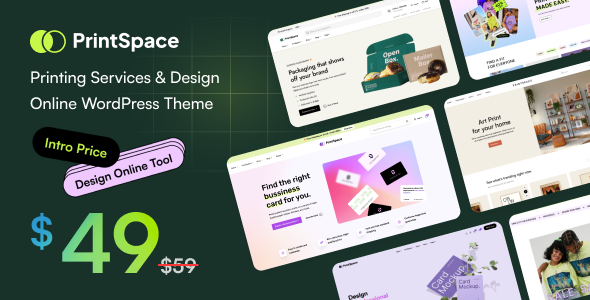
Stuck on your PrintSpace WordPress theme? Let's fix it.
No endless back-and-forth. Just send us the details and we'll get it done.
No obligation · Replies within 1 hour · Quote within 1 day
Setup · Customization · Bug fixes · WooCommerce integration
About PrintSpace WP Theme
PrintSpace is a WordPress theme built by HaruTheme, aimed at print shops, design studios, and creative agencies that sell custom printed products online. It ships with WooCommerce support out of the box, making it straightforward to set up product pages for business cards, banners, apparel, and similar items.
The theme includes multiple homepage layouts, a clean portfolio section, and service-oriented page templates. It uses Elementor for page building, so most layout changes happen visually without touching code. HaruTheme also bundles a few companion plugins that handle things like portfolio post types and custom widgets.
Performance is adequate for a typical print shop site, though the bundled plugin stack adds some weight. Overall, PrintSpace is a solid starting point for a print or design business looking to launch quickly with WooCommerce.
Get matched with a PrintSpace developer in under one day
Tell us about your PrintSpace project. Small fixes, PrintSpace theme customization, or a full website build, whatever you need, we've got it covered.
We'll connect you to the right PrintSpace developers, define the scope, and get everything 100% clear.
You'll get one estimate, hire your preferred developer, and start collaborating.
PrintSpace has enough moving parts that DIY customization often stalls. HaruTheme’s documentation covers the basics, but anything beyond that, such as custom product flows, plugin conflicts, or performance tuning, needs developer time.
Our developers on Codeable have worked with print-focused WooCommerce stores and know the specific friction points this theme creates. You get a vetted developer, a clear estimate before any work starts, and no risk if the project does not move forward. That is a reliable way to get PrintSpace working exactly as your business needs.
Pros
- WooCommerce integration is built in from the start, with product page templates suited to print shop inventory
- Elementor compatibility means layout editing is visual and does not require PHP or CSS knowledge for standard changes
- Multiple pre-built homepage demos reduce initial setup time for design studios or print businesses
- Portfolio post type included, useful for agencies wanting to showcase past print or design work alongside their shop
- HaruTheme provides documentation and support, with regular theme updates to maintain WooCommerce compatibility
Cons
- Bundled companion plugins from HaruTheme add page load weight and can conflict with other installed plugins
- Elementor dependency means the layout is tightly coupled to that page builder, making migrations to other builders difficult
- Demo import does not always transfer cleanly, often leaving placeholder content or broken widget areas that need manual fixing
- Mobile responsiveness on product category pages sometimes needs manual CSS adjustments, particularly for multi-column grid layouts
- Limited options for complex print product configurators out of the box, requiring third-party plugins and custom integration work
Who is PrintSpace for?
Print Shops
PrintSpace suits local or online print shops selling business cards, flyers, banners, and signage. WooCommerce handles the product catalog, and add-on plugins can collect print specifications or artwork files at checkout. The theme’s service page templates also work well for listing turnaround times and pricing tiers.
Graphic Design Studios
Design agencies can use PrintSpace’s portfolio section to show past branding and print projects while also selling design packages through WooCommerce. The clean layout keeps the focus on visuals, which matters when the portfolio is the main sales tool. A developer can adjust the portfolio grid to match the studio’s specific presentation style.
Promotional Product Suppliers
Businesses selling branded pens, tote bags, apparel, or event materials can structure their WooCommerce catalog around product categories and variants. PrintSpace’s homepage layouts support featured product sections and category highlights, which helps buyers navigate a wide product range. Custom quote forms can replace or supplement standard WooCommerce checkout for bulk orders.
Photography Print Services
Photography print services selling canvas prints, framed photos, or fine art prints need clean product presentation and size variant options. PrintSpace’s product templates display large images well, and WooCommerce variable products handle size and finish options. A file upload plugin added to the stack lets customers submit their own photos for printing.
Branded Merchandise Sellers
Sellers of branded merchandise for events, sports teams, or corporate clients can organize the WooCommerce store by category and use the theme’s service pages to explain customization processes. Bulk pricing plugins integrate alongside PrintSpace without major conflicts, and the Elementor layouts make it easy to build campaign-specific landing pages when needed.

Customizing PrintSpace
Customizing PrintSpace goes beyond swapping colors and uploading a logo. Most print businesses need product configuration options, custom quote forms, or specific checkout flows that the default setup does not cover.
A PrintSpace expert can restructure the homepage layouts in Elementor, create custom product templates that match your print categories, and integrate plugins like WooCommerce Product Add-ons for file uploads or specification selects. Typography, spacing, and brand consistency across all page types all require careful attention.
If HaruTheme’s bundled plugins conflict with third-party tools you already use, a developer can audit and resolve those clashes without breaking existing functionality. Child theme setup is also recommended before making any deeper changes to keep updates safe.
Recommended plugins for PrintSpace
PrintSpace pairs well with several plugin categories. WooCommerce Product Add-ons or WC Fields Factory handle print specification inputs like size, material, and quantity. A file upload plugin lets customers attach print-ready artwork at checkout.
For speed, caching and image optimization are important given the theme’s asset load. See our WordPress performance service for that work. If you need organic traffic from search, structured product data and on-page work is covered through our WordPress SEO service. Both extensions work within the existing PrintSpace structure without requiring a theme change.
Not sure which plugins to use? This WordPress plugins directory covers the most popular options with reviews and setup guides.
PrintSpace common issues
PrintSpace demo content not importing correctly
Demo import failures in PrintSpace usually come down to server limits. The XML or JSON import file can be large, and shared hosting often has low PHP memory or execution time limits. Increase max_execution_time, upload_max_filesize, and memory_limit in your php.ini or wp-config.php. If limits are not adjustable on your host, import via WP CLI instead. After import, check that all HaruTheme companion plugins are active, since missing plugins cause widget and template errors. Our bug fixing service can resolve persistent import issues.
PrintSpace WooCommerce product page layout broken
Broken WooCommerce product page layouts in PrintSpace often result from a plugin conflict or a missing HaruTheme companion plugin. First, confirm that the HaruTheme Core plugin is active and up to date. Then check whether Elementor’s saved templates are loading correctly by visiting Elementor’s template library. If a recent WooCommerce update caused the break, the product template may need rebuilding with the updated WooCommerce hooks. Deactivate non-essential plugins one by one to isolate any conflict causing the layout to collapse.
PrintSpace Elementor widgets not loading or showing errors
If Elementor widgets from PrintSpace or HaruTheme stop loading, the most common cause is a version mismatch between Elementor, Elementor Pro, and the HaruTheme Core plugin. Update all three together and clear any caching plugin after doing so. If widgets still show errors, regenerate Elementor’s CSS by going to Elementor, then Tools, then Regenerate Files. A PHP error log will often point to the exact function failing if the issue is deeper than a version conflict.
PrintSpace theme update broke site layout
Theme updates in PrintSpace can overwrite customizations made directly to theme files. If the site layout broke after an update, the most likely cause is that custom CSS or template overrides were stored in the theme folder rather than a child theme. Restore the previous theme version from a backup, move all customizations into a child theme, then apply the update again. If you did not have a backup, our WordPress bug fixing service can audit the damage and rebuild affected templates safely.
PrintSpace FAQ
HaruTheme updates PrintSpace regularly to maintain WooCommerce compatibility, but there is often a short lag after major WooCommerce releases. Always check HaruTheme’s changelog before updating WooCommerce on a live site. Running updates on a staging environment first avoids breaking product pages or checkout flows. If you hit compatibility issues after an update, a developer can patch the affected templates.
PrintSpace works with the free version of Elementor for most layout editing. However, some advanced features like custom popups, forms, or specific widget types require Elementor Pro. HaruTheme’s own widgets are bundled via their companion plugin, so those are available without a Pro license. Check which specific features you need before purchasing Elementor Pro to avoid paying for something unused.
Technically you can deactivate HaruTheme’s companion plugins, but doing so will remove custom post types like portfolio items, break theme-specific widgets, and likely cause template errors on pages that reference those elements. If you want a cleaner plugin setup, a developer can audit which companion plugin features you actually use and replace only those with standalone alternatives.
PrintSpace does not include a native file upload field for WooCommerce products. You need a plugin such as WooCommerce Product Add-ons, WC Fields Factory, or Upload Files for WooCommerce. Once installed, the upload field is added to specific products through the WooCommerce product editor. Some configuration is needed to set allowed file types, size limits, and where uploaded files are stored or emailed.
Migrating content from another theme to PrintSpace is straightforward for posts and pages, but design elements will not transfer. WooCommerce product data migrates cleanly. The main work involves rebuilding page layouts inside Elementor to match PrintSpace’s template structure. If your current site has custom functionality, that needs to be replicated or replaced. Our WordPress migration service handles the full process.
Hire a PrintSpace Developer
Whether you need a full PrintSpace setup, a layout overhaul, or help with a specific WooCommerce issue, we can match you with a developer who knows this theme. Work is delivered through Codeable, so you get a free estimate before committing to anything.
Get a free estimate and describe what you need. A PrintSpace expert will review your project and come back with a clear scope and cost, no obligation to hire.
You'll need a free Codeable account so developers can ask questions and send their quotes.