Promotion WordPress Theme
by Pixflow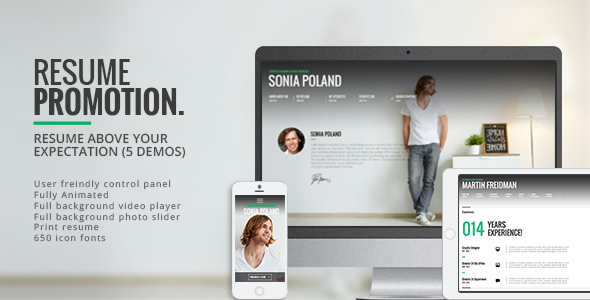
Stuck on your Promotion WordPress theme? Let's fix it.
No endless back-and-forth. Just send us the details and we'll get it done.
No obligation · Replies within 1 hour · Quote within 1 day
Setup · Customization · Bug fixes · WooCommerce integration
About Promotion WP Theme
Promotion is a WordPress theme built by Pixflow, aimed at agencies, creatives, and product-focused businesses that want high visual impact without building everything from scratch. It ships with a drag-and-drop page builder, a library of pre-built demos, and animation controls that go beyond what most themes offer out of the box.
Pixflow is known for motion-heavy, design-forward themes, and Promotion fits that pattern. You get parallax effects, video backgrounds, smooth scroll animations, and a header builder baked in. The demos cover digital agencies, app landing pages, portfolios, and SaaS products. Setup is fast if you stick close to the demo layouts. The theme is sold on ThemeForest and receives regular updates, which matters for long-term WordPress compatibility.
Get matched with a Promotion developer in under one day
Tell us about your Promotion project. Small fixes, Promotion theme customization, or a full website build, whatever you need, we've got it covered.
We'll connect you to the right Promotion developers, define the scope, and get everything 100% clear.
You'll get one estimate, hire your preferred developer, and start collaborating.
Pixflow themes like Promotion are not plug-and-play for complex projects. The builder has quirks, the animation system needs tuning, and mobile optimization often requires manual fixes. Our developers on Codeable have worked with Pixflow themes extensively. They know the shortcuts, the common breakpoints, and how to get production-ready results without rebuilding everything. You get vetted expertise with no guesswork on who you are hiring. Check our WordPress development services to see what is possible.
Pros
- Ships with Revolution Slider and WPBakery included at no extra cost
- Large library of full-page demos covering agencies, apps, and portfolios
- Built-in animation controls including parallax, scroll triggers, and video backgrounds
- Header and footer builder allows layout changes without touching code
- Regular updates from Pixflow maintain WordPress and PHP compatibility
Cons
- Pixflow's custom page builder adds complexity on top of WPBakery, which is already dated
- Page load times are heavy out of the box due to animation scripts and large assets
- Mobile responsiveness often needs manual tweaking per section
- Support response times from Pixflow can be slow for non-standard issues
- Switching away from Promotion later means rebuilding most pages due to builder shortcode lock-in
Who is Promotion for?
Digital Agency Website
Promotion’s agency demos are well-structured with service sections, team grids, case study layouts, and contact forms. Agencies that want a polished site without a full custom build can work from these demos and swap in their own content. The animation system gives agency sites a premium feel that static themes cannot match easily.
App or SaaS Landing Page
The theme includes app-focused demo layouts with feature grids, pricing tables, screenshot sliders, and CTA sections. These map well to SaaS product pages. The scroll animations work well for guiding visitors down a landing page, and the video background support lets you showcase product demos without third-party embeds taking over the design.
Creative Portfolio
Promotion handles portfolio work well through its project grid options and full-screen gallery support. Photographers, designers, and motion studios benefit from the visual-first layout options. Case study pages are easy to build using existing row and column structures, and the typography controls give enough flexibility to match a personal brand identity.
Product Launch Page
For single product or campaign launches, Promotion’s pre-built landing page sections cover most of what you need: hero blocks, feature highlights, testimonials, countdown timers, and conversion-focused CTAs. The theme works well as a standalone launch page without needing a full multi-page site structure around it.
Marketing Consultancy Site
Marketing consultancies need credibility and clarity. Promotion’s clean demo layouts support that with service breakdowns, team sections, client logos, and lead capture forms. The header builder allows a professional navigation structure, and the blog layout works for publishing thought leadership content without requiring a separate theme or plugin.

Customizing Promotion
Promotion gives you a lot of visual control, but that depth can work against you if you are not familiar with Pixflow’s ecosystem. The theme uses its own page builder alongside WPBakery, which means customization has a learning curve that is steeper than themes built on Elementor or the block editor.
Changing fonts, colors, and section spacing is straightforward through the theme options panel. Where things get tricky is custom layouts, advanced animations, and integrating third-party plugins outside Pixflow’s stack. A Promotion expert can shortcut that process significantly. They know which settings interact, which elements break on mobile, and how to build pages that match your brand without starting from scratch. If you need something beyond the demo content, hiring a Promotion expert saves hours of trial and error.
Recommended plugins for Promotion
Promotion bundles several premium plugins, including Revolution Slider and WPBakery, so you are not paying extra for those. For additional functionality, WooCommerce integrates without major issues for simple product or service pages. Adding a caching plugin like WP Rocket makes a measurable difference given the theme’s animation load. You can also pair it with an SEO plugin for full on-page control.
If site speed is a priority, consider reviewing your WordPress performance setup separately. For search visibility, a proper WordPress SEO strategy works alongside the theme rather than relying on it.
Not sure which plugins to use? This WordPress plugins directory covers the most popular options with reviews and setup guides.
Promotion common issues
Promotion theme slow loading speed fix
Promotion loads a significant amount of JavaScript for its animation engine. Start by disabling animations you are not using through the theme options. Install a caching plugin and enable lazy loading for images. Use a CDN for static assets. If you are still seeing slow scores, check whether Pixflow’s custom scripts are being loaded site-wide when they are only needed on specific pages. A developer can audit and defer these scripts properly. See our WordPress performance service for a full audit.
Promotion theme broken layout after update
Layout breaks after a Promotion update are usually caused by WPBakery shortcode changes or Pixflow’s custom elements being modified. First, clear all caches after updating. Check whether child theme overrides are conflicting with updated template files. If sections are collapsed or content is missing, the issue is often a deprecated shortcode that needs replacing. Avoid updating Promotion without a staging environment first. Our WordPress bug fixing service can diagnose and resolve update conflicts quickly.
Promotion theme Revolution Slider not working
If Revolution Slider shows a blank area or throws a console error, the first step is deactivating and reactivating the plugin. Check that the bundled version of Revolution Slider matches the one Promotion expects. Do not update Revolution Slider from the plugin directory if Pixflow has bundled a specific version. Conflicts with caching plugins can also prevent sliders from loading. Disable caching temporarily to confirm. If the slider is missing its animations only, check that jQuery is loading before the slider scripts.
Promotion theme mobile menu not opening
A non-functional mobile menu in Promotion is usually a JavaScript conflict with another plugin. Open browser developer tools on mobile and check the console for errors. Common culprits are contact form plugins, analytics scripts, or custom code in functions.php that load scripts in the wrong order. Try switching to a default WordPress theme temporarily to isolate the issue. If the menu works on the default theme, the conflict is within Promotion’s script loading. A developer can resolve this without breaking other functionality. Check our WordPress maintenance plans to prevent recurring issues.
Promotion FAQ
Promotion is not the most beginner-friendly theme. It uses two page builders, Pixflow’s own system and WPBakery, which adds complexity. If you stick close to the demo content and make light edits, it is manageable. For anything custom, the learning curve is real. Most beginners get stuck on animation settings, mobile adjustments, and header configurations. Starting with a pre-built demo and swapping content is the most practical approach.
Promotion is not built for Elementor. It uses WPBakery and Pixflow’s proprietary builder. You can technically install Elementor alongside it, but you will run into conflicts with styles and scripts. Pixflow does not officially support Elementor with this theme. If Elementor is your preferred builder, you are better off choosing a theme designed around it rather than trying to force compatibility with Promotion.
Promotion includes a one-click demo importer through the theme setup wizard. After activating the theme, go to the demo import panel, choose your preferred demo, and import it. The process installs demo content, widgets, and menu settings. Make sure Revolution Slider and WPBakery are activated before importing. A fresh WordPress install gives the cleanest result. Importing over an existing site can cause content conflicts.
Promotion has basic WooCommerce compatibility. Standard product pages, cart, and checkout work without major issues. The theme is not built primarily as a WooCommerce theme, so complex shop setups with custom product types or advanced filtering may need extra work. For simple product or service pages it performs fine. For a full ecommerce build, a WooCommerce-specific theme is a more reliable foundation.
Always use a child theme for customizations. If you have edited the parent theme files directly, an update will overwrite those changes. Before updating, back up your site and test on a staging environment first. Pixflow sometimes changes template files and shortcode structures between versions, which can shift layouts. Keep a record of any custom CSS you have added so it can be reapplied. Our WordPress maintenance service handles updates safely.
Hire a Promotion Theme Expert Developer
Need a Promotion theme developer who already knows Pixflow’s system? Post your project and get matched with a vetted specialist within 24 hours. Whether it is a custom layout, animation fix, plugin conflict, or a full site build, you get a free estimate with no obligation to hire. Get your free estimate today and see exactly what your project will cost before committing to anything.
You'll need a free Codeable account so developers can ask questions and send their quotes.