Rayden WordPress Theme
by ClaPat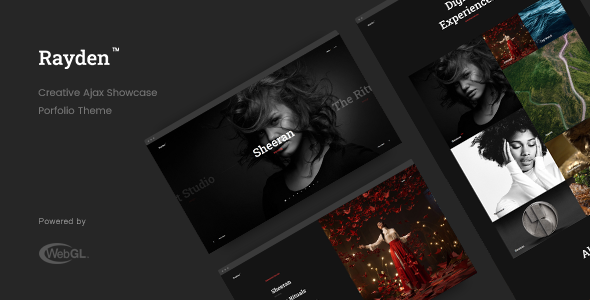
Stuck on your Rayden WordPress theme? Let's fix it.
No endless back-and-forth. Just send us the details and we'll get it done.
No obligation · Replies within 1 hour · Quote within 1 day
Setup · Customization · Bug fixes · WooCommerce integration
About Rayden WP Theme
Rayden is a WordPress theme built by ClaPat, designed primarily for creative agencies, portfolios, and business websites. It ships with a clean visual structure, full-screen layouts, and smooth transitions that give projects a polished, professional look without heavy coding overhead.
The theme integrates with Elementor, making page building accessible to non-developers while still leaving room for custom work. It includes pre-built demo templates, header and footer builders, and support for WooCommerce, which broadens its use beyond simple portfolios.
Rayden is a solid starting point for studios or freelancers who want a visually strong site without building from scratch. That said, getting the most out of it typically requires some configuration work, particularly around typography, spacing, and plugin compatibility.
Get matched with a Rayden developer in under one day
Tell us about your Rayden project. Small fixes, Rayden theme customization, or a full website build, whatever you need, we've got it covered.
We'll connect you to the right Rayden developers, define the scope, and get everything 100% clear.
You'll get one estimate, hire your preferred developer, and start collaborating.
Rayden is not a difficult theme, but it does have a learning curve, especially around its header builder, dynamic templates, and WooCommerce integration. Small misconfigurations cause layout breaks that are time-consuming to trace without experience.
FoxyConcept connects you with vetted Rayden developers through Codeable, a platform built specifically for professional WordPress work. Every developer is screened. You get a free estimate before committing to anything. If your Rayden site needs custom development, a fix, or a full build, this is the faster, lower-risk path.
Pros
- Full Elementor integration with pre-built demo templates that speed up initial setup
- Built-in header and footer builder with flexible layout options per page
- WooCommerce support included, suitable for portfolio sites with a shop section
- Clean visual design with full-screen hero sections and smooth scroll effects
- Active ClaPat support and documentation covering most common configuration questions
Cons
- Elementor dependency means performance can suffer without deliberate asset optimisation
- Advanced layout customisation requires CSS or child theme work beyond the options panel
- Some pre-built demo sections are difficult to repurpose without rebuilding from scratch
- Limited native blog styling options compared to dedicated editorial or news themes
- Plugin conflicts can appear with specific caching or optimisation tools if not configured carefully
Who is Rayden for?
Creative Agency Website
Rayden suits agencies that need a strong visual presence without a bespoke build. Its full-screen sections, animated transitions, and service layout templates map directly to how agency sites are typically structured. A developer can extend this with custom project case study templates and dynamic team pages.
Freelance Portfolio
Freelancers can use Rayden’s portfolio grid and filterable project layouts to showcase work cleanly. The Elementor integration means updating the portfolio does not require developer help day-to-day. Custom work is mainly needed upfront to configure the layout and set up contact forms correctly.
Photography Studio
Photography studios benefit from Rayden’s full-width image layouts and lightbox-ready gallery sections. The theme handles high-resolution visuals well structurally, though performance optimisation is important when working with large image libraries. A developer can also set up client proofing workflows with compatible plugins.
Small Business with WooCommerce
Rayden’s WooCommerce support makes it viable for small shops attached to a creative or service business. Product pages, cart, and checkout all function within the theme’s design language. Custom work is useful for category page layouts, filtered product grids, and checkout field modifications.
Digital Marketing Studio
Digital marketing studios need credibility-focused layouts: clear service pages, case studies, and lead capture forms. Rayden provides the structural foundation. Pairing it with a proper SEO setup and performance audit ensures the site actually ranks and converts, not just looks the part.

Customizing Rayden
Rayden gives you a reasonable set of customization options through the WordPress Customizer and Elementor. You can adjust colors, fonts, header layouts, and section spacing without touching code. The built-in theme options panel covers most surface-level changes.
But custom work goes deeper than toggle switches. If you need a non-standard layout, custom post types, conditional logic, or specific WooCommerce modifications, you will need developer input. A Rayden expert can build child theme overrides, custom Elementor widgets, or hook-based modifications that survive future updates cleanly.
Working with someone who knows Rayden’s template structure saves time. Instead of reverse-engineering how ClaPat built the theme, an experienced developer can move straight to implementation and avoid the common pitfalls around Rayden’s header builder and dynamic content areas.
Recommended plugins for Rayden
Rayden works well with a focused plugin stack. WooCommerce handles shop functionality. WPForms or Gravity Forms cover contact and lead capture. For SEO, pairing Rayden with a proper setup through a WordPress SEO service ensures your schema, meta, and page structure are actually optimised, not just functional.
Performance needs attention too. Rayden loads Elementor assets on every page by default. A targeted WordPress performance audit can cut load times significantly through asset cleanup, caching configuration, and image optimisation. These changes matter more on creative sites where large visuals are common.
Not sure which plugins to use? This WordPress plugins directory covers the most popular options with reviews and setup guides.
Rayden common issues
Rayden header not showing correctly on mobile
Mobile header issues in Rayden are usually caused by conflicting breakpoint settings in the header builder or custom CSS that was not written with responsiveness in mind. Start by checking the mobile breakpoint settings in the Rayden header builder panel. If a custom header template is active, inspect it in Elementor’s responsive preview. In most cases, a targeted media query fix or a header builder reset resolves the problem without touching core files. See our WordPress bug fixing service if the issue persists.
Rayden Elementor sections overlapping after update
Overlapping sections after a Rayden or Elementor update typically point to a z-index or margin conflict introduced by a style change in the update. Open the affected section in Elementor, check for custom positioning settings, and clear any cached CSS. If you are using a caching plugin, flush it fully after the update. If the problem only affects specific templates, regenerating the Elementor CSS files from the Elementor tools panel usually resolves it. Persistent overlap issues may require a child theme CSS fix.
Rayden WooCommerce product page layout broken
WooCommerce layout breaks in Rayden often happen when WooCommerce updates its template files and the theme’s overrides fall out of sync. Check whether Rayden has outdated WooCommerce template files under Appearance > Theme Check or via a plugin like WooCommerce Template Version Checker. Updating the template overrides in a child theme is the clean fix. Avoid editing theme files directly as updates will overwrite changes. Our bug fixing team handles this type of conflict regularly.
Rayden demo import not working or incomplete
Failed or incomplete demo imports in Rayden are usually caused by server timeout limits, memory limits, or a missing required plugin. Before importing, make sure all required plugins listed in the theme documentation are installed and activated. Increase PHP memory limit and max execution time in your server config or php.ini if possible. Try importing content, widgets, and customiser settings separately rather than all at once. If the import still fails, a developer can migrate demo content manually using a staging environment.
Rayden FAQ
Yes. Rayden is well-suited to portfolio websites. It includes filterable project grids, full-screen image sections, and case study layout templates. The design language is clean and visual-first, which works for creative professionals. For more complex portfolio needs, like custom project types or client-facing galleries, a developer can extend the base theme without difficulty.
Yes, Rayden is built around Elementor. Most of its demo templates are Elementor-based, and the page builder is used for layout and content editing throughout the theme. You will need the free version of Elementor at minimum. Some advanced features in the demos may require Elementor Pro. The theme’s header and footer builder also operates through a compatible Elementor-like interface.
To install Rayden demo content, go to Appearance > Import Demo Data after activating the theme. Make sure all required plugins are installed first. Select the demo you want and follow the on-screen steps. If the import times out or completes only partially, check your server’s PHP memory and execution time limits. A staging environment is recommended before importing on a live site.
Yes. Rayden includes WooCommerce support and styles for product pages, shop archives, cart, and checkout. It works for small shops attached to portfolio or agency sites. For more complex WooCommerce setups, such as custom product layouts or checkout modifications, developer work is recommended to ensure the integration holds up across updates.
For basic customisation, yes. Rayden’s options panel and Elementor integration allow non-developers to change colors, fonts, layouts, and content. However, anything beyond the built-in options, such as custom functionality, plugin integration, or layout changes outside of Elementor, will need developer help. It is a good theme for DIY at the surface level, but professional setup saves significant time.
Hire a Rayden WordPress Developer
Need a Rayden developer for a custom build, layout fix, or WooCommerce integration? FoxyConcept works through Codeable, where every developer is vetted and matched to your specific project. You describe what you need, get a free estimate, and only move forward if it makes sense. No guesswork, no hiring risk. Get your free estimate today and have a qualified Rayden expert reviewing your project within 24 hours.
You'll need a free Codeable account so developers can ask questions and send their quotes.